> For the complete documentation index, see [llms.txt](https://hacking-notes.jord4n.pro/llms.txt). Markdown versions of documentation pages are available by appending `.md` to page URLs; this page is available as [Markdown](https://hacking-notes.jord4n.pro/ja/web/cache-poisoning/cache-poisoning-via-an-unindexed-query-string.md).
# インデックスされないクエリ文字列によるキャッシュ・ポイズニング
インデックスされないクエリ文字列によるキャッシュ・ポイズニングの PortSwigger Web Security Academy ラボ向けノート。攻撃フロー、ペイロードテスト、Burp Suite による検証、および是正策の文脈を含みます。
### キーに含まれないクエリ文字列によるWebキャッシュポイズニング
このラボでは、Webキャッシュがポイズニングされる脆弱性が示されています。これは、 **クエリ文字列がキャッシュキーに含まれていないためです**。正規のユーザーは通常、次を使用してサイトのホームページを定期的に訪れます。 **Google Chrome**.
目的は、ホームページをポイズニングして、次を含むレスポンスを返すようにすることです。 **実行されるJavaScript `alert(1)`** 被害者のブラウザ上で。
***
**ステップ1: ホームページのインターセプト**
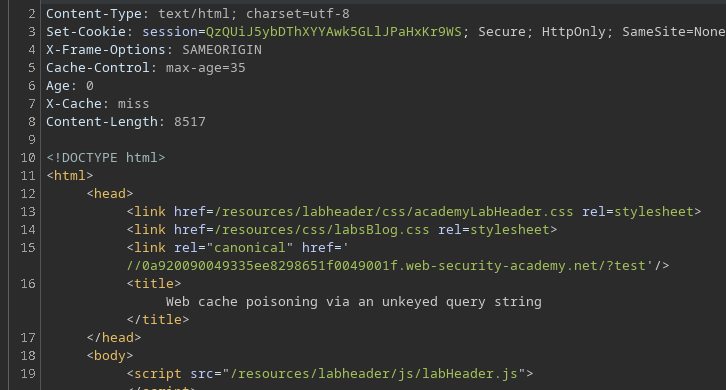
サイトのルートへのリクエスト(`/`)がインターセプトされます。/ レスポンスでは、canonical **リンク**が存在することが確認でき、URLの一部要素がHTMLに反映されることを示しています。
***
**ステップ2: クエリ文字列のテスト**
任意のクエリ文字列をURLに追加します:
```bash
/?test
```
値は適切に **レスポンスに取り込まれています**。これは、クエリ文字列が返されるコンテンツに影響することを確認しています。
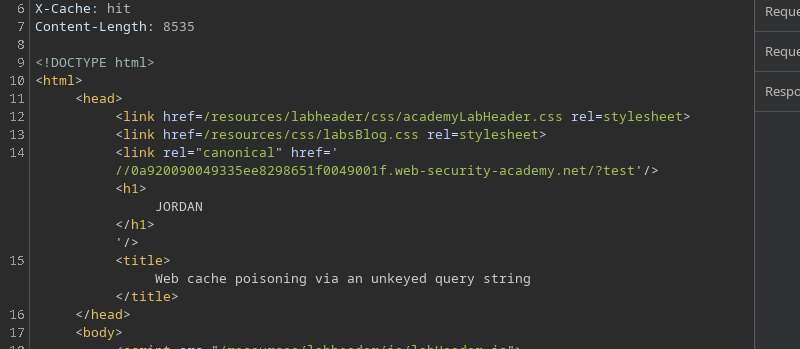
**ステップ3: HTMLインジェクション**
その後、クエリ文字列を変更してHTMLを注入します:
```bash
/?test'/>
JORDAN
```
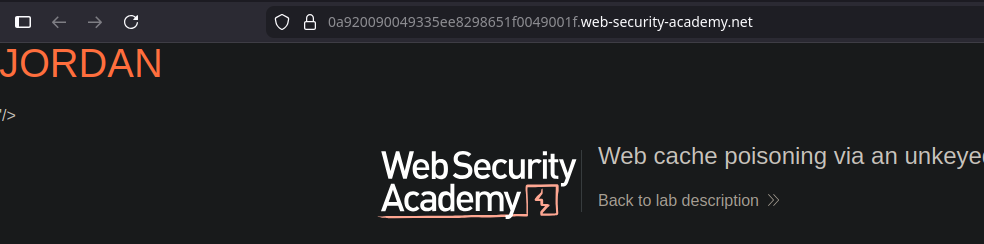
その `
` タグはブラウザによって正しく解釈され、実用可能な \*\*HTMLインジェクション\*\* を示しています。
**ステップ4: JavaScriptインジェクション(キャッシュポイズニング)**
HTMLインジェクションをJavaScriptペイロードに置き換えます:
```bash
/?test'/>
```
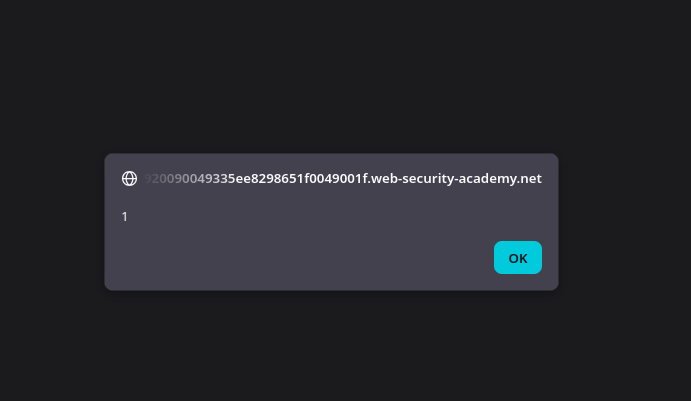
レスポンスには現在スクリプトが含まれており、\*\*ブラウザによって実行されます\*\*。
**結果**
クエリ文字列が **キャッシュキーに含まれていないため**、ポイズニングされたレスポンスが保存され、ホームページを訪れる他のユーザーに配信されます。/ その後、被害者は自動的に次の実行を引き起こします。 `alert(1)` 訪問中にこれが実行され、ラボの動作が確認されます。
---
# Agent Instructions
This documentation is published with GitBook. GitBook is the documentation platform designed so that both humans and AI agents can read, navigate, and reason over technical content effectively. Learn more at gitbook.com.
## Querying This Documentation
If you need additional information that is not directly available in this page, you can query the documentation by asking a question.
Perform an HTTP GET request on the following URL with the `ask` and `goal` query parameters:
```
GET https://hacking-notes.jord4n.pro/ja/web/cache-poisoning/cache-poisoning-via-an-unindexed-query-string.md?ask=&goal=
```
`ask` is the immediate question: it should be specific, self-contained, and written in natural language.
`goal` is what the user is ultimately trying to achieve, the reason they need the answer. Sharing it helps GitBook give you a better, more relevant answer. A goal is most helpful when it describes the outcome the user wants rather than restating the question. For example, with `ask=how do I create an API token`, a goal like `automate deployments from our CI pipeline` lets GitBook tailor the answer to that use case.
The response will contain a direct answer to the question and relevant excerpts and sources from the documentation.
Use this mechanism when the answer is not explicitly present in the current page, you need clarification or additional context, or you want to retrieve related documentation sections.