> For the complete documentation index, see [llms.txt](https://hacking-notes.jord4n.pro/llms.txt). Markdown versions of documentation pages are available by appending `.md` to page URLs; this page is available as [Markdown](https://hacking-notes.jord4n.pro/ja/web/xss/stored-dom-xss.md).
# DOM保存型XSS
PortSwigger Web Security Academy のラボ向けメモ。DOM保存型XSSに関するもので、攻撃手順、ペイロードのテスト、Burp Suite による検証、および対策の文脈を含む。
### 保存された DOM XSS
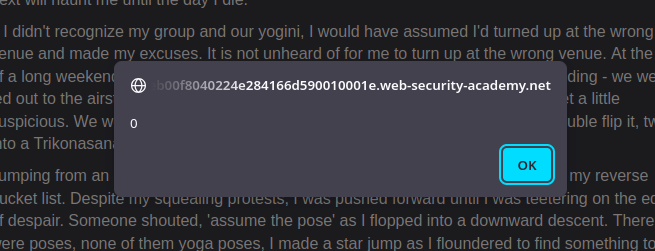
このラボでは、ブログのコメント機能に保存された DOM の脆弱性を示します。ラボを解決するには、この脆弱性を使って次を実行します `alert()` 関数。
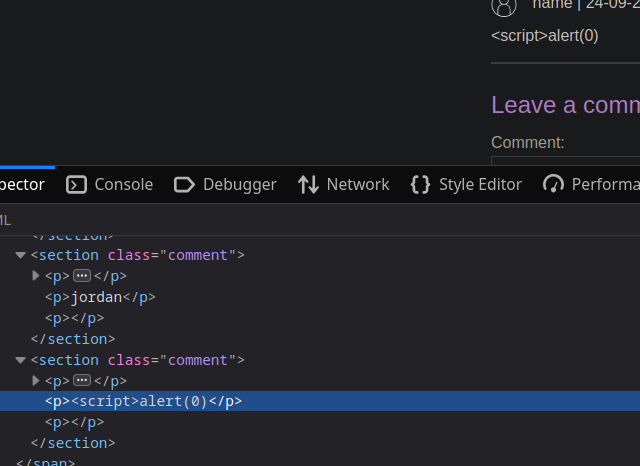
定番の `スクリプト` をコメント欄に挿入すると:
```javascript
```
サイトがコメントの一部を削除していることがわかります。
関数は次のとおりです:
```javascript
function loadComments(postCommentPath) {
let xhr = new XMLHttpRequest();
xhr.onreadystatechange = function() {
if (this.readyState == 4 && this.status == 200) {
let comments = JSON.parse(this.responseText);
displayComments(comments);
}
};
xhr.open("GET", postCommentPath + window.location.search);
xhr.send();
function escapeHTML(html) {
return html.replace('<', '<').replace('>', '>');
}
function displayComments(comments) {
let userComments = document.getElementById("user-comments");
for (let i = 0; i < comments.length; ++i)
{
comment = comments[i];
let commentSection = document.createElement("section");
commentSection.setAttribute("class", "comment");
let firstPElement = document.createElement("p");
let avatarImgElement = document.createElement("img");
avatarImgElement.setAttribute("class", "avatar");
avatarImgElement.setAttribute("src", comment.avatar ? escapeHTML(comment.avatar) : "/resources/images/avatarDefault.svg");
if (comment.author) {
if (comment.website) {
let websiteElement = document.createElement("a");
websiteElement.setAttribute("id", "author");
websiteElement.setAttribute("href", comment.website);
firstPElement.appendChild(websiteElement)
}
let newInnerHtml = firstPElement.innerHTML + escapeHTML(comment.author)
firstPElement.innerHTML = newInnerHtml
}
if (comment.date) {
let dateObj = new Date(comment.date)
let month = '' + (dateObj.getMonth() + 1);
let day = '' + dateObj.getDate();
let year = dateObj.getFullYear();
if (month.length < 2)
month = '0' + month;
if (day.length < 2)
day = '0' + day;
dateStr = [day, month, year].join('-');
let newInnerHtml = firstPElement.innerHTML + " | " + dateStr
firstPElement.innerHTML = newInnerHtml
}
firstPElement.appendChild(avatarImgElement);
commentSection.appendChild(firstPElement);
if (comment.body) {
let commentBodyPElement = document.createElement("p");
commentBodyPElement.innerHTML = escapeHTML(comment.body);
commentSection.appendChild(commentBodyPElement);
}
commentSection.appendChild(document.createElement("p"));
userComments.appendChild(commentSection);
}
}
};
```
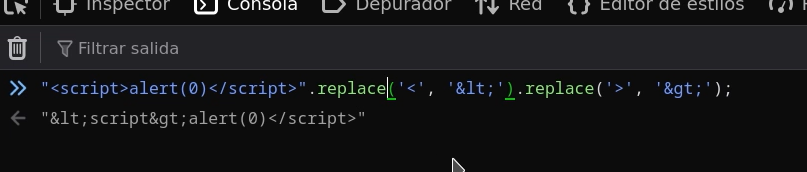
* その `escapeHTML(HTML)` function はエスケープしません **最初の** ~の出現 `<` および `>` (~の使用 `置換` 単純)。
* その後、コードは `innerHTML` を使って値を挿入するため、悪意のあるタグが残り、ブラウザによって解釈される可能性があります。
* したがって、サニタイズは最初の一致にしか有効ではなく、後続の出現は脆弱なままです。
* グローバル置換(`replaceAll` またはグローバル正規表現)を使ってエスケープする **すべての** ~の出現を `<` および `>`.
* 使用を避ける `innerHTML` 信頼できないデータには `textContent` または `createTextNode`
悪用可能なペイロード
* 閉じてスクリプトを注入する:
```javascript
<>
```
* 画像エラーを強制して `onerror:`
```javascript
<>
```
これらのペイロードが機能するのは、変換される文字がわずかしかなく、さらに `<`/`>` の追加の出現が解釈可能なままだからです。
---
# Agent Instructions
This documentation is published with GitBook. GitBook is the documentation platform designed so that both humans and AI agents can read, navigate, and reason over technical content effectively. Learn more at gitbook.com.
## Querying This Documentation
If you need additional information that is not directly available in this page, you can query the documentation by asking a question.
Perform an HTTP GET request on the following URL with the `ask` and `goal` query parameters:
```
GET https://hacking-notes.jord4n.pro/ja/web/xss/stored-dom-xss.md?ask=&goal=
```
`ask` is the immediate question: it should be specific, self-contained, and written in natural language.
`goal` is what the user is ultimately trying to achieve, the reason they need the answer. Sharing it helps GitBook give you a better, more relevant answer. A goal is most helpful when it describes the outcome the user wants rather than restating the question. For example, with `ask=how do I create an API token`, a goal like `automate deployments from our CI pipeline` lets GitBook tailor the answer to that use case.
The response will contain a direct answer to the question and relevant excerpts and sources from the documentation.
Use this mechanism when the answer is not explicitly present in the current page, you need clarification or additional context, or you want to retrieve related documentation sections.