> For the complete documentation index, see [llms.txt](https://hacking-notes.jord4n.pro/llms.txt). Markdown versions of documentation pages are available by appending `.md` to page URLs; this page is available as [Markdown](https://hacking-notes.jord4n.pro/pt-br/privesc/docker-escape/docker-toolbox-default-credentials-linux-privilege-escalation.md).
# Escape de Docker (credenciais padrão do Docker Toolbox) - Escalação de privilégios no Linux
Anotações sobre escape de Docker (credenciais padrão do Docker Toolbox) para escalação de privilégios no Linux, com etapas de enumeração, exemplos de exploração e validação voltada a relatórios.
## O que é
Os caminhos de escape do Docker exploram configurações incorretas de contêiner, recursos do host montados, credenciais padrão, senhas reutilizadas ou privilégios excessivos do contêiner. O objetivo é sair do contexto do contêiner para obter acesso em nível de host. Esta página específica foca em **Escape do Docker (Credenciais padrão do Docker Toolbox)** e mantém o fluxo de exploração prático: identifique a condição, valide-a com segurança e depois execute a menor carga útil necessária para provar o impacto.
## Enumeração
Comece confirmando o contexto local e a configuração incorreta exata antes de executar o caminho de exploração.
```bash
id
cat /proc/1/cgroup
mount
ls -la /var/run/docker.sock 2>/dev/null
```
## Exemplos
{% hint style="info" %}
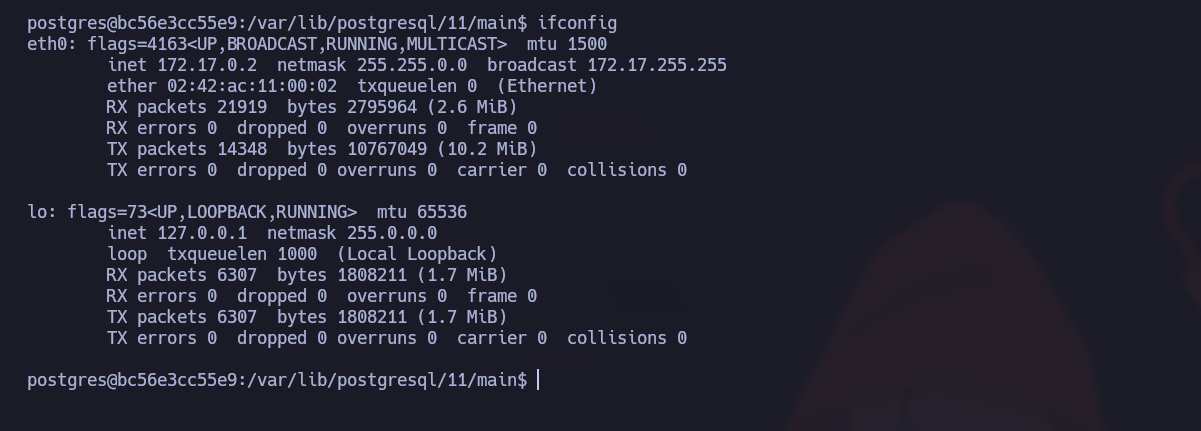
Durante o reconhecimento, identificamos que nossa máquina Windows não estava acessível diretamente. No entanto, conseguimos nos conectar a uma máquina Windows contida em um contêiner Docker, com o endereço IP `172.17.0.2` e o `172.17.0.1` gateway. Agora tentaremos fazer pivot por meio desse contêiner e escalar nossos privilégios.
{% endhint %}
### **Verificação da porta SSH**
Primeiro, precisamos verificar se a porta SSH (22) está aberta no gateway do Docker (172.17.0.1). Use um comando simples para isso:
```bash
echo ' ' > /dev/tcp/172.17.0.1/22 && echo "[+] SSH Open" || echo "[-] SSH Closed"
```
A porta 22 está aberta, o que significa que podemos tentar uma conexão SSH com a máquina no contêiner.
#### **Faça login com as credenciais padrão do Docker Toolbox**
As IDs padrão do Docker Toolbox são:
* **Usuário**: `docker`
* **Senha** : `tcuser`
Agora tentamos nos conectar ao contêiner via SSH usando essas informações. Uma vez conectados à máquina, percebemos que temos acesso ao root do contêiner com o usuário `docker`.
---
# Agent Instructions
This documentation is published with GitBook. GitBook is the documentation platform designed so that both humans and AI agents can read, navigate, and reason over technical content effectively. Learn more at gitbook.com.
## Querying This Documentation
If you need additional information that is not directly available in this page, you can query the documentation by asking a question.
Perform an HTTP GET request on the following URL with the `ask` and `goal` query parameters:
```
GET https://hacking-notes.jord4n.pro/pt-br/privesc/docker-escape/docker-toolbox-default-credentials-linux-privilege-escalation.md?ask=&goal=
```
`ask` is the immediate question: it should be specific, self-contained, and written in natural language.
`goal` is what the user is ultimately trying to achieve, the reason they need the answer. Sharing it helps GitBook give you a better, more relevant answer. A goal is most helpful when it describes the outcome the user wants rather than restating the question. For example, with `ask=how do I create an API token`, a goal like `automate deployments from our CI pipeline` lets GitBook tailor the answer to that use case.
The response will contain a direct answer to the question and relevant excerpts and sources from the documentation.
Use this mechanism when the answer is not explicitly present in the current page, you need clarification or additional context, or you want to retrieve related documentation sections.
.png?alt=media)

.png?alt=media)