> For the complete documentation index, see [llms.txt](https://hacking-notes.jord4n.pro/llms.txt). Markdown versions of documentation pages are available by appending `.md` to page URLs; this page is available as [Markdown](https://hacking-notes.jord4n.pro/pt-br/reconnaissance/web-profiling.md).
# Perfilamento Web
Técnicas de perfilamento web para identificar tecnologias, frameworks, CMS, servidores, bibliotecas e versões expostas em um site-alvo.
O perfilamento web identifica a stack de tecnologia-alvo, incluindo CMS, frameworks, servidores web, bibliotecas JavaScript, ferramentas de análise, produtos de segurança e versões expostas.
{% hint style="info" %}
Há muitas maneiras de aprender sobre as tecnologias usadas por um site. Graças a diferentes ferramentas acessíveis pelo console, extensões do navegador ou sites especializados, você pode obter informações detalhadas sobre as tecnologias usadas por uma página. Aqui estão vários métodos para identificá-las:
{% endhint %}
## WhatWeb:
> O WhatWeb é uma ferramenta de linha de comando muito popular para identificar as tecnologias usadas por um site. Rápido e preciso, ele consegue detectar uma ampla variedade de tecnologias, incluindo CMS, frameworks, servidores web, ferramentas de análise etc. O que o diferencia é sua capacidade de analisar cabeçalhos HTTP, código-fonte e outros elementos da página.
```bash
whatweb https://website.com
```
Este comando fornecerá uma visão geral detalhada das tecnologias usadas pelo site, incluindo o CMS, bibliotecas JavaScript, ferramentas de análise e muito mais.
## BuiltWith:
> [BuiltWith](https://builtwith.com) é uma das ferramentas mais detalhadas para analisar tecnologias de sites. Este serviço online oferece uma visão abrangente das tecnologias usadas, como servidores, frameworks, bibliotecas, ferramentas de marketing e segurança e até mesmo versões de algumas tecnologias. Embora as informações fornecidas às vezes possam ser excessivas, essa ferramenta ainda é ótima para obter uma visão completa.
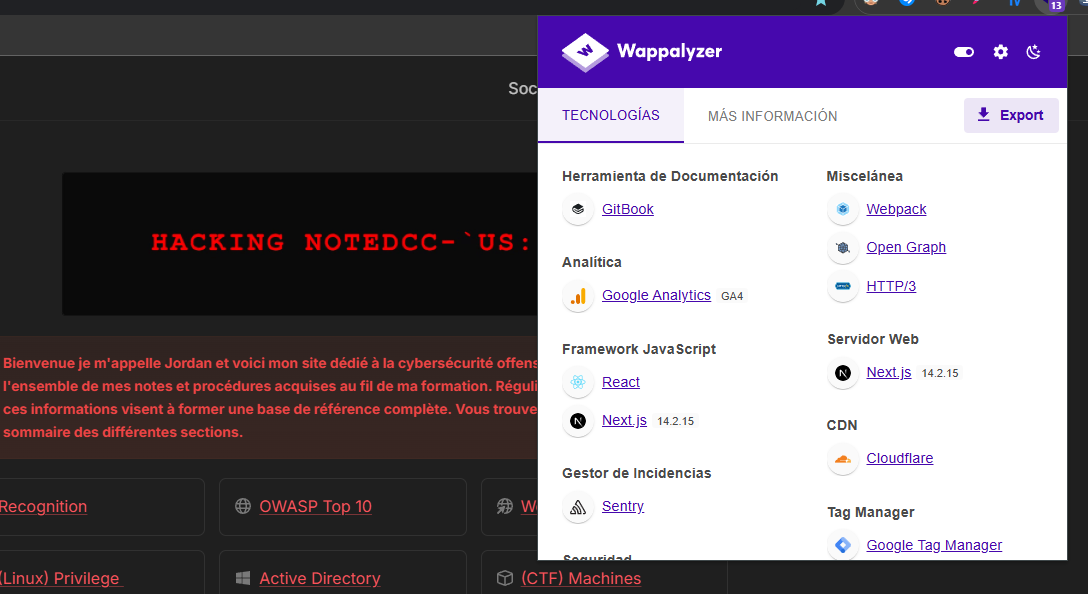
## Wappalyzer:
> [Wappalyzer ](https://www.wappalyzer.com/)é uma extensão de navegador que se destaca pela simplicidade e eficiência. Assim que você acessa um site, a extensão detecta automaticamente as tecnologias usadas, incluindo CMS, servidores web, bibliotecas JavaScript e muito mais. Um dos pontos fortes do Wappalyzer está na sua velocidade, especialmente por fornecer informações essenciais instantaneamente. Além disso, às vezes ele pode exibir as versões das tecnologias detectadas.
---
# Agent Instructions
This documentation is published with GitBook. GitBook is the documentation platform designed so that both humans and AI agents can read, navigate, and reason over technical content effectively. Learn more at gitbook.com.
## Querying This Documentation
If you need additional information that is not directly available in this page, you can query the documentation by asking a question.
Perform an HTTP GET request on the following URL with the `ask` and `goal` query parameters:
```
GET https://hacking-notes.jord4n.pro/pt-br/reconnaissance/web-profiling.md?ask=&goal=
```
`ask` is the immediate question: it should be specific, self-contained, and written in natural language.
`goal` is what the user is ultimately trying to achieve, the reason they need the answer. Sharing it helps GitBook give you a better, more relevant answer. A goal is most helpful when it describes the outcome the user wants rather than restating the question. For example, with `ask=how do I create an API token`, a goal like `automate deployments from our CI pipeline` lets GitBook tailor the answer to that use case.
The response will contain a direct answer to the question and relevant excerpts and sources from the documentation.
Use this mechanism when the answer is not explicitly present in the current page, you need clarification or additional context, or you want to retrieve related documentation sections.
.png?alt=media)
.png?alt=media)