> For the complete documentation index, see [llms.txt](https://hacking-notes.jord4n.pro/llms.txt). Markdown versions of documentation pages are available by appending `.md` to page URLs; this page is available as [Markdown](https://hacking-notes.jord4n.pro/ru/ports-and-services/smb-445/crackmapexec-smb-tool.md).
# CrackMapExec (инструмент SMB)
Перечисление SMB с помощью CrackMapExec для хостов, пользователей, учётных данных, ресурсов, повышенного доступа и RID brute force.
> CrackMapExec (CME) — это инструмент аудита безопасности после эксплуатации для сред Active Directory. Он проверяет учетные данные, перечисляет SMB-экспозицию, обнаруживает распространенные слабые места и может выполнять удаленные команды при наличии достаточных привилегий.
### **Перечисление систем**
Чтобы определить системы в сети и узнать имя домена:
```bash
crackmapexec smb 10.10.10.10
```
Это предоставляет информацию о целевом SMB-сервере, включая домен и доступные службы.
#### Перечисление пользователей
```bash
crackmapexec smb 10.10.10.10 -u '' -p '' --users
```
### **Проверка учетных данных**
Чтобы проверить, является ли пара имя пользователя/пароль действительной:
```bash
crackmapexec smb 10.10.10.10 -u '' -p ''
```
Если учетные данные верны, CME подтвердит доступ к целевой системе.
### **Проверка учетных данных с повышенным доступом (PWNED)**
Если пользователь входит в группу **Remote Management Users** то учетная запись может напрямую подключаться к целевой системе. Чтобы проверить эти учетные данные:
```bash
crackmapexec smb 10.10.10.10 -u '' -p ''
```
Ответ, указывающий на доступ PWNED, означает, что у пользователя есть повышенные привилегии, потенциально позволяющие удаленное выполнение.
### **Перечисление общих ресурсов и разрешений**
Чтобы изучить разрешения и сетевые ресурсы, доступные с предоставленными учетными данными:
```bash
crackmapexec smb 10.10.10.10 -u '' -p '' --shares
```
Это отображает доступные общие ресурсы и разрешения, связанные с пользователем.
### Брутфорс RID
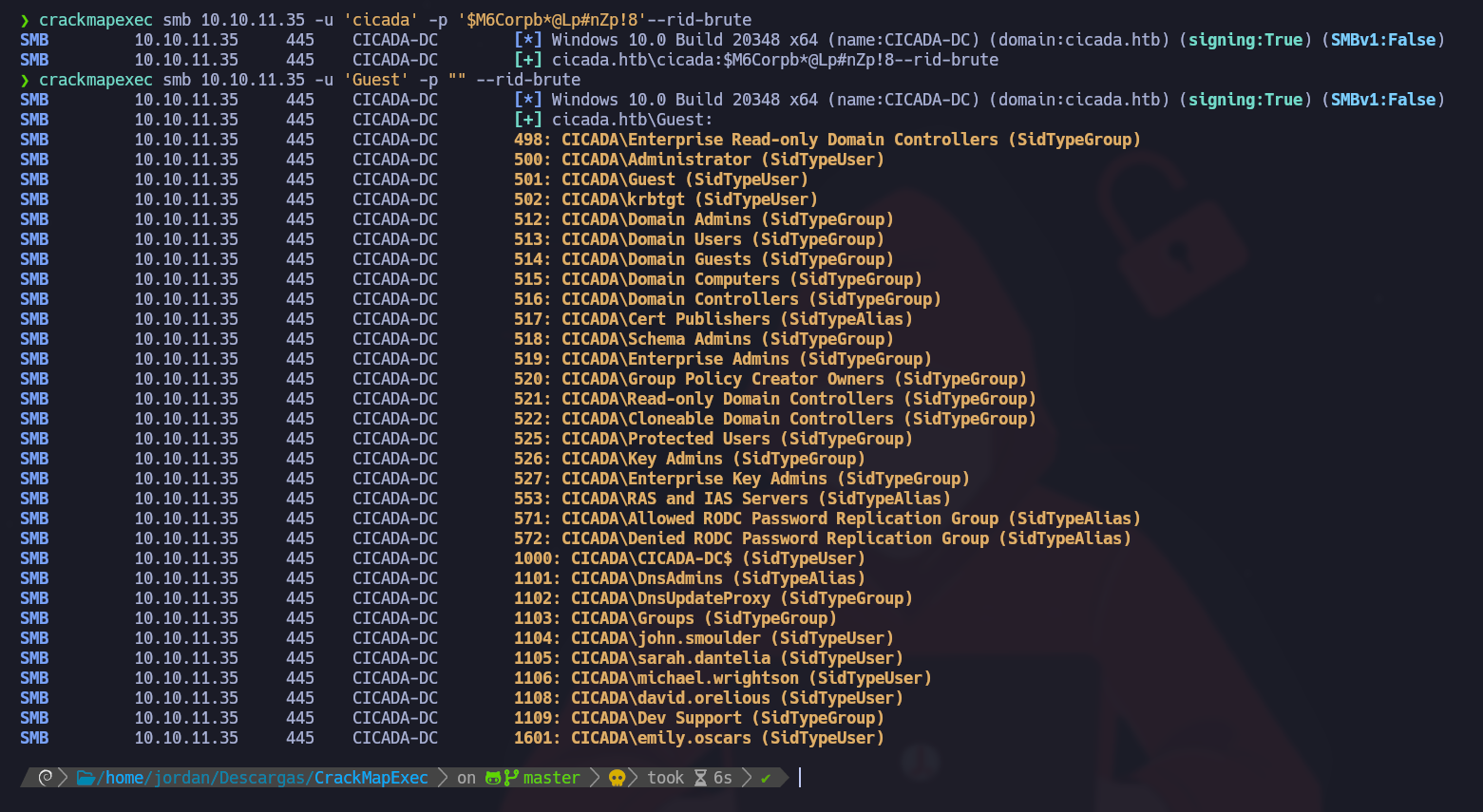
#### Чтобы определить пользователей домена, запустите атаку брутфорса RID:
```bash
crackmapexec smb 10.10.11.35 -u 'Guest' -p "" --rid-brute
```
> Эта `--rid-brute` параметр выполняет **атаку перебором** против **RID (Relative Identifiers)** в домене Windows. RID — это часть идентификатора безопасности Windows и обычно используется для идентификации учетных записей пользователей и групп.
Вот список найденных пользователей:
```
Administrator
Guest
krbtgt
CICADA-DC$
john.smoulder
sarah.dantelia
michael.wrightson
david.orelious
emily.oscars
```
#### Проверка пользователей
Проверьте найденный пароль для всех перечисленных пользователей:
```bash
crackmapexec smb 10.10.11.35 -u users.txt -p 'Cicada$M6Corpb*@Lp#nZp!8'
```
Пользователь **michael.wrightson** использует этот пароль.
---
# Agent Instructions
This documentation is published with GitBook. GitBook is the documentation platform designed so that both humans and AI agents can read, navigate, and reason over technical content effectively. Learn more at gitbook.com.
## Querying This Documentation
If you need additional information that is not directly available in this page, you can query the documentation by asking a question.
Perform an HTTP GET request on the following URL with the `ask` and `goal` query parameters:
```
GET https://hacking-notes.jord4n.pro/ru/ports-and-services/smb-445/crackmapexec-smb-tool.md?ask=&goal=
```
`ask` is the immediate question: it should be specific, self-contained, and written in natural language.
`goal` is what the user is ultimately trying to achieve, the reason they need the answer. Sharing it helps GitBook give you a better, more relevant answer. A goal is most helpful when it describes the outcome the user wants rather than restating the question. For example, with `ask=how do I create an API token`, a goal like `automate deployments from our CI pipeline` lets GitBook tailor the answer to that use case.
The response will contain a direct answer to the question and relevant excerpts and sources from the documentation.
Use this mechanism when the answer is not explicitly present in the current page, you need clarification or additional context, or you want to retrieve related documentation sections.
.png?alt=media)
.png?alt=media)
.png?alt=media)
.png?alt=media)
.png?alt=media)