> For the complete documentation index, see [llms.txt](https://hacking-notes.jord4n.pro/llms.txt). Markdown versions of documentation pages are available by appending `.md` to page URLs; this page is available as [Markdown](https://hacking-notes.jord4n.pro/ru/privesc/user-groups/adm-group-linux-privilege-escalation.md).
# Доступ к журналам через группу adm - эскалация привилегий в Linux
Заметки по группе пользователей (adm) для эскалации привилегий в Linux, с шагами перечисления, примерами эксплуатации и проверкой, ориентированной на отчёт.
## Что это
Опасные членства в локальных группах могут раскрывать привилегированные ресурсы без необходимости эксплуатации ядра. Группы, такие как docker, lxd, adm или proxy, могут предоставлять контроль над хостом, доступ к конфиденциальным логам или пути к конфигурации, полезные для бокового перемещения и повышения привилегий до root. Эта конкретная страница посвящена **Группа пользователей (adm)** и делает процесс эксплуатации практичным: определить условие, безопасно его проверить, затем выполнить минимальную полезную нагрузку, необходимую для подтверждения воздействия.
## Перечисление
Сначала подтвердите локальный контекст и точную ошибку конфигурации, прежде чем запускать путь эксплуатации.
```bash
id
groups
```
## Примеры
> Группа adm обычно имеет разрешения на доступ к системным журналам в каталоге /var/log и другим ресурсам, связанным с системным администрированием.
С **find** мы ищем все журналы сервера:
```bash
find /var/log -group adm 2>/dev/null
```
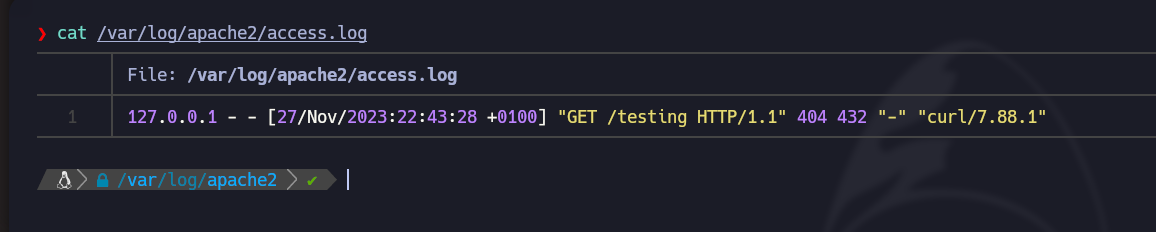
Мы обнаруживаем, что у нас есть доступ к журналам, например из **apache2**:
Эти файлы часто содержат **конфиденциальную информацию**:
---
# Agent Instructions
This documentation is published with GitBook. GitBook is the documentation platform designed so that both humans and AI agents can read, navigate, and reason over technical content effectively. Learn more at gitbook.com.
## Querying This Documentation
If you need additional information that is not directly available in this page, you can query the documentation by asking a question.
Perform an HTTP GET request on the following URL with the `ask` and `goal` query parameters:
```
GET https://hacking-notes.jord4n.pro/ru/privesc/user-groups/adm-group-linux-privilege-escalation.md?ask=&goal=
```
`ask` is the immediate question: it should be specific, self-contained, and written in natural language.
`goal` is what the user is ultimately trying to achieve, the reason they need the answer. Sharing it helps GitBook give you a better, more relevant answer. A goal is most helpful when it describes the outcome the user wants rather than restating the question. For example, with `ask=how do I create an API token`, a goal like `automate deployments from our CI pipeline` lets GitBook tailor the answer to that use case.
The response will contain a direct answer to the question and relevant excerpts and sources from the documentation.
Use this mechanism when the answer is not explicitly present in the current page, you need clarification or additional context, or you want to retrieve related documentation sections.