> For the complete documentation index, see [llms.txt](https://hacking-notes.jord4n.pro/llms.txt). Markdown versions of documentation pages are available by appending `.md` to page URLs; this page is available as [Markdown](https://hacking-notes.jord4n.pro/ru/web/cache-poisoning/url-normalization.md).
# Нормализация URL
Заметки по лабораторным работам PortSwigger Web Security Academy о нормализации URL, включая рабочий процесс эксплуатации, тестирование полезной нагрузки, проверку в Burp Suite и контекст устранения уязвимости.
### Нормализация URL
Этот лабораторный стенд содержит **XSS** уязвимость, которую нельзя использовать напрямую, поскольку браузер автоматически применяет **dURL** кодирование. / Поэтому, **Процесс нормализации URL кэшем** должен использоваться для эксплуатации этой уязвимости.
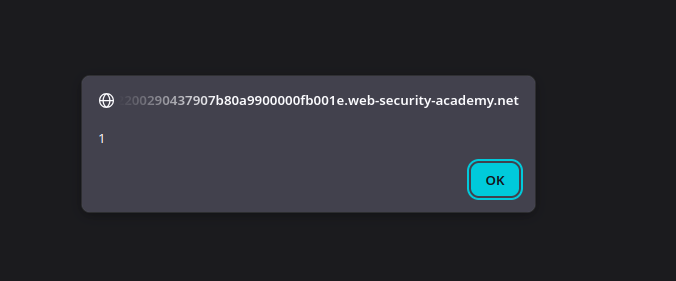
Цель — внедрить полезную нагрузку, которая выполняется `alert(1)` в браузере жертвы, а затем предоставить ему вредоносный URL.
#### 1) Определение точки внедрения
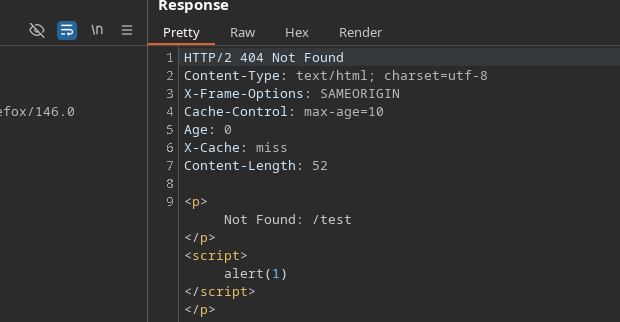
При переходе на несуществующую страницу (например, `/test`), сайт возвращает **страницу ошибки** которая повторно использует запрошенный путь в HTML-ответе.
Если HTML-тег закрыт и внедрён скрипт, это интерпретируется как:
```javascript
/test
```
#### 2) Возникшая проблема
Если этот URL ввести напрямую в браузере, полезная нагрузка **не выполняется**. / Причина в том, что браузер **автоматически кодирует** специальные символы (`<`, `>`, `/`, и т. д.), что препятствует выполнению скрипта.
#### 3) Работа через стандартизацию кэша
Чтобы обойти эту защиту, **кэшем** используется:
* Вредоносный запрос отправляется через **Burp Suite**, без использования адресной строки браузера.
* Кэш **нормализует** URL и сохраняет соответствующий ответ.
* Затем кэшированный ответ содержит полезную нагрузку **в некодированном виде**.
#### (4) Вызов XSS
После того как ответ отравлен в кэше:
* URL передаётся жертве.
* Кэш возвращает стандартную версию страницы.
* Скрипт интерпретируется и `alert(1)` выполняется в браузере жертвы.
---
# Agent Instructions
This documentation is published with GitBook. GitBook is the documentation platform designed so that both humans and AI agents can read, navigate, and reason over technical content effectively. Learn more at gitbook.com.
## Querying This Documentation
If you need additional information that is not directly available in this page, you can query the documentation by asking a question.
Perform an HTTP GET request on the following URL with the `ask` and `goal` query parameters:
```
GET https://hacking-notes.jord4n.pro/ru/web/cache-poisoning/url-normalization.md?ask=&goal=
```
`ask` is the immediate question: it should be specific, self-contained, and written in natural language.
`goal` is what the user is ultimately trying to achieve, the reason they need the answer. Sharing it helps GitBook give you a better, more relevant answer. A goal is most helpful when it describes the outcome the user wants rather than restating the question. For example, with `ask=how do I create an API token`, a goal like `automate deployments from our CI pipeline` lets GitBook tailor the answer to that use case.
The response will contain a direct answer to the question and relevant excerpts and sources from the documentation.
Use this mechanism when the answer is not explicitly present in the current page, you need clarification or additional context, or you want to retrieve related documentation sections.