> For the complete documentation index, see [llms.txt](https://hacking-notes.jord4n.pro/llms.txt). Markdown versions of documentation pages are available by appending `.md` to page URLs; this page is available as [Markdown](https://hacking-notes.jord4n.pro/ru/web/websockets/websocket-message-manipulation.md).

# Манипулирование сообщениями WebSocket

Заметки по лабораторным работам PortSwigger Web Security Academy о манипулировании сообщениями WebSocket, включая рабочий процесс эксплуатации, тестирование полезной нагрузки, проверку в Burp Suite и контекст устранения уязвимости.

### Манипулирование сообщениями WebSocket для эксплуатации уязвимостей

У этого интернет-магазина есть работающая в реальном времени **чат-функция** реализованная с использованием **WebSocket**. / Сообщения, отправленные пользователем, мгновенно отображаются в браузере **сотрудника службы поддержки**. / Цель лабораторной работы — **открыть `alert()`** всплывающее окно в браузере сотрудника, манипулируя сообщением WebSocket.

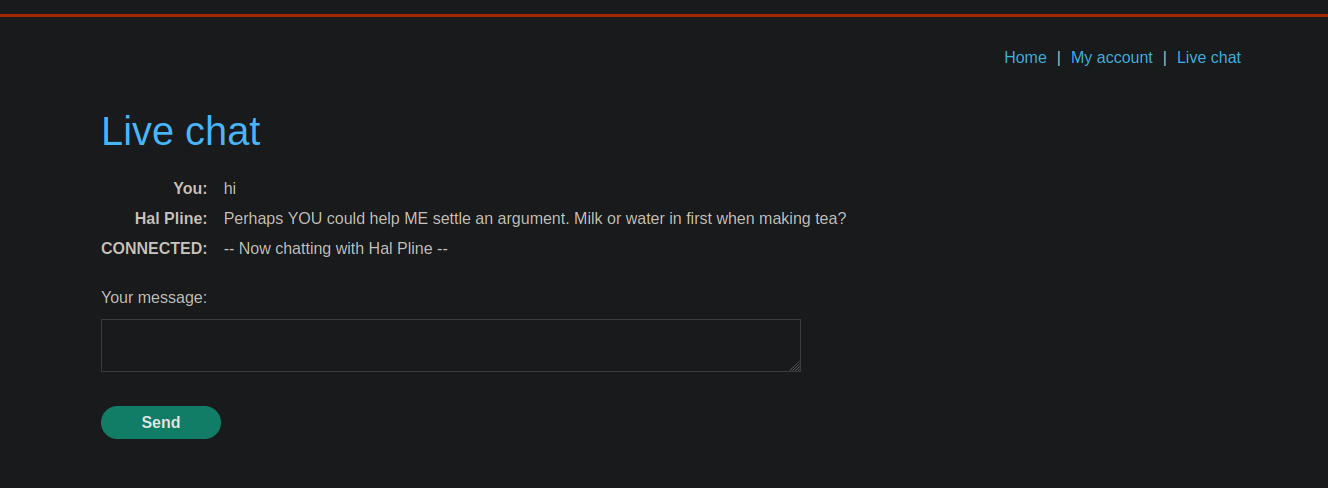
В приложении доступно поле чата.

<figure><img src="https://4248209978-files.gitbook.io/~/files/v0/b/gitbook-x-prod.appspot.com/o/spaces%2Fl4EVJpcOrsgjSGsLI7p2%2Fuploads%2Fgit-blob-8a1408cc26bd95a22c440833e76f726023c18500%2F%7B4BB30044-5EE6-47A0-B6F3-F645051D0B20%7D.png?alt=media" alt=""><figcaption></figcaption></figure>

<figure><img src="https://4248209978-files.gitbook.io/~/files/v0/b/gitbook-x-prod.appspot.com/o/spaces%2Fl4EVJpcOrsgjSGsLI7p2%2Fuploads%2Fgit-blob-70edba498d5cac096e2c547c81053d56c9f57b51%2F%7B36CF1F66-78CE-403E-A5F0-FF2734D3448E%7D.png?alt=media" alt=""><figcaption></figcaption></figure>

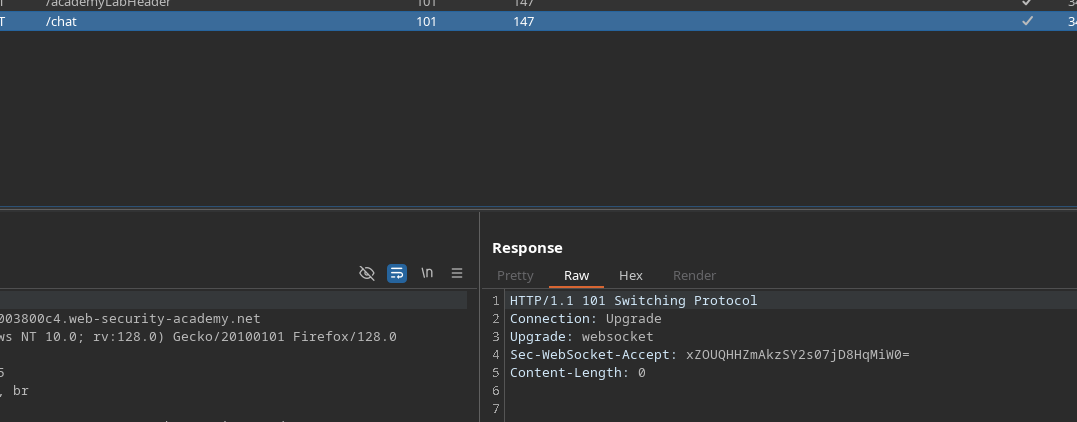
При анализе трафика видно, что сообщения отправляются через WebSocket следующим образом:

```json
{
    "user":"Вы",
    "content":"привет"
}
```

**Проверка фильтрации**

Попробуйте отправить следующий полезный фрагмент через чат:

```javascript
<script>alert(0)</script>
```

Наблюдаемый результат:/ Содержимое \*\*экранируется на стороне сервера\*\* и интерпретируется как текст:

```javascript
&lt;script&gt;alert(0)&lt;/script&gt;
```

<figure><img src="https://4248209978-files.gitbook.io/~/files/v0/b/gitbook-x-prod.appspot.com/o/spaces%2Fl4EVJpcOrsgjSGsLI7p2%2Fuploads%2Fgit-blob-998def77cef804e25c4d01b95be3f538aa45ba77%2F%7B25FE3FD3-7F35-4E9A-88AF-375EB6C95410%7D.png?alt=media" alt=""><figcaption></figcaption></figure>

Это указывает на наличие базовой фильтрации против `<script>` тегов.

**Обход фильтрации**

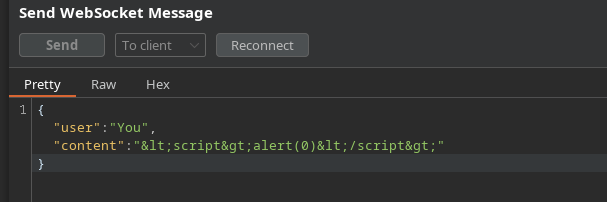
Затем вручную отправляется сообщение WebSocket, содержащее следующий полезный фрагмент:

```http
<img src=0 onerror=alert(0)>
```

Сообщение **пересылается напрямую** через запрос WebSocket, минуя обычные элементы управления интерфейса.

<figure><img src="https://4248209978-files.gitbook.io/~/files/v0/b/gitbook-x-prod.appspot.com/o/spaces%2Fl4EVJpcOrsgjSGsLI7p2%2Fuploads%2Fgit-blob-8e265e5c6749384a69f9ab3bc8f9c4960a399ec9%2F%7BA183AEF0-146B-4DA5-A143-C3FA4387074B%7D.png?alt=media" alt=""><figcaption></figcaption></figure>

Когда сотрудник службы поддержки получает сообщение, браузер интерпретирует `onerror` атрибут, что вызывает:

* выполнение `alert(0)`
* Появление **всплывающего окна** в браузере сотрудника

<figure><img src="https://4248209978-files.gitbook.io/~/files/v0/b/gitbook-x-prod.appspot.com/o/spaces%2Fl4EVJpcOrsgjSGsLI7p2%2Fuploads%2Fgit-blob-5b7ccce08c52c64fb935796e485d5b78d3df2097%2F%7B772C48AA-30F3-46DE-AF8D-DBB33B9C5136%7D.png?alt=media" alt=""><figcaption></figcaption></figure>


---

# Agent Instructions
This documentation is published with GitBook. GitBook is the documentation platform designed so that both humans and AI agents can read, navigate, and reason over technical content effectively. Learn more at gitbook.com.

## Querying This Documentation
If you need additional information that is not directly available in this page, you can query the documentation by asking a question.

Perform an HTTP GET request on the following URL with the `ask` and `goal` query parameters:

```
GET https://hacking-notes.jord4n.pro/ru/web/websockets/websocket-message-manipulation.md?ask=<question>&goal=<user_goal>
```

`ask` is the immediate question: it should be specific, self-contained, and written in natural language.
`goal` is what the user is ultimately trying to achieve, the reason they need the answer. Sharing it helps GitBook give you a better, more relevant answer. A goal is most helpful when it describes the outcome the user wants rather than restating the question. For example, with `ask=how do I create an API token`, a goal like `automate deployments from our CI pipeline` lets GitBook tailor the answer to that use case.

The response will contain a direct answer to the question and relevant excerpts and sources from the documentation.

Use this mechanism when the answer is not explicitly present in the current page, you need clarification or additional context, or you want to retrieve related documentation sections.