> For the complete documentation index, see [llms.txt](https://hacking-notes.jord4n.pro/llms.txt). Markdown versions of documentation pages are available by appending `.md` to page URLs; this page is available as [Markdown](https://hacking-notes.jord4n.pro/ru/web/xss/reflected-xss-with-custom-tags-only.md).
# Отражённый XSS только с пользовательскими тегами
Заметки по отражённому XSS только с пользовательскими тегами для лабораторных работ PortSwigger Web Security Academy, включая процесс эксплуатации, тестирование полезной нагрузки, проверку в Burp Suite и контекст исправления.
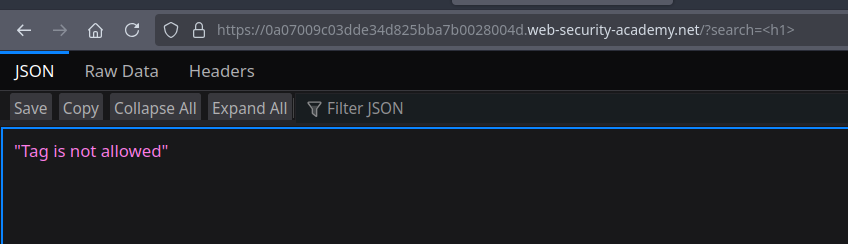
### Отражённый XSS в HTML-контексте, где заблокированы все теги, кроме пользовательских
Это приложение блокирует все «классические» HTML-теги; разрешены только пользовательские элементы. Цель лабораторной работы — внедрить пользовательский тег, который автоматически выполняет `alert(document.cookie)` (здесь вы хотите украсть cookie сеанса с помощью alert).
Наблюдения и подход (переформулировано)
* Поскольку все стандартные теги фильтруются, приём состоит в том, чтобы определить/вставить пользовательский тег, который браузер примет.
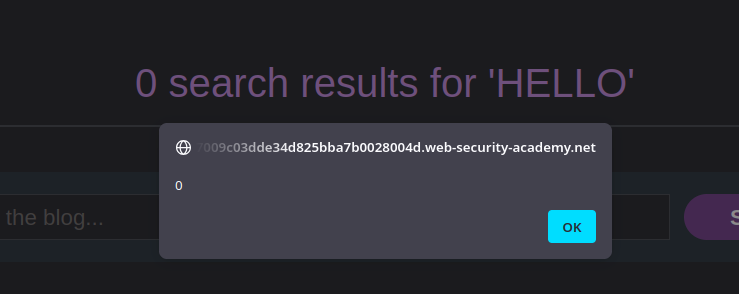
* Пользовательский тег может содержать обработчики событий — но некоторые события происходят только если элемент может получить фокус.
* Пользовательские элементы по умолчанию не фокусируются; поэтому необходимо принудительно задать фокус, добавив `tabindex=1` чтобы соответствующее событие срабатывало при взаимодействии (например, при клике или переходе по Tab).
1. Простой тег — не фокусируемый (alert не выполняется):
```javascript
HELLO
```
2. Тот же тег, сделанный фокусируемым с помощью `tabindex` — `onfocus` работает:
```javascript
HELLO
```
Итоговый PoC (эксфильтрация через перенаправление)
* Мы строим URL, который внедряет пользовательский тег с `onfocus` вызовом `alert(document.cookie)` и принудительно задаём фокус с помощью `tabindex=1`.
* Пример полезной нагрузки, которую нужно отправить жертве (инъекция URL-кодирована в `поисковый` параметр):
{% code overflow="wrap" %}
```javascript
```
{% endcode %}
---
# Agent Instructions
This documentation is published with GitBook. GitBook is the documentation platform designed so that both humans and AI agents can read, navigate, and reason over technical content effectively. Learn more at gitbook.com.
## Querying This Documentation
If you need additional information that is not directly available in this page, you can query the documentation by asking a question.
Perform an HTTP GET request on the following URL with the `ask` and `goal` query parameters:
```
GET https://hacking-notes.jord4n.pro/ru/web/xss/reflected-xss-with-custom-tags-only.md?ask=&goal=
```
`ask` is the immediate question: it should be specific, self-contained, and written in natural language.
`goal` is what the user is ultimately trying to achieve, the reason they need the answer. Sharing it helps GitBook give you a better, more relevant answer. A goal is most helpful when it describes the outcome the user wants rather than restating the question. For example, with `ask=how do I create an API token`, a goal like `automate deployments from our CI pipeline` lets GitBook tailor the answer to that use case.
The response will contain a direct answer to the question and relevant excerpts and sources from the documentation.
Use this mechanism when the answer is not explicitly present in the current page, you need clarification or additional context, or you want to retrieve related documentation sections.