> For the complete documentation index, see [llms.txt](https://hacking-notes.jord4n.pro/llms.txt). Markdown versions of documentation pages are available by appending `.md` to page URLs; this page is available as [Markdown](https://hacking-notes.jord4n.pro/ru/web/xss/stored-dom-xss.md).
# DOM XSS хранимый
Заметки по DOM XSS хранимый для лабораторных работ PortSwigger Web Security Academy, включая процесс эксплуатации, тестирование полезной нагрузки, проверку в Burp Suite и контекст исправления.
### Сохранённый DOM XSS
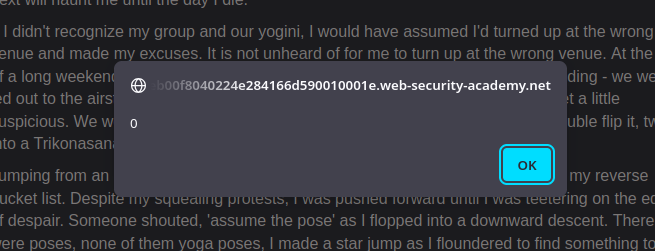
В этой лабораторной работе демонстрируется уязвимость DOM, сохранённая в функции комментариев блога. Чтобы решить лабораторную, используйте эту уязвимость, чтобы выполнить `alert()` функцию.
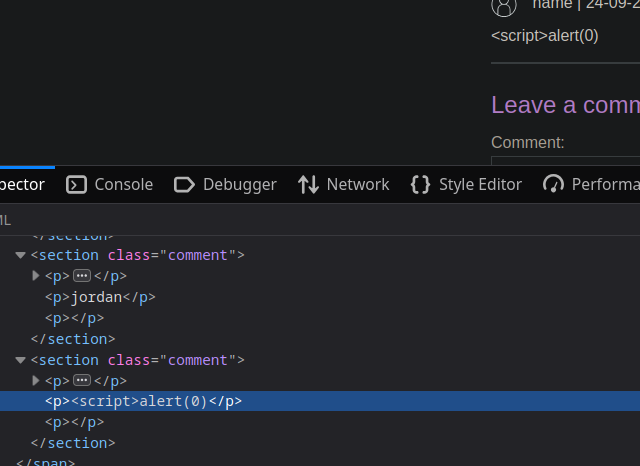
если вы вставите классический `script` в область комментариев:
```javascript
```
Мы заметили, что сайт удаляет часть комментария.
Функция выглядит так:
```javascript
function loadComments(postCommentPath) {
let xhr = new XMLHttpRequest();
xhr.onreadystatechange = function() {
if (this.readyState == 4 && this.status == 200) {
let comments = JSON.parse(this.responseText);
displayComments(comments);
}
};
xhr.open("GET", postCommentPath + window.location.search);
xhr.send();
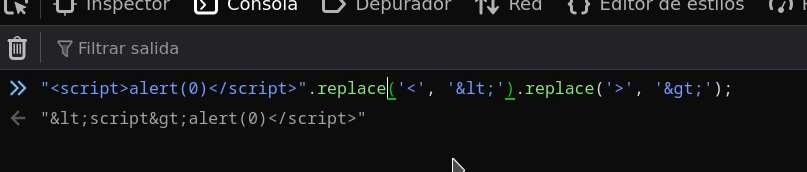
function escapeHTML(html) {
return html.replace('<', '<').replace('>', '>');
}
function displayComments(comments) {
let userComments = document.getElementById("user-comments");
for (let i = 0; i < comments.length; ++i)
{
comment = comments[i];
let commentSection = document.createElement("section");
commentSection.setAttribute("class", "comment");
let firstPElement = document.createElement("p");
let avatarImgElement = document.createElement("img");
avatarImgElement.setAttribute("class", "avatar");
avatarImgElement.setAttribute("src", comment.avatar ? escapeHTML(comment.avatar) : "/resources/images/avatarDefault.svg");
if (comment.author) {
if (comment.website) {
let websiteElement = document.createElement("a");
websiteElement.setAttribute("id", "author");
websiteElement.setAttribute("href", comment.website);
firstPElement.appendChild(websiteElement)
}
let newInnerHtml = firstPElement.innerHTML + escapeHTML(comment.author)
firstPElement.innerHTML = newInnerHtml
}
if (comment.date) {
let dateObj = new Date(comment.date)
let month = '' + (dateObj.getMonth() + 1);
let day = '' + dateObj.getDate();
let year = dateObj.getFullYear();
if (month.length < 2)
month = '0' + month;
if (day.length < 2)
day = '0' + day;
dateStr = [day, month, year].join('-');
let newInnerHtml = firstPElement.innerHTML + " | " + dateStr
firstPElement.innerHTML = newInnerHtml
}
firstPElement.appendChild(avatarImgElement);
commentSection.appendChild(firstPElement);
if (comment.body) {
let commentBodyPElement = document.createElement("p");
commentBodyPElement.innerHTML = escapeHTML(comment.body);
commentSection.appendChild(commentBodyPElement);
}
commentSection.appendChild(document.createElement("p"));
userComments.appendChild(commentSection);
}
}
};
```
* Эта `escapeHTML(HTML)` функция не экранирует **что первое** вхождение `<` и `>` (использование `replace` простое).
* Поскольку затем код использует `innerHTML` для вставки значений, вредоносные теги могут сохраняться и интерпретироваться браузером.
* Таким образом, экранирование эффективно только для первого вхождения; последующие вхождения остаются уязвимыми.
* Используйте глобальную замену (`replaceAll` или глобальное регулярное выражение), чтобы экранировать **все** вхождения `<` и `>`.
* Избегайте использования `innerHTML` для ненадёжных данных; предпочитайте `textContent` или `createTextNode`
Эксплуатируемые полезные нагрузки
* Закройте и внедрите скрипт:
```javascript
<>
```
* Вызовите ошибку изображения, чтобы сработал `onerror:`
```javascript
<>
```
Эти полезные нагрузки работают, потому что преобразуются лишь несколько символов, а дополнительные вхождения `<`/`>` остаются интерпретируемыми.
---
# Agent Instructions
This documentation is published with GitBook. GitBook is the documentation platform designed so that both humans and AI agents can read, navigate, and reason over technical content effectively. Learn more at gitbook.com.
## Querying This Documentation
If you need additional information that is not directly available in this page, you can query the documentation by asking a question.
Perform an HTTP GET request on the following URL with the `ask` and `goal` query parameters:
```
GET https://hacking-notes.jord4n.pro/ru/web/xss/stored-dom-xss.md?ask=&goal=
```
`ask` is the immediate question: it should be specific, self-contained, and written in natural language.
`goal` is what the user is ultimately trying to achieve, the reason they need the answer. Sharing it helps GitBook give you a better, more relevant answer. A goal is most helpful when it describes the outcome the user wants rather than restating the question. For example, with `ask=how do I create an API token`, a goal like `automate deployments from our CI pipeline` lets GitBook tailor the answer to that use case.
The response will contain a direct answer to the question and relevant excerpts and sources from the documentation.
Use this mechanism when the answer is not explicitly present in the current page, you need clarification or additional context, or you want to retrieve related documentation sections.